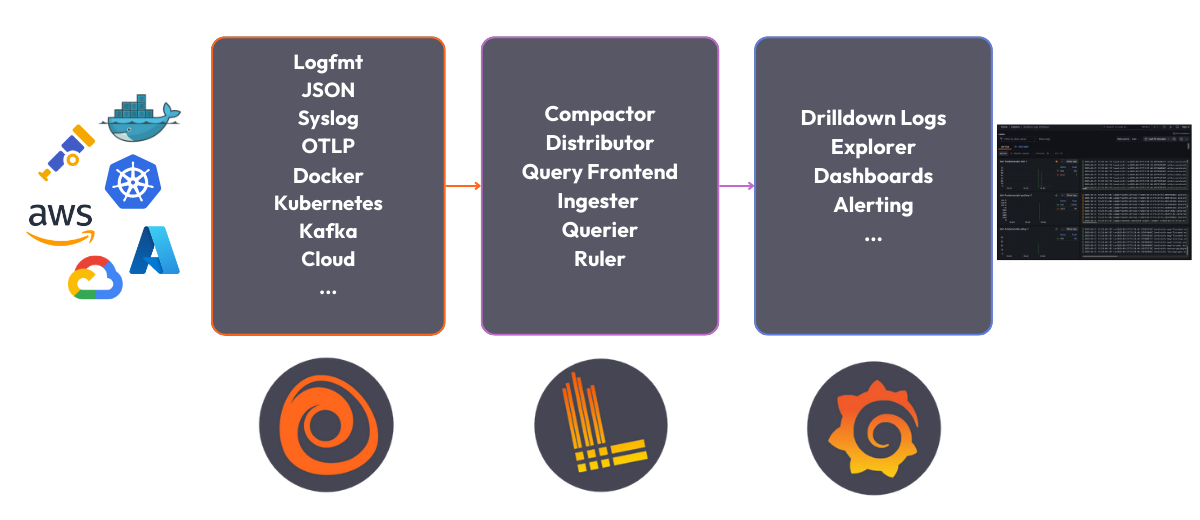
This repository provides a quickstart guide to running Grafana Loki locally using Docker Compose. This setup includes Grafana, Loki, and Grafana Alloy for log collection and visualization.
📖 Loki Quickstart Documentation
Ensure you have the following installed on your system:
- Clone this repository:
git clone https://github.com/grafana/loki-fundamentals.git -b getting-started
- Navigate into the repository:
cd loki-fundamentals - Start Loki, Grafana, and Alloy using Docker Compose:
docker compose up -d
- Verify the components are running:
- Grafana: http://localhost:3000
- Loki: http://localhost:3100/metrics
- Alloy: http://localhost:12345/graph

To test log collection, deploy the Carnivorous Greenhouse application:
docker compose -f greenhouse/docker-compose-micro.yml up -d --buildYou can then interact with the sample app at http://localhost:5005 to generate logs.
You can query logs using Grafana’s Explore feature at http://localhost:3000:
- Open Explore.
- Select the Loki data source.
- Use LogQL queries, e.g.,:
{container="greenhouse-main_app-1"} |= "ERROR"
For more advanced queries and troubleshooting, refer to the full documentation.
Contributions are welcome! To contribute:
- Fork the repository.
- Create a new branch (
feature-branch-name). - Commit your changes.
- Open a pull request.
If you encounter any problems, please open an issue in this repository with:
- A clear description of the problem.
- Steps to reproduce the issue.
- Logs or error messages if available.