The wise way to wrangle your web.
Tab Wise is a productivity-focused Chrome extension that helps you manage, search, and organize open browser tabs. Built with React, TypeScript, and shadcn/ui, it runs in Chrome's side panel with a clean UI and smart tab workflows.

- Smart Tab Search
- Tab Grouping — Organize tabs with domain-based auto-grouping and manual group creation. Refer to 'Auto-Grouping Strategies' for details.
- Saved Sessions
- Recently Closed
- Duplicate Detection
- Activity Tracking
- System Memory Bar
- Light / Dark Theme
- Side Panel UI
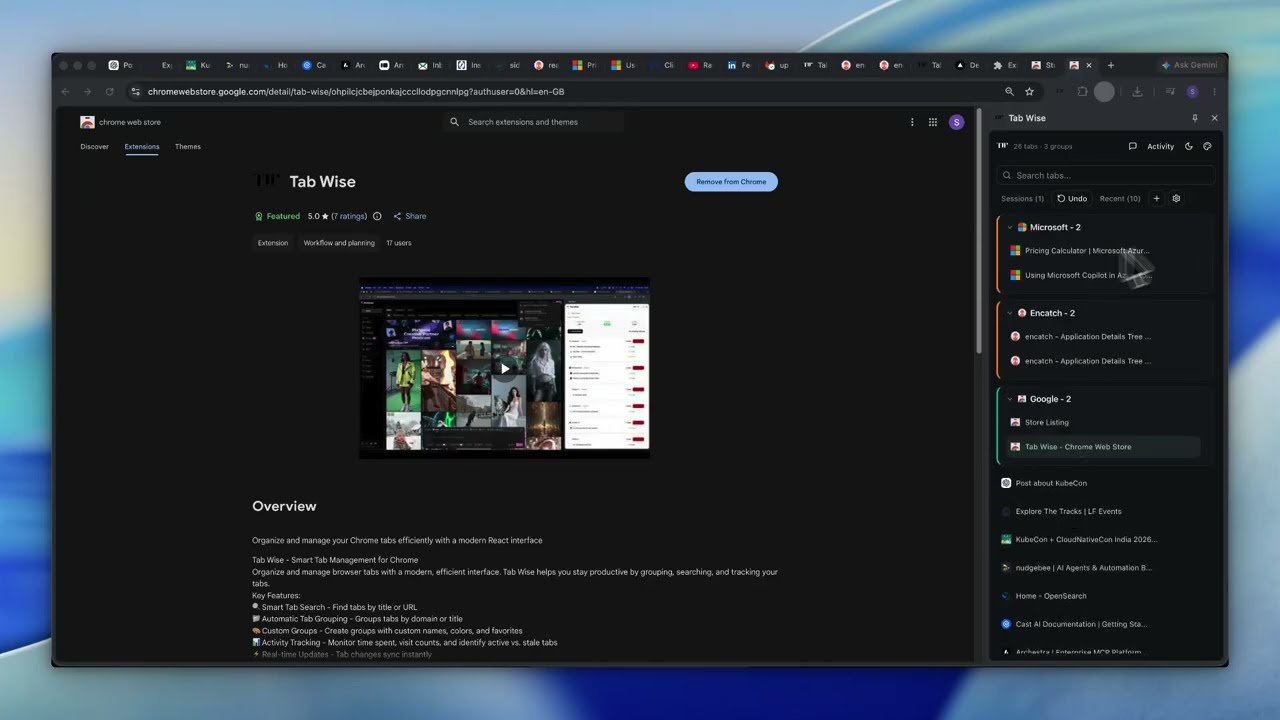
See the side panel in action: quick tab searching, domain-based grouping, and session management at your fingertips.
Install Tab Wise from the Chrome Web Store
Prerequisites: Node.js 20+, pnpm 11+
-
Clone the repository
git clone https://github.com/Sid-1819/tab-wise.git cd tab-wise -
Install dependencies
pnpm install
-
Start the dev server (hot reload)
pnpm dev
Or build for production:
pnpm build
-
Load in Chrome
- Open
chrome://extensions/ - Enable Developer mode
- Click Load unpacked
- Select the
dist/folder
- Open
-
Open the side panel
- Click the Tab Wise toolbar icon, or
- Right-click the icon and choose Open side panel
- Open Tab Wise from the toolbar icon
- Search tabs using the search bar
- Click a tab to switch to it, or close individual tabs
- Use group actions to close, favorite, or reorganize tabs
- Save and restore sessions from the sessions panel
- Toggle theme from the header
Ensure you are on a compatible web page. Chrome's Side Panel API does not function on certain internal browser pages (e.g., chrome://settings). If it fails on standard pages, try reloading the extension in chrome://extensions/.
Tab Wise stores data locally. You can reset your saved sessions and preferences by navigating to chrome://extensions/, clicking the 'Details' button for Tab Wise, and selecting 'Clear site data'.
If you encounter persistent bugs (such as #46 or #30), please check our GitHub Issues to see if a fix is already in progress, or open a new ticket with your Chrome version and a description of the issue.
Tab Wise intelligently organizes your open tabs to streamline your browsing experience. The primary heuristic used for automatic grouping is:
- Domain-based Grouping: Tabs are grouped based on their root domain.
- Heuristic: The extension extracts the main domain from a tab's URL (e.g.,
github.comfromhttps://www.github.com/user/repo). All tabs sharing the same root domain are placed into a single, labeled group. - Example: Tabs like
github.com/repo1,github.com/profile, andnews.github.comwould all be grouped undergithub.com. - Benefit: This simplifies finding and managing related content, providing a cleaner overview of your active browser usage.
- Heuristic: The extension extracts the main domain from a tab's URL (e.g.,
We are continually exploring more sophisticated auto-grouping heuristics for future releases to offer even more customized tab organization.
| Layer | Tools |
|---|---|
| UI | React 18, TypeScript, Tailwind CSS 4, shadcn/ui, Radix UI |
| Build | Vite, @crxjs/vite-plugin |
| Extension | Manifest V3, Chrome Side Panel API, service worker background script |
| Quality | ESLint, TypeScript strict checking |
tab-wise/
├── src/
│   ├── background.ts           # Service worker (tab events, activity tracking)
│   ├── sidepanel-main.tsx      # Side panel entry point
│   ├── components/
│   │   ├── ui/                 # shadcn/ui primitives
│   │   ├── sidepanel.tsx       # Main side panel layout
│   │   ├── tab-group-card.tsx  # Grouped tab cards
│   │   ├── saved-sessions.tsx  # Session save/restore
│   │   └── ...
│   ├── hooks/                  # React hooks (activity, memory)
│   ├── lib/                    # Tab utils, storage, session capture
│   └── types/                  # TypeScript interfaces
├── icons/
├── manifest.json
├── sidepanel.html
└── vite.config.ts
pnpm dev       # Development build with hot reload
pnpm build     # Production build to dist/
pnpm preview   # Preview production build
pnpm lint # Run ESLintContributions are welcome! See CONTRIBUTING.md for setup, code guidelines, and the pull request process.
Feature ideas and roadmap: NEXT_LEVEL_FEATURES.md
Our vision for the next 6 months focuses on stability, performance, and advanced automation features. Here is what we have planned:
- Address critical bug fixes (Issues #46, #30).
- Standardize release versioning (#11).
- Implement automated CI pipelines for build and test validation.
- Enhance tab management with user-requested high-impact features (Issues #33, #31, #32).
- Explore intelligent content-based grouping algorithms beyond domain heuristics.
- Sync session data across devices using cloud storage integration.
- Performance tuning for memory-heavy tab management scenarios.
- Refinement of UI/UX based on community feedback and accessibility audits.
Note: Timelines are subject to change based on community priorities and technical feasibility.
- Bug reports: GitHub Issues
- Feature requests: GitHub Discussions
- Security issues: Security policy — please report privately, not via public issues
Why can't I use npm install?
This project enforces pnpm. Install it first with npm install -g pnpm, then run pnpm install.
Hot reload isn't reflecting my changes?
Hot reload doesn't apply automatically for extensions. After making changes, go to chrome://extensions and click the reload button on the extension manually.
Which folder do I load in Chrome?
Load the dist/ folder — not the project root. Go to chrome://extensions → Enable Developer Mode → Load Unpacked → select dist/.
The side panel isn't opening?
Side panels require Chrome 114 or newer. Update your Chrome browser and try again.
Some tabs aren't being restored?
Chrome blocks access to chrome:// and extension URLs for security reasons. These tabs cannot be restored — this is a Chrome limitation, not a bug.
This project is licensed under the MIT License.


Made with care by Siddhesh Shirdhankar
Experience a streamlined workflow directly in your browser's side panel.
| Tab Management | Session Saving |
|---|---|
|
Quick tab searching, domain-based grouping, and session management at your fingertips.