Some of this stuff from Udemy course.
Latency - time for global task.
Latency = Task
We can try to reduce it using parallelism:
Latency = Task / N, where N - number of threads
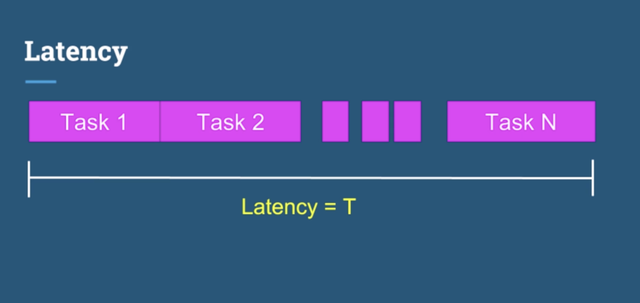
For real reducing, we need to use correct count of threads (N), because idle threads can waste CPU time.
So, thats why:
N = cores of CPU
Usage of painter:
    public static final String IMAGE_PATH = "./resources/flowers.jpg";
    public static final String RESULT_PATH = "./out/flowers.jpg";

    private static final ImagePainter painter = new ImagePainter();

    public static void main(String[] args) throws IOException {

        BufferedImage originalImage = ImageIO.read(new File(IMAGE_PATH));
        BufferedImage resultImage = new BufferedImage(originalImage.getWidth(), originalImage.getHeight(), BufferedImage.TYPE_INT_RGB);

        // Recolor image API call
        painter.recolorImage(originalImage,
                resultImage,
                0,
                0,
                originalImage.getWidth(),
                originalImage.getHeight());

        File outputFile = new File(RESULT_PATH);
        ImageIO.write(resultImage, "jpg", outputFile);
    }
    ...
Input image:

Output image:

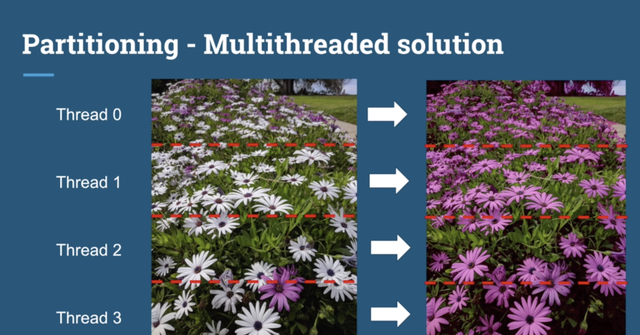
Usage for N threads:
public static void recolorMultithreaded(BufferedImage originalImage, BufferedImage resultImage, int numberOfThreads) {
        List<Thread> threads = new ArrayList<>();
        int width = originalImage.getWidth();
        int height = originalImage.getHeight() / numberOfThreads;

        for(int i = 0; i < numberOfThreads ; i++) {
            final int threadMultiplier = i;

            Thread thread = new Thread(() -> {
                int xOrigin = 0 ;
                int yOrigin = height * threadMultiplier;

                painter.recolorImage(originalImage, resultImage, xOrigin, yOrigin, width, height);
            });

            threads.add(thread);
        }

        for(Thread thread : threads) {
            thread.start();
        }

        for(Thread thread : threads) {
            try {
                thread.join();
            } catch (InterruptedException e) {
            }
        }
    }
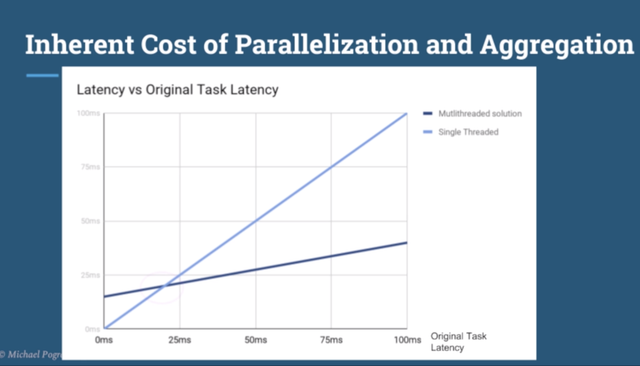
To achieve optimality, it is necessary that the number of threads be equal to the number of cores on the computer. The more complex the task, the more profitable it will be divided into parallel subtasks:
Threads using the same resource, for example - object, database, connection to socket and so on. But using this aproach, be carefull. What happend if two threads start do some dirty thing in parallel?
We have two tasks, one for incrementing, second for decrementing.
CountInventory countInventory = new CountInventory();

Thread first = new Thread(() -> {
        for (int i = 0; i < 10000; i++) {
             countInventory.increment();
        }
});

Thread second = new Thread(() -> {
        for (int i = 0; i < 10000; i++) {
             countInventory.decrement();
         }
});
If we will start them sequently - reuslt will be 0.
first.start();
first.join();

second.start();
second.join();

System.out.print("Result - " + countInventory.getItems());
If we will start them in parallel - the result will not be determined.
first.start();
second.start();

first.join();
second.join();

System.out.print("Result - " + countInventory.getItems());
countInventory.getItems()) can return -2200, -5796, -1785 and so on.
But why not zero?
Because operator var++ non atomic operation and can be splitted into separate operations:
- Get value of
var - Increment it
- Update new value for
var
In case of latency, our timing can be:
FIRST CASE
----------

first task
1. currValue <- 0
2. newValue <- 0 + 1
6. currValue <- 1

second task
3. currValue <- 0
4. currValue <- 0 - 1 <- -1
5. items <- -1

RESULT IS 1

SECOND CASE
-----------
first task
1. currValue <- 0
2. newValue <- 0 + 1
5. currValue <- 1

second task
3. currValue <- 0
4. currValue <- 0 - 1 <- -1
6. items <- -1

RESULT IS -1
In both examples we can see incorrect result.
Atomic operations:
- Reference assigment
Object obj1 = ...;
Object obj2 = ...;
obj1 = obj2; // Atomic
- Assigments to primitive types (except long and double) - reads and writes:
int a = 123; // Atomic
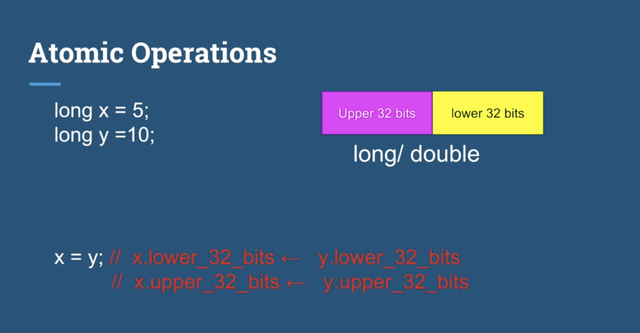
Long & double - 64 bit, that's why java cannot guarantee atomic assigments:
Let's look on next code:
// Which of the following operations are atomic and thread safe?
public class SharedClass {
        private String name;

        public void updateString(String name) {
            this.name = name;
        }

        public String getName() {
            return name;
        }
    }
All objects taken from heap. That's why getName() operaton is thead safe.
The Java volatile keyword guarantees visibility of changes to variables across threads.
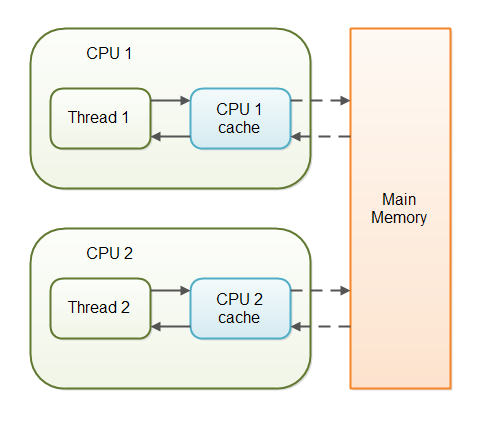
In a multithreaded application where the threads operate on non-volatile variables, each thread may copy variables from main memory into a CPU cache while working on them, for performance reasons. If your computer contains more than one CPU, each thread may run on a different CPU. That means, that each thread may copy the variables into the CPU cache of different CPUs. This is illustrated here:
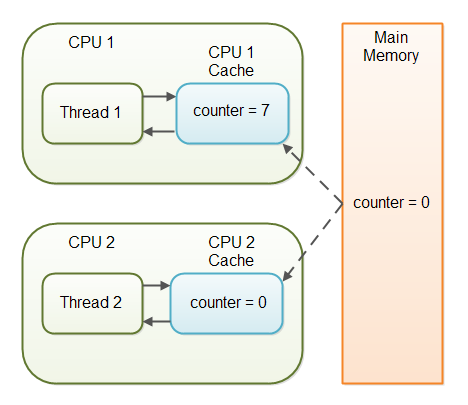
Imagine a situation in which two or more threads have access to a shared object which contains a counter variable declared like this:
public class SharedObject {
    public int counter = 0;
}
Let's look on next code:
class Shared {
   int x;
   int y;

   void increment() {
      x++;
      y++;
   }

   void check() {
      if (y > x) {
         System.out.println("Ooops! y > x");
      }
   }
}
Looks like x always be greater, than y, isn't it? If we just interrupt writer thread and check it after incrementation of x, condition still always be false?
And let's create two threads, one for increment and second for check:
Shared shared = new Shared();

Thread writer = new Thread(() -> {
   for (int i = 0; i < N; i++) {
       shared.increment();
   }
});

Thread reader = new Thread(() -> {
   for (int i = 0; i < N; i++) {
       shared.check();
   }
});

writer.start();
reader.start();
On my MacBook Pro if N = 10, all looks clean and i don't see Ooops! y > x". If i will set N to 1000, for example, situation changes. In some executions i still see no misleading condition (x < y), but now it's looks so weird:
Ooops! y > x
But how can y be greater than x? Actually, this happens because of CPU reordering or data race. To improve perfomance, processor can reorder some instructions. CPU and Compiler can execute instractions out of order for better perfomance and utilization. That's why in several executions you can se that y > x, because CPU reorder this two instructions:
1. x++;
2. y++;
How to fix it? Just use memory barrier!
For example, if we will use volatile fields, our instructions must be in correct order.
Look on section 17.4 Memory Model
Mutual exclusion (Mutex) garantee that only one thread can execute some critical section, while another have no access to this section.
Let's check Peterson algorithm for 2-threaded apllication via C++ based pseudo-code:
struct Lock {
    /* Atomic int - special type, writing & reading from this variables happens as atomic operation */
    atomic_int last;
    atomic_int flag[2];
}

// Spin-lock realisation for 2-threaded application
void lock() {
    int me = threadId(); // Return id of thread, 0 or 1
    int other = 1 - me; // Id of another thread, 1, or 0

    // Atomic operations
    flag[me] = 1;
    last = me;

    // If another thread not acquire the lock and last guy who acquire the lock is me - spin a while
    while (flag[other] && last == me) {}
}

void unlock() {
    me = threadId();
    flag[me] = 0;
}
Spinlock is a lock which causes a thread trying to acquire it to simply wait in a loop ("spin") while repeatedly checking if the lock is available.
Test-and-set instruction - atomic instruction used to write some value to a memory location and return its old value.
It's very easy to use tests-and-set operation in lock algorithm inplementation. Let's check the test-and-set lock (TASLock) example:
class TASLock implements Lock {
    private AtomicBoolean state = new AtomicBoolean(false);

    @Override
    public void lock() {
        while(state.getAndSet(true));
    }

    @Override
    public void unlock() {
        state.set(false);
    }

    // Other Lock methods...
}
Because they avoid overhead from operating system process rescheduling or context switching, spinlocks are efficient if threads are likely to be blocked for only short periods. For this reason, operating-system kernels often use spinlocks. However, spinlocks become wasteful if held for longer durations, as they may prevent other threads from running and require rescheduling. The longer a thread holds a lock, the greater the risk that the thread will be interrupted by the OS scheduler while holding the lock.
A reentrant mutual exclusion Lock with the same basic behavior and semantics as the implicit monitor lock accessed using synchronized methods and statements, but with extended capabilities.
What actually "reentrant" word means? Reentrant mutex (recursive mutex, recursive lock) is a particular type of mutual exclusion (mutex) device that may be locked multiple times by the same process/thread, without causing a deadlock.
// No deadlocks here!
synchronized(mutexA) {
    synchronized(mutexA) {
        // Some code...
    }
}
Basic usage of Lock object:
Lock lock = new ReentrantLock();
try {
    lock.lock();
    // Critical section...
} finally {
    lock.unlock();
}
Versus synchronized:
synchronized(mutexObject) {
    // Critival section...
}
Result here is the same (ecursive mutex property still exists).
When we try to lock.lock(), out thread will spin a while for getting access to mutual exclusion. It's like a Peterson spin-lock or like a basic synchronized construction.
Let's talk about contention. A lock is said to be contented when there are multiple threads concurrently trying to acquire the lock while it’s taken. That's main property of all spin-locks.
And yes, what is a main difference between spin-lock and ReentrantLock? In ReentrantLock we have special tryLock() method, which Acquires the lock only if it is not held by another thread at the time of invocation.
Lock lock = new ReentrantLock();
...
void tryToGetMutex() {
    if (lock.tryLock()) {
        try {
            // Critical section...
        } finally {
            lock.unlock();
        }
    }
}
tryLock() can return true and acquire the lock if it is free, and can return false if lock is not free. Main difference is that tryLock() in case if non-acquiring don't spin a while until lock will be under this thread. Instead of this case, we can retry to call tryToGetMutex() manually in next steps.
Exponential backoff is an algorithm that uses feedback to multiplicatively decrease the rate of some process, in order to gradually find an acceptable rate. It's more common definition, but how we can use it in concurrent applications?
As we saw before, spin-lock alghoritms make several steps:
- Repeatedly reads the lock
- When the lock appears to be free, attemps to acquire the lock.
Here is a key observation: if some other thread acquires the lock between the first and second step, then, most likely, there is a high contention for this lock. Clearly, it is a bad idea to try to acquire a lock for which there is high contention. Instead, it is more effective for the thread to back off for some duration, giving competing threads a chance to finish.
class Backoff {
    private final int minDelay;
    private final int maxDelay;
    private int limit;
    private final Random random;

    public Backoff(int min, int max) {
        this.minDelay = min;
        this.maxDelay = max;
        limit = minDelay;
        random = new Random();
    }

    public void backoff() throws InterruptedException {
        int delay = random.nextInt(limit);
        limit = Math.min(maxDelay, 2 * limit);
        Thread.sleep(delay);
    }
}

class BackoffLock implements Lock {
    private final int minDelay = ...;
    private final int maxDelay = ..;
    private AtomicBoolean state = new AtomicBoolean(false);

    @Override
    public void lock() {
        Backoff backoff = new Backoff(minDelay, maxDelay);
        while (true) {
            while (state.get()) ;

            if (!state.getAndSet(true)) {
                return;
            } else {
                try {
                    backoff.backoff();
                } catch (InterruptedException e) {
                    e.printStackTrace();
                }
            }
        }
    }

    @Override
    public void unlock() {
        state.set(false);
    }
// Another code ...
}
Anyway, perfomance of backoff is sensitive to the choice of minDelay and maxDelay.
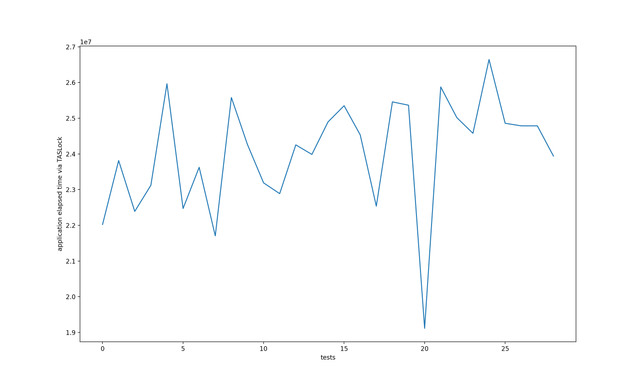
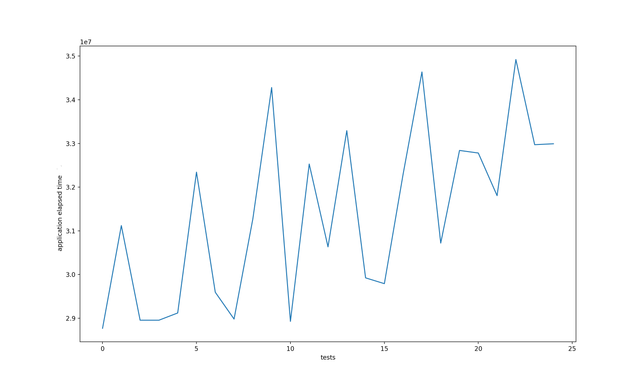
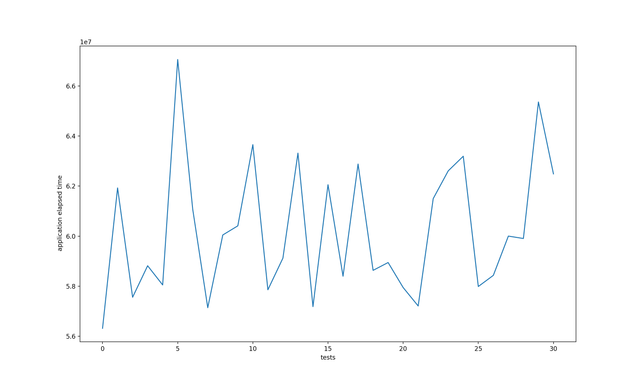
Let's check some metrics, created on my MacBook Pro 13 mid 2019:
- TASLock with 2 threads:
- BackoffLock with 2 threads:

- ReentrantLock with 2 threads:
- TASLock with 4 threads:

- BackoffLock with 4 threads:
Cache coherence - special situation on hardware level, when caches of processor cores are trying to synchronize data with main memory and with another core(s).
Cache line - minimum amount of cache which can be loaded or stored to memory.
For example, on x86 CPU cache line - 64 bytes.
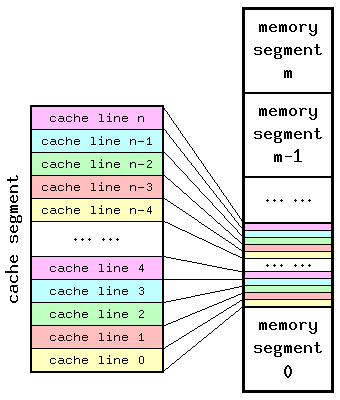
In such cases, special communication protocol exists (MESI), which sync core caches with each other and main memory, it's implemented on hardware level, as i mentiond before. But what about perfomance of our spin lock and backoff lock implementation?
Let's look on more convenient variant of test-and-set spin lock - test-and-test-and-set lock:
class TTASLock implements Lock {

    private AtomicBoolean state = new AtomicBoolean(false);

    @Override
    public void lock() {
        while (true) {
            while (state.get()) {}

            if (!state.getAndSet(true)) {
                return;
            }
        }
    }

    @Override
    public void unlock() {
        state.set(false);
    }

    // Another methods...
}
And what is the difference between TTAS and TAS lock? Result will be the same, but one difference in perfomance. Let's compare two algorithms:
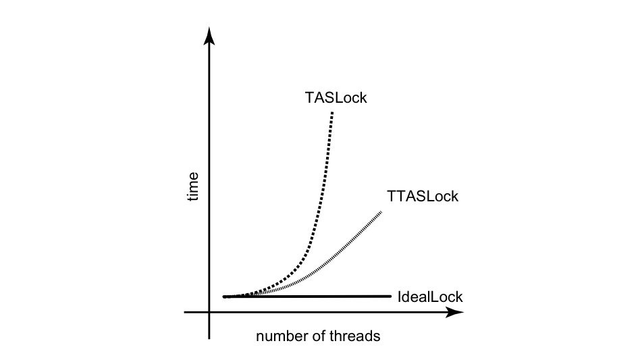
Why TTAS working faster? Because in TTAS implementation we reduce number of accesses (state.getAndSet(true)) to the shared resource (atomic boolean state). We more read the data value and next - change it as needed. So, each processor has a chache, and when a processor reads from an adress in memory, it first checks whether the adress and it's contents are present in it's chache. If so, then the processor has a chache hit and can load value immediately. If not, there is a chache miss and processor must find value in main memory. Anyway, all three (TAS, TTAS, Backoff) implementations have two problems:
- Cache cohherence traffic
- Critical section utilization
More information about cache cohherence and good webpage.
Actor model - conccurency model abstraction, where actor is a fundamental unit of computation. This concept can be used without any locks, because actors send messages to each other. Sending a message does not transfer the thread of execution from the sender to the destination. An actor can send a message and continue without blocking.

By sending a message, an actor delegates work to another actor. Actors are completely isolated from each other and they will never share memory.
Since there is always at most one message being processed per actor, the invariants of an actor can be kept without synchronization. This happens automatically without using locks:
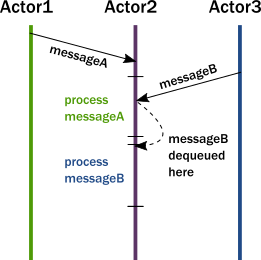
In summary, this is what happens when an actor receives a message:
- The actor adds the message to the end of a queue.
- If the actor was not scheduled for execution, it is marked as ready to execute.
- A (hidden) scheduler entity takes the actor and starts executing it.
- Actor picks the message from the front of the queue.
- Actor modifies internal state, sends messages to other actors.
- The actor is unscheduled.
It’s important to understand that, although multiple actors can run at the same time, an actor will process a given message sequentially. This means that if you send 3 messages to the same actor, it will just execute one at a time. To have these 3 messages being executed concurrently, you need to create 3 actors and send one message to each.
There are 3 methods for inner threads coordination on fundamental level of Object class.
wait()notify()notifyAll()
Wait causes the current thread to wait until another thread wakes it up. In the wait state, that thread is not consuming CPU.
Notify wakes up a single thread waiting on that object.
Notyfy all wakes up all the threads waiting on that object.
To call wait(), notify() or notifyAll() we need to acquire the monitor of that object (use synchronization on that object).
Here we have two methods, which executed in two different threads.
    private static boolean flag = false;

    private synchronized void unlock() {
        if (!flag) {
            this.notify();
            flag = true;
        }

        System.out.println("Unlocked");
    }

     private synchronized void lock() {
        while  (!flag) {
            try {
                this.wait();
            } catch (InterruptedException e) {
                e.printStackTrace();
            }
            System.out.println("Waiting for unlock");
        }

        System.out.println("Locked");
    }
Thread lockThread = new Thread(() -> lock());
Thread unlockThread = new Thread(() -> unlock());

lockThread.start();
unlockThread.start();
System.out.println("Main thread finished");
And we will get something like:
Finished main thread
Waiting for unlock
Unlocked
Locked
When first thread trying to lock, then wait() call force lockThread to sleep. And then monitor is
freed up for unlockThread. It's very important detail, because wait() method release monitor lock. And, unfortunately, documentation lies about it.
For example, if i will change lock method:
private synchronized void lock() {
        while  (!flag) {
            System.out.println("Waiting for unlock");
        }
        System.out.println("Locked");
}
Then execution will be blocked.
Also, wait() method must me invoked via synchronised block:
IllegalMonitorStateExceptionif the current thread is not the owner of the object's monitor
So, if we set flag fair of ReentrantLock to true, which means next:
@param fair {@code true} if this lock should use a fair ordering policy
If a thread is not granted CPU time because other threads grab it all, it is called "starvation". The thread is "starved to death" because other threads are allowed the CPU time instead of it. The solution to starvation is called "fairness" - that all threads are fairly granted a chance to execute. Also, fairness may reduce throughpu of application!
The Java volatile keyword is intended to address variable visibility problems. By declaring the counter variable volatile all writes to the counter variable will be written back to main memory immediately. Also, all reads of the counter variable will be read directly from main memory.
Here is how the volatile declaration of the counter variable looks:
public class SharedObject {
    public volatile int counter = 0;
}
Let's look on this code sample:
class BadTask implements Runnable {
    boolean keepRunning = true;

    @Override
    public void run() {
        while (keepRunning) {
            // Spin a while
        }

        System.out.println("Done.");
    }
}
Let's run it via new thread in main() function:
BadTask badTask = new BadTask();
new Thread(badTask).start();
Thread.sleep(1000);
badTask.keepRunning = false;
System.out.println("keepRunning is false");
The intention of this code is to let BadTask run for 1 second and after that to stop it by setting keepRunning boolean to false. As simple as it may look this code is doomed to fail - the BadTask won’t stop after 1 second and will run until you terminate the program manually.
If the program does not stop you may wonder what happend. In short - the main thread and the thread running BadTask have been executed on different cores. Each core has its own set of registers and caches. The new value of keepRunning has been written to one of these without being flushed to the main memory. Thus it is not visible to the code running on a different core.
Ok, how we can fix it? The simplest and the most correct way is to mark this variable volatile. Another approach would be to acquire a common lock when accessing it but that would be definetly an overkill.
So what we will do today? We will introduce another variable marked with a volatile keyword! In the above code it does not make much sense and is only for demonstrating some aspects of Java memory model. But think about a scenario where there are more variables of keepRunning nature. Have a look at the below code that does not have visibility problem anymore:
class BadTask implements Runnable {
        boolean keepRunning = true;
        volatile boolean flush = true; // !

        @Override
        public void run() {
                while(keepRunning) {
                        if(flush); // Happens before
                }
                System.out.println("BadTask is done.");
        }
}
And let's run it again:
BadTask r = new BadTask();
new Thread(r).start();
Thread.sleep(1000);
r.keepRunning = false;
r.flush = false;
System.out.println("keepRunning is false");
So as already mentioned we have introduced a new volatile variable “flush”. We do two things with it. First, we do a write operation in the main thread, right after modifying a non-volatile keepRunning variable. Second, in the thread running BadTask, we do a read operation on it. Now, how come the value of keepRunning is flushed to the main memory? This is guaranteded by the current Java memory model. According to JSR133 “writing to a volatile field has the same memory effect as a monitor release, and reading from a volatile field has the same memory effect as a monitor acquire”. Thus, actions on memory done by one thread before writing to a volatile variable will be visible to another thread after reading that variable.
Inlining - special kind of optimization, when CPU (or VM) replace call of function with the body of the called function.
Example:
int add(int a, int b) {
    return a + b;
}

int result = add(1, 2);
Will be inlined:
int result = 1 + 2;
CPU pipelines - special hardware pattern, when operations executes in async mode, when one instruction doesn't wait for another. As soon as an instruction is decoded, the decoding of the next one can start immediately, there is no need to wait for the previous instruction to finish. Also, in such cases processor trying to predicate branch of code to execute. It's optimization, which can improve perfomance, but there is no any guarantees.
Let's see some example above:
int arraySize = 32768;
int data[] = new int[arraySize];

Random random = new Random(0);
for (int c = 0; c < arraySize; ++c) {
     data[c] = random.nextInt() % 256;
}

// Optimization for branch predication
// With this, the next loop runs faster
Arrays.sort(data);

long sum = 0;

for (int i = 0; i < 100000; ++i) {
    // Primary loop
    for (int c = 0; c < arraySize; ++c) {
         if (data[c] >= 128) {
             sum += data[c];
	 }
    }
}
Looks pretty simple, we have array with random generated numbers and two loops with some condition statement (if statement).
And it's really one intresting note about sorting. If our array is not sorted - performance is lost.
Test on my MacBook Pro:
NORMAL EXECUTION:
around 16 ms

WITH SORT:
5 ms
But why? Because of branch predication.
Consider an if-statement: At the processor level, it is a branch instruction:

You are a processor and you see a branch. You have no idea which way it will go. What do you do? You halt execution and wait until the previous instructions are complete. Then you continue down the correct path.
If you guess right every time, the execution will never have to stop. If you guess wrong too often, you spend a lot of time stalling, rolling back, and restarting.
And as author of answer tell us, we can prevent such branch predication by bitoperations replacement:
Replace this
if (data[c] >= 128)
    sum += data[c];
By this
int t = (data[c] - 128) >> 31;
sum += ~t & data[c];
Another example:
void isNonNegative(int num) {
        if (num >= 0) {
            // Some operations here...
        } else {
            // Some operations here...
        }
    }
And let's test it:
for (int i = 0; i < 10000000; i++) {
    isNonNegative(5);
}
Execution time: 0.004582331
Another test:
int[] nums = {-100, 2, -30, -5, 0, -1, -6, 4, 5, 7, 9, 9};
for (int i = 0; i < 10000000; i++) {
     isNonNegative(nums[i % nums.length);
}
Execution time: 0.026957939
Test with random array numbers
int[] nums = {-100, 2, -30, -5, 0, -1, -6, 4, 5, 7, 9, 9};
for (int i = 0; i < 10000000; i++) {
     isNonNegative(nums[Math.abs(new Random().nextInt()) % nums.length]);
}
Execution time: 0.627501542
And last test with random numbers:
for (int i = 0; i < 10000000; i++) {
    isNonNegative(new Random().nextInt() % Integer.MAX_VALUE);
}
Execution time: 0.621791105
JDK has powerfull api for streaming. But this section about parallelism and conccurency of such library.
For example, we have list of numbers and then we need to multiply each number by some value. Our imperative aproach will be something like:
List<Integer> list = ...
for (int i = 0; i < list.size(); i++) {
    list.set(i, list.get(i) * N);
}
This code is working fine, but kind of "old". Let's use Stream API.
list.stream()
    .map(obj -> obj * N)
    .collect(Collectors.toList())
This stream operators make the same work, but in functional immutable style. In this case work of map operation is not blocking, maybe we can improve perfomance with parallel computing?
list.stream()
    .parallel()
    .map(obj -> obj * N)
    .collect(Collectors.toList())
Let's focus of perfomance improvements and use JMH benchamring.
Here we have array of random elements (from 0 to 499):
public int[] elements = new Random(1)
                .ints(N, 0, 500)
                .toArray();
And two microbencharks (for example N = 2):
@Benchmark
@BenchmarkMode(Mode.AverageTime)
@OutputTimeUnit(TimeUnit.NANOSECONDS)
public void streamBenchmark(StateChecker stateChecker, Blackhole blackhole) {
     blackhole.consume(Arrays.stream(stateChecker.elements)
              .map(element -> element * 2)
              .toArray());
}

@Benchmark
@BenchmarkMode(Mode.AverageTime)
@OutputTimeUnit(TimeUnit.NANOSECONDS)
public void parallelStreamBenchmark(StateChecker stateChecker, Blackhole blackhole) {
     blackhole.consume(Arrays.stream(stateChecker.elements)
              .parallel()
              .map(element -> element * 2)
              .toArray());
}
As i mentiond before, perfomance actually depends on size of list in such case. Here 3 benchmarks with avarage time execition metrics.
1.For N = 1000
Benchmark                            Mode  Cnt      Score     Error  Units
MyBenchmark.parallelStreamBenchmark  avgt  200  22592.902 ± 410.930  ns/op
MyBenchmark.streamBenchmark          avgt  200   1283.748 ±  11.793  ns/op
- For
N= 1000000
Benchmark                            Mode  Cnt        Score        Error  Units
MyBenchmark.parallelStreamBenchmark  avgt  200  1955588.440 ± 180609.886  ns/op
MyBenchmark.streamBenchmark          avgt  200  2557385.937 ± 149849.122  ns/op
- For
N= 1000000000
Benchmark                            Mode  Cnt          Score         Error  Units
MyBenchmark.parallelStreamBenchmark  avgt  200   85611446.743 ± 2497237.447  ns/op
MyBenchmark.streamBenchmark          avgt  200  139145582.378 ± 1980852.767  ns/op
As benchark results tell us, for small N there is no improvements, only for big values of N.
Some advanced topics and utilities for tracking JVM state. Some information taken from OK course.
Java platform:

We start from serviceability.
jps - Java Virtual Machine Process Status Tool. Lists the instrumented Java Virtual Machines (JVMs) on the target system.
$ jps
And get:
41841 Jps
40489 Launcher
3389
Where first number - process id, second - name of java main class.
So, we can detect java proces with Intelij IDEA (java process 3389):

jstack creates thread dump according on process id.
$ jstack %SOME_PROCESS_ID%
But one warming, jstack neends cooperation with existing JVM. Jstack sends, let's say, request to JVM and only after that creates dump. Sometimes problems may occurs JVM and jstack can hover. In this case you can try:
jstack -F %SOME_PROCESS_ID%
Also, jstack can help you to detect deadlock, let's see the example:
final Object mutexA = new Object();
final Object mutexB = new Object();

void potentialDeadLockForT1() {
     synchronized (mutexA) {
         synchronized (mutexB) {
            System.out.println("No deadlock from T1");
         }
     }
 }

void potentialDeadLockForT2() {
     synchronized (mutexB) {
         synchronized (mutexA) {
            System.out.println("No deadlock from T2");
         }
     }
}
And let's try to execute two threads:
Thread t1 = new Thread(() -> {
            for (int i = 0; i < 10; i++) {
                potentialDeadLockForT1();
            }
});

Thread t2 = new Thread(() -> {
            for (int i = 0; i < 10; i++) {
                potentialDeadLockForT2();
            }
});

t1.start();
t2.start();
Deadlock may happen, and we can detect it using next command:
Found one Java-level deadlock:
=============================
"Thread-0":
  waiting to lock monitor 0x000000010a8d9f00 (object 0x000000070feeb0e8, a java.lang.Object),
  which is held by "Thread-1"
"Thread-1":
  waiting to lock monitor 0x000000010a8d9e00 (object 0x000000070feeb0d8, a java.lang.Object),
  which is held by "Thread-0"

Java stack information for the threads listed above:
===================================================
"Thread-0":
	at Main.potentialDeadLockForT1(Main.java:40)
	- waiting to lock <0x000000070feeb0e8> (a java.lang.Object)
	- locked <0x000000070feeb0d8> (a java.lang.Object)
	at Main.lambda$main$0(Main.java:20)
	at Main$$Lambda$14/0x0000000800066040.run(Unknown Source)
	at java.lang.Thread.run(java.base@11.0.5/Thread.java:834)
"Thread-1":
	at Main.potentialDeadLockForT2(Main.java:48)
	- waiting to lock <0x000000070feeb0d8> (a java.lang.Object)
	- locked <0x000000070feeb0e8> (a java.lang.Object)
	at Main.lambda$main$1(Main.java:25)
	at Main$$Lambda$15/0x0000000800066440.run(Unknown Source)
	at java.lang.Thread.run(java.base@11.0.5/Thread.java:834)

Found 1 deadlock.
jmap prints shared object memory maps or heap memory details of a given process or core file or a remote debug server.
For example, we can create histogram:
$ jmap -histo %SOME_PROCESS_ID%
 num     #instances         #bytes  class name (module)
-------------------------------------------------------
...	...		    ...     ...
The jstat command displays performance statistics for an instrumented Java HotSpot VM.
HotSpot VM take place in:
- A Java Classloader
- A Java bytecode interpreter
- Client and Server virtual machines, optimized for their respective uses
- Several garbage collectors
- A set of supporting runtime libraries
Usage of jstat: jstat -option <pid> <interval> <count>.
jsonsole - GUI tool for tracing memory usage, threads, CPU usage and so on.
jsoncole $SOME_PROCESS_ID

VisualVM - GUI profiler for monitoring state of Java application (CPU, memory usage, threads latency).

Let's, for example, execute next code:
Map<String, Object> map = new HashMap<>();
while (true) {
       map.put("JVM", new Object());
}
We always put to map new object and always get collision. That means that we creates new objects in each iteration. Let's check profiler:

As we can see HashMap avoids OutOfMemoryError, Garbage Collector can successfully reuse heap.
Now, we can execute another code:
List<Object> list = new LinkedList<>();
while (true) {
      list.add(new Object());
}
Here we have pointers no previous and next element, so, Garbage Collector cannot reuse heap space.

And we finally get Exception in thread "main" java.lang.OutOfMemoryError: Java heap space. Also, if we will use ArrayList, we will get this error much faster. More detais here.