

Custom Home Assistant integration that exposes Broadlink RM devices (RM4 Pro, RM4 Mini, etc.) as infrared emitter entities in the Home Assistant 2026.4 infrared platform.
Home Assistant 2026.4 introduced a native infrared entity platform that decouples IR hardware from the devices they control. This integration bridges your existing Broadlink RM devices into that new system.
Before (old way): Manually learn IR codes, create scripts, call remote.send_command with device/command names. Lots of YAML.
With this integration: Your Broadlink universal remote shows up as an IR emitter. Integrations like LG Infrared or my Infrared Remote can use it directly. Your TV appears as a proper media_player entity.
- Home Assistant 2026.4 or later
- The standard Broadlink integration already set up with your RM device(s)

Or manually:
- Open HACS in Home Assistant
- Click the three dots in the top right and select Custom repositories
- Add this repository URL and select Integration as category
- Click Download
- Restart Home Assistant
- Download the
custom_components/broadlink_infraredfolder - Place it in your Home Assistant
config/custom_components/directory - Restart Home Assistant


Or manually:
- Go to Settings > Devices & Services > Add Integration
- Search for Broadlink Infrared Emitter
- Select which Broadlink remote entity to expose as an IR emitter
- Done! Your Broadlink device is now available for consumer integrations
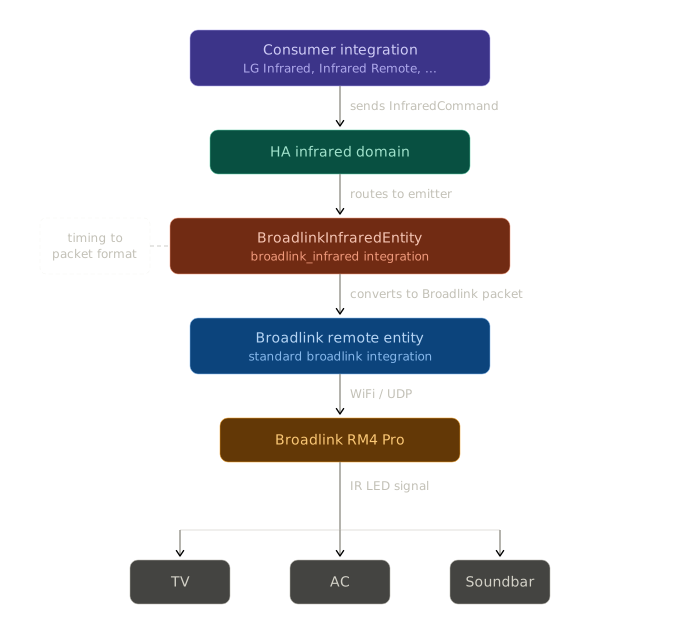
Set up this integration multiple times for multiple Broadlink RM devices (e.g., one per room).
- Transmit only: The new infrared platform currently supports sending only, not receiving/learning
- Consumer integrations needed: Works with integrations that use the new infrared platform (like LG Infrared or Infrared Remote)
- Assumed state: IR is one-way, so state tracking is assumed