Guide to setup the project with various configurations (Dockerized 5G core, Non Dockerized 5G core, Single UE, Multiple UEs, Single gNB, Multiple gNBs, OSC RIC) on Ubuntu 22.04
⚠️ HEADS UP!!!
The config files in this repo are deprecated due to recent srsRAN updates but are kept here in case you need to refer to any values. You can follow the steps outlined here to install the project, but make sure to download and use the latest config files from the official srsRAN website when you are running the project.
sudo apt update
sudo apt upgrade
Restart the system so that updated daemons are up and running
mkdir srsRAN_parent
cd srsRAN_parentsudo apt-get install git cmake make gcc g++ pkg-config libfftw3-dev libmbedtls-dev libsctp-dev libyaml-cpp-dev libgtest-devAdd UHD in the Parent Folder (we don't need an external USRP but we need the UHD related libraries given below)
sudo apt-get install autoconf automake build-essential ccache cmake cpufrequtils doxygen ethtool \
g++ git inetutils-tools libboost-all-dev libncurses5 libncurses5-dev libusb-1.0-0 libusb-1.0-0-dev \
libusb-dev python3-dev python3-mako python3-numpy python3-requests python3-scipy python3-setuptools \
python3-ruamel.yaml

git clone https://github.com/EttusResearch/uhd.git
cd uhd/host
mkdir build
cd build
cmake ../
make
make test # This step is optional
sudo make install
sudo ldconfig
For cmake Boost error sudo apt install build-essential libboost-system-dev libboost-thread-dev libboost-program-options-dev libboost-test-dev python3-mako
Note: For cmake error, deactivate conda base environment conda deactivate to prevent the error.
sudo apt-get install libzmq3-dev

git clone https://github.com/zeromq/libzmq.git
cd libzmq
./autogen.sh
./configure
make
sudo make install
sudo ldconfig

git clone https://github.com/zeromq/czmq.git
cd czmq
./autogen.sh
./configure
make
sudo make install
sudo ldconfiggit clone https://github.com/srsran/srsRAN_Project.git
cd srsRAN_Project
mkdir build
cd build
cmake ../ -DENABLE_EXPORT=ON -DENABLE_ZEROMQ=ON
make -j`nproc`
sudo make install
sudo ldconfigsudo apt-get install build-essential cmake libfftw3-dev libmbedtls-dev libboost-program-options-dev libconfig++-dev libsctp-dev
git clone https://github.com/srsRAN/srsRAN_4G.git
cd srsRAN_4G
mkdir build
cd build
cmake ../
make
make test # This step is optional
sudo make install
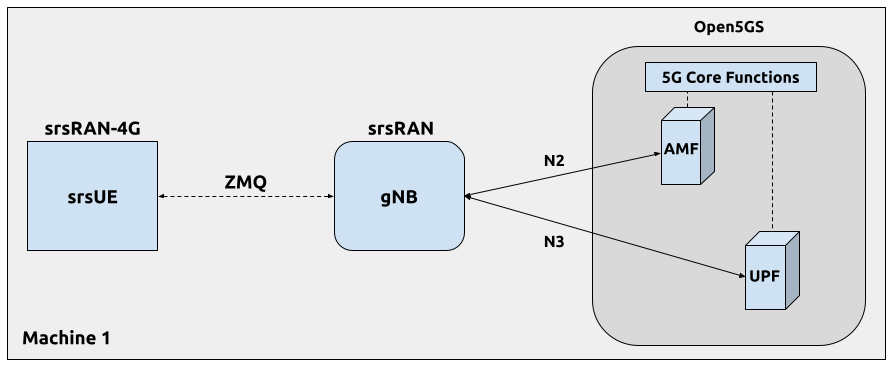
srsran_install_configs.sh userPick between Dockerised 5g core (recommended) and Simple 5g core
Once the 5g core, gNB and ue are connected successfully, we can move ahead and add RIC to this setup
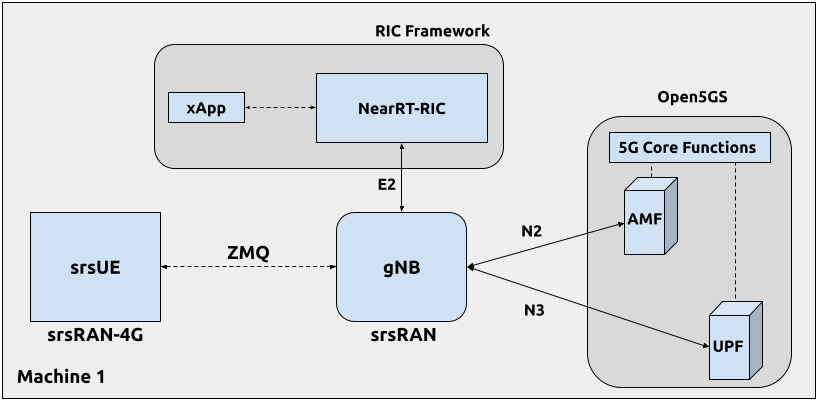
A minimal version of the OSC RIC is provided by srsRAN. Add it in the parent folder.
# Installation
git clone https://github.com/srsran/oran-sc-ricStart up each of the following components in a different terminal window.
cd srsRAN_parent/srsRAN_Project/docker/
sudo docker compose up --build 5gccd srsRAN_parent/oran-sc-ric
sudo docker compose upcd srsRAN_parent/srsRAN_Project/build/apps/gnb
sudo ip netns add ue1
# OSCRIC
sudo ./gnb -c ./single_gnb_zmq.yaml e2 --addr="10.0.2.10" --bind_addr="10.0.2.1"cd srsRAN_parent/srsRAN_4G/build/srsue/src
# Option: running the setup with one UE
sudo ./srsue single_ue_zmq.conf# OSCRIC
cd srsRAN_parent/oran-sc-ric
sudo docker compose exec python_xapp_runner ./kpm_mon_xapp.py --metrics=DRB.UEThpDl,DRB.UEThpUl --kpm_report_style=5The xApp console output should be similar to:
RIC Indication Received from gnb_001_001_00019b for Subscription ID: 5, KPM Report Style: 5
E2SM_KPM RIC Indication Content:
-ColletStartTime:  2024-04-02 13:24:56
-Measurements Data:
--UE_id: 0
---granulPeriod: 1000
---Metric: DRB.UEThpDl, Value: [7]
---Metric: DRB.UEThpUl, Value: [7]