



Latest release: v0.8.12
RadarWise is a Home Assistant dashboard (Lovelace) custom card for current weather, hourly and daily forecasts, precipitation details, sunrise and sunset, wind, humidity, dew point, UV index, optional AQI/pollen, and optional radar. It follows the TideWise/RiverWise visual language while staying a dashboard card, not a backend integration.
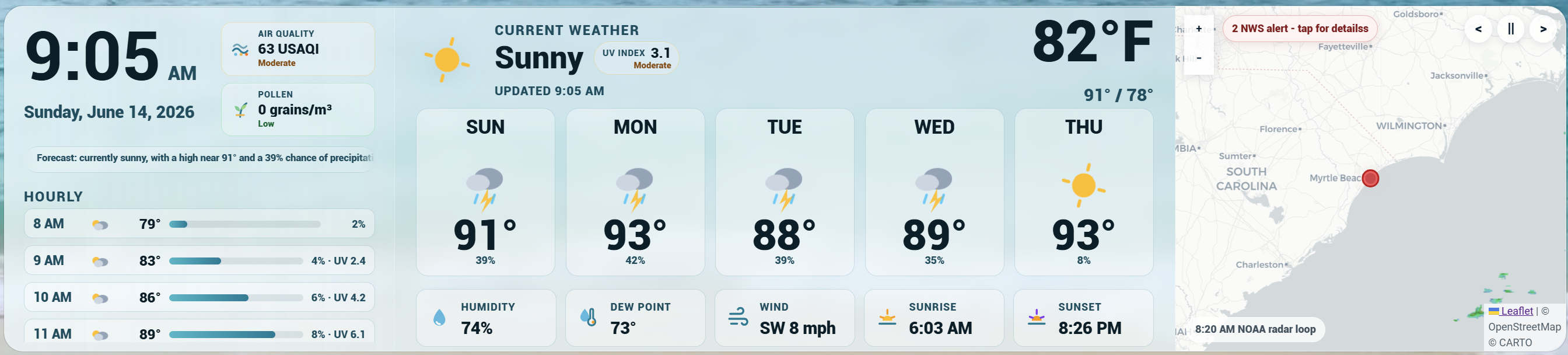
Public release note: RadarWise is ready for regular use, but weather providers vary by region. Please report provider-specific layout, radar, or forecast quirks so support can keep improving.
RadarWise gets weather data from an existing Home Assistant weather entity, so it can work anywhere Home Assistant has a weather provider.
| Region | Weather data | Radar |
|---|---|---|
| United States | Any Home Assistant weather entity |
NOAA radar by default, RainViewer optional |
| Canada | Any Home Assistant weather entity |
Environment Canada radar by default, RainViewer optional |
| Australia | Any Home Assistant weather entity |
Bureau of Meteorology radar by default, RainViewer optional |
| United Kingdom | Any Home Assistant weather entity |
RainViewer global radar by default |
| Global / other | Any Home Assistant weather entity |
RainViewer global radar by default |
RadarWise does not ask for, store, or call private weather API keys from dashboard YAML. Open-Meteo can provide no-key AQI, UV index, and pollen environment data, but radar imagery still comes from the selected radar provider.
Environment Canada radar uses the public MSC GeoMet RADAR_1KM_RRAI WMS layer. Australia radar uses native Bureau of Meteorology WMTS radar tiles and BOM basemap tiles, with no API key required. RainViewer is still available as a no-key global radar option. Its public API is for personal, educational, and small community use and may have service or coverage limits.
RadarWise should still render current conditions and forecasts anywhere Home Assistant has a working weather entity. Outside the initial US, Canada, Australia, and UK presets, radar falls back to RainViewer and local alert/warning overlays may be limited or unavailable.
If you are testing from New Zealand, Europe, South America, Africa, Asia, or any other region, please open a report or feature request with:
- Country/region and nearest city or general area
- Home Assistant weather integration/provider
- Whether hourly and daily forecasts appear
- Whether RainViewer radar loads for your area
- Any local radar, warning, or forecast provider RadarWise should know about
- Custom Lovelace card:
custom:radarwise-card - Legacy alias:
custom:radar-wise-card - Home Assistant visual editor
- Existing
weatherentity support - Optional local temperature sensor override
- Optional humidity sensor fallback
- Optional dew point sensor fallback
- Optional local wind speed and wind direction/bearing overrides
- Optional UV index badge beside the current condition
- Optional hourly UV index when exposed by the provider or Open-Meteo
- Optional AQI tile beside the clock from Home Assistant sensors or Open-Meteo
- Optional pollen summary tile from Home Assistant sensors or Open-Meteo tree/grass/weed data
- Optional mold sensor support from Home Assistant sensors
- Optional localized forecast summary ticker
- Optional custom sensor detail blocks below the weather stats row
- Hourly forecast strip
- Daily or twice-daily forecast cards
- Daily forecast high/low range when the provider exposes a low temperature
- Auto-scroll option for long forecast lists
- Precipitation probability and amount when exposed by the weather provider
- Fahrenheit and Celsius support
- Card language support for Auto, English, French, Spanish, German, Portuguese, and Dutch
- RadarWise built-in theme mode
- Home Assistant theme-aware mode with
theme_mode: auto - Layout presets: auto, wide panel, stacked, radar bottom, and compact
- Content focus presets: full dashboard, essentials, forecast only, hourly only, radar only, and custom
- Density presets for comfortable, slim, or large wall-panel sizing
- Drag-and-drop panel ordering for clock/timeline, current weather, and radar
- Adjustable panel widths with a configurable vertical-collapse threshold
- Panel widths automatically rebalance when optional panels are hidden
- Optional radar panel
- US NOAA radar support
- Environment Canada radar support
- Australia Bureau of Meteorology radar support
- RainViewer global radar support for the UK, global regions, and optional Canada fallback
- Radar playback controls: pause, previous frame, and next frame
- Radar timeline, style, basemap, and loop speed options
- US NWS active warning overlay
- Hidden YAML-only debug panel

RadarWise is not yet listed in the default/searchable HACS store. Until it is accepted into the default HACS list, install it as a custom HACS repository.
- Open HACS in Home Assistant.
- Open the three-dot menu in the top right.
- Choose Custom repositories.
- Add this repository URL:
https://github.com/TheWillMiller/radar-wise
- For category, choose Dashboard.
- Install RadarWise.
- Refresh Home Assistant.
A hard browser refresh is recommended after installing or updating:
- Windows/Linux:
Ctrl + F5 - Mac:
Cmd + Shift + R
Then add the card from your dashboard editor:
- Edit your dashboard.
- Add a new card.
- Search for RadarWise.
- Open the visual editor.
- Choose a weather entity.
- Choose the region/radar setup.
- Save.
- Download or copy
radarwise-card.js. - Place it in your Home Assistant
wwwdirectory. - Add it as a dashboard resource:
url: /local/radarwise-card.js
type: module- Refresh Home Assistant and hard-refresh your browser.
- Add the card to a dashboard.
RadarWise was renamed from its original project name in v0.5.0. If Home Assistant still has an older resource URL that points to weatherwise-card.js, v0.5.1 and later include a compatibility loader at that filename so the card can still register. New installs should use radarwise-card.js.
For quick testing before installing locally, you can add this dashboard resource:
url: https://cdn.jsdelivr.net/gh/TheWillMiller/radar-wise@v0.8.12/radarwise-card.js
type: module
CDN testing is not the preferred long-term install method. HACS is recommended for normal use.
type: custom:radarwise-card
entity: weather.home
title: Local Weather
country: us
radar_provider: auto
theme_mode: radarwise
units: auto
layout: auto
forecast_count: 5
hourly_count: 5
latitude: 33.688
longitude: -78.886
grid_options:
  rows: full
columns: 18type: custom:radarwise-card
entity: weather.home
title: Local Weather
country: ca
radar_provider: auto
theme_mode: radarwise
units: metric
latitude: 43.6532
longitude: -79.3832
grid_options:
rows: full
columns: 18type: custom:radarwise-card
entity: weather.home
title: Local Weather
country: au
radar_provider: auto
theme_mode: auto
units: metric
latitude: -34.9285
longitude: 138.6007
grid_options:
rows: full
columns: 18type: custom:radarwise-card
entity: weather.home
title: Local Weather
country: uk
radar_provider: auto
theme_mode: auto
units: metric
latitude: 51.5072
longitude: -0.1276
grid_options:
rows: full
columns: 18type: custom:radarwise-card
entity: weather.home
environment_source: open_meteo
show_environment: true
latitude: 33.688
longitude: -78.886Open-Meteo mode requests AQI, UV index, and pollen for the configured latitude/longitude and does not need an API key. Use environment_source: sensors to keep AQI, UV index, and pollen fully entity-driven inside Home Assistant, or environment_source: disabled to hide the environment cluster.
RadarWise can show optional Home Assistant sensor blocks below the Humidity, Dew Point, Wind, Sunrise, and Sunset row. The visual editor includes three slots; YAML can define up to six.
type: custom:radarwise-card
entity: weather.home
custom_sensors:
  - entity: sensor.pool_temperature
    name: Pool Temp
    icon: mdi:pool-thermometer
  - entity: sensor.greenhouse_temperature
    name: Greenhouse
    icon: mdi:greenhouse
  - entity: sensor.rain_today
    name: Rain Today
    icon: mdi:weather-pouring
    unit: in
Each item supports entity, name, icon, and unit. If name, icon, or unit are omitted, RadarWise uses the entity's friendly name, icon, and unit where available.
RadarWise defaults to its built-in glass styling:
theme_mode: radarwiseTo make the card follow Home Assistant theme colors more closely, use:
theme_mode: autoThe visual editor includes a Theme dropdown for this setting.
RadarWise includes a Home Assistant visual editor. When adding the card from the dashboard editor, you can:
- Choose a Home Assistant weather entity
- Choose an optional local temperature sensor when the weather entity is not local enough
- Choose an optional humidity sensor when the weather entity does not expose humidity
- Choose an optional dew point sensor when the weather entity does not expose dew point
- Choose an optional UV index sensor when Home Assistant has one
- Choose optional AQI and pollen source: Home Assistant sensors, Open-Meteo, or disabled
- Choose United States, Canada, Australia, United Kingdom, or global/other setup
- Choose automatic radar, NOAA radar, Environment Canada radar, BOM radar, RainViewer radar, or no radar
- Choose radar timeline, style, map style, and radar loop speed
- Set title, units, forecast counts, language, time format, font preset, and theme mode
- Choose card language: Auto, English, French, Spanish, German, Portuguese, or Dutch
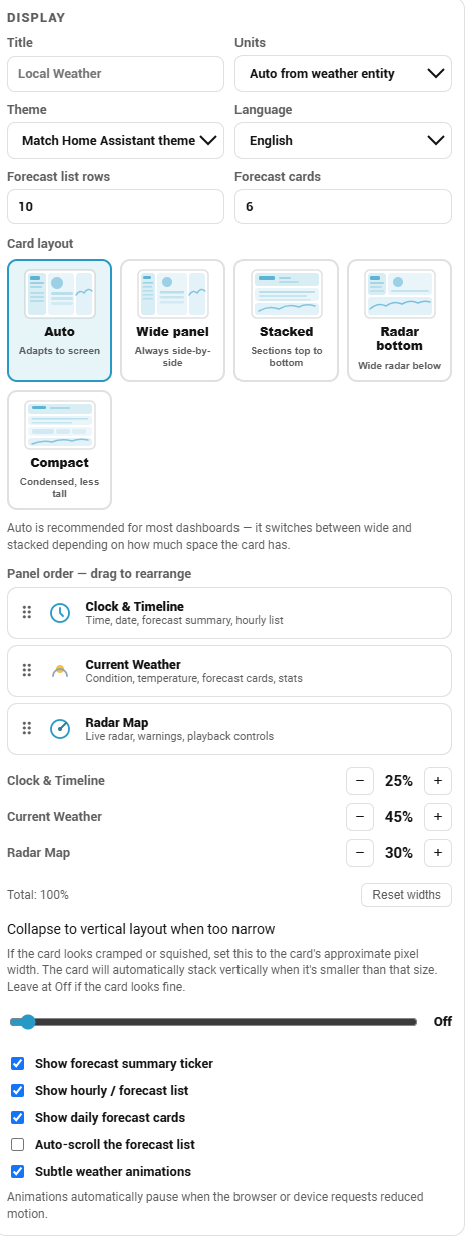
- Choose a layout preset with visual layout tiles
- Drag panels to reorder clock/timeline, current weather, and radar
- Adjust panel widths and choose when the card collapses to vertical layout
- Show or hide the forecast summary
- Show or hide the hourly/forecast list and daily forecast cards
- Enable optional auto-scroll for long forecast lists
- Enable or disable subtle weather animations
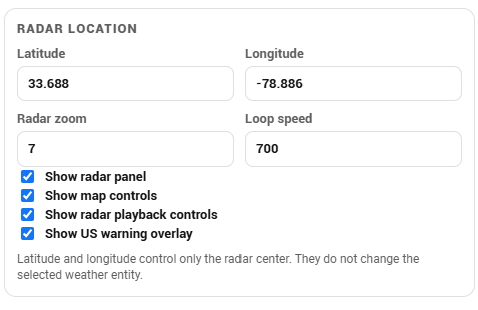
- Set radar latitude/longitude and zoom
- Show or hide the radar panel
- Show or hide map controls
- Show or hide radar playback controls
- Show or hide the US NWS warning overlay
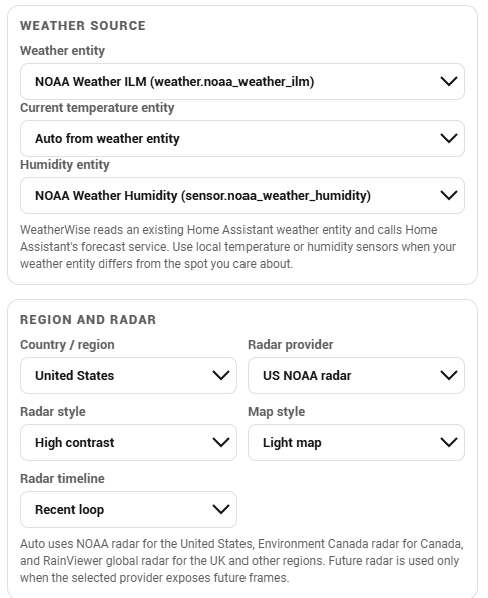
Weather source and radar setup:
Display, layout, panel order, widths, and forecast controls:
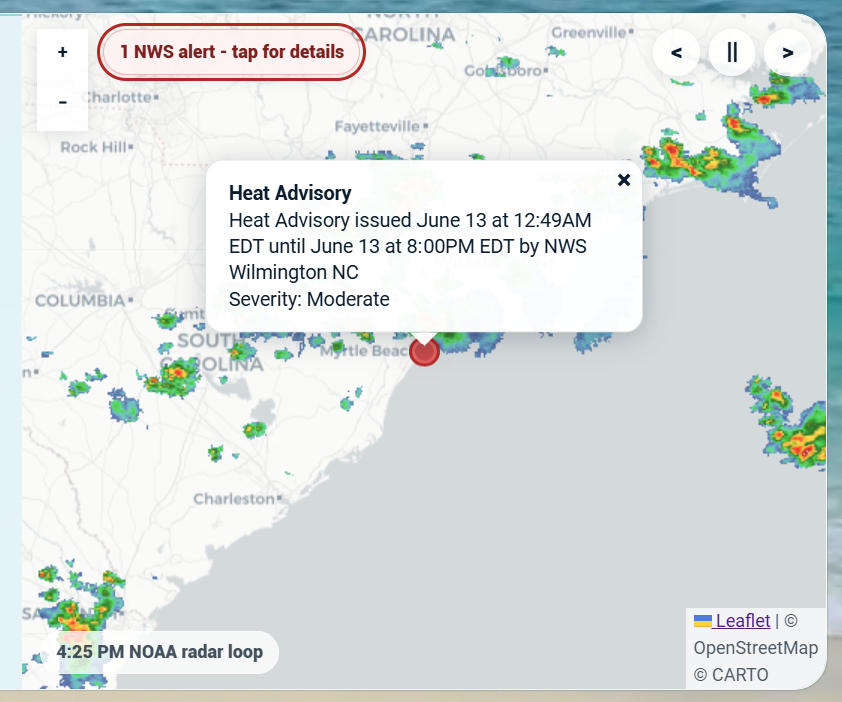
Radar location and map controls:
| Option | Required | Default | Description |
|---|---|---|---|
type |
Yes | Use custom:radarwise-card. The legacy custom:radar-wise-card alias also works. |
|
entity |
Yes | Home Assistant weather entity. |
|
temperature_entity |
No | Optional temperature sensor/helper entity for the current displayed temperature. Useful when an indoor, patio, or hyperlocal sensor differs from the weather provider. | |
humidity_entity |
No | Optional humidity sensor/helper entity. Useful when the weather entity has no humidity attribute. | |
dew_point_entity |
No | Optional dew point sensor/helper entity. RadarWise also auto-reads common dew point attributes from the weather entity when available. | |
wind_speed_entity |
No | Optional local wind speed sensor/helper entity. Useful when your weather station has better wind data than the weather provider. | |
wind_direction_entity |
No | Optional local wind direction/bearing sensor/helper entity. Accepts compass values like SW or numeric degree bearings. |
|
air_quality_entity |
No | Optional AQI/air-quality sensor or helper entity. Displays beside the clock/date when configured. | |
uv_index_entity |
No | Optional UV index sensor/helper entity. Displays beside the current condition. | |
pollen_entity |
No | Optional general pollen sensor/helper entity. | |
tree_pollen_entity |
No | Optional tree pollen sensor/helper entity used in the pollen summary. | |
grass_pollen_entity |
No | Optional grass pollen sensor/helper entity used in the pollen summary. | |
weed_pollen_entity |
No | Optional weed pollen sensor/helper entity used in the pollen summary. | |
mold_pollen_entity |
No | Optional mold sensor/helper entity used in the pollen summary. | |
environment_source |
No | sensors |
AQI/pollen/UV source: sensors, open_meteo, or disabled. Open-Meteo uses the configured radar latitude/longitude and does not need an API key. |
title |
No | Local Weather |
Card title. |
country |
No | us |
Region hint: us, ca, au, uk, or global. |
radar_provider |
No | auto |
auto, noaa, envcanada, bom, rainviewer, or none. |
theme_mode |
No | radarwise |
radarwise or auto. |
units |
No | auto |
auto, imperial, or metric. |
language |
No | auto |
Card display language: auto, en, fr, es, de, pt, or nl. Auto follows Home Assistant/browser language when possible. |
time_format |
No | auto |
Clock and timestamp format: auto, 12, or 24. Auto follows the Home Assistant time setting or browser locale when possible. |
font_family |
No | auto |
Safe local font preset: auto, system, rounded, condensed, or mono. No remote fonts are loaded. |
layout |
No | auto |
auto, wide_panel, stacked, radar_bottom, or compact. Use radar_bottom for a full-width radar below weather content, or stacked/compact for narrow dashboards. |
content_mode |
No | full |
Smart content preset: full, essentials, forecast, timeline, radar, or custom. Use custom for manual visibility switches. |
density |
No | comfortable |
Sizing preset: comfortable, slim, or large. Slim makes thinner dashboard rows; large favors wall-panel readability. |
card_height |
No | Optional fixed card height in pixels, 180-1200. Useful for panel dashboards with extra vertical room. | |
card_max_height |
No | Optional card max height in pixels, 180-1200. If card_height is set and this is blank, RadarWise uses the fixed height as the max height too. |
|
hourly_count |
No | 5 |
Number of hourly/forecast-list rows, 1-24. If hourly forecasts are unavailable, RadarWise falls back to twice-daily or daily data. |
forecast_count |
No | 5 |
Number of daily/twice-daily forecast cards, 1-7. |
show_forecast_summary |
No | true |
Show or hide the one-line forecast summary under the date. The text is generated from existing forecast data, localized by language, and respects reduced-motion settings. |
show_environment |
No | true |
Show or hide the optional AQI/pollen cluster beside the clock/date. |
show_custom_sensors |
No | true |
Show or hide optional custom sensor blocks below the weather detail stat row. |
custom_sensors |
No | [] |
Optional sensor detail blocks. Each item supports entity, name, icon, and unit. The visual editor exposes three slots; YAML supports up to six. |
show_timeline |
No | true |
Show or hide the left hourly/forecast list. |
show_forecast |
No | true |
Show or hide the daily/twice-daily forecast card strip. |
timeline_autoscroll |
No | false |
Slowly auto-scroll long forecast lists. Manual scrolling pauses it briefly. |
panel_order |
No | ["clock", "weather", "radar"] |
Order of the three major panels. Values must include clock, weather, and radar. |
column_widths |
No | [25, 50, 25] |
Percentage widths for the ordered panels. Total should equal 100. |
stack_below |
No | 0 |
Pixel width threshold for forcing vertical layout. Use 0 or leave unset to disable. |
show_animations |
No | true |
Show subtle weather icon, forecast, and hourly row animations. Respects reduced-motion settings. |
show_radar |
No | true |
Show or hide the radar panel. |
show_map_controls |
No | true |
Show or hide map zoom controls. |
radar_controls |
No | true |
Show or hide radar playback controls. |
radar_timeline |
No | loop |
loop, latest, or future. Future frames are used only when the selected radar provider exposes them. BOM uses observed recent frames for loop and latest. |
radar_style |
No | standard |
Radar overlay style: standard, vivid, or soft. |
radar_basemap |
No | light |
Map style: light, dark, or osm. The osm street-map style uses CARTO-hosted tiles with OpenStreetMap attribution rather than the volunteer tile.openstreetmap.org endpoint. BOM radar uses BOM-native light/dark map tiles. |
radar_speed |
No | 700 |
Radar loop speed in milliseconds, 300-3000. |
radar_zoom |
No | 7 |
Initial radar zoom. |
show_warning_overlay |
No | true |
Show active US NWS alerts on the radar map when available. |
latitude |
No | Home Assistant latitude | Radar center latitude. |
longitude |
No | Home Assistant longitude | Radar center longitude. |
debug |
No | disabled | Hidden troubleshooting object. Use debug: { enabled: true, panel: true } only when diagnosing data issues. |
Hidden Debug Panel
For troubleshooting, RadarWise includes a YAML-only debug panel. It is hidden from normal users and is not exposed in the visual editor.
debug:
  enabled: true
  panel: true
Remove it after testing.
RadarWise is free and has no telemetry, ads, popups, tracking pixels, or in-card donation prompts.
If RadarWise helps your dashboard, you can support development here:
Available for custom Home Assistant dashboards, Lovelace cards, and kiosk interfaces. I take 2-3 commissions/month, typically $300-600 depending on scope.
- Confirm RadarWise is installed in HACS.
- Confirm the loaded resource points to
/hacsfiles/.../radarwise-card.jsor the compatibility/hacsfiles/.../weatherwise-card.js. - Hard-refresh the browser.
- Restart Home Assistant if needed.
- Check that the dashboard resource exists.
- Open the browser console and look for RadarWise errors.
- Verify the selected weather entity exists.
- Confirm the entity supports Home Assistant forecast data.
- Try another
weatherentity. - Check the browser console for forecast service errors.
- Check the selected radar provider.
- Use
radar_provider: noaaonly for US radar. - Use
radar_provider: envcanadafor Canada,radar_provider: bomfor Australia, orradar_provider: rainviewerfor UK and global setups. - For Australia, confirm
latitudeandlongitudeare in Australia when usingradar_provider: bom. - Confirm the dashboard browser can reach external map/radar tile services.
The red radar dot appears when the US NWS warning overlay finds an active alert near the radar location. Click or tap the red dot for the alert headline. The small dark dot is the configured radar center.
- Check whether the selected weather entity exposes a humidity attribute.
- If it does not, choose a humidity sensor in the visual editor.
- Or set
humidity_entity: sensor.your_humidity_sensorin YAML.
- Check whether the selected weather entity exposes a dew point attribute.
- If it does not, choose a dew point sensor in the visual editor.
- Or set
dew_point_entity: sensor.your_dew_point_sensorin YAML.
- In the visual editor, open Environment sensors.
- Choose Open-Meteo, no API key if you want RadarWise to fetch AQI, UV index, and pollen by latitude/longitude.
- Or keep Home Assistant sensors and choose
air_quality_entity,pollen_entity,tree_pollen_entity,grass_pollen_entity,weed_pollen_entity, ormold_pollen_entity. - Confirm
show_environmentis enabled. - Open-Meteo provides AQI, UV index, and pollen, but not mold. Mold requires a Home Assistant sensor.
- Choose Open-Meteo, no API key under Environment sensors, or select a UV index sensor.
- Confirm the radar latitude/longitude is set if using Open-Meteo.
- Hourly UV appears only for hourly forecast rows, not daily or twice-daily rows.
The blue bars in the forecast list show relative temperature across the visible rows. Longer bars are warmer compared with the other rows currently shown. If your weather provider exposes precipitation probability or amount, RadarWise also shows that beside the bar.
RadarWise intentionally uses Home Assistant weather entities instead of direct address lookup. Address entry would require geocoding plus direct weather-provider calls from the browser, which adds privacy, API key, rate-limit, and regional-provider questions. A future RadarWise integration could offer address-based setup more cleanly by creating the right entities in Home Assistant.
RadarWise does not include telemetry, tracking pixels, external analytics, or phone-home behavior.
When radar is enabled, the browser viewing the dashboard loads map/radar tiles from the selected provider. If environment_source: open_meteo is enabled, the browser sends the configured latitude and longitude to Open-Meteo's public air quality and forecast APIs to request AQI, UV index, and pollen data. If environment_source: sensors is used, AQI, UV index, and pollen come only from your Home Assistant entities or selected weather provider data. The card does not send weather entity data to a RadarWise server.
RadarWise is informational. It is not a life-safety, severe-weather warning, aviation, boating, or emergency tool.
Always check official local forecasts, warnings, alerts, and emergency information for safety-critical decisions.
MIT License.
The distributable card is:
radarwise-card.js
Run the local syntax check before opening a pull request:
npm run checkFor HACS default repository submission, RadarWise is a dashboard/custom card. HACS validation/submission uses the plugin category internally for dashboard plugins.