



Latest release: v0.2.7
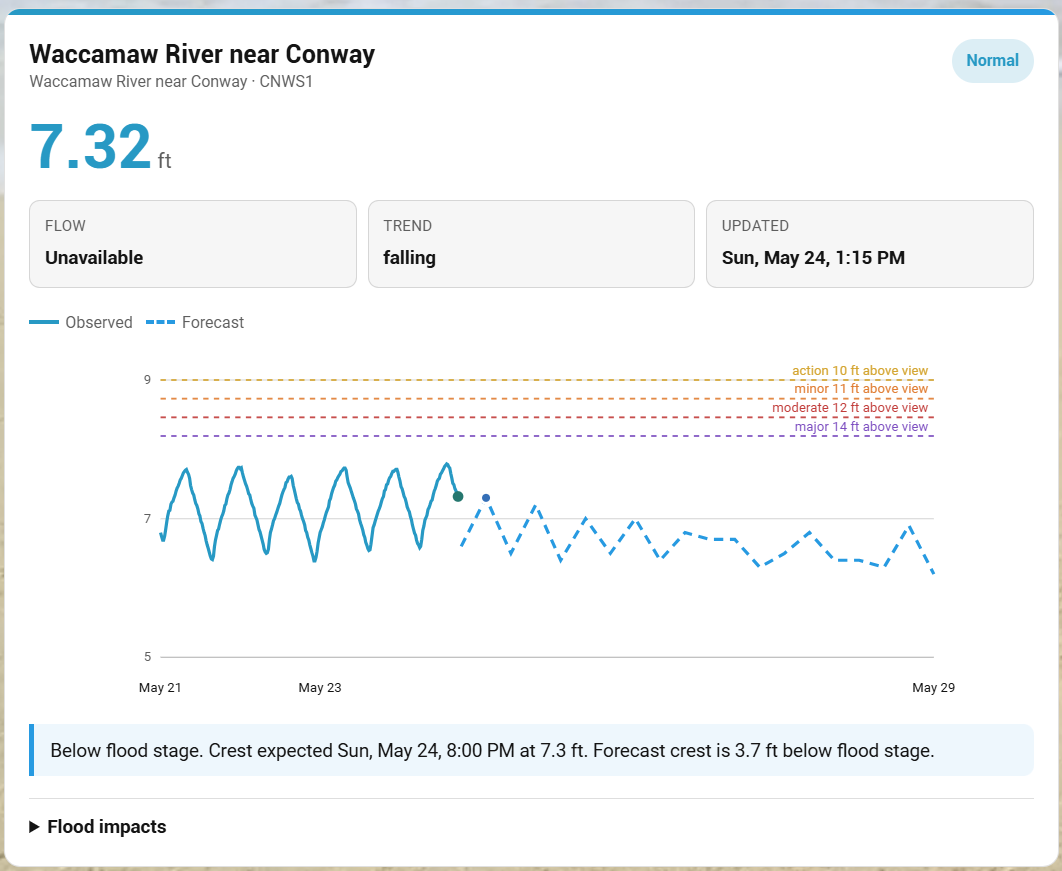
RiverWise is a Home Assistant dashboard (Lovelace) custom card for river, lake, reservoir, tailwater, and flood gauges.
It displays current stage, flow when available, trend, observed/forecast hydrographs, flood thresholds, crest summaries, and optional flood impact statements using public government water data.
RiverWise currently supports:
- US NOAA/NWS National Water Prediction Service (NWPS)
- UK Environment Agency flood-monitoring stations for England
Beta notice: RiverWise is early beta software. Please expect occasional provider-specific quirks, missing-data fallbacks, and gauge-specific layout issues while testing.
RiverWise needs real-world gauge testing. If it works for your setup, please consider starring the repo so I can gauge interest and so you can follow development:
RiverWise has no telemetry, ads, popups, tracking pixels, or in-card donation prompts. If it helps your dashboard, you can buy me a coffee.
Available for custom Home Assistant dashboards, Lovelace cards, and kiosk interfaces. I take 2-3 commissions/month, typically $300-600 depending on scope.
If you run into issues or want to confirm your gauge works, please open one of these quick reports:
Helpful details include Home Assistant version, HACS version, RiverWise version, browser/device, provider, gauge or station code, and a screenshot or console error if something broke.
- Current gauge name, ID, stage, flow, trend, and update time
- Flood category awareness from NWPS metadata where available
- Observed river-stage hydrograph
- Forecast hydrograph for US NWPS gauges where available
- Flood threshold lines and forecast crest marker
- Forecast summary with distance to flood stage
- Optional flood impact statements where NWPS provides them
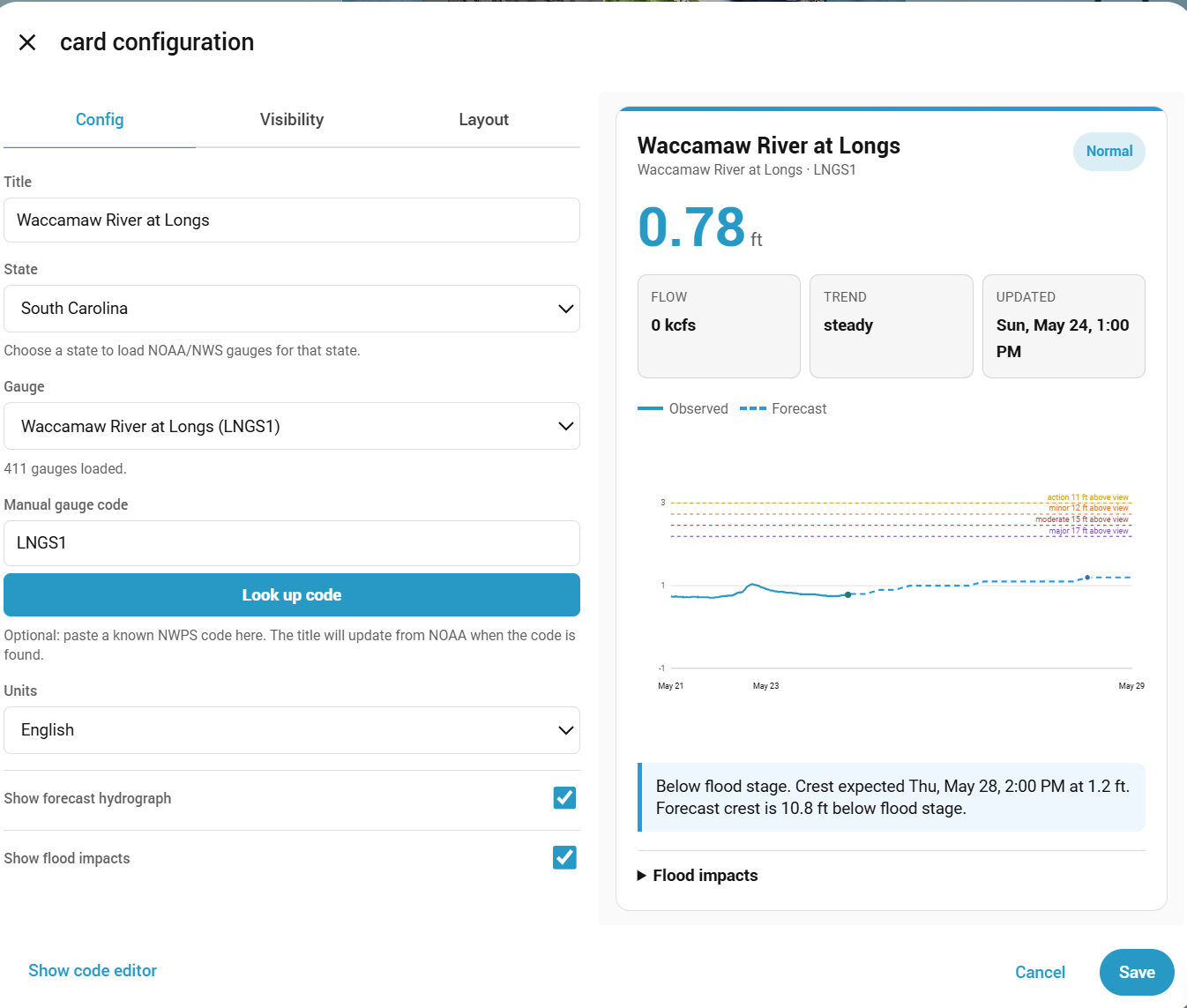
- Visual editor support
- US state and gauge selector
- Manual US NWPS gauge code lookup
- UK Environment Agency station search and station lookup
- Home Assistant theme-aware styling
- Hidden YAML-only debug output for troubleshooting

RiverWise is not yet listed in the default/searchable HACS store. Until it is accepted into the default HACS list, install it as a custom HACS repository.
- Open HACS in Home Assistant.
- Open the three-dot menu in the top right.
- Choose Custom repositories.
- Add this repository URL:
https://github.com/TheWillMiller/river-wise
-
For category, choose Dashboard.
If your HACS version uses older wording, choose the dashboard/card/frontend/plugin-style option.
-
Install RiverWise.
-
Refresh Home Assistant.
A hard browser refresh is recommended after installing or updating:
- Windows/Linux:
Ctrl + F5 - Mac:
Cmd + Shift + R
Then add the card from your dashboard editor:
- Edit your dashboard.
- Add a new card.
- Search for RiverWise.
- Open the visual editor.
- Choose a provider.
- Select a gauge or station.
- Save.
- Download or copy
river-wise-card.js. - Place it in your Home Assistant
wwwdirectory. - Add it as a dashboard resource:
url: /local/river-wise-card.js
type: module- Refresh Home Assistant and hard-refresh your browser.
- Add the card to a dashboard.
For quick testing before installing locally, you can add this dashboard resource:
url: https://cdn.jsdelivr.net/gh/TheWillMiller/river-wise@v0.2.7/river-wise-card.js
type: module
After changing resources, refresh Home Assistant and hard-refresh the browser tab.
CDN testing is not the preferred long-term install method. HACS is recommended for normal use.
type: custom:river-wise-card
title: Ohio River at Meldahl Dam
provider: us_nwps
gauge: MELO1
gauge_state: OH
units: english
show_forecast: true
show_impacts: true
grid_options:
  rows: full
columns: 18type: custom:river-wise-card
title: Bourton Dickler
provider: uk_ea
gauge: 1029TH
uk_station: 1029TH
units: metric
show_forecast: false
show_impacts: true
grid_options:
  rows: full
columns: 18RiverWise is a chart card. In Home Assistant section/grid dashboards, give it enough horizontal space:
grid_options:
rows: full
columns: 18On narrower dashboards, use:
grid_options:
  rows: full
columns: fullRiverWise includes a Home Assistant visual editor. When adding the card from the dashboard editor, you can:
- Choose US NOAA/NWS NWPS or UK Environment Agency
- Select a US state and gauge
- Search UK Environment Agency stations
- Enter a custom US gauge code or UK station reference
- Set English or metric units
- Enable or disable forecast rendering
- Enable or disable flood impact rendering
US state gauge lists are loaded from the NWPS API using state bounding boxes. If your gauge is not in the dropdown, enter the NWPS gauge code manually and use Look up code.
UK station search uses the Environment Agency flood-monitoring API. Enter a place, river name, or station reference, then choose a result.
RiverWise uses NOAA/NWS NWPS API endpoints directly for US gauges:
https://api.water.noaa.gov/nwps/v1/gauges/{identifier}
https://api.water.noaa.gov/nwps/v1/gauges/{identifier}/stageflow/observed
https://api.water.noaa.gov/nwps/v1/gauges/{identifier}/stageflow/forecast
The visual editor loads state gauge lists from:
https://api.water.noaa.gov/nwps/v1/gauges
with bounding-box query parameters for the selected state.
For UK Environment Agency stations, RiverWise uses:
https://environment.data.gov.uk/flood-monitoring/id/stations
https://environment.data.gov.uk/flood-monitoring/id/stations/{id}
https://environment.data.gov.uk/flood-monitoring/id/measures/{id}/readings
UK data uses Environment Agency flood and river level data from the real-time flood-monitoring API.
Forecast data is not available for every US NWPS gauge. RiverWise will still render observed data when forecast data is missing.
UK Environment Agency support currently renders observed readings only. The EA real-time API exposes station and measure readings, but not the same NWPS-style forecast crest feed.
Flood impact text is provider-specific. NWPS may provide gauge-specific flood impacts. UK Environment Agency station readings usually do not include NWPS-style impact statements.
Hidden Debug Panel
For troubleshooting, RiverWise includes hidden debug state. It is not exposed in the visual editor.
Enable it manually only when diagnosing a gauge or provider issue:
debug: trueDebug output is logged to the browser console and stored on the card element as _riverWiseDebug. Remove it again after testing.
| Option | Required | Default | Description |
|---|---|---|---|
type |
Yes | Use custom:river-wise-card. |
|
title |
No | RiverWise |
Card title. If a gauge lookup succeeds, the visual editor can update this from provider metadata. |
provider |
No | us_nwps |
Data provider. Use us_nwps or uk_ea. |
gauge |
Yes | US NWPS gauge ID or UK station reference. | |
gauge_state |
No | US state abbreviation used by the visual editor gauge dropdown. | |
uk_station |
No | UK Environment Agency station reference. Usually the same value as gauge in UK mode. |
|
units |
No | english |
Display units. Use english or metric. Provider data availability may vary. |
show_forecast |
No | true |
Show forecast hydrograph when available. US NWPS only for now. |
show_impacts |
No | true |
Show flood impact statements when provider metadata includes them. |
debug |
No | false |
Hidden troubleshooting mode. Not available in the visual editor. |
If RiverWise works for you after troubleshooting, please consider starring the repo or opening a Works For Me / Confirmed Gauge report. If it breaks, a Beta Install Report with your versions and gauge code helps a lot.
- Confirm RiverWise is installed in HACS.
- Hard-refresh the browser.
- Restart Home Assistant if needed.
- Check that the card resource exists.
- Open the browser console and look for RiverWise errors.
HACS may cache repository metadata.
Try:
- Open HACS.
- Open RiverWise.
- Open the three-dot menu.
- Select Redownload.
- Choose the latest version.
- Hard-refresh your browser.
If HACS shows a short value like 214b6c2 instead of v0.2.7, that is a GitHub commit hash. HACS shows commit hashes when a repository has tags but no full GitHub Release yet. Publishing a full GitHub Release makes HACS show the release version instead.
- Verify the provider.
- Verify the gauge or station code.
- Try a known working gauge such as
MELO1for US NWPS. - Confirm your browser/Home Assistant can reach the provider API.
- Open the browser console and check for network, CORS, or station errors.
Forecast data is optional and gauge-specific. If a provider returns no forecast series, RiverWise renders observed data only.
- Confirm the latest RiverWise JS is loaded.
- Hard-refresh the browser.
- Redownload the latest HACS release.
- Check the browser console for custom element errors.
RiverWise does not include telemetry, tracking pixels, external analytics, or phone-home behavior.
The card fetches only the public provider data needed to render the configured dashboard card. Adoption tracking is based only on GitHub-native signals such as stars, issues, release activity, and tester reports.
Maintainer notes for GitHub-native adoption signals are in PROJECT_INSIGHTS.md.
The full checklist is also available in BETA_TESTER_CHECKLIST.md.
If you are testing RiverWise, please report:
- Home Assistant version
- HACS version
- RiverWise version
- Browser/device
- Provider and gauge/station code used
- Whether you installed from HACS custom repository, manual resource, or CDN
- Screenshot of any layout issue
- Browser console errors, if any
- Whether the issue happens after a hard refresh
Basic test steps:
- Install RiverWise from HACS custom repository.
- Add the card from the dashboard card picker.
- Open the visual editor.
- Select a provider.
- Select a gauge or station.
- Save.
- Refresh the dashboard.
- Confirm the card still loads.
- Confirm current stage and hydrograph render.
- Test on desktop and phone.
- Screenshot or copy any errors.
RiverWise is informational. It is not an emergency alerting, flood warning, dam safety, navigation, boating safety, or life-safety tool.
Always check official forecasts, warnings, local emergency management guidance, road closures, and on-site conditions before making weather, flooding, boating, or travel decisions.
Do not use RiverWise as your only source for flood risk, evacuation, boating, or hazardous-water decisions.
RiverWise is licensed under the MIT License.
The distributable card is:
river-wise-card.js
For HACS default repository submission, RiverWise is a dashboard/custom card. HACS validation/submission uses the plugin category internally for dashboard plugins.
Run the local syntax check before opening a pull request:
npm run checkPlanned areas for future releases:
- More provider-specific polish for UK Environment Agency data
- Better international provider discovery
- More complete gauge search and filtering
- Additional theme and mobile layout polish
- Optional threshold/alert customization for gauges without published flood stages
Bug reports, confirmed-gauge reports, and focused feature requests are welcome through GitHub Issues.
For code changes:
- Keep RiverWise as a dashboard/custom card, not an integration.
- Preserve existing HACS custom repository install behavior.
- Keep changes scoped and update
CHANGELOG.mdwhen behavior changes. - Run
npm run check. - Include screenshots for visible UI changes when practical.