⚠️ Beta
This is in beta. It is intended to be tested further on workloads covering more of edge cases.
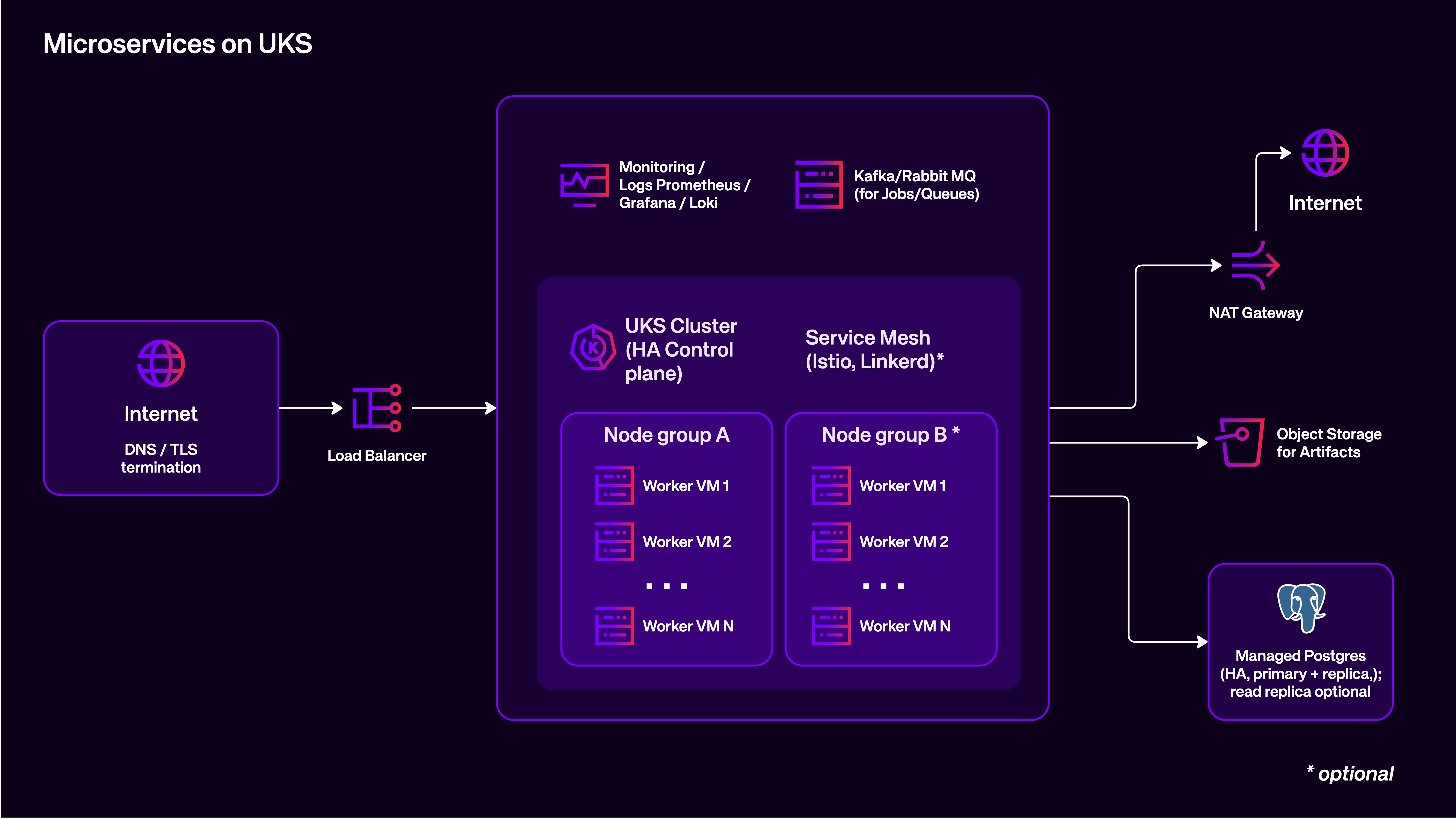
This repo is a hands-on blueprint that provisions a small Kubernetes-based microservices environment on UpCloud Kubernetes Service (UKS) with a practical “orders” demo application and a basic observability stack (Prometheus + Loki + Grafana).
The goal is to make it easy for anyone to:
- provision the infrastructure with Terraform,
- build their own application images from source (no “magic” prebuilt images),
- deploy the app to UKS,
- verify end-to-end flow (API → RabbitMQ → worker → Postgres),
- and validate observability (metrics + logs) from a fresh environment.
This repo uses git submodules for
app/andinfra/.
.
├── app/          # (submodule) application source + Kubernetes manifests + deploy script
├── infra/        # (submodule) Terraform: core (UpCloud) + addons (Kubernetes add-ons)
├── smoke/        # end-to-end smoke test script
├── Makefile      # helper targets (incl. smoke)
└── README.md     # you are here
If you cloned without submodules:
git submodule update --init --recursiveOr clone fresh with:
git clone --recurse-submodules https://github.com/praivan/uks-microservices-blueprint.git- UKS cluster on a private SDN network (nodes have no public IPs).
- Outbound access via NAT Gateway.
- RabbitMQ VM (public + private NIC) for queueing.
- Managed Postgres (UpCloud Managed Databases) for persistence.
- Monitoring VM runs Docker Compose with:
- Grafana
- Prometheus
- Loki
- node-exporter / postgres-exporter / rabbitmq-exporter
- In-cluster logging:
- Promtail DaemonSet tails node container logs and ships to Loki.
- In-cluster metrics:
- kube-state-metrics (for cluster state metrics)
- Terraform
- kubectl
- GNU
envsubst(from gettext) - Docker (for building images)
jq,curl,ssh,make
On macOS (example):
brew install terraform kubectl gettext jqThen ensure envsubst is available:
which envsubstYou’ll need UpCloud API credentials available to Terraform (commonly via environment variables). Check infra/ for the exact provider config expected in your setup.
From the infra/ submodule:
cd infraInitialize + apply:
cd core   && terraform init
terraform apply

cd ../addons && terraform init
terraform apply
Useful outputs (from infra/core):
cd ../core
terraform output -raw uks_kubeconfig_path
terraform output -raw rabbitmq_amqp_url
terraform output -raw postgres_app_dsn
terraform output -raw grafana_url
Export kubeconfig (so kubectl talks to UKS):
export KUBECONFIG="$(cd infra/core && terraform output -raw uks_kubeconfig_path)"
kubectl get nodes -o wideUKS nodes must be able to pull your images from a registry reachable from the cluster (e.g. GHCR or Docker Hub).
cd app/orders-api
docker build -t ghcr.io/<YOUR_GH_USER_OR_ORG>/orders-api:v1 .
docker push ghcr.io/<YOUR_GH_USER_OR_ORG>/orders-api:v1cd ../orders-worker
docker build -t ghcr.io/<YOUR_GH_USER_OR_ORG>/orders-worker:v1 .
docker push ghcr.io/<YOUR_GH_USER_OR_ORG>/orders-worker:v1Apple Silicon tip: if your cluster is amd64, build amd64 images:
docker buildx build --platform linux/amd64 -t ... --push .
The app deploy script expects these environment variables:
IMAGE_APIIMAGE_WORKERRABBITMQ_URLPOSTGRES_DSN
Set them from Terraform outputs:
export IMAGE_API="ghcr.io/<YOUR_GH_USER_OR_ORG>/orders-api:v1"
export IMAGE_WORKER="ghcr.io/<YOUR_GH_USER_OR_ORG>/orders-worker:v1"

export RABBITMQ_URL="$(cd infra/core && terraform output -raw rabbitmq_amqp_url)"
export POSTGRES_DSN="$(cd infra/core && terraform output -raw postgres_app_dsn)"
Deploy:
cd app
./deploy.sh
Verify:
kubectl -n app-demo get pods -o wide
kubectl -n app-demo get svcThe API serves:
- HTML UI at
/ - JSON API at
/orders
kubectl -n app-demo port-forward svc/orders-api 8080:8080Open:
In another terminal:
curl -i -X POST "http://127.0.0.1:8080/orders" \
  -H 'Content-Type: application/json' \
  -d '{"order_id":"demo-1","quantity":1}'
List last orders:
curl -s "http://127.0.0.1:8080/orders" | jq .Note: the API publishes to RabbitMQ. The worker consumes from the queue and inserts into Postgres. If the “Last 50 Orders” list stays empty, check
orders-workerlogs.
Get the URL from Terraform:
cd infra/core
terraform output -raw grafana_url
Open that URL in your browser.
Worker logs:
kubectl -n app-demo logs deploy/orders-worker --tail=200API logs:
kubectl -n app-demo logs deploy/orders-api --tail=200Promtail status (in-cluster):
kubectl -n logging get pods -o wide
kubectl -n logging logs ds/promtail --tail=100From the repo root, the smoke test can provision and validate everything end-to-end.
Example:
export IMAGE_API="ghcr.io/<YOUR_GH_USER_OR_ORG>/orders-api:v1"
export IMAGE_WORKER="ghcr.io/<YOUR_GH_USER_OR_ORG>/orders-worker:v1"

SMOKE_APPLY=1 SMOKE_DESTROY=0 make smokeDestroy everything (addons first, then core):
cd infra/addons && terraform destroy
cd ../core && terraform destroy