


I learn by testing real systems, rebuilding workflows, and refining setups —
then turning that experience into practical tools that others can actually reuse.
From an early age, I was drawn to computing and electronics, even taking related courses along the way. Life eventually led me into a different branch of engineering, but Linux brought me back to that original curiosity.
A few years ago, after discovering creators like Chris Titus Tech and others in the Linux community, I started exploring Linux seriously in my spare time. Most of what I know has come from self-learning, experimentation, and countless hours of rebuilding, testing, and refining.
I am not a traditional software developer, and I do not come from a formal IT background. I am an enthusiast who learns by doing, studies how other people build their systems, and uses modern tools to turn useful ideas into practical projects.
This GitHub is where I share projects designed to make Linux easier to understand, easier to experiment with, and easier to customize.
A big part of that motivation comes from helping family members replicate useful setups, understand how Linux desktops are structured, and choose how they want their own computers to behave.
I do not build these projects to look like a developer.
I build them because they solve real problems for me, help the people around me, and hopefully make Linux more approachable for others too.
|
|


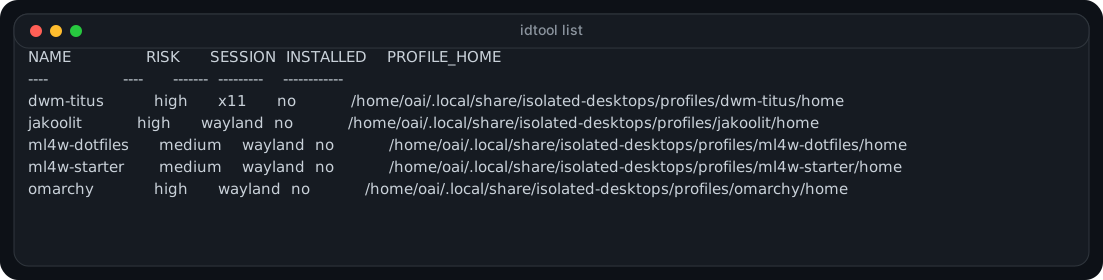
isolated-desktops is a session-profile manager for testing multiple Linux desktop setups on one machine while keeping separate session homes and a cleaner workflow for reviewing plans, installing profiles, verifying setups, and opening editor workspaces.
|
|
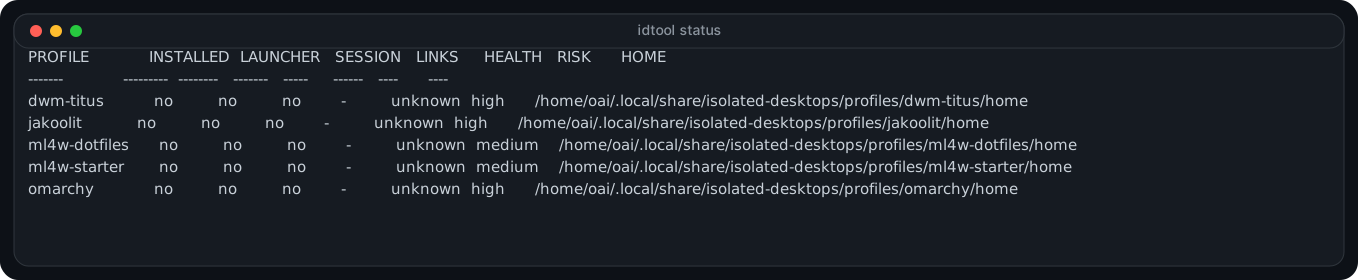
See another preview
%%{init: {'theme':'base', 'themeVariables': { 'background':'#0D1117', 'primaryColor':'#0D1117', 'primaryBorderColor':'#00BFFF', 'primaryTextColor':'#D9FFFF', 'lineColor':'#00E5FF', 'secondaryColor':'#0D1117', 'tertiaryColor':'#0D1117' }, 'flowchart': { 'curve': 'stepBefore', 'htmlLabels': true }}}%%
flowchart TB
    CORE["VG CHIP<br/>Linux Desktop Experimentation"]:::chip

    subgraph BUS[" "]
      direction LR
      PM["Profile Management"]:::moduleB
      DA["Desktop Analysis"]:::moduleG
      TD["Tool Development"]:::moduleB
      CS["Community Support"]:::moduleG
    end

    CORE ==> PM
    CORE ==> DA
    CORE ==> TD
    CORE ==> CS

    PM --> PM1["Session isolation"]:::nodeB
    PM --> PM2["Config separation"]:::nodeB
    PM --> PM3["Safe testing"]:::nodeB

    DA --> DA1["Structure study"]:::nodeG
    DA --> DA2["Workflow comparison"]:::nodeG
    DA --> DA3["Best practices"]:::nodeG

    TD --> TD1["Reusable scripts"]:::nodeB
    TD --> TD2["Modular design"]:::nodeB
    TD --> TD3["Documentation"]:::nodeB

    CS --> CS1["Family guidance"]:::nodeG
    CS --> CS2["New user help"]:::nodeG
    CS --> CS3["Knowledge sharing"]:::nodeG

    classDef chip fill:#07131A,stroke:#39FF14,stroke-width:4px,color:#D9FFFF;
    classDef moduleB fill:#0D1117,stroke:#00BFFF,stroke-width:3px,color:#A7FFF4;
    classDef moduleG fill:#0D1117,stroke:#39FF14,stroke-width:3px,color:#D9FFF1;
    classDef nodeB fill:#0D1117,stroke:#00E5FF,stroke-width:2px,color:#BFFCFF;
    classDef nodeG fill:#0D1117,stroke:#00FF9C,stroke-width:2px,color:#D9FFF1;
    linkStyle default stroke:#00D9FF,stroke-width:2px;

|

|

|

|
I want this GitHub to grow into a collection of practical tools that help people:
Explore Linux → Understand design choices → Build their own setups → Gain confidence
The goal is simple: make Linux customization feel less overwhelming, so new users can experiment safely and gradually shape a desktop that fits the way they actually work.
|
Analyze how others structure their setups |
Extract what is genuinely useful |
Build something cleaner and reusable |
Document it so others can learn |
I am especially interested in making Linux customization approachable, so new users can experiment with confidence and gradually build something that is truly their own.

