
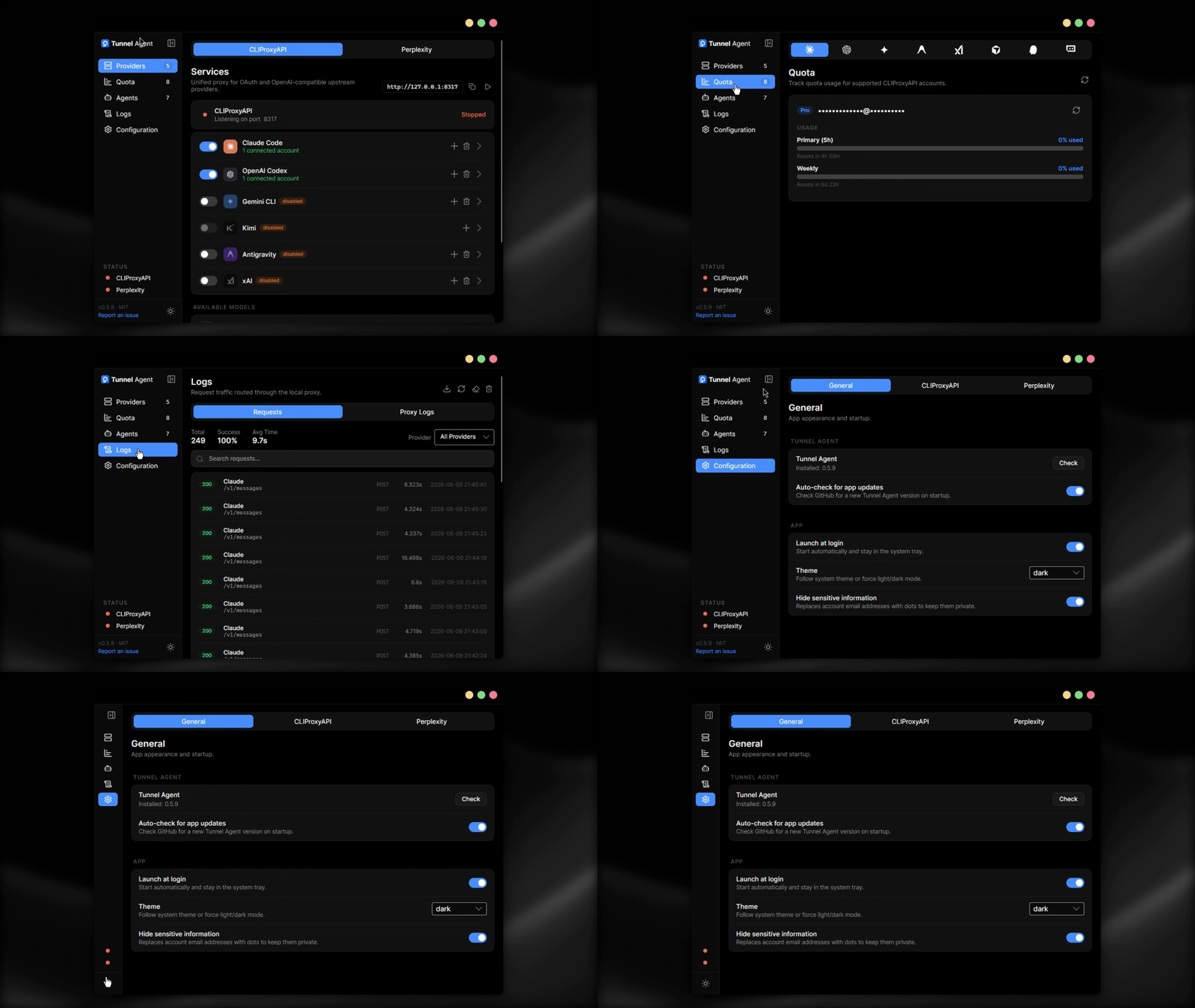
Desktop UI for CLIProxyAPI and Perplexity WebUI Scraper. Manage OAuth providers, API keys, and Perplexity session accounts, then point any coding agent at the local endpoint.
One click to connect. Works with whatever you already have.


Download · Issues · TODO · Contributing
Warning
This app has only been tested on Windows. It may require changes to work correctly on Linux or macOS. Contributions to add full support for both platforms are very welcome.
- 🖥️ Native Windows Experience: clean Avalonia UI that respects your system theme and keeps local engine management in one place
- 🌍 Multi-Language UI (i18n): fully localized interface with runtime language switching across 14 languages, auto-detecting your system language on first launch
- 🔀 Multi-Engine Control: run and manage both CLIProxyAPI and Perplexity from the same desktop app, with per-engine configuration, endpoint controls, and status
- 🚀 One-Click Server Management: start and stop each local engine directly from the Providers view
- 🔐 Credential Storage: secure handling for OAuth tokens, custom provider API keys, and file-based Perplexity session accounts stored under Tunnel Agent settings
- 👥 Provider Management: connect Claude Code, OpenAI Codex, Gemini CLI, Kimi, Antigravity, xAI (Grok), and custom OpenAI-compatible providers
- 🧠 Perplexity WebUI Sessions: add multiple Perplexity accounts, set a default session, reset accounts safely, and auto-install the Perplexity engine when needed
- 🎚️ Model Visibility: browse available models grouped by connected provider or engine source, including Perplexity-backed model listings
- 🔁 Model Fallback: create virtual models backed by ordered provider/model chains, automatically fail over when quota is exhausted, expose the virtual models through
/v1/models, and cache the last working route for a configurable duration - 📈 Usage Dashboard: Home view with live usage telemetry (calls, tokens, success rate) over selectable time ranges, an interactive usage chart, and a summary table that groups by provider or model — backed by SQLite history that persists across restarts
- 💰 Cost Estimation: per-request cost estimates using live OpenRouter pricing (input/output/cache read & write rates) cached on disk for offline use, with a built-in price table fallback
- 📊 Live Status: see sidebar engine health plus focused engine state, endpoint, and release info
- ⚙️ Configuration: control startup behaviour, per-engine ports, updates, release selection, routing strategy, and credential actions
CLIProxyAPI remains the main unified OpenAI-compatible local proxy for OAuth and upstream providers. Tunnel Agent lets you:
- install and update CLIProxyAPI releases
- switch to a pinned release instead of always following latest
- manage connected providers and custom OpenAI-compatible accounts
- inspect provider quotas and available models exposed by the running proxy
Tunnel Agent now includes first-class support for the Perplexity WebUI Scraper engine. You can:
- install and start Perplexity from the same UI
- manage Perplexity session token accounts separately from CLIProxy auth files
- store each Perplexity account as its own JSON file under the Tunnel Agent settings directory
- generate a Perplexity session token directly from the UI with a guided email/OTP/TOTP wizard
- edit account labels in-place from the account list
- view Perplexity endpoint status and available models from the Perplexity server
- keep Perplexity on a selected release instead of being forced to latest
| Provider | Auth method |
|---|---|
| Claude (Anthropic) | OAuth |
| Gemini CLI (Google) | OAuth |
| OpenAI Codex | OAuth |
| Kimi (Moonshot) | OAuth |
| Antigravity | OAuth |
| xAI (Grok) | OAuth |
| Perplexity | WebUI session token |
| Custom OpenAI-compatible | API key + base URL |
| IDE | Description |
|---|---|
| Cursor | Auto-detected when installed and logged in |
| Kiro | Auto-detected when installed and logged in |
| Trae | Auto-detected when installed and logged in |
Note
These IDEs are only used for quota usage monitoring. They cannot be used as providers for the proxy.
| Agent | Config method |
|---|---|
| Claude Code | ~/.claude/settings.json |
| Codex CLI | ~/.codex/config.toml + auth.json |
| Gemini CLI | Environment variables |
| Amp | ~/.config/amp/settings.json + ~/.local/share/amp/secrets.json |
| OpenCode | ~/.config/opencode/opencode.json |
| Pi | ~/.pi/agent/models.json |
| Factory Droid | ~/.factory/settings.json |
The interface is fully localized with runtime language switching (Configuration → General → Language). Use System default to follow the current OS language, or pick a specific locale to keep a manual override.
| Language | Locale |
|---|---|
| System default | null |
| English | en-US |
| Español | es-ES |
| Português | pt-PT |
| Italiano | it-IT |
| Français | fr-FR |
| Deutsch | de-DE |
| 简体中文 | zh-CN |
| 日本語 | ja-JP |
| العربية | ar-SA |
| Українська | uk-UA |
| Русский | ru-RU |
| हिन्दी | hi-IN |
| 한국어 | ko-KR |
| Türkçe | tr-TR |
Note
Translations live in src/TunnelAgent.Avalonia/Resources/Strings*.resx, one file per locale (e.g. Strings.es-ES.resx), with Strings.resx as the English base. To fix or improve a translation, edit the <value> text for the matching key in that locale's file (keep the name keys and any {0} placeholders unchanged) and open a PR. To add a new language, copy Strings.resx to Strings.<locale>.resx, translate the values, and register the locale in LocalizationService.cs.
Installer (recommended): download TunnelAgent-x.y.z-win-Setup.exe from the latest release and run it. Updates are applied automatically in the background.
Portable: download TunnelAgent-x.y.z-win-x64-portable.zip, extract it, and run TunnelAgent.exe. No installation required.
Scoop:
scoop bucket add villoh https://github.com/Villoh/scoop-bucket
scoop install tunnel-agent
Requirements: Windows 10 or later.
- Start the engine: click the play button next to the endpoint. The status indicator turns green when the engine is running.
- Connect providers: open the Providers tab for CLIProxyAPI, connect OAuth providers (Claude, Gemini CLI, Kimi…) or add custom API key accounts.
- Configure your agents: open the Agents tab to auto-write or manually copy the proxy config for each agent. For unsupported clients, copy the endpoint (e.g.
http://127.0.0.1:8317/v1) from the Providers header and configure it manually. - Track quota: open the Quota tab to see remaining quota for connected CLIProxyAPI providers and standalone IDE accounts (Kiro, Trae).
Requirements: .NET SDK 10.0.203+
Clone and run:
git clone https://github.com/Villoh/tunnel-agent.git
cd tunnel-agent
dotnet restore
dotnet run --project src/TunnelAgent.Avalonia/TunnelAgent.Avalonia.csproj
If the app is already running, stop it before rebuilding; Windows locks
TunnelAgent.exewhile it is open.
- VibeProxy: original concept and inspiration
- CLIProxyAPI: the unified proxy that powers multi-provider support
- perplexity-webui-scraper: Perplexity engine and session token CLI
- Quotio: reference implementation for quota tracking and IDE account detection
- OpenUsage: provider API documentation and reference implementations for Claude, Codex, Kiro, and more quota endpoints
Contributions are welcome. See CONTRIBUTING.md for guidelines.
To report a vulnerability, see SECURITY.md. Do not open a public issue.
MIT License, see LICENSE for details.