


A lightweight C# class library for MySQL — designed for developers who want to stay close to SQL while removing the tedium around it.
MySqlExpress has a sibling library for SQLite, SQLiteExpress, which mirrors this API — giving you a consistent database interface across both MySQL and SQLite projects.
Part 1 — The Library
Getting Started
MySqlExpress Highlights
More API
Reference
Part 2 — MySqlExpress Helper App
- What the Helper does
- Download
- Generating class fields
- Generating dictionary entries
- Generating the update column list
Part 3 — Extras
About
No ORM. No migrations. No DbContext. No LINQ-to-SQL translation layer.
You write SQL. MySqlExpress handles the plumbing: parameterization, object binding, type conversion, CRUD generation. So you don't have to repeat yourself.
The idea is simple: wrap a raw MySqlCommand and give it superpowers.
using MySqlConnector;

using (MySqlConnection conn = new MySqlConnection(connString))
{
    conn.Open();
    using (MySqlCommand cmd = new MySqlCommand())
    {
        cmd.Connection = conn;

        MySqlExpress m = new MySqlExpress(cmd);

        // You're ready. That's it.
    }
}
Throughout this README,
mis theMySqlExpressinstance.
MySqlExpress ships as a single .cs file, distributed through NuGet. There are two packages — pick the MySQL connector you prefer:
| Connector | NuGet Package | License |
|---|---|---|
| MySqlConnector (default) | MySqlExpress | MIT |
| MySql.Data (Oracle) | MySqlExpress.MySql.Data | GPL / Oracle |
PM> NuGet\Install-Package MySqlExpress
or for the Oracle connector:
PM> NuGet\Install-Package MySqlExpress.MySql.Data
Prefer to drop the source in directly? Grab MySqlExpress.cs from the repo — it lives in the System namespace, so any file that already has using System; picks it up automatically.
using System;
using System.Collections.Generic;
using MySqlConnector;

string connStr = "server=localhost;user=root;pwd=1234;database=test;";

using (MySqlConnection conn = new MySqlConnection(connStr))
{
    conn.Open();
    using (MySqlCommand cmd = new MySqlCommand())
    {
        cmd.Connection = conn;

        MySqlExpress m = new MySqlExpress(cmd);

        // Insert a row.
        Dictionary<string, object> dic = new Dictionary<string, object>();
        dic["code"] = "P001";
        dic["name"] = "John Smith";
        dic["date_register"] = DateTime.Now;
        dic["tel"] = "0123456789";
        dic["email"] = "john@mail.com";
        dic["status"] = 1;

        m.Insert("player", dic);

        int newId = m.LastInsertId;

        // Read it back.
        int count = m.ExecuteScalar<int>("select count(*) from player;");
        Console.WriteLine($"Rows: {count}, last id: {newId}");
    }
}Throughout this README, most examples build dictionaries with the indexer-initializer form (["key"] = value). C# gives you a few equivalent ways to write the same thing — use whichever your fingers prefer:
// Style 1 — indexer initializer (used in this README)
Dictionary<string, object> dic = new Dictionary<string, object>
{
    ["id"]    = 1,
    ["name"]  = "John",
    ["score"] = 100,
};

// Style 2 — collection initializer
var dic = new Dictionary<string, object>
{
    { "id", 1 },
    { "name", "John" },
    { "score", 100 },
};

// Style 3 — plain assignment
Dictionary<string, object> dic = new Dictionary<string, object>();
dic["id"]    = 1;
dic["name"]  = "John";
dic["score"] = 100;
All three produce the same Dictionary<string, object>. MySqlExpress doesn't care which you pick.
Dictionary-based. Pass a table name and a Dictionary<string, object> of column → value. MySqlExpress builds the parameterized INSERT, handles type conversion, and you're done.
Dictionary<string, object> dic = new Dictionary<string, object>
{
    ["code"]          = "P001",
    ["name"]          = "John Smith",
    ["date_register"] = DateTime.Now,
    ["tel"]           = "0123456789",
    ["email"]         = "john@mail.com",
    ["status"]        = 1,
};

m.Insert("player", dic);

int newId  = m.LastInsertId;      // int
long newIdLong = m.LastInsertIdLong; // long, for BIGINT primary keysBind a single row to an object, or a result set straight into a List<T>. Column names are matched against both fields and properties — no attributes, no ceremony.
// Single row
obPlayer p = m.GetObject<obPlayer>("select * from player where id = 1;");

// With parameters
Dictionary<string, object> paramsP2 = new Dictionary<string, object>();
paramsP2["@vid"] = 1;

obPlayer p2 = m.GetObject<obPlayer>("select * from player where id = @vid;", paramsP2);

// Into an existing instance
obPlayer p3 = new obPlayer();
m.GetObject("select * from player where id = 1;", p3);

// List
List<obPlayer> lst = m.GetObjectList<obPlayer>("select * from player;");

// List with LIKE filter
Dictionary<string, object> paramsList = new Dictionary<string, object>();
paramsList["@vname"] = "%adam%";

List<obPlayer> matches = m.GetObjectList<obPlayer>("select * from player where name like @vname;", paramsList);
It also works cleanly with multi-table joins — project any SELECT shape into a custom POCO:
public class obPlayerTeam
{
    public int id { get; set; }
    public string name { get; set; }
    public int year { get; set; }
    public string teamname { get; set; }
    public string teamcode { get; set; }
    public int teamid { get; set; }
}

List<obPlayerTeam> lst = m.GetObjectList<obPlayerTeam>(@"
    select a.id, a.name, b.year,
           c.name as teamname, c.code as teamcode, c.id as teamid
    from player a
    inner join player_team b on a.id = b.player_id
    inner join team c on b.team_id = c.id
    where a.name like @vname;",
    new Dictionary<string, object> { ["@vname"] = "%adam%" });
See Class Field Binding Modes for the supported POCO styles.
Insert a row — and if the primary key already exists, update only specific columns. Uses MySQL's INSERT ... ON DUPLICATE KEY UPDATE.
List<string> lstUpdateCol = new List<string> { "score", "level", "status" };

Dictionary<string, object> dic = new Dictionary<string, object>();
dic["year"]      = 2024;
dic["player_id"] = 1;
dic["score"]     = 99.5m;
dic["level"]     = 5;
dic["status"]    = 1;

m.InsertUpdate("player_team", dic, lstUpdateCol);
Include / exclude mode:
List<string> lstCols = new List<string> { "score", "level" };

// include = true: update ONLY score and level on conflict
m.InsertUpdate("player_team", dic, lstCols, include: true);

// include = false: update everything EXCEPT score and level
m.InsertUpdate("player_team", dic, lstCols, include: false);
Especially useful for tables with composite primary keys and no auto-increment — the typical "upsert this year's row for this player" pattern.
The default Update overloads append LIMIT 1 for safety — the most common bug in hand-written SQL is an UPDATE without a proper WHERE, and this catches it. Pass updateSingleRow: false when you genuinely want to update multiple rows.
// 1) Single-column condition (updates one matching row)
Dictionary<string, object> data = new Dictionary<string, object>
{
    ["name"] = "John Smith Updated",
    ["tel"]  = "0999888777",
};
m.Update("player", data, "id", 1);

// 2) Same, but update every matching row
m.Update("player", data, "status", 1, updateSingleRow: false);

// 3) Multi-column condition
Dictionary<string, object> cond = new Dictionary<string, object>
{
    ["status"] = 1,
    ["tel"]    = "0123456789",
};
m.Update("player", data, cond);

// 4) Multi-column condition, no LIMIT 1
m.Update("player", data, cond, updateSingleRow: false);Reflection-based wrappers that map a class object to a Dictionary<string, object> and call InsertUpdate with all non-primary-key columns. Field and property names must match the column names.
obPlayer player = new obPlayer();
player.code = "P001";
player.name = "John Smith";

m.Save("player", player);

// Bulk
List<obPlayer> lst = new List<obPlayer> { player1, player2, player3 };
m.SaveList("player", lst);
Save/SaveListuseINSERT ... ON DUPLICATE KEY UPDATEsemantics — insert if the PK is new, update all non-PK columns if it already exists. For fine-grained control over which columns update, useInsertUpdatedirectly.
If you're doing more than one write, wrap it in a transaction. Two big reasons:
1. Data safety. Either everything succeeds, or nothing does. If the second insert throws, the first one won't be left stranded in the database. Your tables stay in a consistent state.
2. Speed. MySQL commits to disk at the end of every statement by default. On a 7200 rpm HDD, that caps you at roughly 100–120 write operations per second. Inside a transaction, MySQL batches the commits into a single disk flush at the end. Bulk inserts commonly run 10×–100× faster inside a transaction.
try
{
    m.StartTransaction();

    m.Insert("player", dic1);
    m.Insert("player", dic2);
    m.Update("player", data, "id", 1);

    m.Commit();
}
catch
{
    m.Rollback();
    throw;
}
Without a transaction: each Insert / Update / Execute is its own auto-committed unit. A crash halfway through leaves partial data. Bulk operations are slow.
With a transaction: the whole block behaves as one atomic operation. Commit makes all changes permanent; Rollback discards them. Always pair StartTransaction with a try / catch that calls Rollback on failure.
Rule of thumb: any time you write more than one row — or any time a write depends on a previous write — use a transaction.
Select returns a DataTable.
// All rows
DataTable dt = m.Select("select * from player;");

// With a dictionary of parameters
DataTable dt2 = m.Select(
    "select * from player where id = @vid;",
    new Dictionary<string, object> { ["@vid"] = 1 });

// With an explicit list of MySqlParameter
List<MySqlParameter> plist = new List<MySqlParameter>
{
    new MySqlParameter("@name", "John"),
};
DataTable dt3 = m.Select("select * from player where name = @name;", plist);Returns a single value. The generic form converts for you.
int count       = m.ExecuteScalar<int>("select count(*) from player;");
string name     = m.ExecuteScalar<string>("select name from player where id = 1;");
decimal total   = m.ExecuteScalar<decimal>("select sum(score) from player;");
DateTime when   = m.ExecuteScalar<DateTime>("select date_register from player where id = 1;");

// Non-generic returns object
object raw = m.ExecuteScalar("select count(*) from player;");

// With parameters
long age = m.ExecuteScalar<long>(
    "select age from player where name = @n;",
    new Dictionary<string, object> { ["@n"] = "alice" });
Execute runs any non-query statement — DDL, hand-written INSERT/UPDATE/DELETE, set statements, anything that doesn't return rows.
m.Execute("create index idx_player_name on player(name);");

// First execution
Dictionary<string, object> dic1 = new Dictionary<string, object>();
dic1["@vid"] = 5;

m.Execute("delete from player where id = @vid;", dic1);

// Second execution
Dictionary<string, object> dic2 = new Dictionary<string, object>();
dic2["@vname"] = "James O'Brien";
dic2["@vcode"] = "P001";

m.Execute("delete from player where name = @vname or code = @vcode;", dic2);
Select is the escape hatch for anything — joins, CTEs, subqueries, window functions, anything that returns rows. You write the SQL, MySqlExpress parameterizes it and hands you a DataTable.
DataTable dt = m.Select(@"
    select a.id, a.name, b.year, b.score
    from player a
    inner join player_team b on a.id = b.player_id
    where b.year = @year
    order by b.score desc;",
    new Dictionary<string, object> { ["@year"] = 2024 });
Pair it with GetObjectList<T> when you'd rather have strongly-typed objects than a DataTable.
MySqlExpress supports three mapping styles for POCOs. Pick whichever suits your codebase.
Mode 1 — Private fields + public properties (recommended)
Private field names match column names exactly (MySQL's snake_case). Public properties follow C# conventions (PascalCase). MySqlExpress binds to the private fields; your application code uses the clean property names.
public class obPlayer
{
    int id = 0;
    string code = "";
    string name = "";
    DateTime date_register = DateTime.MinValue;
    string tel = "";
    string email = "";
    int status = 0;

    public int Id { get { return id; } set { id = value; } }
    public string Code { get { return code; } set { code = value; } }
    public string Name { get { return name; } set { name = value; } }
    public DateTime DateRegister { get { return date_register; } set { date_register = value; } }
    public string Tel { get { return tel; } set { tel = value; } }
    public string Email { get { return email; } set { email = value; } }
    public int Status { get { return status; } set { status = value; } }
}
This gives you the best of both worlds: the private fields bridge MySQL's snake_case naming to .NET, while the public API stays idiomatic C#.
Mode 2 — Public properties only
Property names must match column names exactly.
public class obPlayer
{
    public int id { get; set; }
    public string code { get; set; }
    public string name { get; set; }
    public DateTime date_register { get; set; }
    public string tel { get; set; }
    public string email { get; set; }
    public int status { get; set; }
}
Mode 3 — Public fields only
Field names must match column names exactly.
public class obPlayer
{
    public int id = 0;
    public string code = "";
    public string name = "";
    public DateTime date_register = DateTime.MinValue;
    public string tel = "";
    public string email = "";
    public int status = 0;
}
A note on the
obprefix: naming classesobPlayer,obPlayerTeam, etc. is a personal convention —obfor "object of". Use whatever prefix (or no prefix) you prefer; MySqlExpress doesn't care about class names, only field/property names.
Escapes single quotes and backslashes so a string is safe to inline into SQL.
string safe = m.Escape("Jane O'Brien"); // "Jane O''Brien"Wraps each whitespace-separated token with %.
string like    = m.GetLikeString("John Smith");           // "%John%Smith%"
string likeEsc = m.GetLikeString("Jane O'Brien", true);   // "%Jane%O''Brien%"

// Typical use
List<obPlayer> lst = m.GetObjectList<obPlayer>(
    "select * from player where name like @vname;",
new Dictionary<string, object> { ["@vname"] = m.GetLikeString("James O'Brien") });Builds a parameterized multi-word LIKE condition and appends it to a StringBuilder.
StringBuilder sb = new StringBuilder();
sb.Append("select * from player where 1=1");

Dictionary<string, object> dicParam = new Dictionary<string, object>();
m.GenerateContainsString("name", "john smith", sb, dicParam);

// sb:
//   select * from player where 1=1 and (`name` like @csname0 and `name` like @csname1)
// dicParam:
//   { "@csname0": "%john%", "@csname1": "%smith%" }

List<obPlayer> results = m.GetObjectList<obPlayer>(sb.ToString(), dicParam);List<string> tables = m.GetTableList(); // show tables;
string createSql = m.GetCreateTableSql("player"); // show create table `player`;MySqlExpress handles automatic conversion for:
string, bool, byte, sbyte, short, ushort, int, uint, long, ulong, float, double, decimal, char, DateTime, byte[], Guid, TimeSpan
null and DBNull values convert to the type's default ("", 0, false, DateTime.MinValue, etc.), so you never get a NullReferenceException reading a nullable column into a non-nullable field.
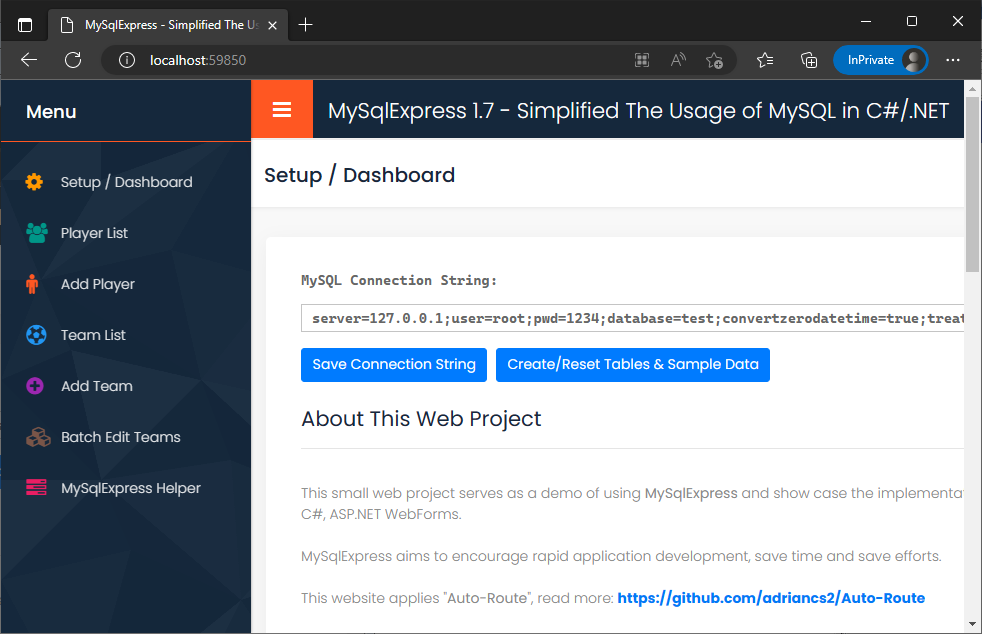
MySqlExpress Helper is a small Windows desktop app that connects to your MySQL database and generates C# boilerplate you'd otherwise type by hand: class field definitions, dictionary entries for Insert and Update, and update column lists for InsertUpdate.
It's entirely optional — everything the Helper generates, you can write yourself. The library doesn't depend on it. But for bootstrapping a new table into your codebase, copy-pasting from the Helper is faster than typing out 20 properties.
Demo:
Get the latest release from the GitHub releases page:
https://github.com/adriancs2/MySqlExpress/releases
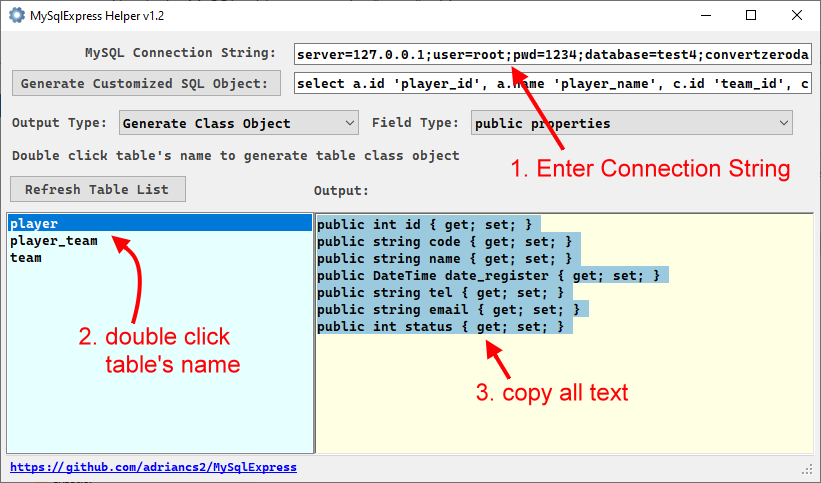
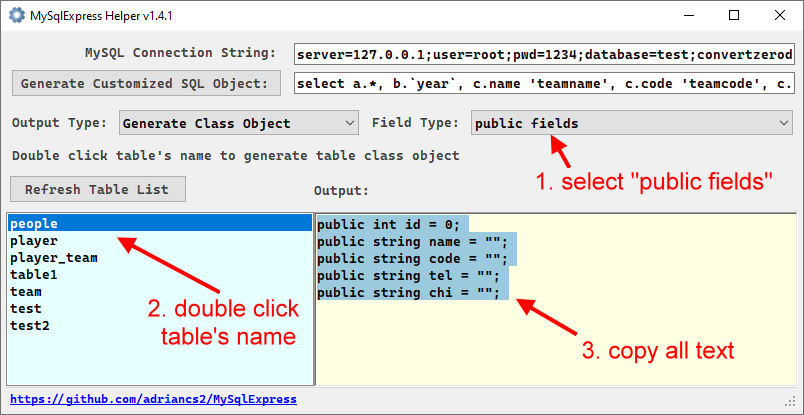
Three output modes, matching the three Class Field Binding Modes.
Mode 1 — Private fields + public properties (recommended)
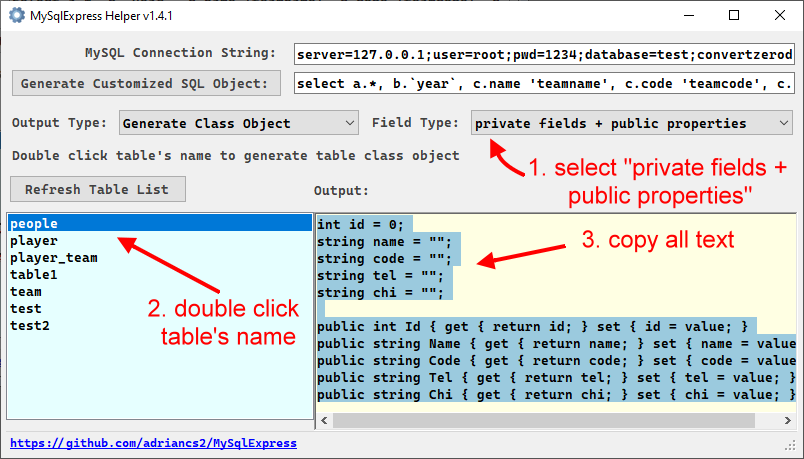
Paste the generated text into your class:
public class obPlayer
{
    int id = 0;
    string code = "";
    string name = "";
    DateTime date_register = DateTime.MinValue;
    string tel = "";
    string email = "";
    int status = 0;

    public int Id { get { return id; } set { id = value; } }
    public string Code { get { return code; } set { code = value; } }
    public string Name { get { return name; } set { name = value; } }
    public DateTime DateRegister { get { return date_register; } set { date_register = value; } }
    public string Tel { get { return tel; } set { tel = value; } }
    public string Email { get { return email; } set { email = value; } }
    public int Status { get { return status; } set { status = value; } }
}
Mode 2 — Public properties
Mode 3 — Public fields
Custom SELECT (joins, aliases, projections)
Paste any custom SELECT — including joins — and the Helper generates a POCO matching the result shape.
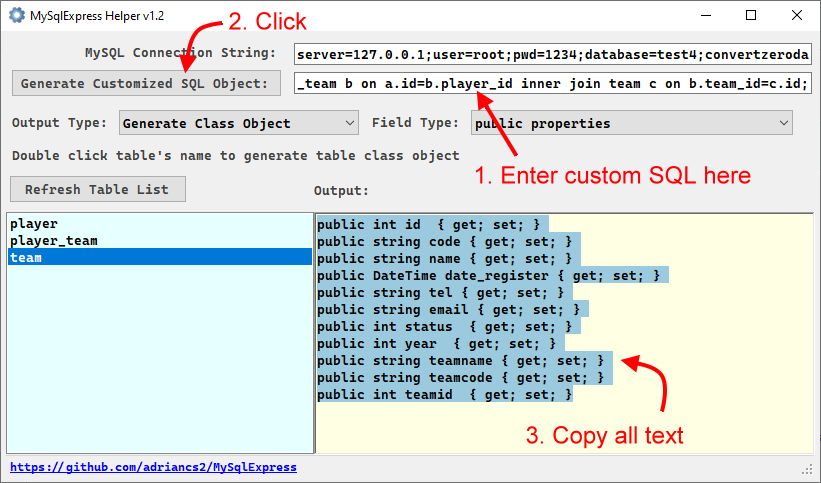
public class obPlayerTeam
{
    int id = 0;
    string code = "";
    string name = "";
    DateTime date_register = DateTime.MinValue;
    string tel = "";
    string email = "";
    int status = 0;
    int year = 0;
    string teamname = "";
    string teamcode = "";
    int teamid = 0;

    public int Id { get { return id; } set { id = value; } }
    public string Code { get { return code; } set { code = value; } }
    public string Name { get { return name; } set { name = value; } }
    public DateTime DateRegister { get { return date_register; } set { date_register = value; } }
    public string Tel { get { return tel; } set { tel = value; } }
    public string Email { get { return email; } set { email = value; } }
    public int Status { get { return status; } set { status = value; } }
    public int Year { get { return year; } set { year = value; } }
    public string Teamname { get { return teamname; } set { teamname = value; } }
    public string Teamcode { get { return teamcode; } set { teamcode = value; } }
    public int Teamid { get { return teamid; } set { teamid = value; } }
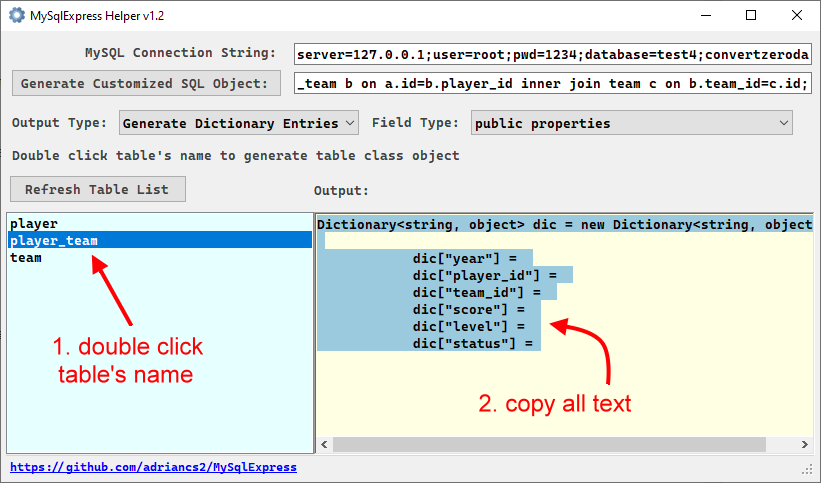
}For Insert and Update, the Helper generates an empty dictionary populated with all column keys, ready for you to fill in the values.
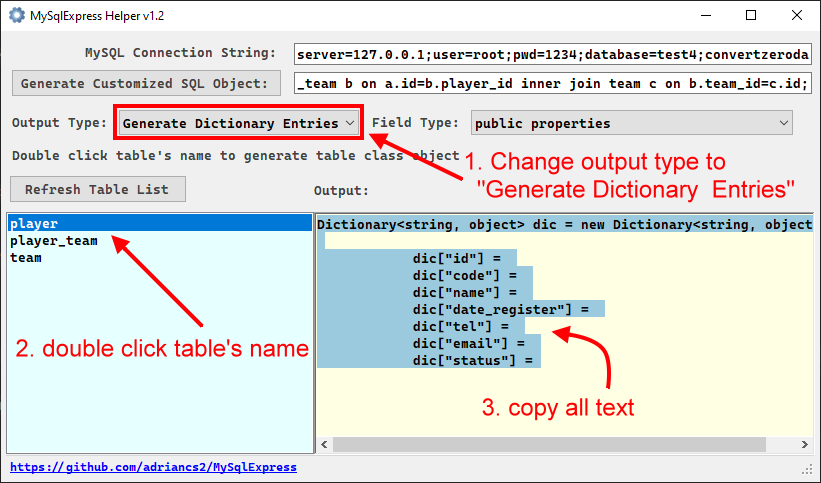
Dictionary<string, object> dic = new Dictionary<string, object>();

dic["id"]            =
dic["code"]          =
dic["name"]          =
dic["date_register"] =
dic["tel"]           =
dic["email"]         =
dic["status"]        =
Delete the auto-increment primary key line (dic["id"] =), fill in the rest, and you have a working Insert:
Dictionary<string, object> dic = new Dictionary<string, object>();

dic["code"]          = "P001";
dic["name"]          = "John Smith";
dic["date_register"] = DateTime.Now;
dic["tel"]           = "0123456789";
dic["email"]         = "john@mail.com";
dic["status"]        = 1;

m.Insert("player", dic);
There's also a sibling generator for parameter dictionaries (@paramName keys), used for Select and ExecuteScalar calls.
For InsertUpdate, the Helper generates a List<string> of all non-primary-key columns — the columns that should get updated on conflict.
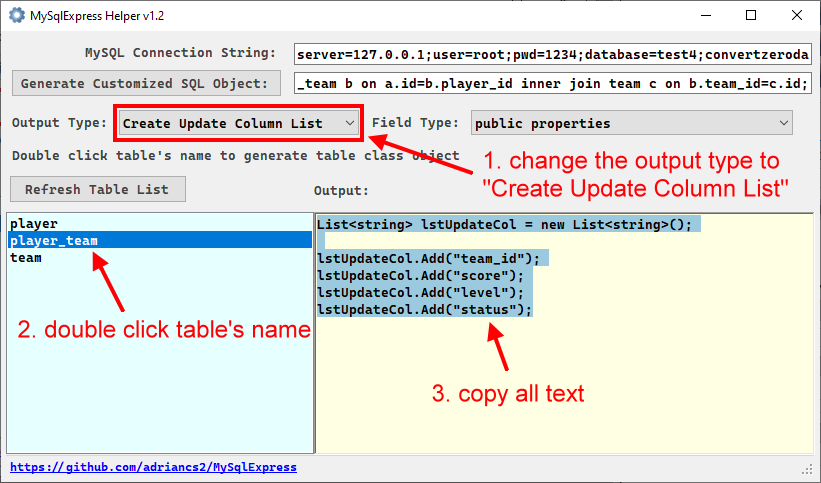
List<string> lstUpdateCol = new List<string>();

lstUpdateCol.Add("team_id");
lstUpdateCol.Add("score");
lstUpdateCol.Add("level");
lstUpdateCol.Add("status");

Dictionary<string, object> dic = new Dictionary<string, object>();
dic["year"]      = 2024;
dic["player_id"] = 1;
dic["team_id"]   = 1;
dic["score"]     = 10m;
dic["level"]     = 1;
dic["status"]    = 1;

m.InsertUpdate("player_team", dic, lstUpdateCol);
The Helper is a convenience. Everything it generates can also be produced programmatically at runtime through MySqlExpress itself:
GenerateTableClassFields,GenerateCustomClassField,GenerateTableDictionaryEntries,GenerateParameterDictionaryTable, andGenerateUpdateColumnList. Use whichever workflow fits your project.
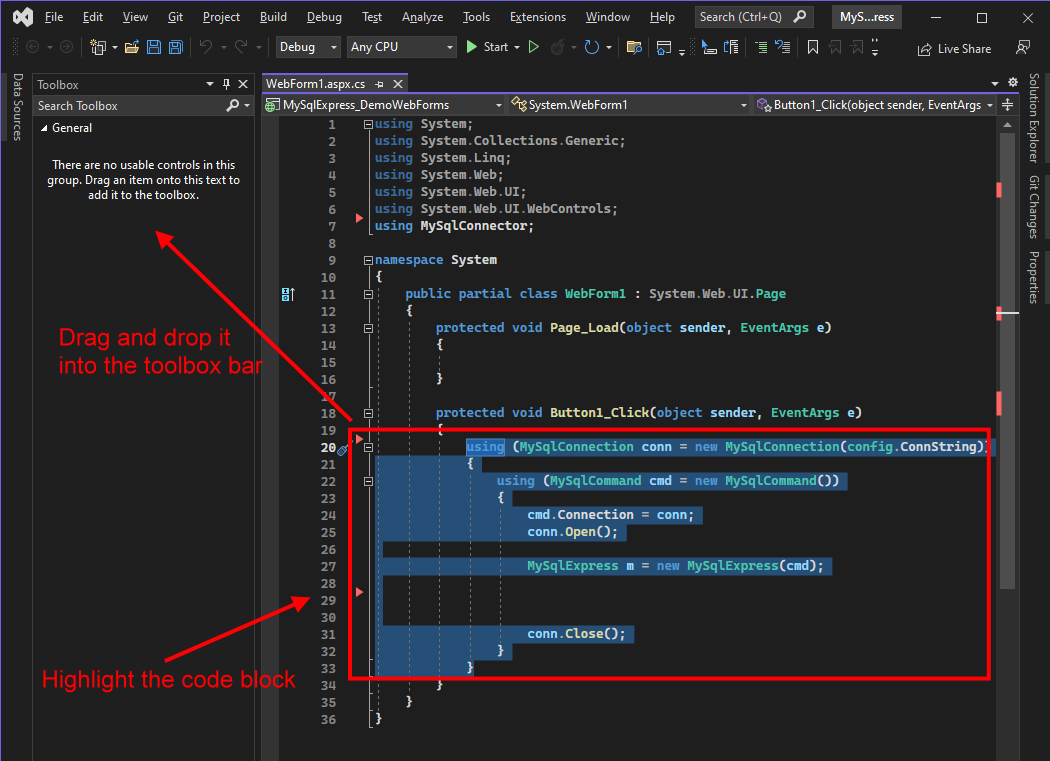
The standard MySQL connection block is boilerplate you'll type hundreds of times. Visual Studio's Toolbox can hold it as a drag-and-drop snippet.
Select the code block, drag it onto the Toolbox:
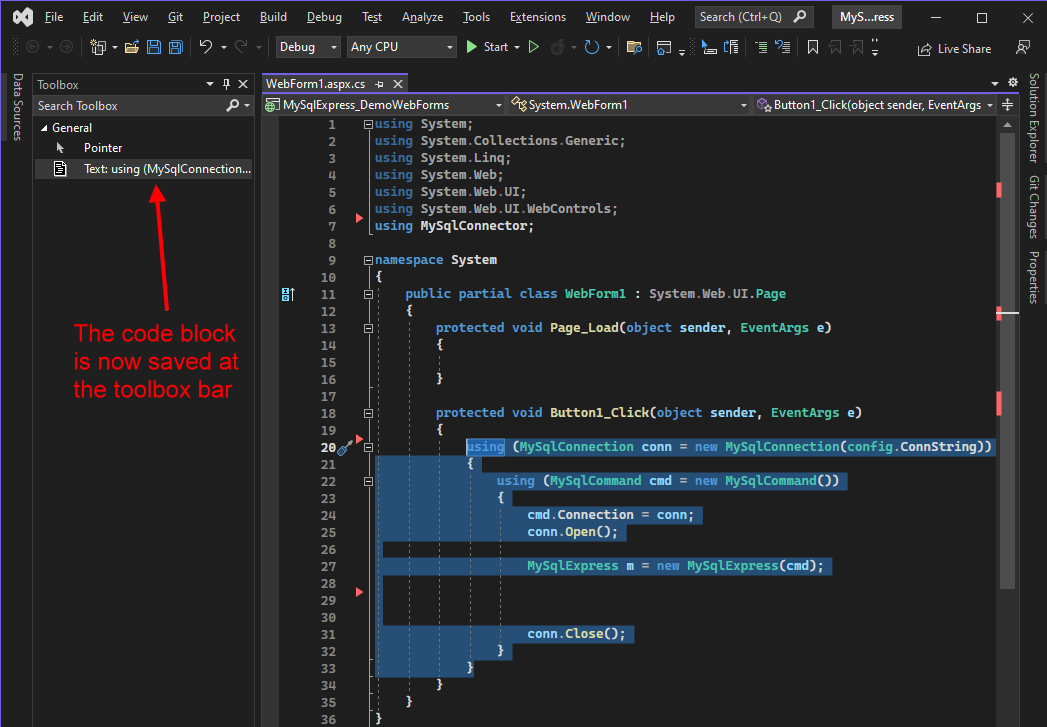
Once saved, it lives in the Toolbox:
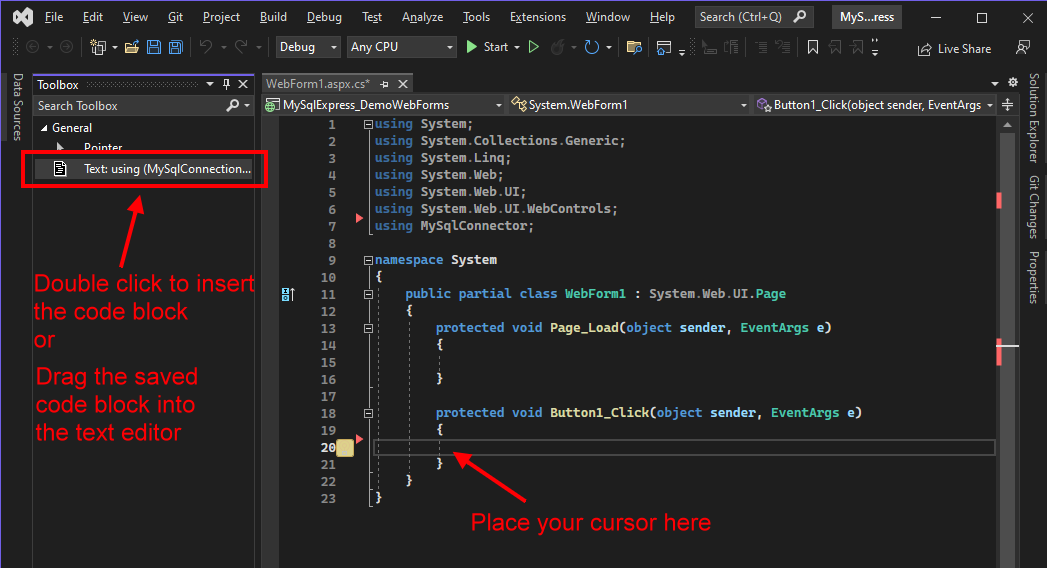
Next time, drag it from the Toolbox into the editor:
Small thing, but it adds up over a career.
SQLiteExpress mirrors this library's API for SQLite. If you work across both databases, you can keep the same mental model — Insert, GetObject<T>, InsertUpdate, Update, and the rest behave identically, with only the connection/command types swapping out.
| Feature | MySqlExpress | SQLiteExpress |
|---|---|---|
| Select / Execute / ExecuteScalar | ✓ | ✓ |
| GetObject<T> / GetObjectList<T> | ✓ | ✓ |
| GetObject into existing instance | ✓ | ✓ |
| Insert (Dictionary) | ✓ | ✓ |
| Update (single / multi condition, LIMIT 1) | ✓ | ✓ |
| InsertUpdate (Upsert) | ✓ (ON DUPLICATE KEY UPDATE) |
✓ (ON CONFLICT DO UPDATE) |
| InsertOrReplace | — | ✓ |
| Save / SaveList (object) | ✓ | ✓ |
| String helpers (Escape, GetLikeString, …) | ✓ | ✓ |
| Code generation | ✓ | ✓ |
| Table DDL (CreateTable, etc.) | — | ✓ |
| Attach / Detach database | — | ✓ |
The differences reflect the underlying databases: MySQL has robust ALTER TABLE, so SQLiteExpress's DDL helpers aren't needed here; SQLite doesn't have INSERT ... ON DUPLICATE KEY UPDATE, so the upsert syntax differs under the hood.
Public Domain. No attribution required. Use it, fork it, rebrand it, ship it.