

A terminal UI for managing GitHub Gists. Browse, diff, download, upload, create, edit, and
pin your gists — and pair them with files in your working directory — all through the
GitHub CLI (gh).
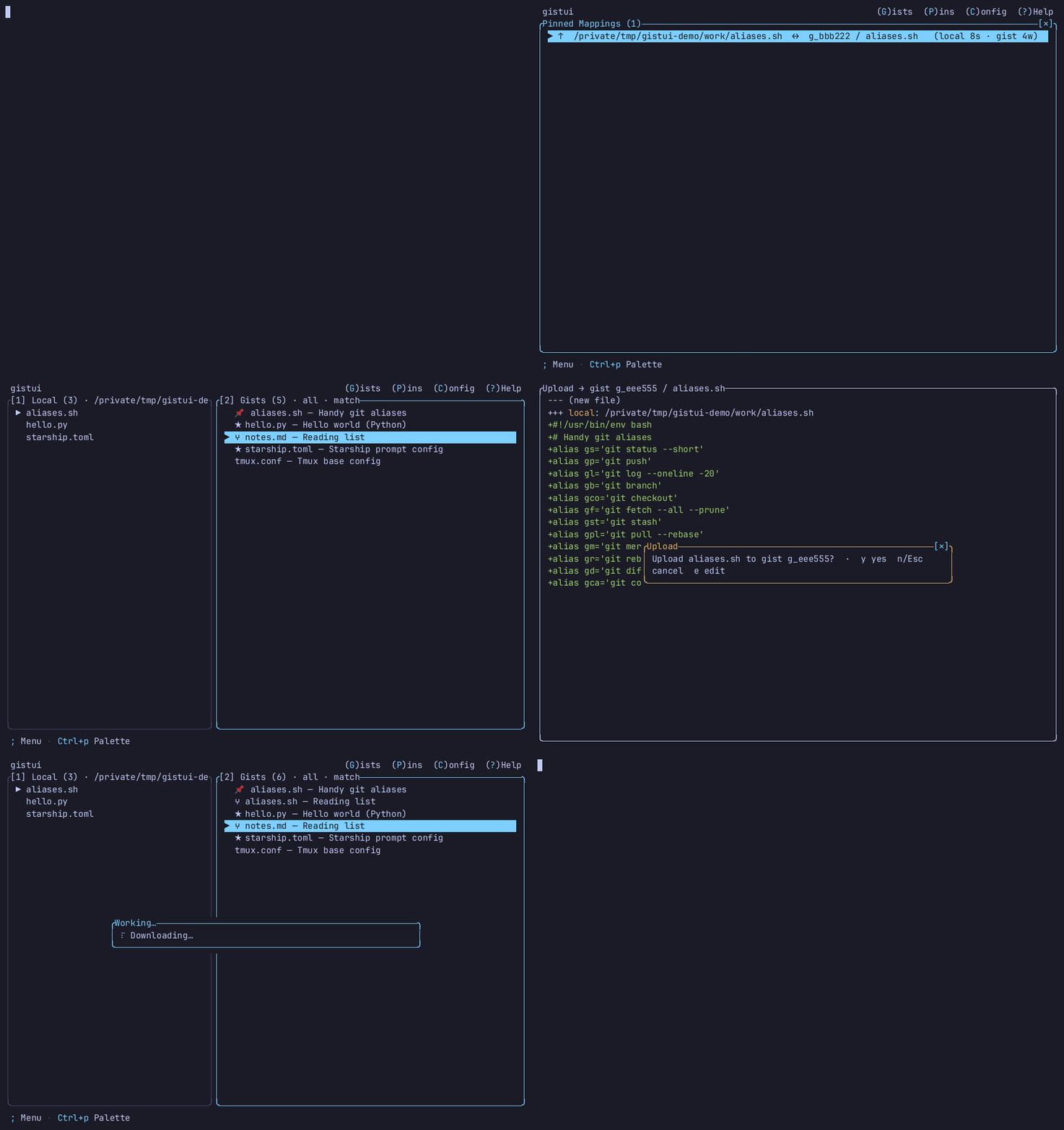
- vs.
gh gist— the official CLI is non-interactive and text-only.gistuiadds a full TUI: visual word-level diffs, anchor-driven ranking of gists against your working directory, and one-key pinned sync. - vs. the web UI — never leave the terminal, work directly against your local files, and pair gists with the directory you launched from.
- Safe by default — an existing file is never overwritten without first showing the diff
and a
y/nconfirmation; no tokens are stored (auth is delegated togh).
- The GitHub CLI:
gh, installed and on yourPATH - An authenticated
ghsession:gh auth login - A Rust toolchain — only if building from source — https://rustup.rs
- Optional, for
y/Yclipboard copy: a clipboard tool on yourPATH—pbcopy(macOS, built in),clip(Windows, built in), orwl-copy/xclip/xsel(Linux). Without one, copy reports a clear status instead of failing.
gistui shells out to gh at runtime (it stores no GitHub token of its own), so gh must
be installed and authenticated wherever you run gistui.
Recommended — download a checksummed prebuilt binary (no Rust toolchain):
curl -fsSL https://raw.githubusercontent.com/akunzai/gistui/main/install.sh | bashOn Windows, use the PowerShell installer instead of
piping install.sh into bash.
Homebrew, Scoop, crates.io, mise, manual download, build-from-source, and self-upgrade
(gistui --upgrade) are documented in docs/INSTALL.md.
gistui            # launch the TUI in the current directory (needs a TTY)
gistui ~/dotfiles # launch against a specific working directory
gistui --check    # print gh readiness, then exit (no TUI)
gistui --upgrade  # upgrade a pre-built release binary (see docs/INSTALL.md)
Run from the directory whose files you want to pair with gists (or pass that path as an
argument). The left pane lists local files; the right pane lists your gists. Ranking is
anchor-driven: one pane drives the match order (⚓ in its title) — press a to flip
which pane anchors; this is independent of focus, so you can Tab to the ranked pane
without resetting order. Pinned pairs show 📌; same-filename candidates are bold.
Essential keys (main list):
| Key | Action |
|---|---|
Tab / 1/2 |
switch or jump panes · ↑/↓ or j/k move · PgUp/PgDn or Ctrl+b/Ctrl+f page · ←/→ or h/l scroll a long row |
Enter |
diff local ↔ gist (then d download / u upload) |
Space |
preview gist content (syntax-highlighted; binary blocked) |
d / u |
download gist file / upload local file into gist |
n |
create a new gist from the selected local file |
p / P |
pin pair / open Pins view |
g |
gist manager (per-gist view; Enter for detail, v visibility, * star) |
a |
flip anchor pane · / filter focused pane · ? help |
C |
open Settings (theme, mouse, update check, scan depth, …) |
Press ? anytime for the full, contextual keymap — it opens the current screen's
topic; Tab browses all topics (List, Pins, Gist manager, Settings, …).
The idle footer shows ; Menu · Ctrl+p Palette; every screen also shows a
(G)ists (P)ins (C)onfig (?)Help shortcut bar in the top-right corner (click, or use the
underlying key). Press ; (or right-click) for a context menu of actions valid on
the current screen and selection; press Ctrl+p for the full command palette with
fuzzy-filter search and cross-screen navigation (Go to Pins, Open settings, Toggle theme, Quit, …).
The app version, the GitHub repo link, and update-check status live in ? Help's
About topic (press 0 from the Help index, or Tab then scroll to it).
Mouse (on by default; disable with mouse = false in config or --no-mouse):
| Action | Effect |
|---|---|
| Wheel up/down | scroll the focused list or content pane |
| Click a row | select it (List panes also switch focus) |
| Double-click a row | open it — List diff, gist detail, pin diff, revision diff, file preview, or Help topic (same as Enter) |
| Click a tab (Gist details) | switch between Files / Comments (newest 30 comments load first; m or clicking the top line loads 30 older comments) |
Click [✕] button (pop-up screens) |
close / go back |
Click (G)ists / (P)ins / (C)onfig / (?)Help (top bar) |
jump to that screen, from anywhere — same as pressing g / P / C / ? |
| Right-click | open the context menu at the click (same as ;) |
| Click a menu / palette row | run that action (same as selecting it and pressing Enter) |
Click the repository URL (? Help → About) |
open the GitHub repository in the system's default browser |
gistui is conservative about writes: downloads land only in ./<gist-filename>; an existing
file is never overwritten without a diff and y/n confirmation (a difference that is only a
file-final newline counts as no change — disable with ignore_trailing_newline = false);
destructive remote actions
each get their own confirm. Others' gists (e.g. starred) are read-only for pin/upload/delete
— fork with F in gist detail. No GitHub token is stored; gist content is never written to
config. Mouse is on by default and can be disabled with mouse = false in the config file or
the --no-mouse flag. On startup gistui checks GitHub once a day for a newer release and
surfaces it on the ? Help → About topic if one exists (no telemetry; fails silently offline)
— disable with check_updates = false or --no-update-check.
Full rules: docs/SAFETY.md.
Most preferences can be changed in-app with C (Settings) or Ctrl+p → Open settings
— values are written only after you change a field (opening Settings alone does not create
the file). The config file lives at ~/.config/gistui/config.toml (or
$XDG_CONFIG_HOME/gistui/config.toml if that variable is set). It is also created when you
pin a file or toggle the theme with T. All fields are optional.
| Field | Type | Description |
|---|---|---|
scan_depth |
integer |
Maximum directory depth for recursive discovery (r key). Default 2. |
diff_context |
integer |
Unchanged context lines kept around each change in the diff view; c toggles between this radius and the full file. Default 3. |
diff_show_full |
bool |
Remembered state of the diff c toggle: true shows the full file, false collapses to diff_context lines. Rewritten when you press c. Default false. |
theme |
string |
Built-in colour theme: "dark" (default) or "light" (for light-background terminals). |
mouse |
bool |
Enable mouse support (wheel scroll, click/double-click, close button). Default true; --no-mouse forces it off for one session. |
check_updates |
bool |
Check GitHub once a day on startup for a newer release and surface it on the ? Help → About topic. Default true; --no-update-check forces it off for one session. |
ignore_trailing_newline |
bool |
Treat a difference that is only a file-final newline as no change in the diff view and the overwrite-confirm gate. Default true; set false for strict, byte-exact diffs. |
skip_dirs |
[string] |
Directory names skipped during recursive discovery (r key). Defaults to common build/dependency dirs (node_modules, target, …). Hidden dirs (.-prefix) are always skipped. |
[[pinned]] |
table array |
Local-file ↔ gist mappings managed by the p/P keys. Can also be edited by hand. |
Copy config.example.toml from the repo for an annotated
starting point:
mkdir -p ~/.config/gistui
cp config.example.toml ~/.config/gistui/config.toml
Syntax highlighting in the preview and diff views honours the conventional
NO_COLOR environment variable: set NO_COLOR=1 to render content
plain (the semantic diff -/+ colours and other UI colours are unaffected).
Contributing? See CONTRIBUTING.md.