A lightweight Node.js Command Line Interface (CLI) application to track and manage your personal tasks. This tool allows you to organize your workflow by keeping track of what needs to be done, what is in progress, and what has been completed.
This project is a solution to the Task Tracker CLI challenge from Roadmap.sh
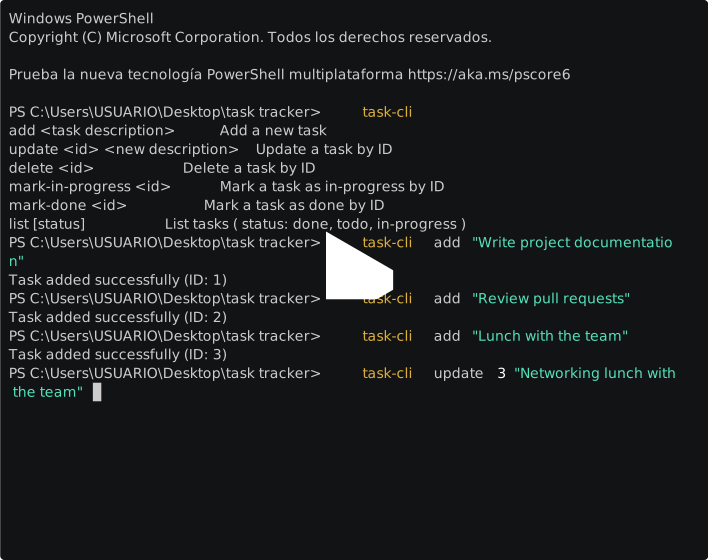
- Full CRUD: Add, Update, and Delete tasks.
- Status Management: Change task status to
todo,in-progress, ordone. - Filtering: View tasks by their current status.
- Zero Production Dependencies: Built using native Node.js modules for core logic.
- Persistence: Tasks are stored safely in a local JSON file.
Follow these steps to set up the CLI on your machine:
npm installNote: Although the project uses no external libraries for its core logic, TypeScript and build tools are required for the installation process.
npm run buildThis command compiles the TypeScript code and links the task-cli command to your system.
If you want to modify the code and test your changes in real-time without rebuilding the entire project, use the development script:
# Run the project in development mode
npm run dev
This uses ts-node-dev to execute the TypeScript files directly and will automatically restart or refresh when it detects changes in the source code.
Once installed, you can use the task-cli command from any terminal directory:
# Shows all commands list ( help )
task-cli

# Adding a new task
task-cli add "Buy groceries"
# Output: Task added successfully (ID: 1)

# Updating and deleting tasks
task-cli update 1 "Buy groceries and cook dinner"
task-cli delete 1

# Marking a task as in progress or done
task-cli mark-in-progress 1
task-cli mark-done 1

# Listing all tasks
task-cli list

# Listing tasks by status
task-cli list done
task-cli list todo
task-cli list in-progress- Language: TypeScript
- Environment: Node.js
- Patterns used: Builder Pattern and Composite Pattern.
- Storage: Local JSON file system.
- Build a CLI with Node.js
- Builder Pattern
- Composite Pattern
- Yargs Docs
- Exclude test files from Compilation in TypeScript
Tools Used
- Terminal Recording: PowerSession-rs - Used for creating terminal demonstrations.
