
Author: Vigneshwaran
Version: 2.0
Port: 8086
A lightweight, dependency-free Python dashboard for viewing Microsoft Intune Enterprise App Catalog (EAM) packages and live production app deployments. Runs entirely in your browser via a local HTTP server.
New in v2: Two authentication methods — use an App Registration or sign in interactively with your own Microsoft account (no App Registration needed).
| Platform | Requirement |
|---|---|
| macOS / Linux | Python 3.8 or later |
| Windows | Python 3.8 or later |
No third-party packages needed. Uses Python stdlib only:
urllib, json, ssl, threading, http.server.
Check your Python version:
# macOS / Linux
python3 --version

# Windows
py --versionUses Client Credentials Flow — best for automation, scheduled runs, or shared team use. Requires a one-time setup in Microsoft Entra.
What you need:
- Tenant ID
- Client ID (Application ID)
- Client Secret
Required permission:
DeviceManagementApps.Read.All (Application type, admin-consented)
Setup steps:
- Go to https://entra.microsoft.com
- Identity → Applications → App registrations → New registration
- Name: e.g.
IntunEAM-Live-Reader - Supported account types: This organization only
- Click Register
- Name: e.g.
- Note the Application (client) ID and Directory (tenant) ID
- Go to Certificates & secrets → New client secret
- Set an expiry → click Add
- Copy the Value immediately — it won't be shown again
- Go to API permissions → Add a permission → Microsoft Graph → Application permissions
- Add:
DeviceManagementApps.Read.All - Click Grant admin consent (requires admin role)
- Add:
Uses Device Code Flow — sign in with your own Microsoft / Entra account. No App Registration or Client Secret required.
What you need:
- Tenant ID only (or use
commonfor any tenant) - Your Entra account must have Intune Administrator or Global Reader role
How it works:
- Script displays a short code and opens
https://microsoft.com/devicelogin - Enter the code on that page and sign in with your Entra account
- Script automatically detects the login and continues
Note: Device Code uses your user account's delegated permissions. Data access is scoped to what your account can see in Intune. The token is stored in memory only and is valid for the session.
# Option 1 — App Registration (prompted)
python3 IntunEAM-Live-v2.py

# Option 1 — App Registration (env vars, skips all prompts)
TENANT_ID="your-tenant-id" \
CLIENT_ID="your-client-id" \
CLIENT_SECRET="your-secret" \
python3 IntunEAM-Live-v2.py

# Option 2 — Device Code (browser login)
AUTH_METHOD=2 TENANT_ID="your-tenant-id" python3 IntunEAM-Live-v2.py

# Option 2 — Device Code (any tenant)
AUTH_METHOD=2 TENANT_ID="common" python3 IntunEAM-Live-v2.py# Option 1 — App Registration (py launcher, recommended)
py -3 IntunEAM-Live-v2.py
# Option 1 — App Registration (env vars, PowerShell)
$env:TENANT_ID="your-tenant-id"
$env:CLIENT_ID="your-client-id"
$env:CLIENT_SECRET="your-secret"
py -3 IntunEAM-Live-v2.py
# Option 2 — Device Code
$env:AUTH_METHOD="2"
$env:TENANT_ID="your-tenant-id"
py -3 IntunEAM-Live-v2.py─────────────────────────────────────────────────
IntunEAM Live — Authentication
─────────────────────────────────────────────────
Choose login method:
[1] App Registration (Client ID + Secret) — recommended
[2] Interactive Browser Login (Device Code) — no App Reg needed
Enter 1 or 2 [default: 1]: 1
Tenant ID : xxxxxxxx-xxxx-xxxx-xxxx-xxxxxxxxxxxx
Client ID : xxxxxxxx-xxxx-xxxx-xxxx-xxxxxxxxxxxx
Client Secret : (hidden)
=================================================
IntunEAM Live v1
Tab 1: EAM Catalog Apps
Tab 2: Live Apps
Tab 3: App Updates
Author : Vigneshwaran
=================================================
URL : http://localhost:8086
Tenant : your-tenant-id
Starting data fetch in background...
Browser will open automatically.
Press Ctrl+C to stop.
─────────────────────────────────────────────────
  IntunEAM Live — Authentication
─────────────────────────────────────────────────
  Choose login method:
  [1] App Registration (Client ID + Secret) — recommended
  [2] Interactive Browser Login (Device Code) — no App Reg needed

  Enter 1 or 2 [default: 1]: 2

  Tenant ID     : your-tenant-id

  ┌─────────────────────────────────────────────────────┐
  │  Open browser: https://microsoft.com/devicelogin   │
  │  Enter code  : ABC123XYZ                           │
  └─────────────────────────────────────────────────────┘
  Waiting for you to sign in...
  ✅ Login successful.
If TENANT_ID, CLIENT_ID, and CLIENT_SECRET are all set as environment
variables, the script skips the menu entirely:
[Auto] All credentials detected via environment — using App Registration.
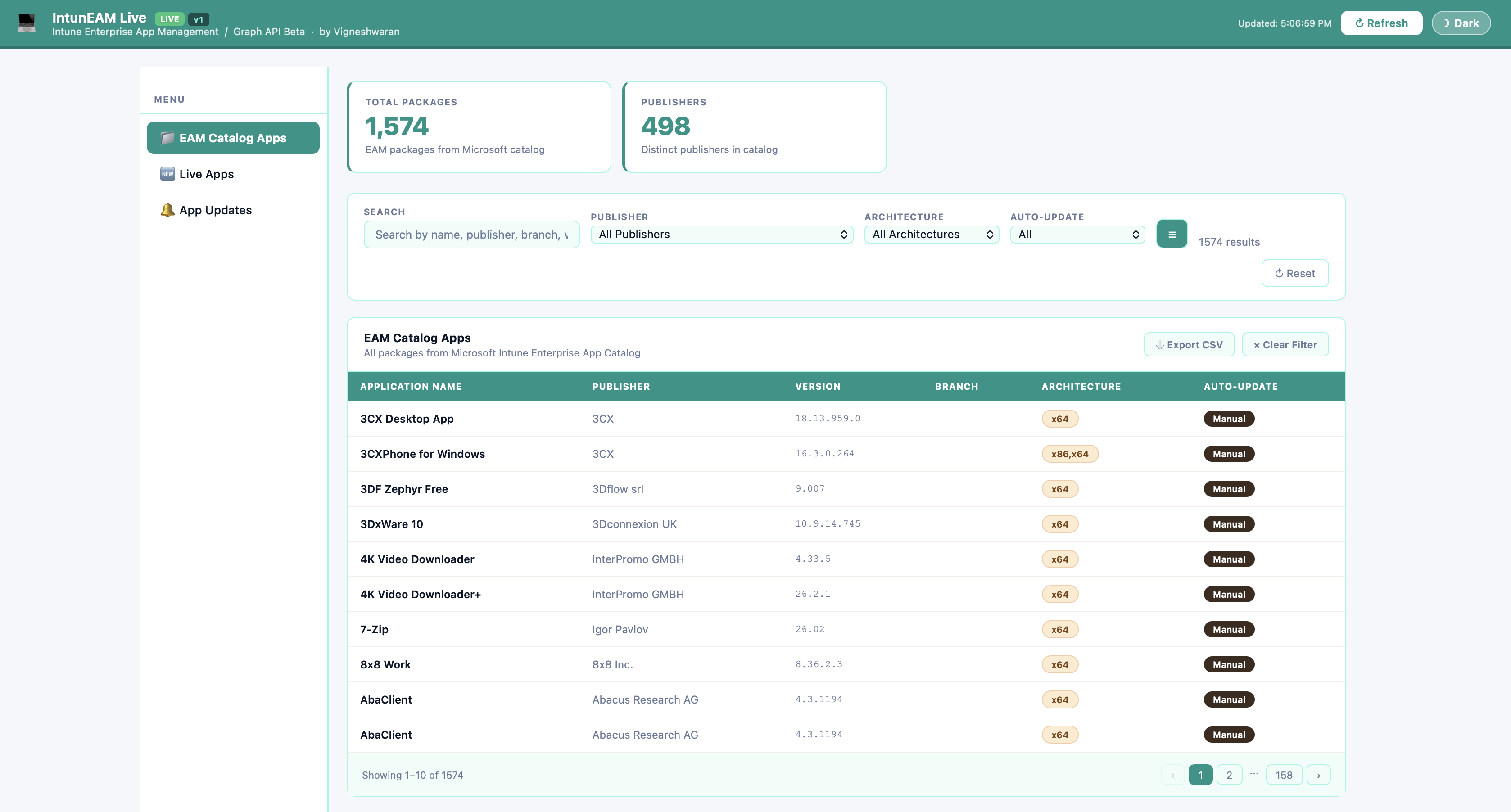
The dashboard has three tabs in the left sidebar:
Displays all packages in the Microsoft Intune Enterprise App Catalog.
| KPI | Description |
|---|---|
| Total Packages | All EAM packages available |
| Publishers | Distinct software publishers |
| Filter | Options |
|---|---|
| Search | Name, publisher, branch, version |
| Publisher | Filter by publisher |
| Architecture | x64, x86, x86_x64, ARM64 |
| Auto-Update | All / Auto-Update / Manual |
| Column | Description |
|---|---|
| Application Name | Package display name |
| Publisher | Software publisher |
| Version | Latest version in catalog |
| Branch | Release branch (Stable, Preview…) |
| Architecture | Supported CPU architectures |
| Auto-Update | Auto-update capable |
Displays EAM apps deployed in your Intune tenant, fetched live from Microsoft Graph API.
Loads after the catalog tab. Progress bar shows fetch status. For large tenants this may take 1–3 minutes.
| KPI | Description |
|---|---|
| Assigned | Apps with at least one group assignment |
| Unassigned | Apps with no group target |
| Filter | Options |
|---|---|
| Assignment | All / Assigned / Unassigned |
| Install Context | All / System / User |
| Update Method | All / Auto-Update / Manual |
| Search | Name or publisher |
| Column | Description |
|---|---|
| Application Name | Intune display name |
| Publisher | Publisher as set in Intune |
| Assignment | Assigned / Unassigned badge |
| Install Context | System or User install |
| Update Method | Auto or Manual |
| Supersedence | Superseding/superseded relationships |
Click any row to open the app detail modal showing assignments, update method, supersedence relationships by name, and dependencies.
Displays EAM apps with a newer version available in the catalog compared to what is deployed in Intune.
| Column | Description |
|---|---|
| App Name | Application display name |
| Publisher | Publisher name |
| Deployed Version | Currently deployed version |
| Latest Available | Newest version in catalog |
| Update Available | Yes / No |
| Update Eligible | Yes / No |
| Superseded | Whether superseded by another app |
| Variable | Description | Required |
|---|---|---|
TENANT_ID |
Your Entra Directory (tenant) ID | Always |
CLIENT_ID |
App Registration client ID | Option 1 only |
CLIENT_SECRET |
App Registration client secret | Option 1 only |
AUTH_METHOD |
1 = App Reg, 2 = Device Code |
Optional (default: 1) |
PORT |
Server port (default: 8086) |
Optional |
🔒 Note: All data fetched from Microsoft Graph API is processed entirely on your local machine — it is stored in memory by the Python server, rendered in your browser, and never transmitted to any external service, third-party server, or analytics platform.
- Credentials are never stored — entered at runtime or via env vars only
- The server binds to localhost only — not accessible from other machines
- Client Secret is entered via hidden input — not echoed to terminal
- Device Code tokens are held in memory only — cleared when script stops
- Only read permissions are used — no write access to your tenant
- No third-party libraries, no CDN calls, no analytics
| Issue | Fix |
|---|---|
| Browser doesn't open | Navigate manually to http://localhost:8086 |
Address already in use |
Port 8086 is taken. Set PORT=8087 or stop the other process |
| Live Apps shows no data | Wait for catalog to finish loading, then click Refresh |
Authentication failed |
Check credentials and ensure admin consent is granted |
| Device Code timed out | Restart and complete the browser login within 15 minutes |
Still fetching after 5 mins |
Click the Refresh button in Live Apps tab |
| SSL / certificate error | Corporate proxy may intercept TLS — contact your IT team |
Press Ctrl+C in the terminal window where the script is running.
| Version | Changes |
|---|---|
| v2 | Added Device Code (browser login) as Option 2. Auto-detects env vars. |
| v1 | Initial release. App Registration only. |
IntunEAM Live — Author: Vigneshwaran