Visual USB topology and debugging for Linux
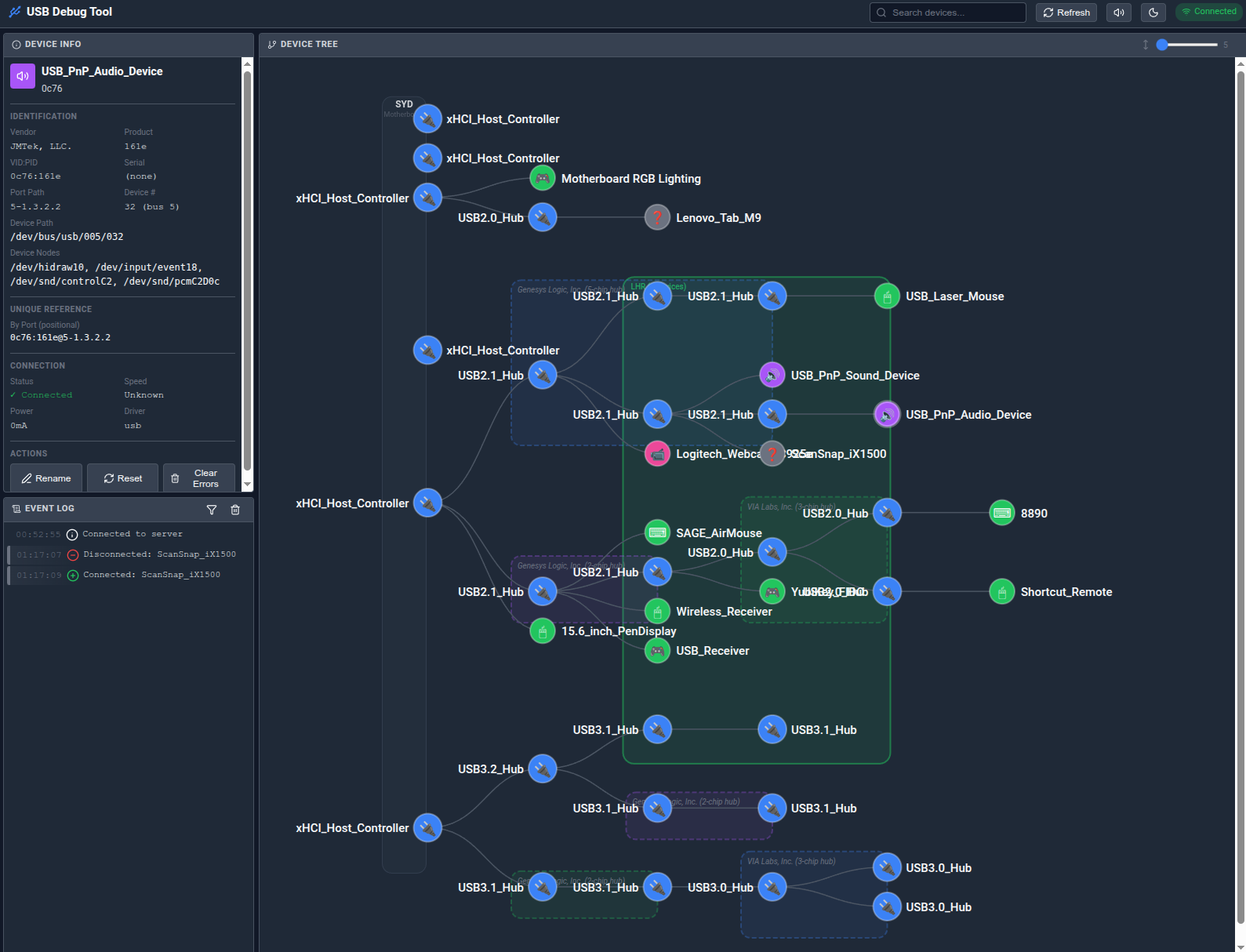
- Live Device Tree: Visual representation of USB topology with hub grouping
- Real-time Updates: Instant notification of device changes via WebSocket
- Error Detection: Automatic parsing of dmesg for USB errors
- Audio Alerts: Sound notifications for plug/unplug events
- Device Reset: Reset problematic devices from the UI
- Custom Names: Label your devices and hub groups for easy identification
- Search: Find devices by name, vendor, product ID, or path
- Device Nodes: Shows /dev paths like /dev/ttyACM0, /dev/sda
It's hard to know what physcially makes up a USB hub! The process is heuristic and doesn't always get it right. As such there's a function to discover what the hubs are by switching them on and off and noticing what turns on/off at the same time. This could affect storage devices or other device with state, so we caution the user, but caveat emptor!
- Python 3.9+
- Linux with udev
- Root/sudo access (optional, for device reset feature)
# Install system dependency first
# Debian/Ubuntu:
sudo apt install libudev-dev
# Fedora/RHEL:
sudo dnf install systemd-devel

# Install USB Explorer
pipx install usb-explorer# Install system dependency (see above)
pip install usb-explorer# Clone the repository
git clone https://github.com/appositeit/usb-explorer.git
cd usb-explorer
# Install system dependency (see above)
# Option 1: Install with pip
pip install -e .
# Option 2: Use the install script (creates virtual environment)
./install.sh# Start USB Explorer (browser opens automatically)
usb-explorer
# Or with root privileges (enables device reset feature)
sudo usb-explorer
# The browser will open automatically to http://localhost:8080# With browser auto-open (default)
usb-explorer
# Without browser
USB_EXPLORER_OPEN_BROWSER=0 usb-explorer
# Custom port
USB_EXPLORER_PORT=9000 usb-explorer
# Run as Python module
python -m usb_explorerCopy and edit config/devices.yaml (created automatically on first run):
# Server settings
port: 8080
host: 0.0.0.0
auto_open_browser: true

# Custom device names
devices:
  - vendor_id: "05e3"
    product_id: "0610"
    custom_name: "Main USB Hub"
    notes: "Connected to monitor"

# Hub group labels (displayed on hub boxes in the tree)
hub_labels:
  motherboard: MOBO
05e3:0610@5-1: DESK| Variable | Default | Description |
|---|---|---|
USB_EXPLORER_PORT |
8080 | Server port |
USB_EXPLORER_HOST |
0.0.0.0 | Server bind address |
USB_EXPLORER_OPEN_BROWSER |
1 | Auto-open browser (0 to disable) |
| Endpoint | Method | Description |
|---|---|---|
/ |
GET | Main UI |
/ws |
WebSocket | Real-time updates |
/api/devices |
GET | Device tree JSON |
/api/device/{path} |
GET | Single device info |
/api/device/{path}/reset |
POST | Reset device |
/api/device/name |
POST | Set custom device name |
/api/hub-labels |
GET/POST | Get/set hub group labels |
/api/errors |
GET | Recent USB errors |
/api/health |
GET | Health check |
/api/shutdown |
POST | Graceful shutdown |
Some features require root access:
sudo usb-explorer- Ensure libudev is installed:
sudo apt install libudev-dev - Check udev is running:
systemctl status udev
- Check firewall allows the configured port
- Try a different browser
This is an AppArmor issue. Create /etc/apparmor.d/local/lsusb:
/etc/udev/hwdb.bin r,
/usr/share/hwdata/usb.ids r,
/var/lib/usbutils/usb.ids r,
Then reload: sudo apparmor_parser -r /etc/apparmor.d/lsusb
./uninstall.shMIT License - see LICENSE for details.