Steve, a financial analyst, needs a program that can efficiently analyze thousands of stocks. Our goal is to ensure the program created in VBA is efficient in handling large datasets. We will refactor the program code and compare the script run times, so we can ensure that the program is optimized to meet Steve's needs. We will specifically analyze the 2018 Stock Dataset to compare the refactored code.
The analysis is well described with screenshots and code. Using code to automate tasks decreases the chance of errors and reduces the time needed to run analyses, especially if they need to be done repeatedly. The original VBA script was .01 second slower than the refactored code.
 Figure 1 Refactored Code Script Run Time
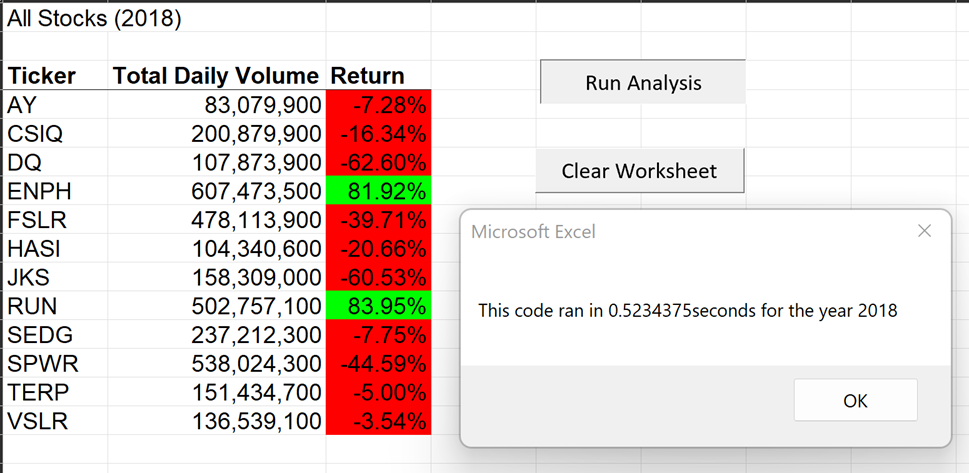 Figure 2 Original Code Script Run Time
`Sub DQAnalysis()
Figure 2 Original Code Script Run Time
`Sub DQAnalysis()
Worksheets("DQ Analysis").Activate

'Worksheet headers
Cells(1, 1).Value = "DAQO (Ticker: DQ)"
Cells(3, 1).Value = "Years"
Cells(3, 2).Value = "Total Daily Volume"
Cells(3, 3).Value = "Return"

Worksheets("2018").Activate

totalVolume = 0
Dim startingPrice As Double
Dim endingPrice As Double

'Establish the number of rows to loop over

rowStart = 2
rowEnd = Cells(Rows.Count, "A").End(xlUp).Row

For i = rowStart To rowEnd
    'increase totalVolume if ticker is "DQ"
    If Cells(i, 1).Value = "DQ" Then

    'increase totalVolume
        totalVolume = totalVolume + Cells(i, 8).Value

    End If

    If Cells(i - 1, 1).Value <> "DQ" And Cells(i, 1).Value = "DQ" Then

        startingPrice = Cells(i, 6).Value
    End If

    If Cells(i + 1, 1).Value <> "DQ" And Cells(i, 1).Value = "DQ" Then

        endingPrice = Cells(i, 6).Value

    End If

Next i

Worksheets("DQ Analysis").Activate

Cells(4, 1).Value = 2018

Cells(4, 2).Value = totalVolume

Cells(4, 3).Value = endingPrice / startingPrice - 1
End Sub`
`Sub AllStocksAnalysisRefactored()
Dim startTime As Single

Dim endTime  As Single`

yearValue = InputBox("What year would you like to run the analysis on?")

startTime = Timer

'Format the output sheet on All Stocks Analysis worksheet
Worksheets("All Stocks Analysis").Activate

Range("A1").Value = "All Stocks (" + yearValue + ")"

'Create a header row
Cells(3, 1).Value = "Ticker"
Cells(3, 2).Value = "Total Daily Volume"
Cells(3, 3).Value = "Return"

'Initialize array of all tickers
Dim tickers(11) As String

tickers(0) = "AY"
tickers(1) = "CSIQ"
tickers(2) = "DQ"
tickers(3) = "ENPH"
tickers(4) = "FSLR"
tickers(5) = "HASI"
tickers(6) = "JKS"
tickers(7) = "RUN"
tickers(8) = "SEDG"
tickers(9) = "SPWR"
tickers(10) = "TERP"
tickers(11) = "VSLR"

'Activate data worksheet
Worksheets(yearValue).Activate

'Get the number of rows to loop over
RowCount = Cells(Rows.Count, "A").End(xlUp).Row
'1a) Create a ticker Index
tickerIndex = 0
'1b) Create three output arrays
Dim tickerVolumes As Long
Dim tickerStartingPrices As Single
Dim tickerEndingPrices As Single
'2a) Create a for loop to initialize the tickerVolumes to zero.
    totalVolume = 0
For i = 0 To 11
    ticker = tickers(i)
    Worksheets(yearValue).Activate
'2b) Loop over all the rows in the spreadsheet.
    For j = 2 To RowCount
        '3a) Increase volume for current ticker
        If Cells(j, 1).Value = ticker Then
            totalVolume = totalVolume + Cells(j, 8).Value
        End If
    '3b) Check if the current row is the first row with the selected tickerIndex.
        If Cells(j - 1, 1).Value <> ticker And Cells(j, 1).Value = ticker Then
            startingPrice = Cells(j, 6).Value
        End If
    '3c) check if the current row is the last row with the selected ticker
     'If the next row’s ticker doesn’t match, increase the tickerIndex.
        If Cells(j + 1, 1).Value <> ticker And Cells(j, 1).Value = ticker Then
            endingPrice = Cells(j, 6).Value
            '3d Increase the tickerIndex.
            tickerIndex = tickerIndex + 1
        End If
    Next j
'4) Loop through your arrays to output the Ticker, Total Daily Volume, and Return.
    Worksheets("All Stocks Analysis").Activate
    Cells(4 + i, 1).Value = ticker
    Cells(4 + i, 2).Value = totalVolume
    Cells(4 + i, 3).Value = endingPrice / startingPrice - 1
Next i
'Formatting
Worksheets("All Stocks Analysis").Activate
Range("A3:C3").Font.FontStyle = "Bold"
Range("A3:C3").Borders(xlEdgeBottom).LineStyle = xlContinuous
Range("B4:B15").NumberFormat = "#,##0"
Range("C4:C15").NumberFormat = "0.0%"
Columns("B").AutoFit
dataRowStart = 4
dataRowEnd = 15
For i = dataRowStart To dataRowEnd
    If Cells(i, 3) > 0 Then
        Cells(i, 3).Interior.Color = vbGreen
                Else
        Cells(i, 3).Interior.Color = vbRed
    End If
Next i
endTime = Timer
MsgBox "This code ran in " & (endTime - startTime) & " seconds for the year " & (yearValue)
End Sub 'Sub formatAllStocksAnalysisTable() 'End Sub Sub ClearWorksheet() Cells.Clear End Sub`
- What are the advantages or disadvantages of refactoring code? Using code to automate tasks decreases the chance of errors and reduces the time needed to run analyses, especially if they need to be done repeatedly. The advantages of refactoring code entail optimizing script runtime. Big data needs analysis to run efficiently, so If your code smells due to anti-patterns or kludges then your analysis would benefit from refactoring. Yes, it is worth ensuring you have quality design patterns in your code, but a disadvantage of refactoring code is the time it takes to review a code that is already working. For inexperienced programmers refactoring comes at the cost of making errors that wil need to be debugged in order for the program to run again.
- How do these pros and cons apply to refactoring the original VBA script? The original VBA script ran close to the given refactored code. I do not know how much of a negative impact the original code would have with larger datasets. So overall I believe that the pros of refactoring the original VBA script were minimal.