| title | Api Integration |
|---|
NB. We recommend that you use webhooks to keep your system up to date with the Members data, as this will relieve the load from the API. But you are still welcome to use the API
Please read the Getting Started section before going through this page. Once scopes have been approved for your client (application) you can integrate with the members api.
It is currently only possible to get access to the API via an API Key. OAuth2 support will come soon.
- To get access to your API key, please navigate to your organization click on the "Applications" tab, then on the application you want to work with and then the "Data Access" tab
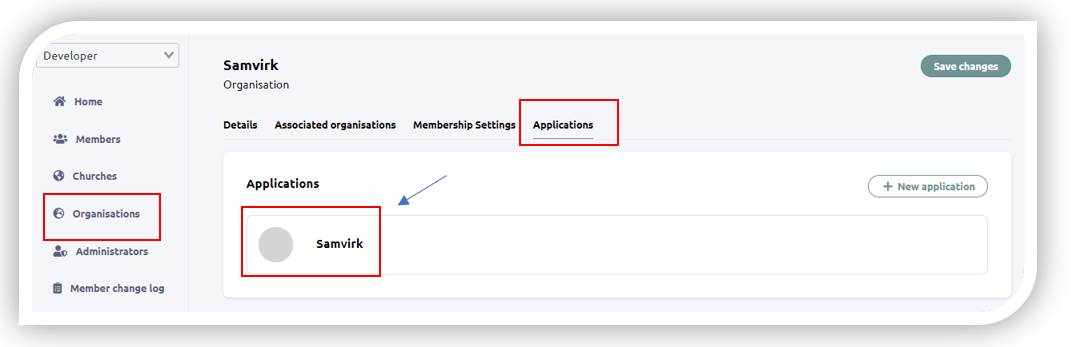
- On the "Data Access" page you should see the section for API Keys

For these example we are using the node-fetch npm package
const fetch = require('node-fetch');
    try {
        let httpResponse = await fetch('https://members.bcc.no/person?personID=12345',
            {
                method: 'get',
                headers:
                    {   'Content-Type': 'application/json',
                        'x-access-token':'API-KEY-HERE'
                    }
            })

        const result = await httpResponse.json()
        const person = result.data[0]
        console.log('Person retrieved from the members api', JSON.stringify(person))

    } catch (error) {
        console.log(error.message)
}const fetch = require('node-fetch');
try {
let httpResponse = await fetch('https://members.bcc.no/person?churchID=69&$limit=50&$skip=0',
{
method: 'get',
headers:
{ 'Content-Type': 'application/json',
'x-access-token':'API-KEY-HERE'
}
})
const result = await httpResponse.json()
const everybodyFromOsloFollo = result.data
console.log('Fifty people retrieved in Oslo/Follo from the members API', JSON.stringify(everybodyFromOsloFollo))
} catch (error) {
console.log(error.message)
}Coming soon