| title | Webhooks |
|---|
The Members System support webhooks. You can register your webhook in the UI or via the API. Currently we only support changes for the "person" entity.
To access your application please see the Getting Started guid and the Webhooks integration guide.
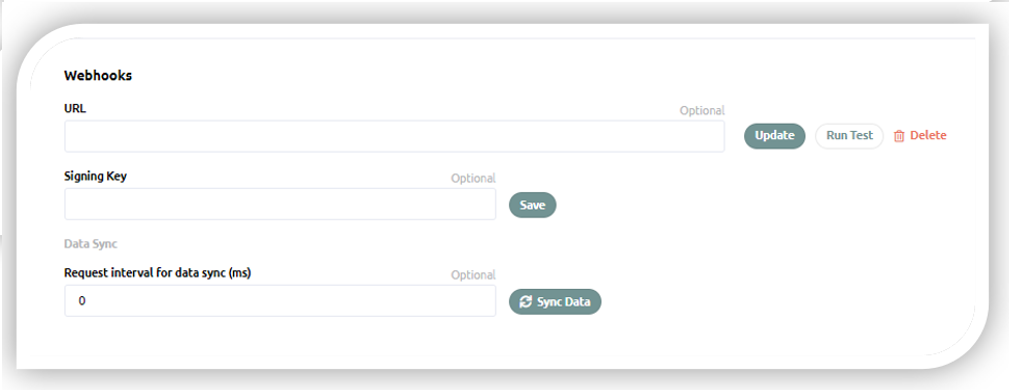
The URL fields has to be a fully valid URL including the protocol (https), we don't add or remove anything when posting to this URL. This field is required.
NOTE: updating webhook endpoint URL may take up to 2 minutes in the system.
The signing key is used to create a hash of the body of the request. This gives you the ability to verify the origin of the HTTP POST This field is required.
When implementing your webhook endpoint it might be nice to test it every now and then to make sure everything is on track. You can use the "Run Test" method for this. When you click this button we will take the currently logged in user and POST it to your webhook.
When you click on "Sync Data" we will make sure to push all the persons your application have access to to your webhook. This might overload your system. The Request interval for data sync setting is there to prevent that, if you give this setting a value we will make sure not to POST requests more frequent than what the value indicates. If the value is 0, we will POST requests to your webhook as fast as our system can scale.
Update Webhook url for application X. (In order to remove the webhook set url to empty string)
const fetch = require('node-fetch');
   try {
       let updatedField = {
           webhook: {
               url: 'https://someurl.com/something'
           }
       }
       let httpResponse = await fetch('https://members.bcc.no/application/{APPLICATION-ID}',
           {
               method: 'patch',
               headers:
                   {   'Content-Type': 'application/json',
                       'x-access-token':'API-KEY-HERE'
                   },
               body: JSON.stringify(updatedField)
           })

       const result = await httpResponse.json()

       console.log('Updated the webhook url via API', result.webhook.url)
   } catch (error) {
       console.log(error.message)
   }
NOTE: updating webhook endpoint URL may take up to 2 minutes in the system.
Update Signing Key for application X
const fetch = require('node-fetch')
try {
    let updatedField = {
        webhook: {
            signingKey: 'helloWorld',
        },
    }
    let httpResponse = await fetch(
        'https://members.bcc.no/application/{APPLICATION-ID}',
        {
            method: 'patch',
            headers: {
                'Content-Type': 'application/json',
                'x-access-token': 'API-KEY-HERE',
            },
            body: JSON.stringify(updatedField),
        }
    )

    const result = await httpResponse.json()

    console.log('Updated the signing key via API', result.webhook.url)
} catch (error) {
    console.log(error.message)
}Trigger a webhook test for application X
Code snippet coming soon
Trigger a full sync for application X
Code snippet coming soon
To properly receive webhook messages in your application some preparation is needed. Here you can find most important information on that topic.
For Members Webhooks to properly deliver messages, endpoint specified in Members UI/API must be a publicly accessible HTTPS address. The server for the push endpoint must have a valid SSL certificate signed by a certificate authority. If all these requirements are fulfilled endpoint should be able to receive requests.
When Members Webhooks delivers a message to a push endpoint, Members Webhooks sends the message in the body of a POST request. The body of the request is a JSON object and the message data is in the message.data field. The message data is base64-encoded.
Following is an example of message issued by Members Webhook:
{
    "message": {
        "attributes": {
            "hash": "HashOfData"
        },
        "data": [{updatedPersonScopedData}],
        "messageId": "2070443601311540",
        "message_id": "2070443601311540",
        "publishTime": "2021-02-26T19:13:55.749Z",
        "publish_time": "2021-02-26T19:13:55.749Z",
    },
   "subscription": "idOfASubscription"
}
where message.data is an array and updatedPersonScopedData is PersonDetails entity with removed properties according to scopes approved. PersonDetails schema can be found in Data Structures and Scopes
- Decode message data from Base64 to plain string.
- Calculate hash from plain string of data and output it as base64 encoded string.
- Compare calculated hash with one send in message attributes.
- Deserialize plain string data to object.
Alongside message data of POST Request Members Webhook sends hash attribute. This is base64-encoded string containing SHA256 HMAC of stringified message data using singingKey from Webhook configuration for your app. Only Members and your application knows this secret, so you can use it to verify integrity of message data.
To sign message code like this is used:
async signMessage(personData: any, signingKey: string) {
    const {createHmac} = await import('crypto');
    const hash = createHmac('sha256', signingKey)
        .update(JSON.stringify(personData))
        .digest()
        .toString('base64')
    return hash;
}
To check validity of message data replicate code above and compare both hashes. If they do not match, message data was tampered with.
Message data is Base64-encoded and must be decoded first.
router.post('/message-subscriber', (req, res) => {
    const message = req.body ? req.body.message : null

    if (message) {
        const buffer = Buffer.from(message.data, 'base64')
        const data = buffer ? buffer.toString() : null

        console.log(`Received message ${message.messageId}:`)
        console.log(`Data: ${data}`)
    }

    return res.send(204)
})After you receive a push request, return an HTTP status code. To acknowledge the message, return one of the following status codes:
- 102
- 200
- 201
- 202
- 204
Your application has by default 600 seconds to acknowledge message.
To send a negative acknowledgement for the message, return any other status code. If you send a negative acknowledgement or the acknowledgement deadline expires, Members Webhooks resends the message. Webhook will continue to resend unacknowledged message with increasing interval (from 10 to 600 seconds) and will stop resending after 7 days. This means that if you encounter a permanent error that you know will not be fixed (for example updating an unknown user and you refuse to create new users), you should acknowledge the message, otherwise you will receive it again and again!
You can't modify the acknowledgement deadline of individual messages that you receive from push subscriptions.