A WordPress block plugin to display and manage filterable job listings directly within the block editor, rendering separate entries for jobs with multiple locations.


This plugin provides a custom Gutenberg block that allows users to easily add and manage job openings on their WordPress site. It features frontend filtering, dynamic counts, support for multiple locations per job (displaying each as a unique filterable item), and SEO enhancements.
If you find this plugin useful, please consider supporting its development with a small donation. Thank you!
- Block Editor Integration: Manage job listings directly using sidebar controls.
- Customizable Job Details: Add Title, Department, Employment Type, Short Description (for SEO), and a "Learn More" URL for each job posting.
- Multiple Locations: Assign multiple locations to a single job posting (entered one per line in the editor).
- Individual Location Display: Each location assigned to a job is rendered as a separate item on the frontend list.
- Link Target Control: Choose whether the "Learn More" link opens in a new tab or the same tab.
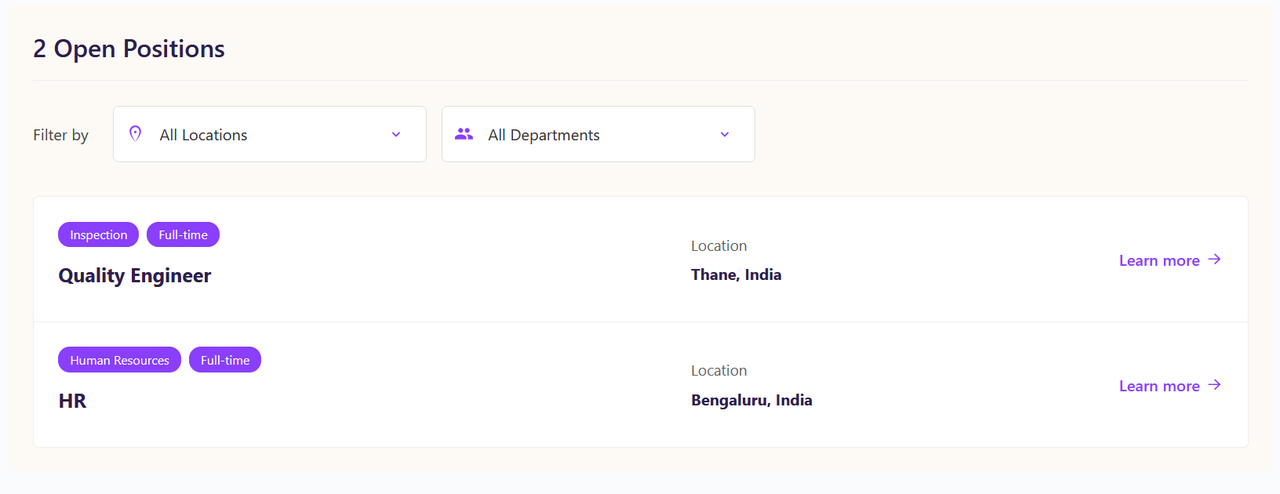
- Frontend Display: Renders a clean, responsive list of job openings (one row per job/location combination).
- Dynamic Filtering: Allows frontend users to filter the job list by individual Department and Location. Jobs appear if their specific location instance matches the filter.
- Clear Filters Button: Easily reset active location and department filters.
- Dynamic Job Count: Displays the number of currently visible open positions (counting each location instance), updating as filters are applied.
- "No Results" Message: Shows a user-friendly message when filters result in no matching jobs.
- SEO Friendly: Automatically generates JSON-LD
JobPostingstructured data (uses the first location listed for schema). - Customizable Hiring Org: Set your organization's name and website URL for the SEO schema.
- Theme Font Inheritance: Designed to inherit fonts from your active WordPress theme for better integration.
- WordPress 6.0 or higher
- Tested up to WordPress 6.8
- PHP 7.4 or higher
There are two ways to install this plugin:
Method 1: Using the Release ZIP (Recommended for Users)
- Go to the Releases page of this repository.
- Download the latest
.zipfile from the Assets section. - Log in to your WordPress admin dashboard.
- Navigate to Plugins -> Add New.
- Click the Upload Plugin button at the top.
- Click Choose File and select the
.zipfile you downloaded. - Click Install Now.
- After installation, click Activate Plugin.
Method 2: Building from Source (For Developers)
- Clone or Download: Clone this repository or download the source code ZIP to your local machine.
- Install Dependencies: Open your terminal/command prompt, navigate into the plugin's directory (
job-listings-block), and run:npm install
- Build Assets: Run the build command:
npm run build
- Create ZIP: Generate the installable ZIP file using:
npm run plugin-zip
- Upload: Upload this generated ZIP file via the WordPress admin dashboard (Plugins -> Add New -> Upload Plugin).
- Activate: Activate the plugin after installation.
- Once the plugin is activated, go to the WordPress editor for a Page or Post where you want to display the job listings.
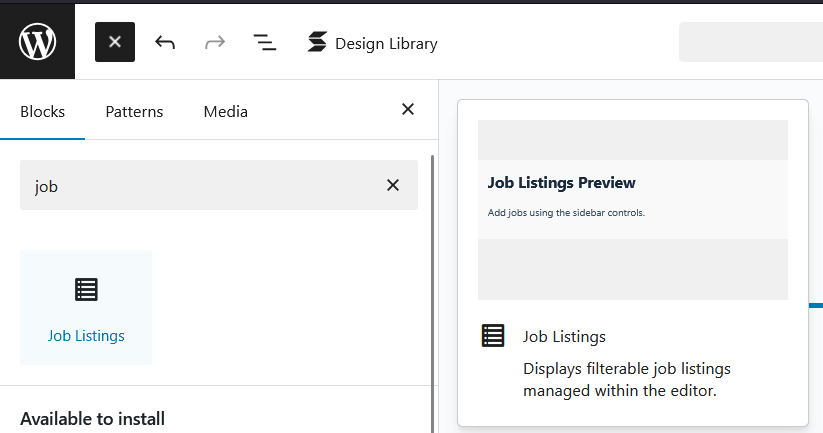
- Click the "+" button (Block Inserter) or type
/and search for "Job Listings". - Select the block to add it to your content.
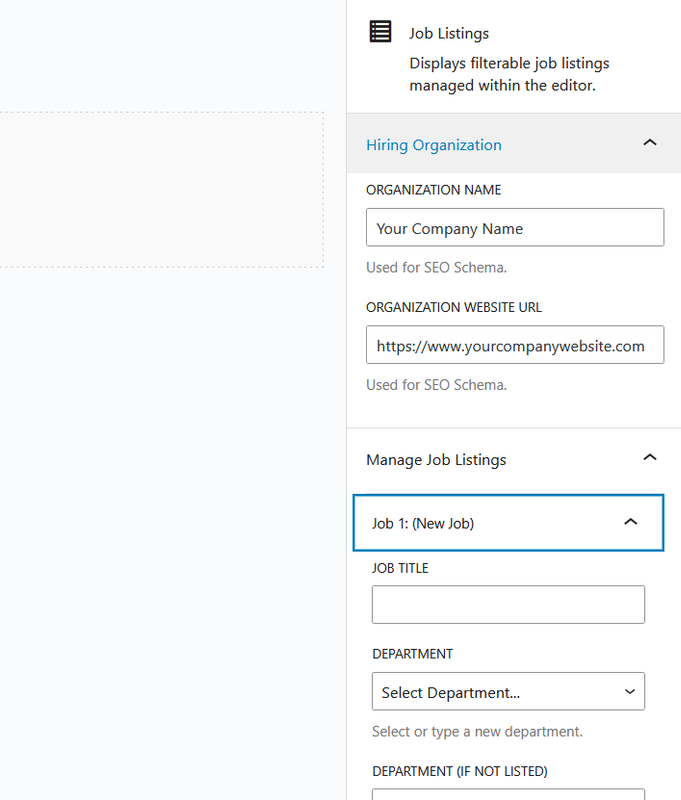
- With the block selected, use the Inspector Controls (the sidebar on the right) to configure it:
- Hiring Organization: Enter your company's name and website URL (used for SEO).
- Manage Job Listings:
- Click "Add Job" to create a new listing.
- Expand a job's details.
- Fill in the required fields: Job Title, Department, Locations (enter one location per line, e.g., "Melbourne, Australia" on line 1, "Mumbai, India" on line 2), Learn More URL.
- Select the Employment Type.
- Add a Short Description (optional but recommended for SEO).
- Toggle the "Open link in new tab" option as desired.
- Click "Remove Job" to delete a specific listing.
- Save or Update your Page/Post.
- View the page on the frontend. You will see a separate row for each location entered for a job. The filters will show each unique location name once.
- Screenshot of the block added in the editor.
- Screenshot showing the Inspector Controls (sidebar options).
- Screenshot of the frontend display with filters and job list.
- Screenshot of the "No open position found" message.



- Change: Render separate list items for each location assigned to a job.
- Change: Populate location filter dropdown with unique individual locations.
- Change: Update job count logic to count rendered job/location instances.
- Change: Rename "Clear All" button to "Clear Selection".
- Style: Adjust "Clear Selection" button style to better match dropdowns.
- Fix: Ensure Location(s) label updates correctly based on the original job data.
- Fix: Corrected location filter de-duplication logic in JavaScript.
- Feature: Add option to open "Learn More" link in a new tab.
- Feature: Add support for multiple locations per job posting (initial implementation).
- Feature: Add "Clear Filters" button to reset selections.
- Feature: Display total open position count as a heading above filters.
- Fix: Apply appropriate escaping to all frontend output per WordPress guidelines.
- Fix: Add missing translator comment for pluralization.
- Update: Tested up to WordPress 6.8.
- Initial release.
This plugin is licensed under the GPL-2.0-or-later. See the LICENSE file for details.