The git-native CMS for Astro. Point AstroAdmin at your Astro project and get a full editing UI — forms auto-generated from your Zod schemas, a visual block editor, live preview, and publishing that's just a git push.


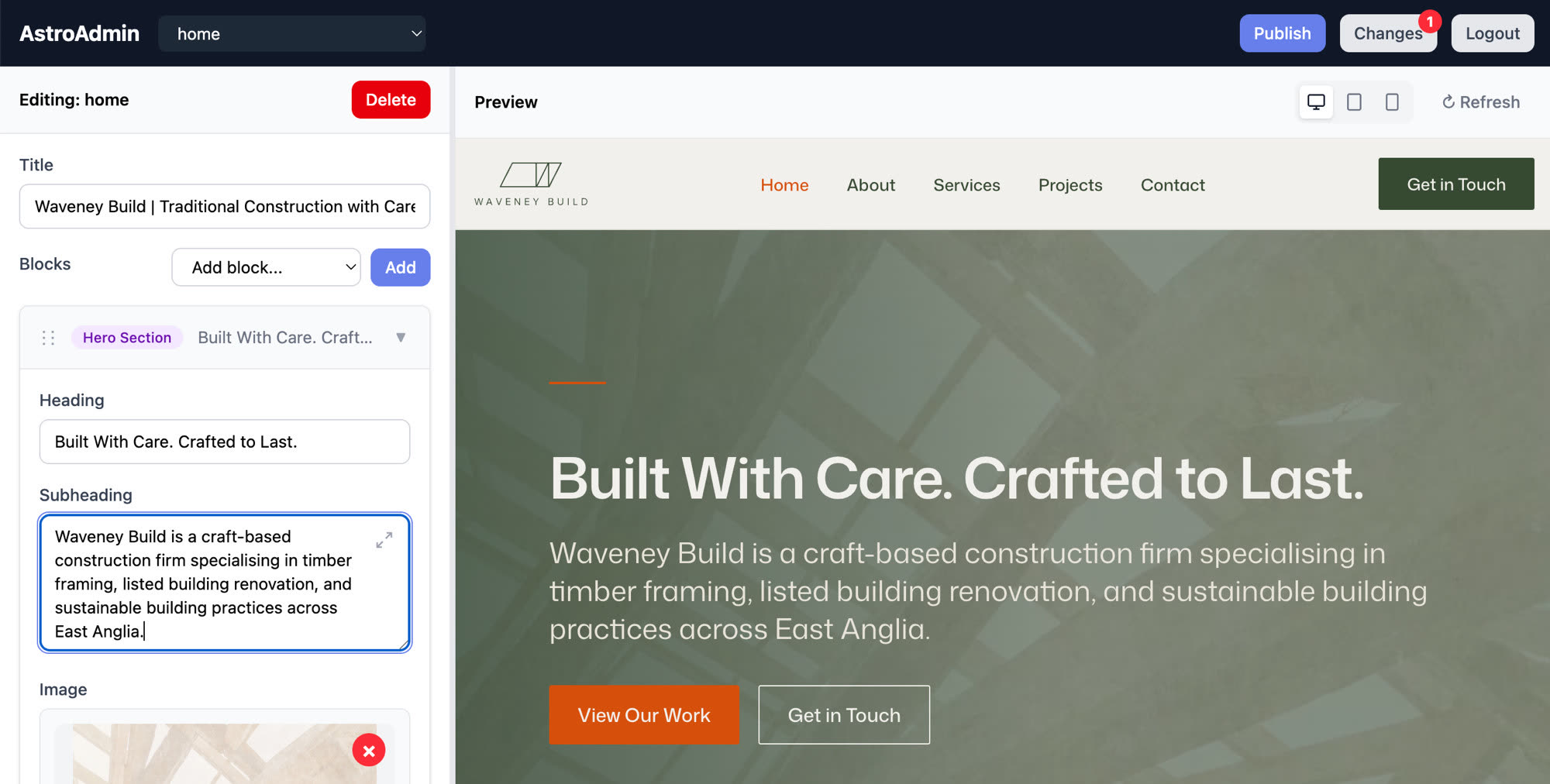
Your Astro site already defines its content model — the Zod schemas in
src/content.config.ts. AstroAdmin reads those schemas and generates the admin
interface from them. No duplicated schema definitions, no config DSL, no
separate CMS backend to keep in sync with your site.
- Your repo is the database. Content stays as markdown and JSON files,
exactly where Astro's native
glob()/file()loaders read them. No vendor lock-in and nothing to migrate away from — remove AstroAdmin and your site still builds. - Publish = commit + push. Pair it with any build-on-push host (Netlify, Cloudflare Pages, GitHub Pages) and the host becomes your build sandbox, CDN, and rollback story. Self-hosting? Deploy adapters (rsync today) cover that too.
- Built for page builders. Discriminated unions in your schemas become a visual block editor — add, reorder, and edit sections with live preview.
- Previews look like your site. The preview iframe renders through your own Astro dev server with your site's own styles, not a lookalike.
- Schema-driven forms — fields generated from
src/content.config.ts - Files + git as the source of truth — markdown/JSON in your repo
- Block editor — visual editing for discriminated unions (page builders)
- Live preview — see changes in real time via iframe
- Image uploads — upload and manage images with alt text
- Publish = commit + push — or use a deploy adapter for self-hosting
- Collection management — create and delete entries
- Auth built in — session auth with argon2 password hashing and rate limiting
From your Astro project root:
npx astroadmin devThat starts AstroAdmin and your Astro dev server together and prints the URLs. Log in, edit an entry, watch the preview update.
More options:
# Pick a port / point at a project elsewhere
npx astroadmin dev --port 3030 --project ./my-astro-site

# If you manage the Astro dev server yourself
npx astroadmin dev --no-astro
Default credentials are admin / admin — for anything internet-facing, set
ADMIN_USERNAME and ADMIN_PASSWORD_HASH (generate the argon2 hash with
npx astroadmin hash-password) plus a real SESSION_SECRET. AstroAdmin warns
at startup if production runs with weak auth config.
- Bun — AstroAdmin runs on Bun
- Astro with
astro.config.mjsorastro.config.ts - Content Collections schemas in
src/content.config.ts
Content is stored as files in your repo — markdown with frontmatter for
content collections, JSON for data/file() collections — exactly where
your Astro loaders read them:
your-astro-site/
├── astro.config.mjs        ← Required
└── src/
    ├── content.config.ts   ← Required (collection schemas)
    └── content/
        ├── pages/          ← Example glob() collection
        │   ├── home.md
        │   └── about.md
        └── team.json       ← Example file() collection
Don't have Content Collections yet? See the setup guide.
- Getting Started — full setup guide
- Requirements — detailed requirements
- Content Collections — schema setup guide
- Configuration — customization options
For collections that aren't pages (e.g., testimonials, team members), AstroAdmin can preview them rendered inside their block components. Add the integration to your Astro config:
// astro.config.mjs
import { defineConfig } from 'astro/config';
import astroadmin from 'astroadmin/integration';

export default defineConfig({
  integrations: [astroadmin()],
});
This injects a /component-preview/ route during development that renders your
block components with the item being edited. Without this integration,
non-page collections will show a 404 in the preview iframe.
Requirements:
- Block components in
src/components/blocks/following the naming convention{BlockType}Block.astro(e.g.,TestimonialsBlock.astro) - Fields referencing collections should use the naming convention
{collection}Ids(e.g.,testimonialIds)
In the default files mode, content edits are ordinary file changes in your
repo. Publishing commits the configured paths (src/content/, styles, images
— config.git.paths) and pushes; a build-on-push host (Netlify, Cloudflare
Pages, GitHub Pages via Actions) rebuilds the site from git. The host is your
build sandbox, CDN, and rollback story.
No build-on-push host? Configure a deploy adapter
(rsync today) and publishing becomes commit → build → deploy from the machine
running AstroAdmin. Git can be disabled entirely (GIT_ENABLED=false) for
deploy-adapter-only setups.
Create astroadmin.config.js in your project root:
export default {
  preview: {
    url: 'http://localhost:4321', // Astro dev server
  },
  auth: {
    username: process.env.ADMIN_USERNAME || 'admin',
    passwordHash: process.env.ADMIN_PASSWORD_HASH, // npx astroadmin hash-password
  },
};
See Configuration for the full reference.
We're working toward a hosted version: connect your repo, invite your editors, and we run the admin, previews, and builds for you — no server to manage.
Interested? Add yourself to the waitlist issue (a 👍 or a comment about your use case) or email james@cloudship.co.uk.
This means AstroAdmin couldn't find the required files:
- Run from project root — where
astro.config.mjsis located - Set up Content Collections — create
src/content.config.ts
See Requirements for details.
- AstroAdmin should auto-start Astro — check for
[astro]prefixed output - If using
--no-astro, ensure your Astro dev server is running on port 4321 - Check the preview URL in your config matches the Astro server
- Parses your
src/content.config.tsusing esbuild - Converts Zod schemas to JSON Schema via
zod-to-json-schema - Auto-generates form fields from the schema
- Detects discriminated unions for block-based editing
- Saves changes to the content files in
src/content/(or the loader's declaredbase/file()path), atomically - Your site reads those files natively via its
glob()/file()loaders; publishing commits + pushes them
AstroAdmin also ships an alternative storage backend where content lives in a
SQLite database (.astroadmin/content.db) and the site reads it at build time
via the astroadmin/loader content-layer loader (Astro 6+, build under Bun).
It is not the default and not the current direction — it is preserved
behind content.store = 'db' (env ASTROADMIN_CONTENT_STORE=db) for a future
hosted/multi-tenant phase.
Migrating a db-mode site back to files: switch src/content.config.ts from
astroadminLoader to the target glob()/file() loaders first, then run
npx astroadmin export — it reads the parsed loaders to write every DB entry
to the right path (and the right extension), preserving frontmatter/body,
locales, and file() array order.
MIT