I was so used to my 25+ years old version of ACDSee to quickly see my files, i just made my own image viewer with Python and Qt.
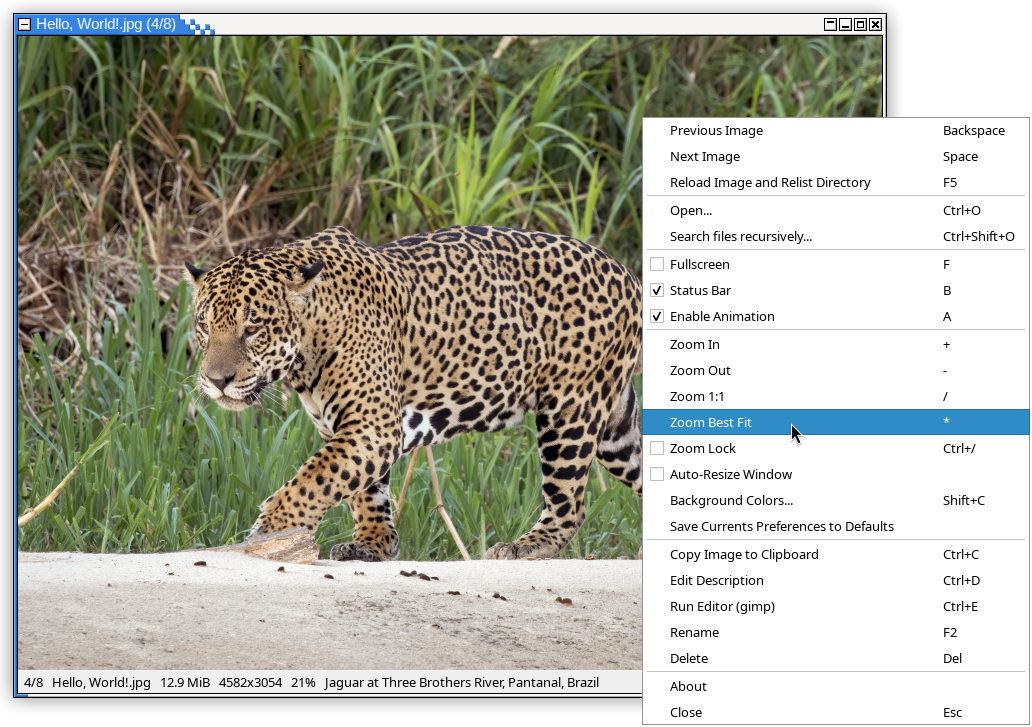
- You can run it without argument in any directory containing pictures, it will show the first of files with any recognized extension, and next/prev will show others files in current directory
- You can run it with one file name as argument to display it (or associate jaggimage-viewer with images files), next/prev will also show others files of the same directory
- You can run it with several files as argument, the first one will be displayed, next/prev will show others images you listed
Most keyboard shortcuts are shown in the contextual menu (right click), but some functions have several. I tried to keep the sames shortcuts than ACDSee.
| Shortcut(s) | Functionality |
|---|---|
Space, Page Down, Scroll wheel |
Next image |
Backspace, Page Up, Shift+Space, Scroll wheel |
Previous image |
Home |
First image |
End |
Last image |
+, Ctrl/Shift + Scroll wheel |
Zoom in |
-, Ctrl/Shift + Scroll wheel |
Zoom out |
/ |
Zoom 1:1 ("pixel perfect") |
* |
Toggle zoom best-fit / full width or height |
Ctrl+/ |
Toggle zoom lock (zoom level not changing when displaying another image) |
F, F11, Double-click |
Toggle full-screen mode |
A |
Toggle animation enabled (and force animation/disable interpolation) |
B |
Toggle status bar |
Shift+C |
Colors (background and transparency) settings dialog |
Ctrl+D |
Edit file description |
Arrows keys (with Ctrl: faster, with Shift: slower) |
Panning image (if not zoomed best fit) |
Alt+← or Alt+→ |
Rotating image view |
Alt+↑ or Alt+↓ |
Flip image view |
F2 |
Rename file (and .txt description file, if present) |
Del |
Delete current file (and display next image) |
F5 |
Reload file and relist directory |
F10 |
Show contextual menu |
Ctrl+O |
Open a specific file (in same or different directory) |
Ctrl+Shift+O |
Open a dialog for searching images recursively |
Ctrl+C |
Copy current image to clipboard |
Ctrl+E |
Open the image with an external editor (gimp by default) |
Escape, Ctrl+W (and probably Alt+F4 too) |
Quit the program |
This assumes you have either Python and pip, or uv installed.
With pip:
pip install jaggimage-viewerWith uv:
uv tool install jaggimage-viewer-
Have
uvinstalled: https://docs.astral.sh/uv/#installation -
Clone the repository:
git clone https://github.com/clxjaguar/jaggimage-viewer.git
-
Run the installation:
cd jaggimage-viewer
uv build
uv tool install .