Full, unrestricted fan control for the Lenovo Legion Go 2 (models 8ASP2 / 8AHP2), packaged as a Decky Loader plugin for SteamOS, Bazzite, CachyOS, and other Linux handheld setups.
Tired of the fan revving up and down regardless of whether you're playing something light or heavy? Existing tools won't let you override the hardware's minimum fan speeds. This plugin talks directly to the embedded controller (EC), so any fan speed you set at any temperature actually takes effect.
This is a fork of the original LeGo2 Fan Control by Luke Cama, with an overhauled smoothing algorithm and several stability and safety fixes. See Changes in this fork.
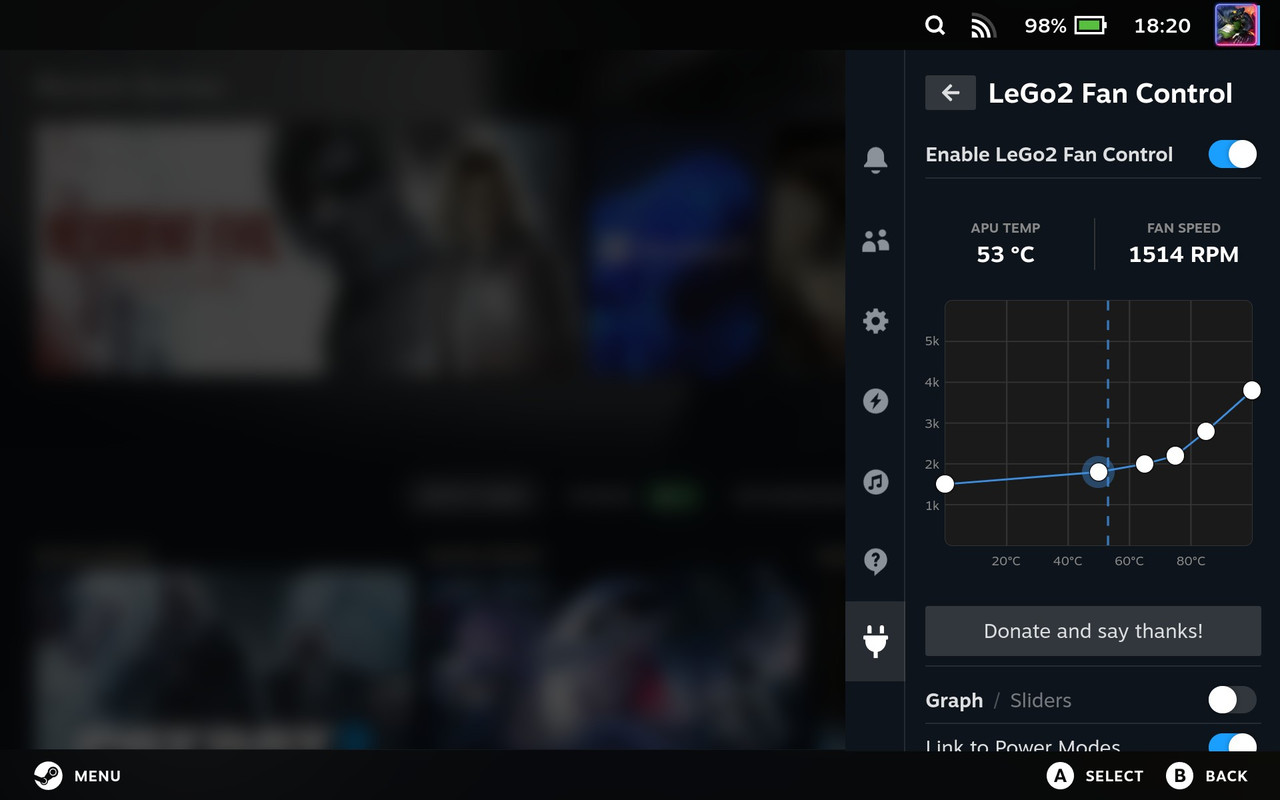
- Interactive fan curve graph — draw your own curve directly in the Decky sidebar.
- Smart fan smoothing — ramp-rate limiting combined with hysteresis. The fan responds promptly to real heat but ramps up gradually instead of skyrocketing on brief spikes, and it won't hunt up and down around a breakpoint.
- Per-power-mode curves — assign different curves to your Performance, Balanced, Quiet, and Custom power profiles.
- Stepped or smooth curves — change speed only at temperature breakpoints, or interpolate continuously across the whole curve.
- Thermal failsafe — if the APU hits 101°C, the plugin instantly forces a high RPM to cool down, regardless of your curve.
- Lightweight — a single background thread that sleeps most of the time; CPU usage sits around 0–0.2%.
- Safe by design — hands fan control back to the firmware whenever the plugin unloads (reload, desktop-mode switch, or shutdown).
- Lenovo Legion Go 2 (
8ASP2/8AHP2). The plugin auto-detects the hardware via DMI and disables itself on anything else. - Decky Loader installed.
The plugin runs with root privileges (declared in plugin.json) because it needs direct EC access via /dev/port.
In Game Mode: open Decky (the plug icon) → Settings (gear) → Developer → enable Developer Mode → Install Plugin from ZIP File, then select the plugin zip.
The UI is TypeScript/React and must be compiled before packaging:
npm install        # install frontend dependencies
npm run build      # compiles src/ into dist/index.js
Then bundle the runtime files into a folder named LeGo2 Fan Control and zip it:
LeGo2 Fan Control/
├── plugin.json
├── main.py
├── fan_logic.py
├── package.json
└── dist/index.js
Install the resulting zip through Decky as described above. (Note: the Decky CLI's plugin build requires Docker even for a Python-only plugin; the manual zip above avoids that dependency.)
When smoothing is enabled, every tick (3 seconds) the plugin reads the APU temperature and computes the ideal RPM from your curve, then decides how to move toward it:
- Hysteresis decides whether to react. It responds to rising temperature once it has climbed 3°C past the last change, and to falling temperature once it has dropped 7°C. This keeps the fan from constantly adjusting around a single point.
- Ramp-rate limiting decides how fast to move. RPM changes by at most +300 per tick when speeding up and −200 per tick when slowing down, so transitions are gradual rather than abrupt.
- Hold timeout prevents getting stuck: if the temperature holds steady above the current fan speed for several ticks, the fan ramps anyway until it reaches the curve target.
The 101°C thermal failsafe bypasses all of this and jumps straight to a high RPM.
With smoothing disabled, the fan simply follows the curve exactly, adjusting every tick.
- Rewrote the smoothing algorithm — ramp-rate limiting + hysteresis + hold-timeout (described above), replacing the previous fixed-distance approach. Fixes both fan "skyrocketing" on fast temperature deltas and lagging behind sustained load.
- Thread safety — added a lock around state shared between the background control loop and the UI, removing read/write races.
- Atomic settings saves — settings are written to a temp file and renamed, so a power loss mid-write can't corrupt them.
- Input validation — curves received from the UI are bounds-checked before being applied.
- Reliable sleep/wake handling — detects wake via a monotonic time-gap and immediately re-applies fan settings.
- Faster, safer shutdown — the control loop uses an interruptible wait, so unloading returns almost instantly while still releasing EC control back to the firmware.
- Cleanup and testability — removed unused plugin-template scaffolding and extracted the pure control math into
fan_logic.py, with atest_smoothing.pysimulation harness for verifying behavior without hardware.
By using this software, you accept full responsibility for any damage that may occur. Bypassing hardware thermal limits carries inherent risk — use sensible fan curves. You can technically set 0 RPM at 100°C; please don't.
- Original plugin created by Luke Cama.
- EC behaviour reverse-engineered with the help of Undervoltologist.
- This fork maintained by codingadventures.
Licensed under GPLv3.