The real estate intelligence platform that turns neighborhood guesswork into data-driven decisions — and transforms apartment parking chaos into a frictionless digital experience.



- Problem Statement
- Our Solution
- Features
- Tech Stack
- System Architecture
- Folder Structure
- Installation Guide
- Usage Guide
- Screenshots
- API Documentation
- Database Schema
- Future Improvements
- Challenges Faced
- Contributing
- License
- Authors
Real estate is one of the most significant financial decisions a family will ever make — often involving multi-crore investments, multi-year EMIs, and permanent lifestyle shifts. Yet, the tools available to homebuyers are alarmingly primitive.
When Rahul and his family decided to buy a 3BHK in the outskirts of Pune, they visited six properties, liked two, and chose one based on the price and the builder's brochure. Six months after moving in, they discovered:
- The nearest school had a D-rated infrastructure
- A chemical processing unit 2km away consistently pushed the AQI above 180
- The area had 4–6 hour power cuts every summer
- The proposed metro line that the broker promised was still a decade away
- The local water supply was tanker-dependent for 5 months a year
This is not an edge case. This is the norm.
Homebuyers today rely on:
- Broker word-of-mouth — biased by commission
- Google Maps reviews — unstructured, incomplete
- Social media groups — anecdotal, often outdated
- Government PDFs — buried in bureaucratic portals, unreadable
There is no single, structured, reliable platform that aggregates:
| Data Category | Current Availability | NexHood Approach |
|---|---|---|
| School Quality Index | Scattered across state portals | Aggregated + scored |
| Air Quality Index | CPCB portal, raw numbers | Visualization from static/mock data |
| Water Availability | Utility boards, inconsistent | Crowd-sourced + verified |
| Future Infrastructure | Master plans in 200-page PDFs | Extracted + mapped |
In any gated society with 200+ apartments, parking is a daily battlefield.
Scenario: Mrs. Mehta's daughter is visiting for the weekend. She parks in what seems like a guest slot. Fifteen minutes later, a resident returns and finds their paid spot occupied. The security guard has no record of the visitor. The RWA (Resident Welfare Association) gets a complaint. The visitor is embarrassed. The resident is furious. The guard is helpless.
This happens every single day in apartments across India.
The root causes:
- No digital visitor registration — paper logbooks are ineffective
- No parking slot mapping — residents don't know which slots are available
- No time-bound permissions — visitors stay beyond acceptable hours
- No accountability chain — when a slot is misused, there's no audit trail
- Gatekeeping is manual — security guards work with outdated printouts
The result: conflicts, security risks, and a degraded living experience for everyone.
NexHood is a full-stack real estate intelligence platform built around two core engines:
A data aggregation, scoring, and visualization system that gives homebuyers a 360° profile of any neighborhood before they commit. The platform uses structured static and mock data to present neighborhood metrics across education, safety, environment, water & utilities, infrastructure, and growth potential.
Every neighborhood receives a NexScore™ — a composite score out of 100 — broken into six sub-scores that buyers can review to compare localities.
A QR-code-based, role-aware parking management system that brings digital accountability to apartment visitor access.
The flow is simple:
- Resident invites a visitor via the app → system generates a time-bound QR pass
- Visitor shows QR at gate → security guard scans → system validates and logs entry
- System allocates a guest parking slot → visitor navigates to it
- On expiry or exit, slot is freed and audit log updated
No paper. No confusion. Full traceability.
- Interactive map view with color-coded NexScore overlays
- Comparison mode: Compare neighborhoods side-by-side across all metrics
- Drill-down cards: Click any metric to see data and last-updated timestamp
- Neighborhood data served from static/mock JSON datasets
- Composite score (0–100) computed from structured neighborhood data
- Weighted average of 6 sub-scores:
- 🏫 Education Index: School density, board affiliation, infrastructure rating
- 🔒 Safety Index: Crime incident frequency, type distribution
- 🌬️ Environment Index: AQI data, green cover percentage
- 💧 Water & Utilities Index: Water availability, power outage frequency
- 🏗️ Infrastructure Index: Road quality, metro/highway proximity
- 🔮 Growth Potential Index: Upcoming projects, price appreciation history
- Resident Portal: Generate time-bound visitor passes (2 hours / 4 hours / full day / custom)
- Pass carries: Visitor name, vehicle number, arrival window, host apartment
- QR code generation: Server-side QR generated via
qrcodelibrary - Parking slot dashboard: Visual map of all guest slots and availability
- Automatic expiry: System flags overstay
- Audit logs: Every scan event stored with timestamp, guard ID, outcome
Admin Dashboard:
- Society overview: Total units, active residents, parking capacity
- Daily visitor traffic analytics
- Incident reports management
Resident Dashboard:
- Generate and manage visitor passes
- View parking slot map
- Neighborhood score for their locality
- Fully responsive design with Tailwind CSS breakpoints
- Touch-optimized map interactions
- QR scanner uses native camera API
Three distinct roles with granular permissions:
| Role | Capabilities |
|---|---|
| Society Admin | Manage residents, configure parking, view all logs |
| Resident | Generate passes, view dashboards |
| Security Guard | Scan QR codes, log manual entries |
JWT-based authentication with middleware protection on all private routes.
| Technology | Purpose |
|---|---|
| React.js 18 | Component-based UI framework |
| React Router | Client-side routing |
| Tailwind CSS 3 | Utility-first responsive styling |
| Recharts | Responsive chart components (line, bar, radar) |
| Axios | HTTP client with interceptors for auth headers |
| Context API | Global auth state management |
| Technology | Purpose |
|---|---|
| Node.js 18 | Runtime environment |
| Express.js | REST API framework |
| JWT | Stateless authentication |
| qrcode | Server-side QR code generation as PNG/SVG |
| Joi | Request payload validation |
| Technology | Purpose |
|---|---|
| MongoDB 6 | Primary database (neighborhoods, users, visitor passes) |
| Mongoose | ODM with schema validation and middleware |
| Technology | Purpose |
|---|---|
| ESLint + Prettier | Code style enforcement |
| dotenv | Environment variable management |
NexHood follows a clean MVC architecture — with a React frontend (View), Express controllers (Controller), and Mongoose models (Model).
┌─────────────────────────────────────────────────────────────────────┐
│                          CLIENT LAYER                               │
│                                                                     │
│   ┌──────────────────────────────────────────────────────────┐     │
│   │              React Web App (Vite + React Router)          │     │
│   │         Home · Login · Dashboard · Neighborhood · Parking │     │
│   └──────────────────────────┬───────────────────────────────┘     │
└──────────────────────────────┼──────────────────────────────────────┘
                               │  HTTPS (REST API calls via Axios)
                               ▼
┌──────────────────────────────────────────────────────────────────────┐
│                      Express.js API Server                           │
│               Auth Middleware · CORS · Request Logging               │
└───────┬────────────────────────┬────────────────────────────────────┘
        │                        │
        ▼                        ▼
┌───────────────┐   ┌────────────────────┐   ┌───────────────────────┐
│  Neighborhood │   │  Parking & Visitor │   │   User & Auth         │
│  Controller   │   │  Controller        │   │   Controller          │
│               │   │                   │   │                       │
│  - Fetch data │   │  - Generate QR    │   │  - Register / Login   │
│  - Score calc │   │  - Verify QR      │   │  - Role assignment    │
│  - Reports    │   │  - Slot tracking  │   │  - Profile mgmt       │
└───────┬───────┘   └────────┬───────────┘   └──────────┬────────────┘
        │                    │                           │
        └────────────────────┴───────────────────────────┘
                                      │
                                      ▼
                          ┌──────────────────────┐
                          │       MongoDB         │
                          │                      │
                          │  - Users             │
                          │  - Neighborhoods     │
                          │  - Visitor Passes    │
                          └──────────────────────┘
                                      │
                                      ▼
                          ┌──────────────────────┐
                          │    Static Mock Data   │
                          │  (neighborhoods.json  │
                          │   neighborhoods.js)   │
                          └──────────────────────┘
User clicks "View Neighborhood"
        │
        ▼
React frontend calls GET /api/neighborhood-data/:locality_id
        │
        ▼
Express API validates JWT via authMiddleware, routes to neighborhoodController
        │
        ├──► MongoDB: fetch neighborhood document
        │
        └──► Static mock data: fill missing fields from neighborhoods.js
        │
        ▼
Controller composes full neighborhood object
        │
        ▼
Response returned to frontend as JSON
        │
        ▼
React renders dashboard with Recharts + map visualization
nexhood/
├── client/                     # React frontend (View)
│   ├── public/
│   ├── src/
│   │   ├── assets/             # images, icons
│   │   ├── components/         # reusable UI
│   │   │   ├── ui/
│   │   │   ├── layout/
│   │   │   ├── charts/
│   │   │   └── map/
│   │   │
│   │   ├── pages/              # main pages (View layer)
│   │   │   ├── Home.jsx
│   │   │   ├── Login.jsx
│   │   │   ├── Dashboard.jsx
│   │   │   ├── Neighborhood.jsx
│   │   │   └── Parking.jsx
│   │   │
│   │   ├── hooks/              # Controller logic (React hooks)
│   │   │   ├── useAuth.js
│   │   │   ├── useNeighborhood.js
│   │   │   └── useParking.js
│   │   │
│   │   ├── services/           # API calls (Controller)
│   │   │   ├── api.js
│   │   │   ├── authService.js
│   │   │   ├── neighborhoodService.js
│   │   │   └── parkingService.js
│   │   │
│   │   ├── context/            # global state (optional)
│   │   │   └── AuthContext.jsx
│   │   │
│   │   ├── utils/              # helpers
│   │   │   ├── constants.js
│   │   │   └── helpers.js
│   │   │
│   │   ├── data/               # static/mock data (IMPORTANT)
│   │   │   └── neighborhoods.json
│   │   │
│   │   ├── App.jsx
│   │   └── main.jsx
│   │
│   ├── package.json
│   └── tailwind.config.js
│
├── server/                     # Backend (Model + Controller)
│   ├── config/
│   │   └── db.js
│   │
│   ├── models/                 # Model layer
│   │   ├── User.js
│   │   ├── Neighborhood.js
│   │   └── Visitor.js
│   │
│   ├── controllers/            # Controller logic
│   │   ├── authController.js
│   │   ├── neighborhoodController.js
│   │   └── parkingController.js
│   │
│   ├── routes/                 # Routes
│   │   ├── authRoutes.js
│   │   ├── neighborhoodRoutes.js
│   │   └── parkingRoutes.js
│   │
│   ├── middleware/
│   │   └── authMiddleware.js
│   │
│   ├── utils/
│   │   └── generateQR.js
│   │
│   ├── data/                   # mock data (VERY USEFUL)
│   │   └── neighborhoods.js
│   │
│   ├── app.js
│   └── package.json
│
├── README.md
└── package.json
Ensure you have the following installed:
- Node.js >= 18.0.0
- MongoDB 6.x (local or Atlas)
- Git
git clone https://github.com/your-org/nexhood.git
cd nexhood# Install root dependencies
npm install
# Install client dependencies
cd client && npm install
# Install server dependencies
cd ../server && npm install# App
NODE_ENV=development
PORT=4000
# MongoDB
MONGODB_URI=mongodb://localhost:27017/nexhood
# JWT
JWT_SECRET=your-very-long-random-secret-key-here
JWT_EXPIRES_IN=7d
# QR Code
QR_BASE_URL=http://localhost:3000/verifyVITE_API_URL=http://localhost:4000/api# If running locally
mongodcd server
npm run seed
# Populates: sample neighborhoods, demo society, admin user# Terminal 1 — Backend API
cd server && npm run dev
# Terminal 2 — Frontend
cd client && npm run devVisit the following URLs to confirm everything is running:
- Frontend:
http://localhost:5173 - API Health:
http://localhost:4000/api/health
Default credentials after seeding:
- Admin:
admin@nexhood.in/Admin@123 - Resident:
demo.resident@nexhood.in/Resident@123
- Register as a new user at
/register - Navigate to Neighborhood Explorer from the sidebar
- Search for a locality by name or pin code (e.g., "Baner, Pune")
- View the NexScore™ overview card — overall score + 6 sub-scores
- Click "View Full Analysis" to expand the dashboard:
- Explore the AQI trend chart
- View the infrastructure timeline (upcoming projects)
- Click "Compare" to add a second neighborhood side-by-side
Step 1 — Resident generates a pass:
- Resident logs in → goes to Parking section
- Clicks "Invite Visitor"
- Fills form: Visitor Name, Vehicle Number, Expected Arrival, Duration
- Clicks "Generate Pass"
- System creates a time-bound QR code
Step 2 — Visitor arrives:
- Visitor shows QR code on phone to security guard
- Guard opens the Guard App (
/guard) and taps "Scan QR" - Camera opens → scans QR
- System validates: checks token signature and expiry
- If valid: ✅ Green screen with slot assignment (e.g., "G-07")
- If expired/invalid: ❌ Red screen with reason
Step 3 — Slot update:
- Resident's dashboard shows parking slot as "Occupied"
- On visitor exit, guard marks exit → slot freed → dashboard updates
The UI/UX of NexHood is designed with a focus on clarity, data-driven insights, and seamless user experience for both homebuyers and residential societies.
The design system emphasizes:
- Clean and intuitive dashboards for complex data visualization
- Map-first interface for neighborhood exploration
- Mobile-friendly flows for visitor parking and QR scanning
- Role-based UI tailored for Admins, Residents, and Security Guards
Key Screens Designed:
- Neighborhood Explorer
- NexScore Dashboard
- Infrastructure Timeline
- Visitor Pass Generation
- QR Scanner (Guard App)
Note: The screenshots below are exported directly from the Figma designs.
📌 Screenshots are from the live staging environment at
staging.nexhood.in
| Screen | Preview |
|---|---|
| Neighborhood Explorer | 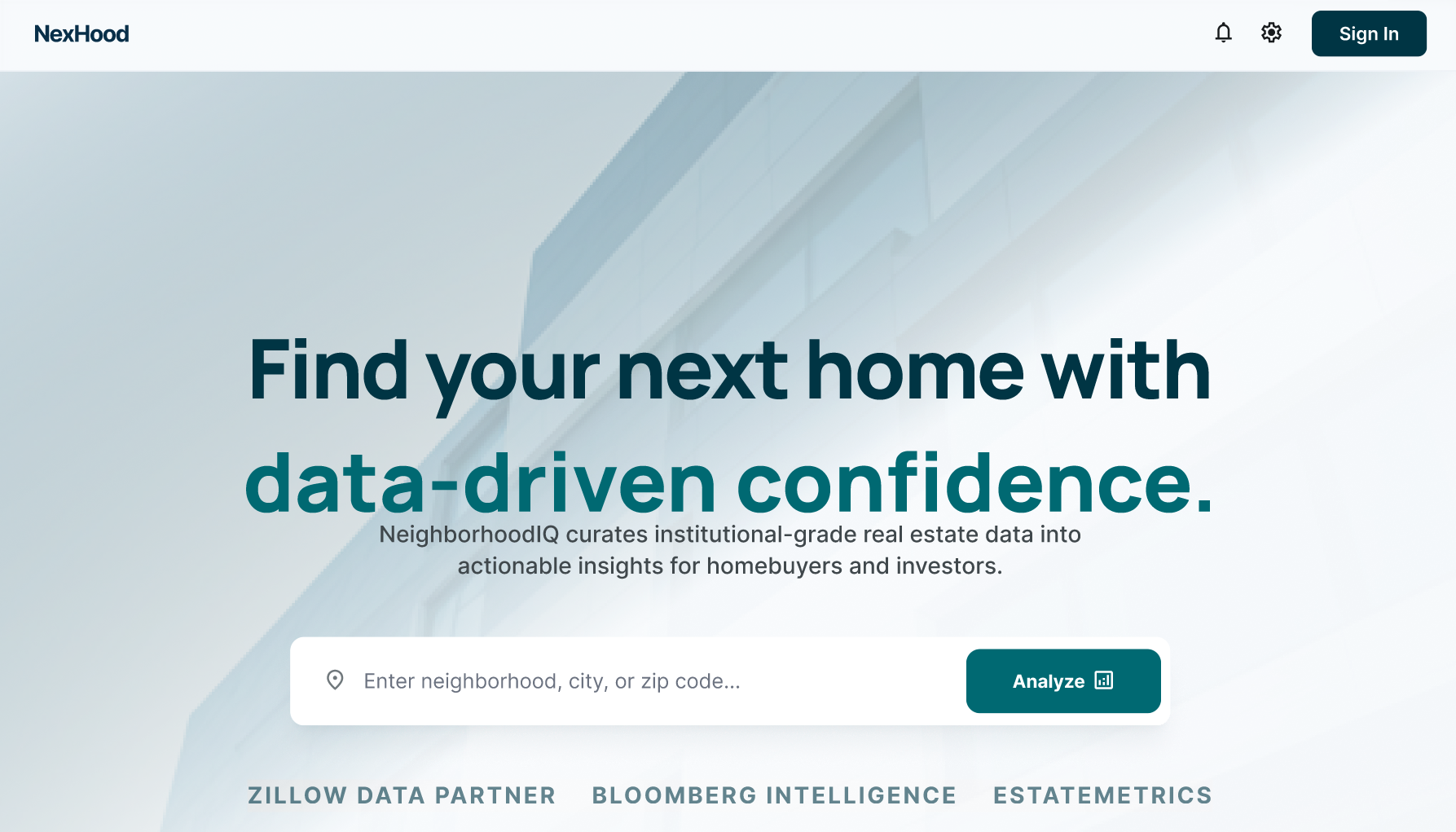 |
| NexScore™ Dashboard | 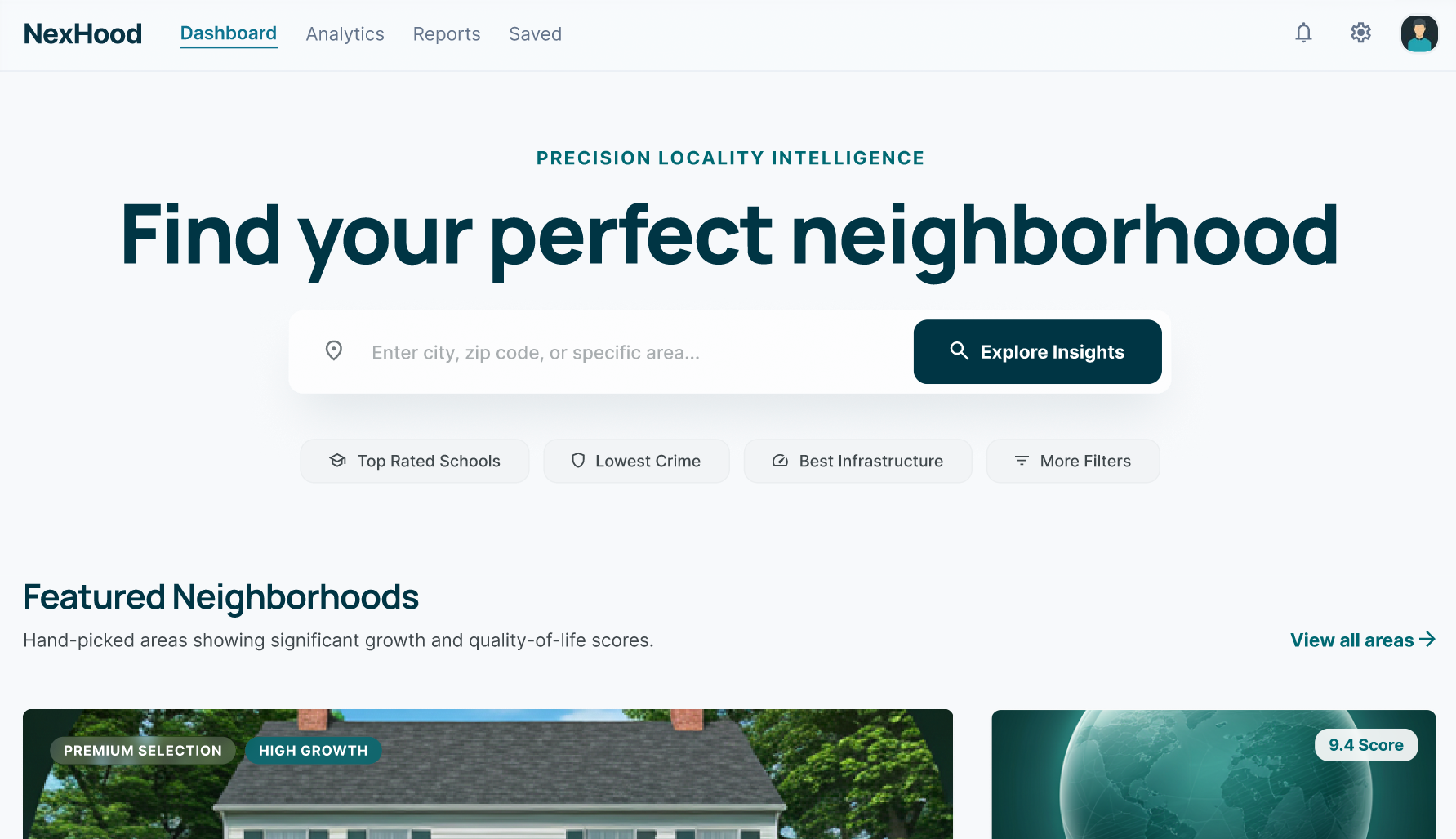 |
| Infrastructure Timeline | 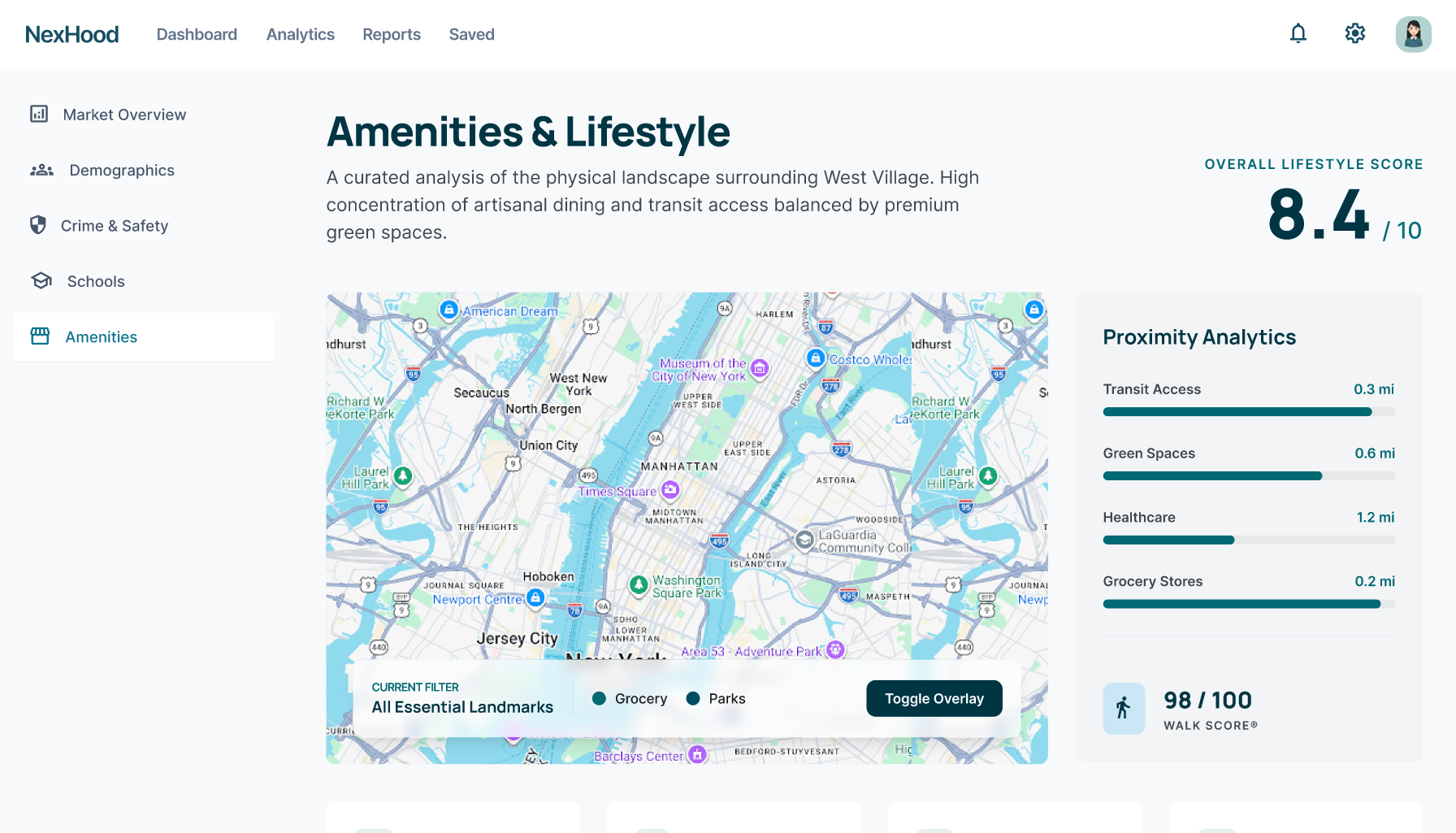 |
| Neighborhood Comparison | 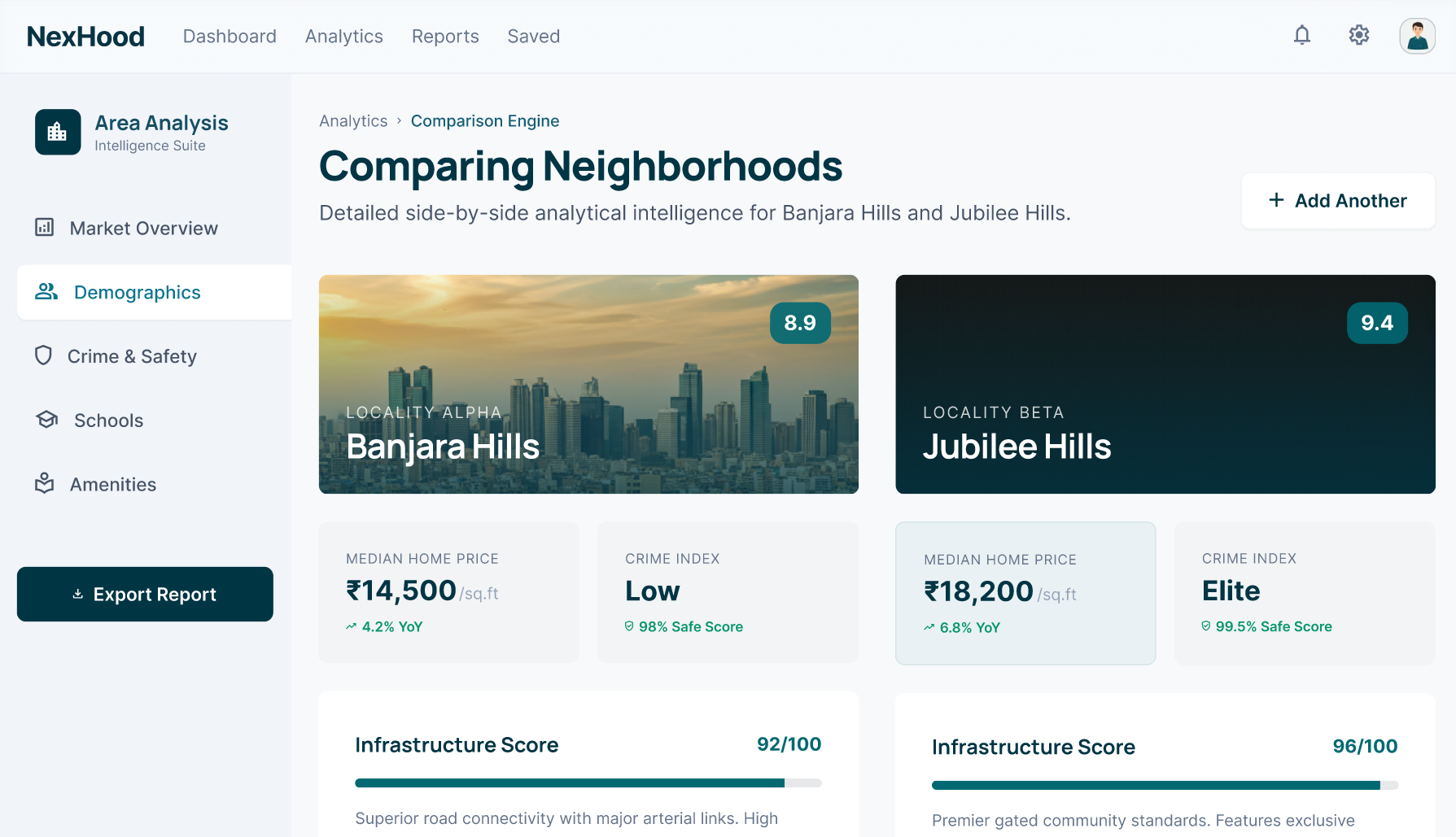 |
Base URL: http://localhost:4000/api
All authenticated endpoints require:
Authorization: Bearer <access_token>
Content-Type: application/json
Register a new user.
Request:
{
  "name": "Rahul Sharma",
  "email": "rahul@example.com",
  "password": "SecurePass@123",
  "role": "resident",
  "society_id": "soc_abc123"
}
Response 201:
{
  "success": true,
  "user": { "id": "usr_xyz", "name": "Rahul Sharma", "role": "resident" },
  "accessToken": "eyJhbGci..."
}Authenticate and receive token.
Fetch full neighborhood data object.
Response 200:
{
  "locality": {
    "id": "loc_pune_baner",
    "name": "Baner",
    "city": "Pune",
    "coordinates": { "lat": 18.5590, "lng": 73.7868 },
    "nexscore": 71,
    "sub_scores": {
      "education": 78,
      "safety": 65,
      "environment": 58,
      "water_utilities": 72,
      "infrastructure": 80,
      "growth_potential": 74
    },
    "data_confidence": "high"
  }
}Compare multiple localities.
Request:
{
  "locality_ids": ["loc_pune_baner", "loc_pune_wakad", "loc_pune_kothrud"]
}
Response 200: Array of scored locality objects.
Generate a new time-bound QR visitor pass. Requires resident role.
Request:
{
  "visitor_name": "Priya Kapoor",
  "vehicle_number": "MH12AB1234",
  "arrival_window_start": "2025-04-15T14:00:00Z",
  "duration_hours": 4,
  "host_apartment": "B-402"
}
Response 201:
{
  "pass_id": "vp_7f9c2a",
  "qr_code_url": "http://localhost:4000/qr/vp_7f9c2a.png",
  "valid_until": "2025-04-15T18:00:00Z",
  "slot_pre_assigned": "G-07",
  "status": "active"
}Validate a scanned QR pass. Requires guard or admin role.
Request:
{
  "token": "vp_7f9c2a_signed_payload_here",
  "guard_id": "grd_001",
  "scan_type": "entry"
}
Response 200 (valid):
{
  "valid": true,
  "visitor_name": "Priya Kapoor",
  "vehicle_number": "MH12AB1234",
  "host_apartment": "B-402",
  "slot_assigned": "G-07",
  "valid_until": "2025-04-15T18:00:00Z",
  "message": "Access granted. Direct visitor to slot G-07."
}
Response 403 (expired):
{
  "valid": false,
  "reason": "pass_expired",
  "expired_at": "2025-04-15T18:00:00Z",
  "message": "This pass has expired. Please ask the resident to generate a new pass."
}Mark a visitor as exited and free the parking slot.
Response 200:
{
  "success": true,
  "slot_freed": "G-07",
  "duration_parked": "3h 22m",
  "exit_time": "2025-04-15T17:22:00Z"
}Get parking slot map for a society.
Response 200:
{
  "total_guest_slots": 20,
  "available": 13,
  "occupied": 7,
  "slots": [
    { "slot_id": "G-01", "status": "available" },
    { "slot_id": "G-07", "status": "occupied", "pass_id": "vp_7f9c2a", "visitor": "Priya Kapoor" }
  ]
}{
_id: ObjectId,
locality_id: String, // Unique slug: "pune_baner"
name: String,
city: String,
state: String,
coordinates: { lat: Number, lng: Number },
nexscore: Number, // Composite score
sub_scores: {
education: Number,
safety: Number,
environment: Number,
water_utilities: Number,
infrastructure: Number,
growth_potential: Number
},
raw_data: {
aqi: { current: Number, trend: Array },
schools: Array,
upcoming_projects: Array
},
last_synced: Date,
created_at: Date
}{
_id: ObjectId,
pass_id: String, // "vp_7f9c2a"
resident_id: ObjectId,
society_id: ObjectId,
visitor_name: String,
vehicle_number: String,
host_apartment: String,
slot_assigned: String,
qr_token: String, // Signed token embedded in QR
valid_from: Date,
valid_until: Date,
status: Enum['active', 'used', 'expired', 'revoked'],
scan_logs: [{
guard_id: ObjectId,
scan_type: Enum['entry', 'exit'],
timestamp: Date,
result: Enum['success', 'failed']
}],
created_at: Date
}{
_id: ObjectId,
name: String,
email: String, // Unique
password_hash: String, // bcrypt
role: Enum['admin', 'resident', 'guard'],
society_id: ObjectId,
apartment: String, // e.g., "B-402"
is_active: Boolean,
created_at: Date
}- Price appreciation forecast: ML model trained on historical price data + infrastructure developments to predict 2–5 year property value growth
- Personalized matching: Input your lifestyle profile and get ranked neighborhood recommendations
- iOS + Android apps built with React Native
- Offline-first architecture with local caching for low-connectivity areas
- Biometric authentication for guard app
- Push notifications for QR expiry, slot availability
- Ultrasonic sensors in parking slots transmit live occupancy via MQTT
- Automatic slot status updates without manual guard intervention
- Dashboard shows sensor battery levels and health
- Direct API integrations with:
- NCRB (National Crime Records Bureau)
- UDISE+ (Unified District Information System for Education)
- Smart Cities Mission portal
- MoHUA (Ministry of Housing and Urban Affairs)
- Auto-sync scheduled tasks replace manual data upload
- Public API for PropTech companies to embed NexScore widgets
- White-label neighborhood intelligence for real estate portals
- Tiered pricing with rate limiting via API keys
- UI localization: Hindi, Marathi, Tamil, Telugu, Kannada
- Voice-based neighborhood search for low-literacy users
- Regional government portal scraping for state-specific data
Challenge: Government data exists in 50+ formats — some as PDFs, some as Excel sheets, some as poorly structured HTML tables.
Approach: Used structured static JSON datasets (neighborhoods.json / neighborhoods.js) as a reliable fallback, with mock data representing verified neighborhood metrics. Coverage can be extended as real data sources become available.
Challenge: A malicious user could screenshot a valid QR and share it, or attempt to reuse expired tokens.
Approach:
- QR tokens are signed with HMAC using a server-side secret
- Token validity is checked against expiry on every scan
- Guard app displays registered vehicle number for manual cross-check
- 5-minute post-expiry grace window to handle clock drift
Challenge: Visitor pass data contains PII. QR token security must be airtight.
Approach:
- Visitor PII encrypted at rest
- QR tokens are time-bound with expiry validation
- Role-based access ensures only authorized guards can verify passes
We welcome contributions from developers, designers, data engineers, and domain experts in real estate and urban planning.
- Fork the repository
- Create a feature branch:
git checkout -b feat/your-feature-name - Follow the coding standards:
npm run lint && npm run format - Write tests for new features:
npm run test - Submit a pull request with a clear description
- 🗄️ Data: Help source and clean neighborhood datasets for new cities
- 🎨 Design: UI/UX improvements, accessibility
- 🔧 Backend: New API endpoints, performance optimization
- 📖 Docs: Improve documentation and add usage examples
- All code must pass ESLint + Prettier checks
- New API endpoints must include Joi validation
- React components must follow hook-based patterns
- Commits follow Conventional Commits format
Use the GitHub Issues tab. Please include:
- Environment (OS, Node version, browser)
- Steps to reproduce
- Expected vs actual behaviour
- Relevant logs (redact sensitive data)
This project is licensed under the MIT License.
MIT License

Copyright (c) 2025 NexHood Technologies Pvt. Ltd.

Permission is hereby granted, free of charge, to any person obtaining a copy
of this software and associated documentation files (the "Software"), to deal
in the Software without restriction, including without limitation the rights
to use, copy, modify, merge, publish, distribute, sublicense, and/or sell
copies of the Software, and to permit persons to whom the Software is
furnished to do so, subject to the following conditions:

The above copyright notice and this permission notice shall be included in all
copies or substantial portions of the Software.

THE SOFTWARE IS PROVIDED "AS IS", WITHOUT WARRANTY OF ANY KIND, EXPRESS OR
IMPLIED, INCLUDING BUT NOT LIMITED TO THE WARRANTIES OF MERCHANTABILITY,
FITNESS FOR A PARTICULAR PURPOSE AND NONINFRINGEMENT.
See LICENSE for full text.
|
Hanuman Singh Full-Stack Engineer & Product Lead @Github · LinkedIn |
💌 For business inquiries, partnerships, or pilot programs: hanumanrajpurohit.vercel.app
Built with ❤️ for homebuyers who deserve better data.
NexHood — Know Your Neighborhood. Own Your Space.
⭐ If this project helped you, consider giving it a star!