Seamless WYSIWYG markdown editing for VS Code — Write markdown the way humans think.




We also support standard shortcuts like
CTRL/CMD + B, etc
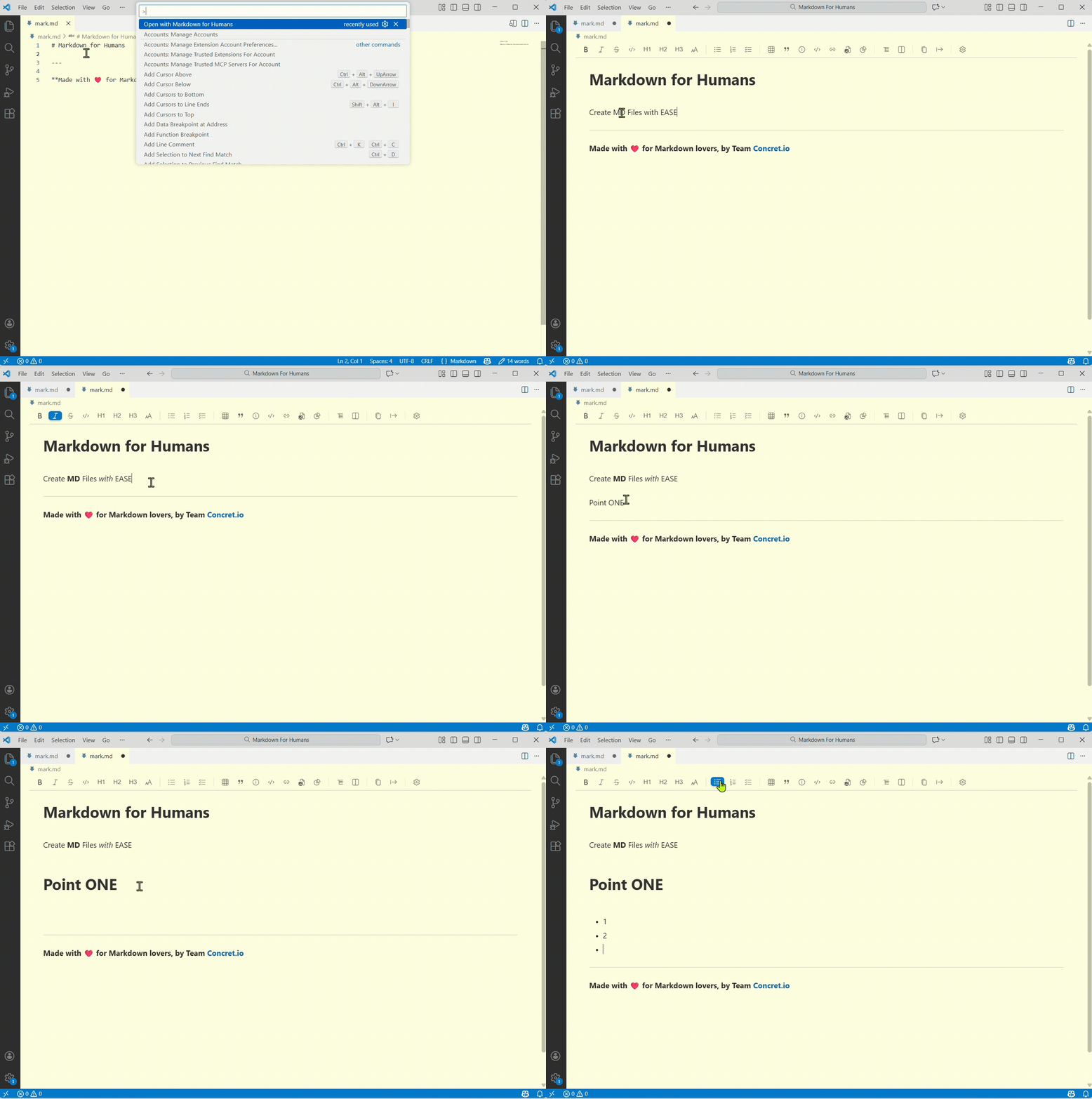
Experience seamless WYSIWYG markdown editing with visual table editing, image management, and more—all in VS Code.
Tired of manually writing table syntax? Struggling with image paths, resizing, renaming? Or you dont like memorising Markdown Syntax.
Most markdown editors force you to memorize syntax, fight with split panes, or manually manage files. Markdown for Humans solves the biggest pain points that make markdown editing frustrating.
📌 100% free. No trials. No limits. No paywalls, ever.
As natural as it gets in Microsoft Word or Google Docs etc.
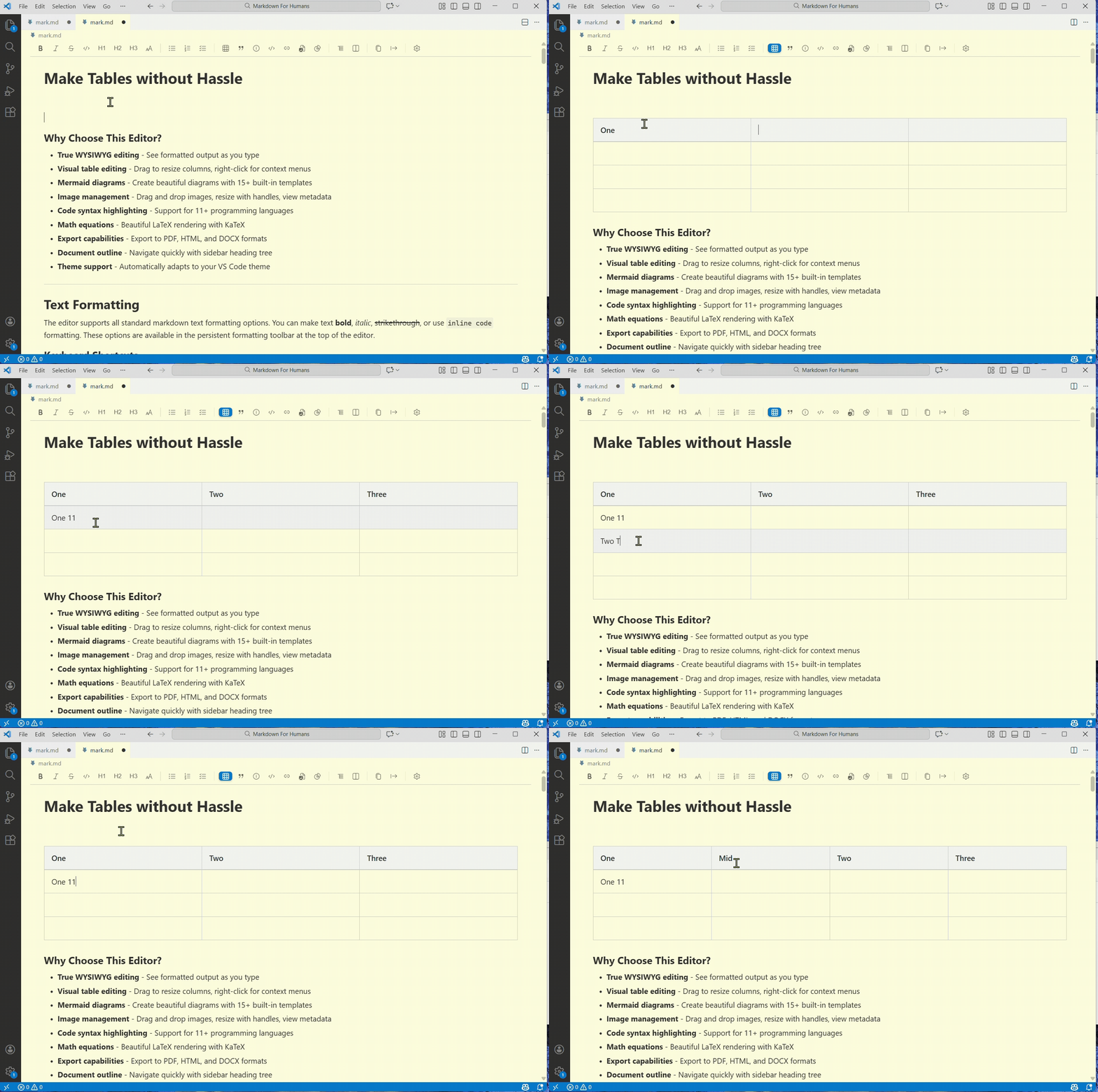
Drag column borders to resize. Right-click to add rows. No syntax to memorize.
- ✅ Drag-to-resize columns — Click and drag column borders, just like Excel
- ✅ Right-click context menu — Insert/delete rows and columns instantly
- ✅ Toolbar controls — Add/remove rows and columns with dropdown menus
- ✅ Tab navigation — Move between cells with Tab/Shift+Tab
Stop counting pipes and dashes. Start editing tables visually.
Press shift while dragging images, in case your face issues on drag drop in editor
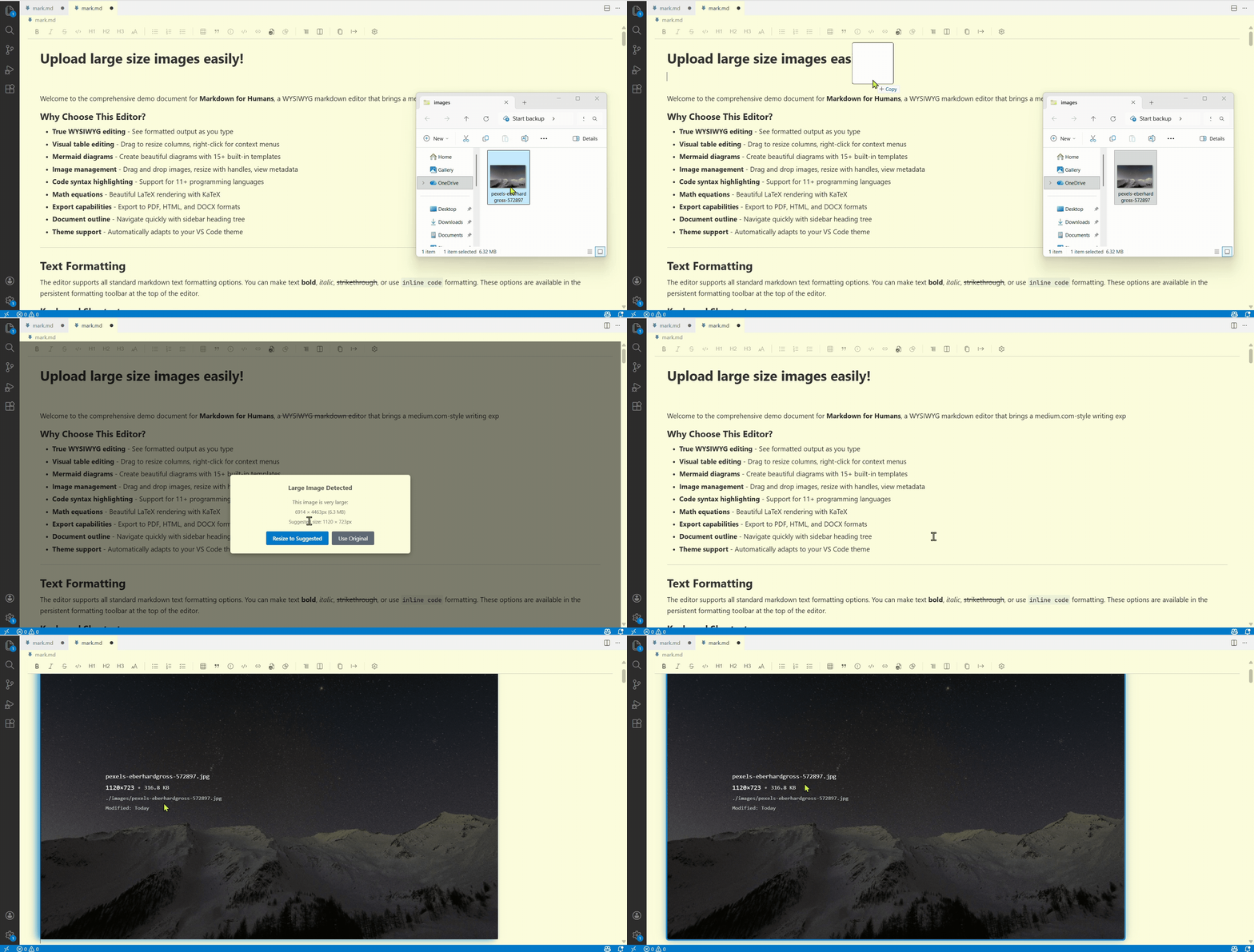
Drag images in. Resize with handles. Rename inline. No manual file operations.
- ✅ Drag & drop — Drop images directly into your document
- ✅ In-place resizing — Drag handles to adjust width, see live preview
- ✅ Auto-size suggestions — Get warnings for oversized images (saves your storage on GIT)
- ✅ Rename images — Change filenames without leaving the editor (we rename file on disk, and also update the markdown code)
- ✅ Metadata overlay — View dimensions, file size, and path at a glance
Important
We backup original image always, before resizing.
Adjust image width with intuitive resize handles for perfect layout control.
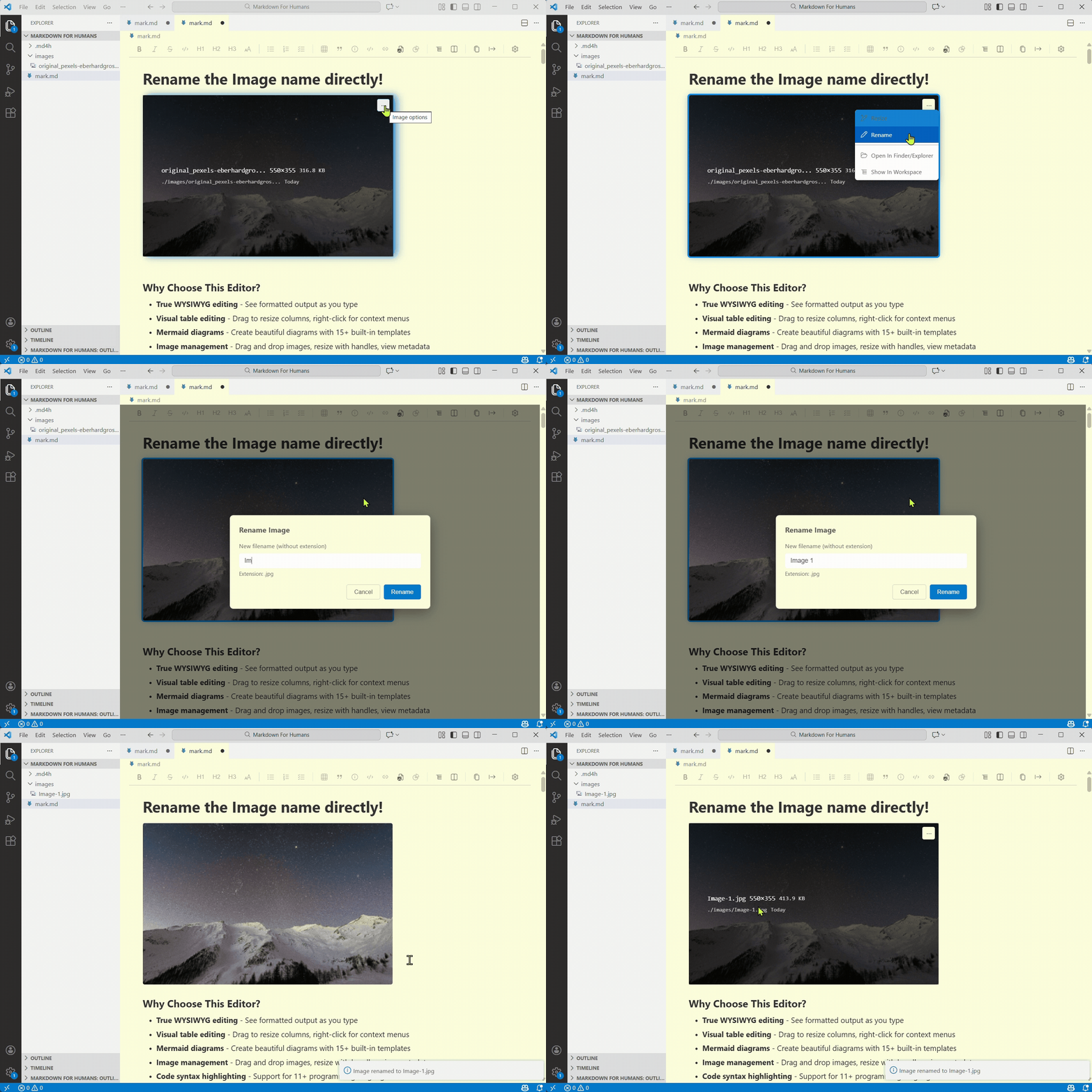
Rename images directly from the editor to keep your assets organized.
Humans work that way.
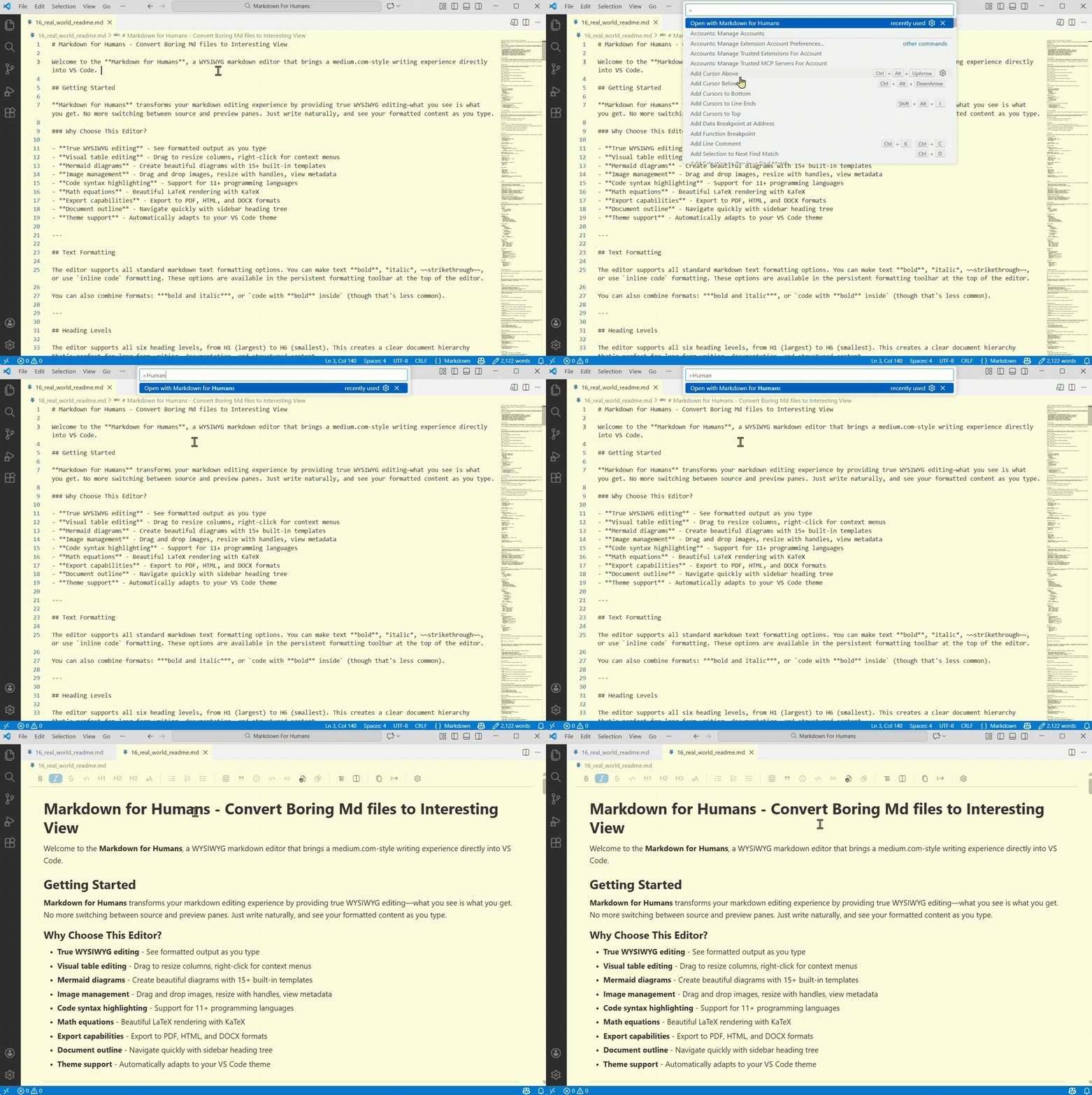
See your formatted output as you type. No split panes. No preview mode. Just write.
Built on TipTap with a human-first design philosophy:
- Persistent formatting bar — See your options, click what you need
- Floating shortcuts — Actions appear where you need them (Tables: right-click, Images: More icon)
- No command palette overload — Actions are visible, not buried in
/commands - No context switching — Everything you need is right there
| Feature | Markdown for Humans | Markdown All in One | Standard Editors |
|---|---|---|---|
| WYSIWYG Editing | ✅ Full-screen, no split pane | ❌ Split pane only | ❌ Plain text |
| Visual Table Editor | ✅ Drag, resize, edit cells | ❌ Manual syntax | |
| Image Management | ✅ Rename, resize inline | ❌ Manual file ops | ❌ Manual file ops |
| Mermaid Diagrams | ✅ Live rendering | ✅ Preview only | ❌ Not supported |
VS Code
Option 1: Via Marketplace (Recommended)
- Visit VS Code Marketplace
- Click "Install"
Option 2: Within VS Code
- Open Extensions (
Ctrl+Shift+X/Cmd+Shift+X) - Search for "Markdown for Humans" or use the extension ID:
concretio.markdown-for-humans - Click Install
Cursor / Windsurf / VSCodium / Other Open VSX IDEs
Via Open VSX Registry:
- Open Extensions panel
- Search for "Markdown for Humans" or use the extension ID:
concretio.markdown-for-humans - Install (automatically pulls from Open VSX Registry)
Direct Link: Open VSX Registry
Supported IDEs:
- Cursor
- Windsurf
- VSCodium
- Gitpod
- Eclipse Theia
- Other Open VSX-compatible IDEs
💡 Pro Tip: For precise results, search using the extension ID
concretio.markdown-for-humansin the Extensions panel of any IDE.
- Open any
.mdfile → Right-click → "Open with Markdown for Humans" - Start writing!
Toggle between WYSIWYG and source: Click the </> Source button in the toolbar
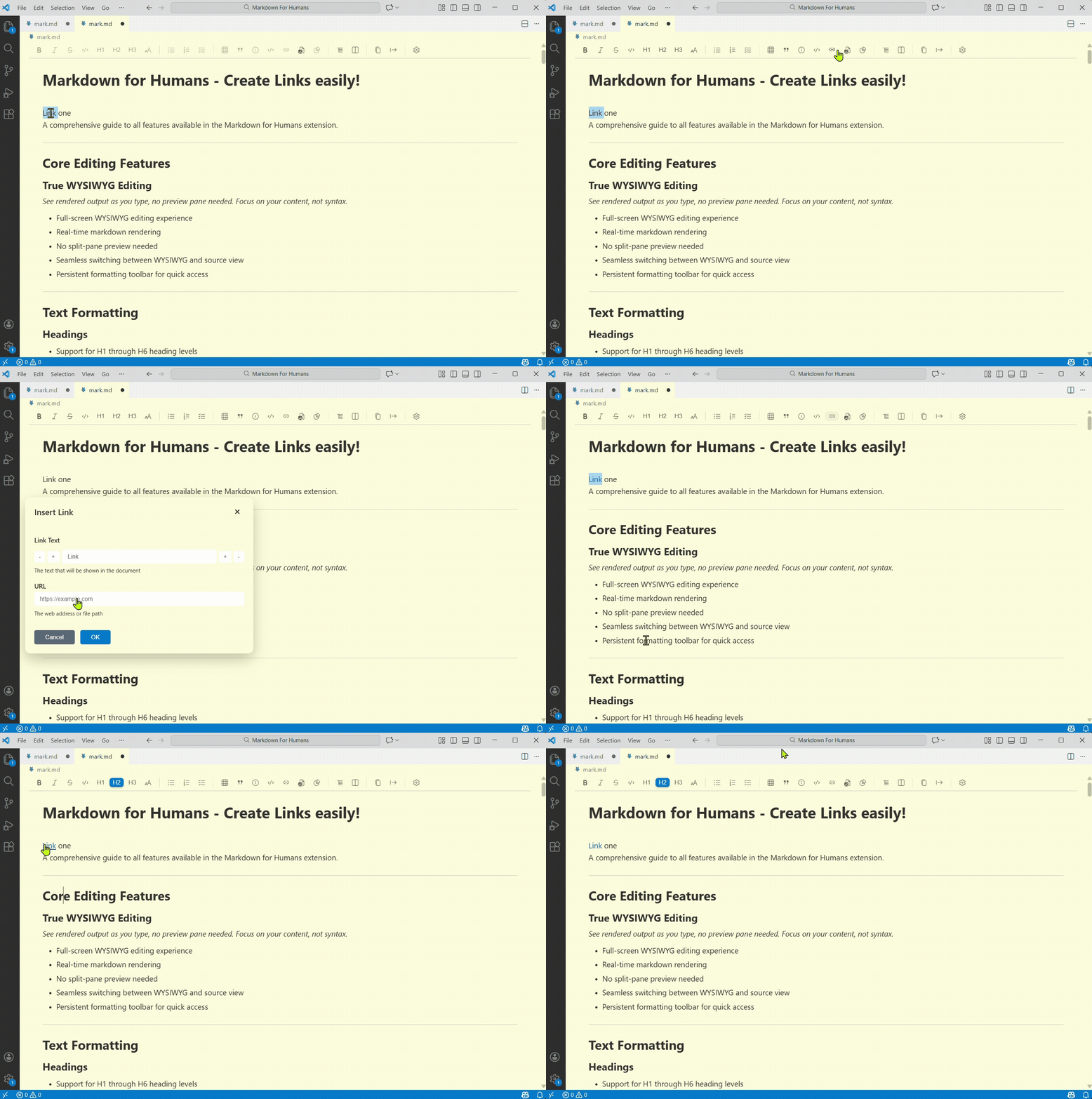
Create links easily with support for URLs, file linking, heading links, and more—all through an intuitive dialog interface.
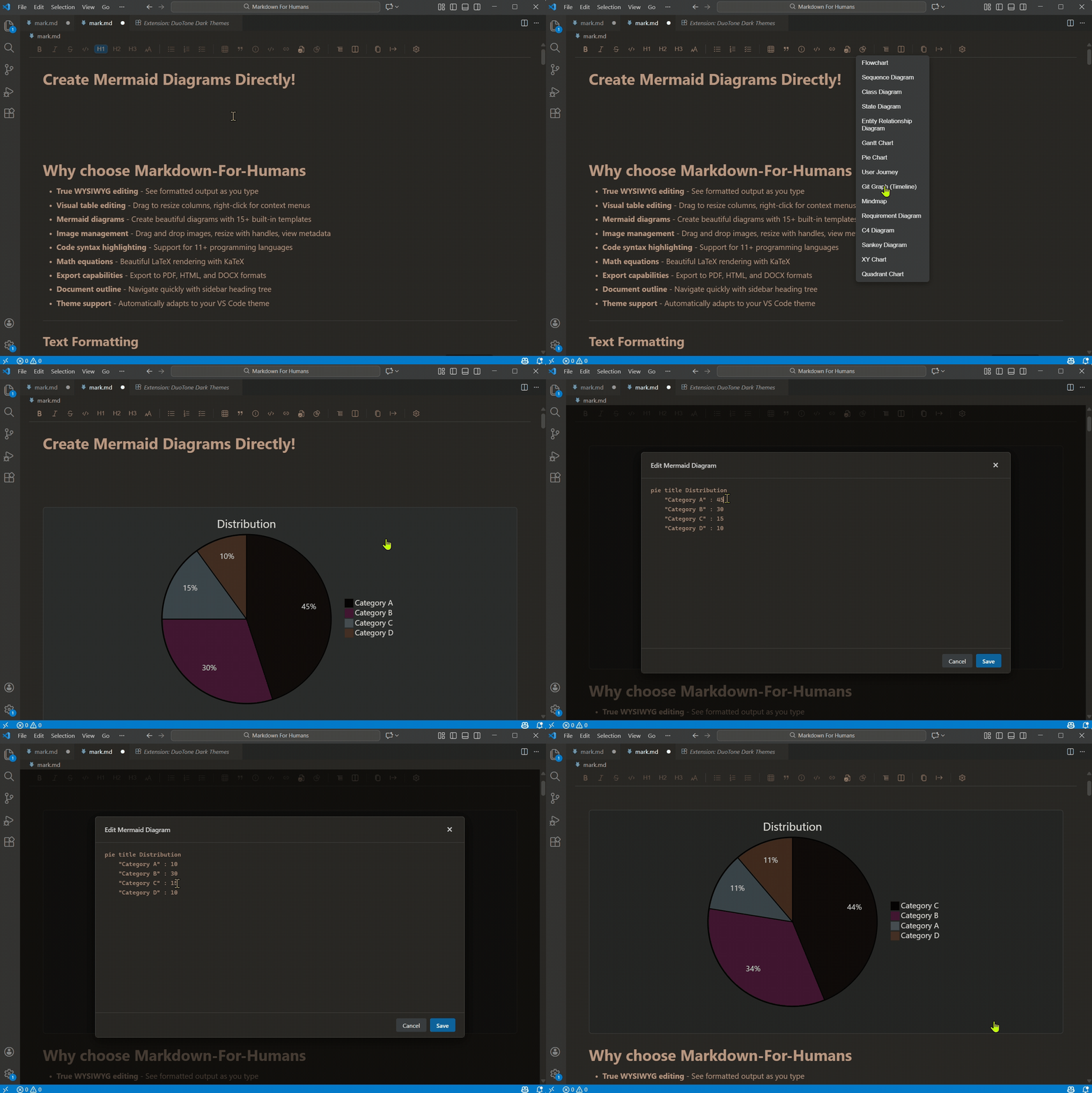
Create flowcharts, sequence diagrams, Gantt charts, and more with 15 built-in templates.
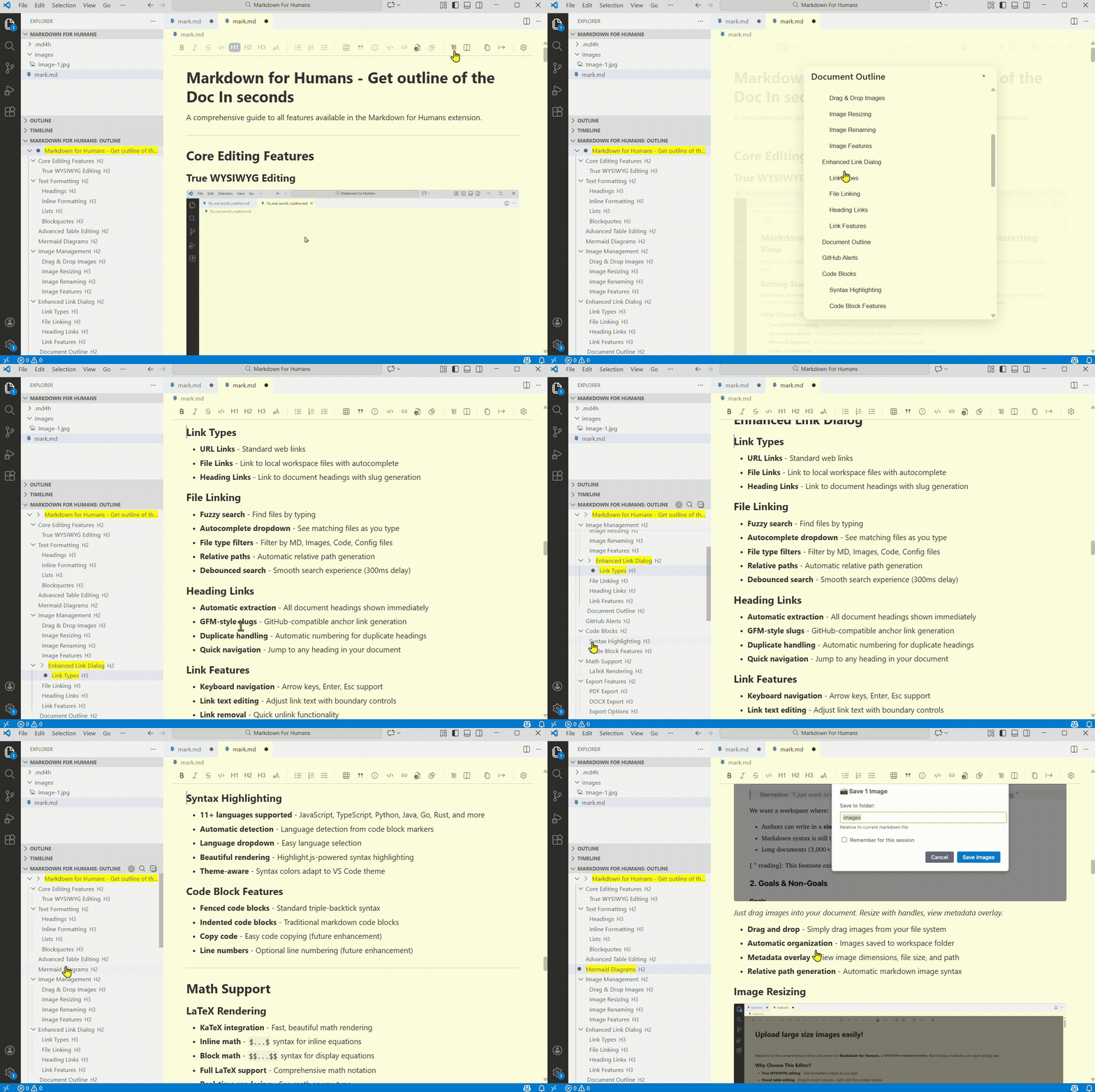
Navigate your document quickly with sidebar outline showing all headings for instant access.
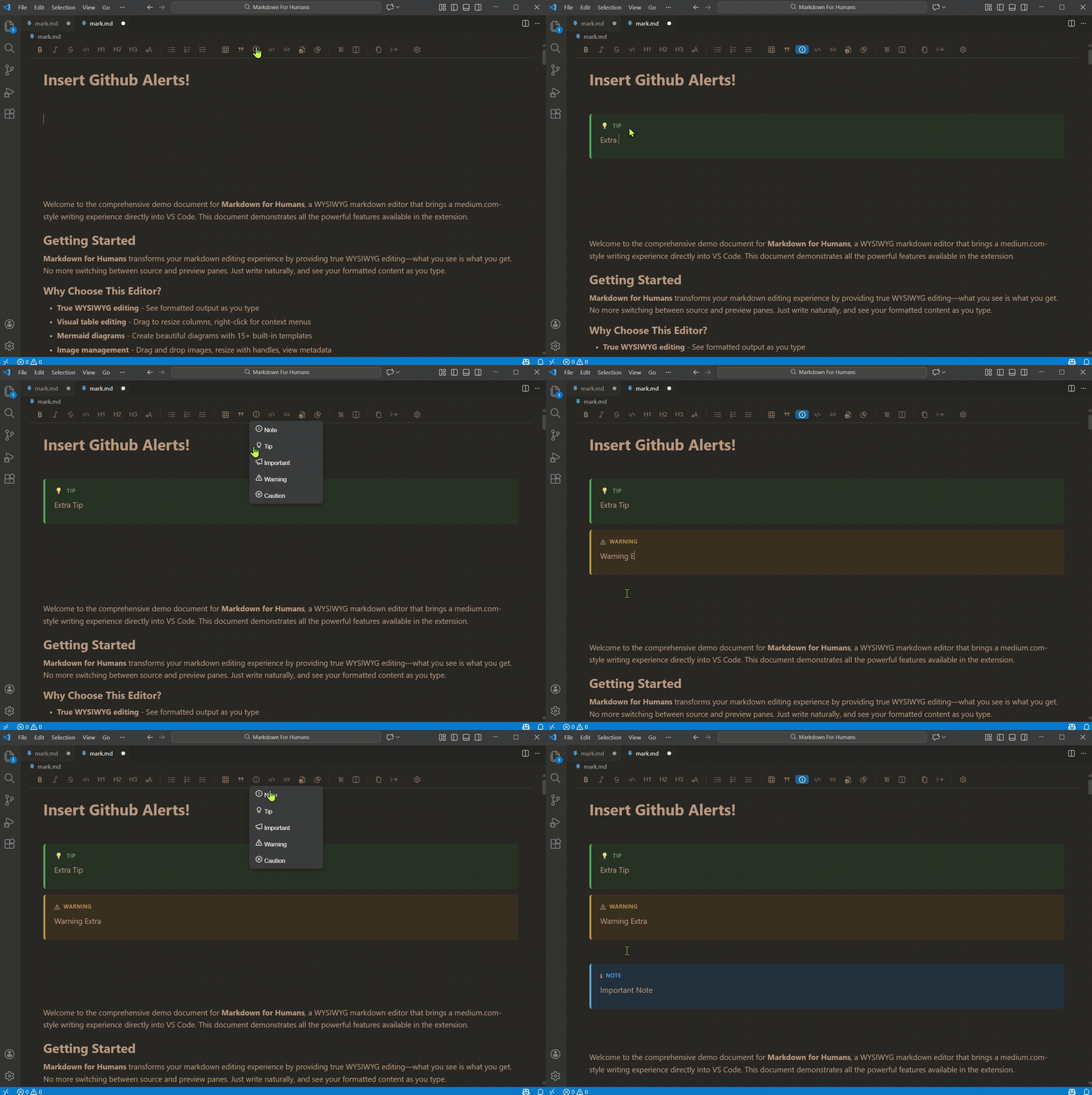
Create beautiful GitHub-style alert boxes for notes, warnings, tips, and important information.
Markdown for Humans includes everything you need for a modern writing experience:
- True WYSIWYG editing powered by TipTap—see your formatted output as you type
- Advanced table editing with drag-to-resize columns, context menus, and toolbar controls
- Mermaid diagrams with 15 built-in templates and double-click editing
- Code blocks with syntax highlighting for 11+ languages
- Math support with beautiful LaTeX rendering via KaTeX
- PDF and DOCX export for sharing your documents
- Document outline with sidebar navigation for quick heading access
- Theme support for Light, Dark, and System themes (inherits your VS Code theme)
- Word count and reading time to track your writing progress
Writing should feel natural, not technical. You shouldn't need to memorize syntax, dig through command palettes, or fight with your tools. You should just write.
Existing markdown editors force writers to choose between split-pane previews that waste screen space, plain text editing that requires memorizing syntax, standalone apps that don't integrate with your workflow, or command-heavy interfaces that bury actions in overloaded palettes.
We built Markdown for Humans to solve the real pain points—tables and images—that make markdown editing frustrating, while keeping the underlying file as plain markdown (so Git diffs, tooling, and other editors still work).
- User Guide
- Known Issues - Known issues and workarounds
- Report Issues
- Contributing - Developer setup and guidelines
- Architecture - Technical deep dive
- Development Guide - Philosophy and roadmap
- Build Guide - Build and packaging
- Troubleshooting - Technical troubleshooting
- Release Checklist - Release process
- QA Manual - Testing procedures
⚡ Built on open source, for the community.
Markdown for Humans exists because open source software empowers everyone. We believe that the best tools should be built, improved, and maintained by the whole community—not limited by a few. By embracing collaboration and transparency, we keep innovation moving forward for everyone.
We welcome contributions! See CONTRIBUTING.md for guidelines.
Ways to contribute:
- Report bugs
- Suggest features
- Improve documentation
- Submit pull requests
- Star the repo
This extension was built through AI / vibe coding, with minimal human effort focused on fixes and stability. The basic functional model came together in minutes, but what took days and hours was testing each feature to ensure everything works smoothly in real-world use.
It's the classic 80:20 rule in action: that final 20% of polish, edge cases, and real-world testing takes 80% of the time, and that's where the real value lives.
We're open-sourcing this because in AI era, code has limited value, the real work was in the creativity in planning, design, and relentless testing.
Countless hours went into vibe-coded wireframes, user experience design, and polish to create something that feels natural and intuitive.
MIT © Concret.io
Built with:
- TipTap - Headless editor framework
- KaTeX - Fast math rendering
- Mermaid - Diagram generation
- VS Code Extension API
**Made with ❤️ for Markdown lovers, by Team Concret.io**