A Python module capable of create a Sierpinski triangle (or any other shape) by randomly placing dots on a screen (following two rules). This uses Python's turtle module to draw the graphics on the screen.
The Sierpiński triangle (sometimes spelled Sierpinski), also called the Sierpiński gasket or Sierpiński sieve, is a fractal attractive fixed set with the overall shape of an equilateral triangle, subdivided recursively into smaller equilateral triangles. Originally constructed as a curve, this is one of the basic examples of self-similar sets—that is, it is a mathematically generated pattern that is reproducible at any magnification or reduction. It is named after the Polish mathematician Wacław Sierpiński, but appeared as a decorative pattern many centuries before the work of Sierpiński. - Wikipedia
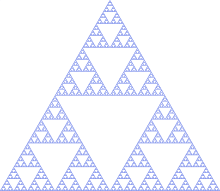
Start by adding three dots to a canvas of sorts in the formation of a triangle. Next add a dot half way between the first dot and the second dot.
Repeat these rules to create the Sierpinski triangle:
- Pick one of the random original corners
- Draw a dot half way between this corner and the dot you last drew
That's it!
Please ensure you have an up-to-date working version of Python 3 with tkinter installed (if tkinter isn't installed turtle will not work).
If the script doesn't work for you please open up a Python shell and run the following:
import turtleIf an error occurs this is not an issue with my code by rather your installation of Python so please do not spam me with Issues and/ or Pull requests regarding this matter
git clone https://github.com/curious-liberal/Sierpinski
cd Sierpinski
python3 example.py
Just why, use Linux it's better!
If you're not convinced then please clone the repository into a directory and run the Python files appropriately. Note that the file main.py must be running in the same directory as the sierpinski.py file for this work unless you wish to edit the code yourself.
The code in the sierpinski.py file is extremely well documented, therefore anybody without prior coding knowledge should be able to understand it, however below is some basic usage for those whom wish for more customisation than is offered by default in the example.py file.
# Import Sierpinski (note capitalisation is important here)
from sierpinski import Sierpinski

# Amount of sides for shape
sides = 5

# Length between corners of shape (note the more
# corners the lower this number should be - unless you wan't part of
# your shape going off the screen)
length = 200

# Speed to draw at
speed = 10

# Size of dots to draw
dotsize = 5

# Create the doodler object (note all the paramaters are optional
# as they're provided by default
doodler = Sierpinski(sides=sides, length=length, speed=speed, dotsize=dotsize)

# Actually draw
doodler.draw_sierpinski()