One prompt, many models — compare quality, speed, and cost.




Live demo → · Quick start · Web UI · CLI · Providers · Eval suites · Architecture
Bench AI runs one prompt against many LLMs and lines up answers, latency, tokens, and cost in a single npm package: a CLI (binary bench-ai), a Next.js web UI (bench-ai web), and a programmatic API (import { … } from "@darkrishabh/bench-ai").
npx @darkrishabh/bench-ai "Explain the CAP theorem in one paragraph" --models claude,ollamaWorks on macOS, Linux, and Windows with Node.js 18+.
- Why Bench AI?
- Features
- Quick start
- Providers
- Configuration
- Eval suites (YAML)
- Web UI
- CLI usage
- Architecture
- Contributing
- License
Picking the right model shouldn't mean mentally mapping which output came from where. Bench AI keeps every model's answer and metrics in one place so you can decide with data.
Tip: Use the CLI in CI and scripts (
--output json). Usebench-ai webor the hosted app when you want a polished compare view, YAML test suites, and judge-backed rubrics — without restarting the server when you change models.
| Side-by-side compare | Same prompt, every enabled model — outputs, errors, and metrics in one grid. |
| YAML eval suites | Prompt templates × variable matrices × assertions (contains, latency, cost, llm-rubric). |
| Live suite logs | Streamed run log in the web UI so you see each LLM and judge call as it happens. |
| OpenAI model list | With an API key, the UI loads chat models from OpenAI's /v1/models (plus presets & "Other"). |
| Secrets & judge | Web settings for secret variables, Anthropic/Ollama judge, and YAML import/export. |
| One package | npx @darkrishabh/bench-ai, npm i -g @darkrishabh/bench-ai, bench-ai web, and import … from "@darkrishabh/bench-ai". |
ANTHROPIC_API_KEY=sk-... npx @darkrishabh/bench-ai "What is LoRA?"

npx @darkrishabh/bench-ai "Review this function" --file ./utils.py --models claude,ollama

# Average latency over 5 runs
npx @darkrishabh/bench-ai "Summarize this" --runs 5 --output json
The npm package is scoped as @darkrishabh/bench-ai because unscoped bench-ai is taken by another project and unscoped bench-ai is blocked as too similar. After npm i -g @darkrishabh/bench-ai, the CLI is bench-ai / bench-ai web.
Open https://bench-ai-web.vercel.app/. Add API keys under Settings in the browser; test suites live at /suite.
git clone https://github.com/darkrishabh/bench-ai
cd bench-ai
npm install
npm run dev
Then open http://localhost:3000 (or 3001 if 3000 is busy).
From a global or local install you can also run:
bench-ai webNote: Suite streaming and eval need a Node deployment (not
output: 'export'). The suite API sets a longmaxDurationfor hosts like Vercel; very heavy runs may still need a higher limit or a long-lived server.
- Root Directory →
.(repository root), or leave empty if the Vercel project is linked to this repo only. - Build Command → leave empty (uses root
vercel.json:npm run build) or set explicitly tonpm run build. - Install → default
npm installat the repo root.
next.config.ts sets outputFileTracingRoot to the project root for correct serverless file tracing.
| Provider | Env var | Notes |
|---|---|---|
| Claude | ANTHROPIC_API_KEY |
Haiku, Sonnet, Opus |
| OpenAI | OPENAI_API_KEY |
Full list in UI when key is set |
| Groq | GROQ_API_KEY |
Very fast inference |
| OpenRouter | OPENROUTER_API_KEY |
Many models, one key |
| Together | TOGETHER_API_KEY |
Open-weight models |
| NVIDIA NIM | NVIDIA_NIM_API_KEY |
NIM endpoints |
| Perplexity | PERPLEXITY_API_KEY |
Search-grounded |
| Minimax | MINIMAX_API_KEY + MINIMAX_GROUP_ID |
API + group ID |
| Custom | — | Any OpenAI-compatible base URL |
| Provider | Requirements |
|---|---|
| Ollama | ollama.ai — local tags discovered via /api/models |
| Claude CLI | @anthropic-ai/claude-code on PATH |
| Codex CLI | @openai/codex on PATH |
| LM Studio | OpenAI-compatible server (e.g. localhost:1234) via Custom |
Copy .env.example to .env.local for the web app, or export vars in your shell for the CLI.
ANTHROPIC_API_KEY=sk-ant-...
OLLAMA_BASE_URL=http://localhost:11434   # optional

OPENAI_API_KEY=sk-...
GROQ_API_KEY=gsk_...
OPENROUTER_API_KEY=sk-or-...
TOGETHER_API_KEY=...
NVIDIA_NIM_API_KEY=nvapi-...
PERPLEXITY_API_KEY=pplx-...

MINIMAX_API_KEY=...
MINIMAX_GROUP_ID=...Define prompt templates, test rows (vars), and assertions: contains, not-contains, latency, cost, and llm-rubric (needs a judge — Claude when a key is available, or --judge ollama / none).
Full example: examples/bench-ai.yaml
npx @darkrishabh/bench-ai run --config examples/bench-ai.yaml --models claude,ollama,minimax
npx @darkrishabh/bench-ai run --config examples/bench-ai.yaml --output json --fail-on-error
npx @darkrishabh/bench-ai run --config examples/bench-ai.yaml --judge none
With a global install (npm i -g @darkrishabh/bench-ai), use bench-ai run --config … instead of npx @darkrishabh/bench-ai.
Bench AI can run agentskills.io skill evals and write the standard artifact layout (iteration-N/eval-*/{with_skill,without_skill}/outputs, timing.json, grading.json, plus benchmark.json).
import { evaluateSkills } from "@darkrishabh/bench-ai/skills";
import { OpenAICompatibleProvider } from "@darkrishabh/bench-ai/providers";

const provider = new OpenAICompatibleProvider({
  baseUrl: process.env.OPENAI_BASE_URL!,
  apiKey: process.env.OPENAI_API_KEY!,
});

const { failed } = await evaluateSkills({
  root: "./plugins",
  workspace: "./bench-workspace",
  baseline: true,
  target: { model: "claude-haiku-4-5-20251001", provider },
  judge: { model: "claude-sonnet-4-5", provider },
});

process.exit(failed > 0 ? 1 : 0);
CLI:
npx @darkrishabh/bench-ai skills ./plugins --baseline \
  --target claude-haiku-4-5 --judge claude-sonnet-4-5 \
  --workspace ./bench-workspace
The supported skill shape follows the standard:
my-skill/
├── SKILL.md
└── evals/
    └── evals.json
SKILL.md should include name and description YAML frontmatter. evals/evals.json includes skill_name and an evals array with id, prompt, expected_output, optional files, and optional assertion strings. See examples/skills/code-review.
The web app runs the same engine at POST /api/suite with SSE live logs when stream: true.
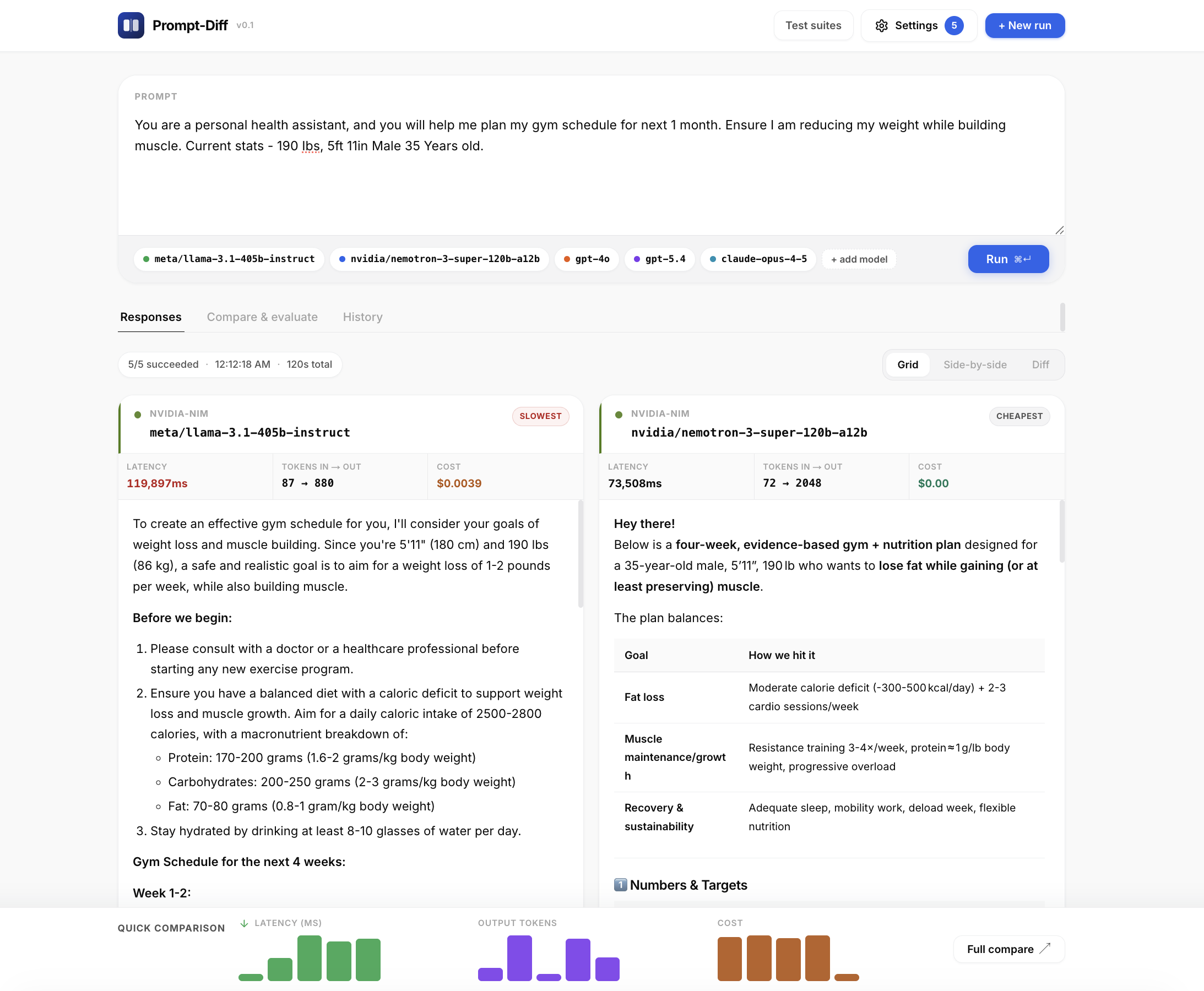
| Capability | Description |
|---|---|
| Run workspace | Prompt card, colored model chips, + add model, Run, then Responses / Compare & evaluate / History |
| Responses | Grid (wrapping cards, 4+ models), Side-by-side (horizontal scroll), or Diff (line-level LCS between two outputs) |
| Model cards | Provider label, model ID, highlight pills (fastest / slowest / cheapest / best rated), 3-column metrics, markdown body, star rating + Copy |
| Quick comparison | Sticky footer mini-bars for latency, output tokens, and cost; Full compare jumps to the evaluate tab |
| History | Last runs stored in localStorage; click an entry to reload prompt + results |
| Test suites | /suite — YAML editor, run target banner, judge summary, live log, matrix results, recent runs (last 15, browser localStorage) |
| Settings | Models, secrets, judge, YAML import/export — stored in localStorage |
| API routes | /api/diff, /api/suite, /api/models (Ollama GET, OpenAI POST) |
The binary name is bench-ai. Use npx @darkrishabh/bench-ai … for one-off runs, or npm i -g @darkrishabh/bench-ai and then bench-ai ….
Top-level: bench-ai --help — commands are diff (default), run, and web.
You can omit diff; it is the default command.
Usage: bench-ai diff [options] [prompt]

Arguments:
  prompt                     Prompt to send to all providers

Options:
  --file <path>              Append file contents to the prompt
  --models <list>            Comma-separated providers (default: "claude,ollama")
  --runs <n>                 Runs for latency averaging (default: 1)
  --output <format>          pretty | json (default: "pretty")
  -h, --help                 Show help for this command
Program options: -V / --version, -h / --help (when no subcommand).
bench-ai "Implement binary search in Python" --models claude,ollama
bench-ai diff "Hello" --models groq,claude --runs 10 --output json | jq '.results[].latencyMs'
bench-ai "Find bugs" --file ./server.ts
bench-ai "Explain recursion" --models claude-cli,codexUsage: bench-ai run [options]
Options:
--config <path> Path to suite YAML (required)
--models <list> Comma-separated providers (default: "claude,ollama")
--output <format> pretty | json (default: "pretty")
--verbose Per-case assertion details and full prompts
--fail-on-error Exit 1 if any provider result fails
--judge <name> llm-rubric judge: auto | claude | ollama | none (default: "auto")
-h, --help Show help
Use npx @darkrishabh/bench-ai run … when the CLI is not installed globally.
Usage: bench-ai web [options]

Options:
  -p, --port <port>          Port to listen on (default: "3000")
  -h, --help                 Show help
Starts the Next.js dev server from the @darkrishabh/bench-ai package directory (works with npx @darkrishabh/bench-ai and global installs).
This repository is one npm package at the root (@darkrishabh/bench-ai): no workspaces or packages/ split. Use npm install / npm run dev / npm run build from the clone root.
flowchart LR
  subgraph clients [Clients]
    CLI[CLI / Ink]
    WEB[Next.js UI]
  end

  subgraph pkg [npm @darkrishabh/bench-ai]
    ENG["Engine\nrunDiff · runSuite · providers"]
    API[API routes]
  end

  CLI --> ENG
  WEB --> API
  API --> ENG
  ENG --> P1[Claude / Ollama / OpenAI-compat …]
| Area | Role |
|---|---|
This repo (npm @darkrishabh/bench-ai) |
Engine (src/engine), CLI (src/cli, binary bench-ai), Next.js app (src/app, src/components, …) |
bench-ai web |
Runs next dev with cwd at the installed package root |
Adding a provider is on the order of tens of lines: implement Provider in the engine and wire it in the web API (and CLI config if needed). OpenAICompatibleProvider covers most REST APIs; subprocess adapters cover local CLIs.
git clone https://github.com/darkrishabh/bench-ai.git
cd bench-ai
npm install
npm run dev          # engine watch + Next dev
npm run build
npm run type-check
If your local origin still uses the old repository name:
git remote set-url origin https://github.com/darkrishabh/bench-ai.gitIdeas that move the needle: new providers (Gemini, Bedrock, Azure OpenAI), richer diff UX, terminal markdown, tighter CI eval stories.
MIT — see LICENSE.
Built by @darkrishabh