Important
To get your "App ID" go to the Discord Developer Portal, press New Application and on General Information you will see Application ID.
Important
To get an Icon for the application, head over to (on the same application you created) Rich Presence -> Art Assets -> Rich Presence Assets and name it just icon (can be changed, but requires rebuilding)
Warning
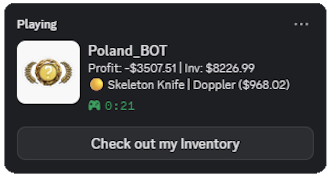
You cannot see the "Check out my Inventory" button (showInventoryButton setting), but others can and will (if the feature is enabled)
A small project for Poland_BOT, which uses the open API in order to display your stats using Discord RPC.
Calls Made:
Directories for config.json (found here)
Windows > \AppData\Roaming\poland_bot_rpc\config.json
Linuxㅤㅤ> ~/.config/poland_bot_rpc/config.json

{
    "showUsername": true,
    "showProfit": true,
    "showBestPull": true,
    "showInventoryValue": true,
    "showCasesOpened": true,
    "showInventoryButton": true,
    "alwaysOnTop": false,
    "username": "",
    "appid": ""
}There are 2 things you can do:
- Directly run
- Clone the repo
git clone https://github.com/devPoland/poland-bot-rpc - Run
npm install - Run
npm start
- Clone the repo
- Build
- You can do this by using the already existing workflow, so probably just forking the repo with your changes
- To build locally you need to clone the repo, run
npm installand thennpm run build:winornpm run build:linux, for reference you can look into the workflow