

SchoolBoost is a .NET-based program designed to improve student involvement in high school events. It tracks student participation and attendance, awards points, and offers prizes based on accumulated points. The program incentivizes students to engage in school events, promoting teamwork, leadership, and time management skills. By making it easier for schools to plan events and engage with their student body, SchoolBoost aims to enhance the overall school experience for students.
- Operating system: Windows
- Microsoft SQL Server Management Studio 19 installed
- Microsoft Visual Studio 2022 installed
- Web browser (Google Chrome, Mozilla Firefox, etc.)
1.1. Clone or download code from GitHub repository
- Clone the code from GitHub onto your local Visual Studio
- Download the ZIP file with all program files and unzip
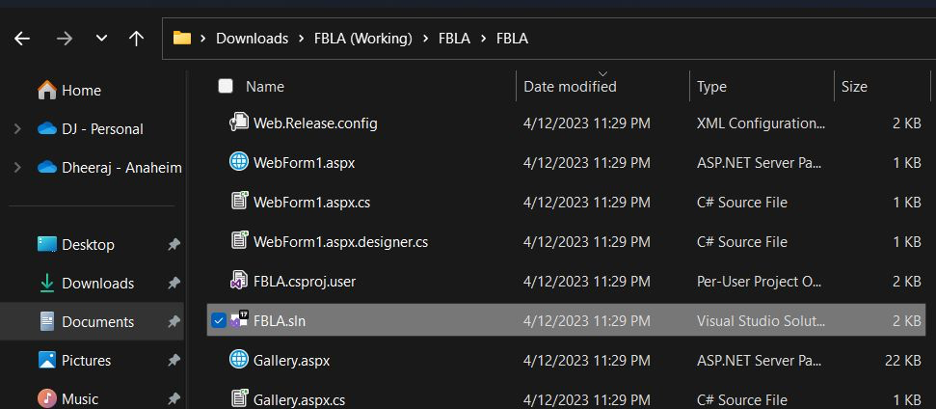
1.2. Open the source code in your local IDE
- Navigate to FBLA.sln located in "C:\Users\<YOUR_USERNAME>\Downloads\SchoolBoost\FBLA\FBLA\FBLA.sln"
2.1. Open a project in Visual Studio
2.2. Right-click on the project name and click Manage NuGet Packages
2.3. In the Browse Section, install the following if not already installed:
- DocumentFormat.OpenXml
- System.ValueTuple
- System.Threading.Tasks.Extensions
- System.Runtime.CompilerServices.Unsafe
- System.Numerics.Vectors
- System.Memory
- System.Diagnostics.DiagnosticSource
- System.Buffers
- Microsoft.Extensions.Primitives
- Microsoft.Extensions.Options
- Microsoft.Extensions.Logging.Abstractions
- Microsoft.Extensions.Logging
- Microsoft.Extensions.DependencyInjection.Abstractions
- Microsoft.Extensions.DependencyInjection
- Microsoft.CodeDom.Providers.DotNetCompilerPlatform
- Microsoft.Bcl.AsyncInterfaces
3.1. Open the FBLA.sln file in Visual Studio
3.2. Ensure all NuGet packages are installed as mentioned in Step 2
3.3. Press F5 or click on the green triangle to build and run the application
4.1. Connect to the SQL Server with your credentials
4.2. Create a New Database called CollegeEvents in SQL Server Management Studio
- Right-click on Databases and select Restore Database
- Select Device for the source and click on the '...' button
- Select "Add" for the source and click on the "..." button and navigate to the path of the SQL backup
- Typically, the path would be "C:\Users\<YOUR_USERNAME>\Downloads\SchoolBoost\SqlBackup"
- Click "Ok" and "Ok" again and follow the prompts to create the database
4.3. If you would like to erase all the data from the tables, use the command truncate <TABLE NAME> on every table.
4.4. To establish a connection between Dotnet and SQL, update the connection string ID within the Web.Config file with your own login credentials
- Use the program to track student participation and attendance at school events.
- Track the amount of time students spend participating in each event.
- Generate reports at the end of the quarter to show points per student in each grade and the event participation count.
- Use the leaderboard to track the top participants and the amount of time they spent participating.
- Post pictures at events
SchoolBoost was developed by Dheeraj Koppu for the 2023 FBLA Coding and Programming Event. Dheeraj is a sophomore at Cypress High School. The source code for the program is available on Github at https://github.com/DheerajKoppu/school-boost.git. If you have any questions or suggestions, please contact him at schoolboostfbla@gmail.com.