A powerful web application for transforming and querying JSON data using JSONata expressions, with AI-powered assistance.
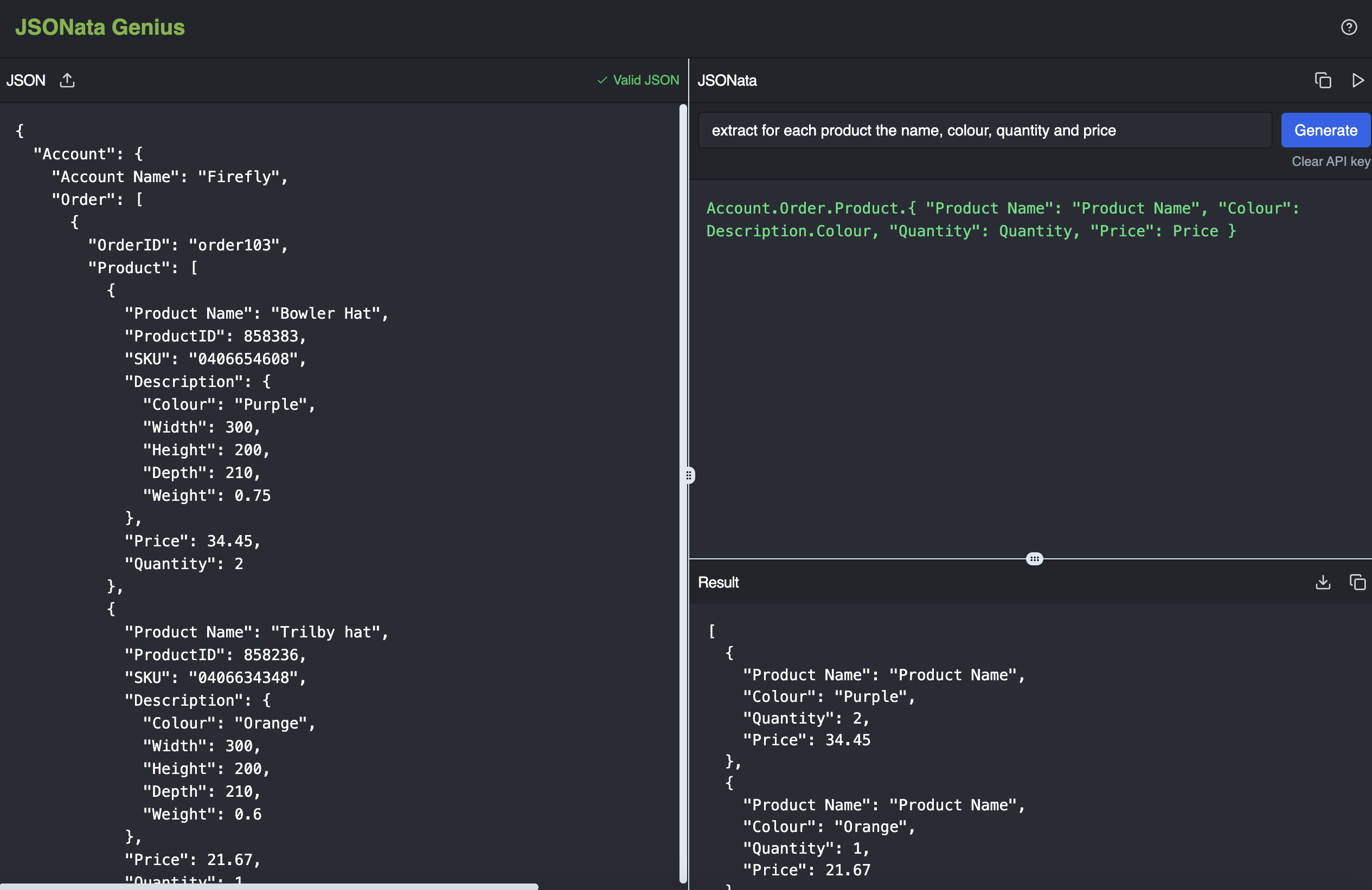
JSONata Genius is an intuitive tool that helps you work with JSON data using JSONata expressions. It combines a clean interface with AI-powered generation of JSONata expressions, making it easy to extract, transform, and analyze your JSON data without having to be a JSONata expert.
Try it now: https://jsonata-genius.up.railway.app/
- Interactive JSON Editor: Edit and validate your JSON data in real-time
- AI-Powered Expression Generation: Describe what you want to achieve in plain English, and let AI generate the JSONata expression for you
- Live Expression Evaluation: See results as you type or modify expressions
- File Operations: Upload JSON files and download transformed results
- Resizable Interface: Customize your workspace with resizable panels
- Dark Mode: Easy on the eyes with a modern dark theme interface
- Node.js (v14 or newer)
- npm or yarn package manager
- An OpenAI API key (for AI-powered expression generation)
-
Clone the repository:
git clone https://github.com/emilefyon/jsonata-genius.git cd jsonata-genius -
Install dependencies:
npm install # or yarn install -
Start the development server:
npm run dev # or yarn dev -
Open http://localhost:5173 in your browser
-
Input JSON Data:
- Paste your JSON in the left panel, or
- Click the upload icon to import a JSON file
-
Create JSONata Expressions:
- Write expressions manually in the middle panel, or
- Enter a description of what you want to extract/transform and click "Generate" to use AI
-
View and Use Results:
- See the results in the bottom panel in real-time
- Download the results as a JSON file using the download button
JSONata is a lightweight query and transformation language for JSON data. Here are some basic examples:
$- Returns the entire JSON documentAccount."Account Name"- Access nested propertiesAccount.Order.Product[0]- Access array elementsAccount.Order.Product.Price- Returns an array of all pricessum(Account.Order.Product.Price)- Calculate the sum of all prices
Learn more in the JSONata documentation
To use the AI feature for generating expressions:
- Enter your OpenAI API key when prompted (stored only in your browser's localStorage)
- Type a plain English description of what you want to extract or transform
- Click "Generate" to create a JSONata expression based on your description
- The expression will be automatically executed and results displayed
Example: "Give me the total price of all products" might generate sum(Account.Order.Product.(Price * Quantity))
- Your JSON data never leaves your browser except when using the AI feature
- OpenAI API keys are stored only in your browser's localStorage
- You can clear your API key at any time using the "Clear API key" link
Contributions are welcome! Please feel free to submit a Pull Request.
- Fork the repository
- Create your feature branch:
git checkout -b feature/amazing-feature - Commit your changes:
git commit -m 'Add some amazing feature' - Push to the branch:
git push origin feature/amazing-feature - Open a Pull Request
This project is licensed under the MIT License - see the LICENSE file for details.