
A decentralized supply chain management system built on Ethereum blockchain using Solidity smart contracts, Next.js, and Web3.js


Star • Fork • Report Bug • Request Feature
- Overview
- Features
- Technology Stack
- Architecture
- Installation
- Setting up Ganache (step by step)
- Troubleshooting
- Running the Project
- Usage Guide
- Smart Contract Details
- Contributing
- License
Supply Chain Blockchain DApp is an open-source, blockchain-based supply chain management application built with Solidity smart contracts, Hardhat, Next.js, Web3.js, and MetaMask. It demonstrates how to build an end-to-end Ethereum decentralized application (dApp) for transparent, secure, and traceable pharmaceutical supply chains.
- Transparency: All transactions and product movements are recorded on the blockchain
- Security: Immutable records prevent tampering and fraud
- Efficiency: Automated processes reduce administrative overhead
- Traceability: Complete product journey from raw materials to consumer
- Decentralization: No single point of failure
- Role-Based Access Control: Secure role assignment (Owner, Raw Material Supplier, Manufacturer, Distributor, Retailer)
- Product Management: Add and track products through the entire supply chain
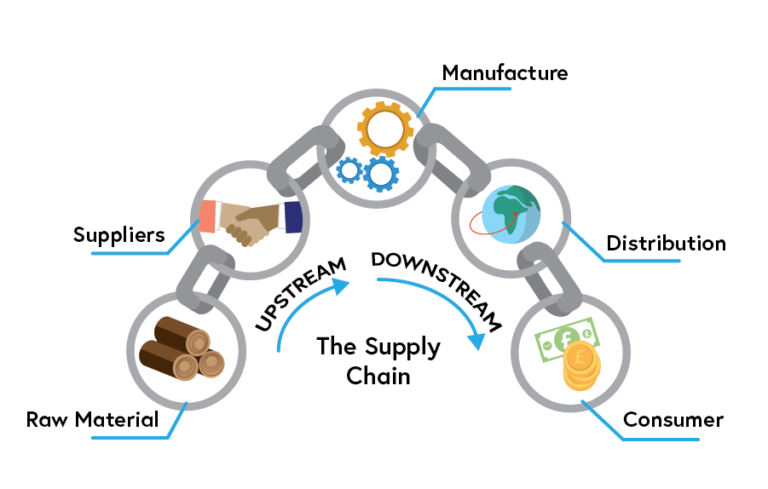
- Supply Chain Flow: Manage product stages (Order → Raw Material Supply → Manufacturing → Distribution → Retail → Sold)
- Real-Time Tracking: Track products with detailed stage information and QR codes
- Modern UI: Responsive interface built with Next.js and Tailwind CSS
- Web3 Integration: Seamless connection with MetaMask wallet
- Mobile Responsive: Works well on desktop and mobile devices
- Next.js 14 - React framework with App Router
- TypeScript - Type-safe development
- Tailwind CSS - Utility-first CSS framework
- Web3.js - Ethereum blockchain interaction
- QRCode.react - QR code generation for product tracking
- Solidity ^0.8.19 - Smart contract programming language
- Hardhat - Ethereum development environment
- Ganache - Personal blockchain for development
- MetaMask - Web3 wallet integration
- Node.js 18+ - JavaScript runtime
- npm/yarn - Package management
- Git - Version control

The application follows a decentralized architecture where:
- Smart Contracts (Solidity) handle all business logic and data storage on the blockchain
- Frontend (Next.js) provides the user interface and interacts with the blockchain via Web3.js
- MetaMask acts as the bridge between users and the Ethereum network
- Ganache provides a local blockchain for development and testing
User → Next.js Frontend → Web3.js → MetaMask → Ethereum Network → Smart Contract
The product journey through the supply chain:
Order → Raw Material Supplier → Manufacturer → Distributor → Retailer → Consumer
Before you begin, ensure you have the following installed:
- Node.js (v18 or higher) - Download
- Git - Download
- Ganache - Download
- MetaMask - Chrome Extension | Firefox Add-on
- VS Code (Recommended) - Download
git clone https://github.com/faizack619/Supply-Chain-Blockchain.git
cd Supply-Chain-BlockchainInstall root dependencies (for Hardhat):
cd backend
npm install
cd ..
Install client dependencies:
cd client
npm install
cd ..Follow the detailed walkthrough: Setting up Ganache (step by step). In short, use RPC http://127.0.0.1:7545 and chain ID 1337 so they match backend/hardhat.config.ts (networks.ganache) and the keys in client/src/deployments.json.
This project’s default Hardhat network ganache uses http://127.0.0.1:7545 and chain ID 1337. MetaMask, Ganache, and Hardhat must all use the same RPC URL and chain ID (EIP-155), or you will see “wrong network” or “contract not found”.
-
Install Ganache
Download and install Ganache (Truffle Suite). -
Create a workspace
Open Ganache → New Workspace (or open an existing workspace). A workspace persists accounts and settings across restarts; Quickstart resets when you close the app. -
Open workspace settings
Click the gear / Settings icon for the workspace. -
Server (host and port)
In Server (sometimes HOST & PORT):- HOSTNAME:
127.0.0.1(use this in MetaMask on the same machine). - PORT:
7545
This must matchnetworks.ganache.urlinbackend/hardhat.config.ts(http://127.0.0.1:7545).
- HOSTNAME:
-
Chain ID
Set Chain ID (or EIP-155 Chain ID, depending on your Ganache version) to1337.
If the UI only shows NETWORK ID, set it to1337for this repo so it stays consistent with Hardhat’sganachenetwork and the frontend’s default deployment entry. -
Save and restart
Save settings and restart the workspace if Ganache prompts you. -
Confirm RPC
On the main Accounts (or CONTRACTS) screen, check that the RPC SERVER ishttp://127.0.0.1:7545(or equivalent with127.0.0.1and port7545). -
Deployer account
Hardhat uses Ganache’s first account by default when you deploy without a customaccountsconfig. In MetaMask, import that account’s private key (key icon in Ganache) if you need to act as the contract owner.
After you change chain ID or reset the chain: redeploy the contract (npx hardhat run scripts/deploy.ts --network ganache from backend) so client/src/deployments.json gets a valid address for the current chain.
If you use the Ganache CLI instead of the desktop app, start a node that matches the same host, port, and chain ID:
npx ganache --host 127.0.0.1 --port 7545 --chain.chainId 1337Leave this process running, then deploy from backend with --network ganache as usual.
If your Ganache instance must use chain ID 5777, use Hardhat’s ganache5777 network and deploy with:
cd backend
npx hardhat run scripts/deploy.ts --network ganache5777
Ensure MetaMask’s Chain ID is 5777 and that client/src/deployments.json includes a "5777" entry after deploy.
Update backend/hardhat.config.ts with your Ganache network settings (default RPC http://127.0.0.1:7545 and chain ID 1337):
networks: {
  ganache: {
    url: "http://127.0.0.1:7545", // Your Ganache RPC URL
    chainId: 1337, // Your Ganache Chain ID
    accounts: {
      mnemonic: "your ganache mnemonic" // Optional: if using mnemonic
    }
  }
}All Hardhat commands must be run from the backend folder (where hardhat.config.ts lives).
Compile the smart contracts:
cd backend
npx hardhat compile
Deploy to Ganache:
cd backend
npx hardhat run scripts/deploy.ts --network ganache
The deployment script will automatically update client/src/deployments.json with the contract address.
Use the same RPC URL and chain ID everywhere: Ganache, backend/hardhat.config.ts, MetaMask, and client/src/deployments.json (defaults: http://127.0.0.1:7545, chain ID 1337). Images are in assets/.
1. Read the RPC server URL from Ganache
You will paste this into MetaMask in the next step.

2. Add the network in MetaMask
Network menu → Add network → Add a network manually, then set:
- Network name: e.g.
Ganache Local - RPC URL: same as Ganache (e.g.
http://127.0.0.1:7545) - Chain ID:
1337(must match Ganache and Hardhatnetworks.ganache) - Currency symbol:
ETH
Save and select this network before using the app.

3. Copy the deployer private key from Ganache
Hardhat deploys with Ganache’s first account by default. That address is the contract owner (Register Roles, Order Materials). Copy its private key from the key icon.

4. Import the account in MetaMask
Account menu → Import account → paste the private key → Import. Keep this account selected when acting as owner.

5. Run the app
From client: npm run dev → open http://localhost:3000. The deploy log line Deploying with account: 0x... must match the active MetaMask account for owner-only actions.
Chain ID 5777 vs 1337: Some docs confuse network ID with chain ID (EIP-155). This project expects chain ID to match everywhere. If Ganache uses 5777, deploy with npx hardhat run scripts/deploy.ts --network ganache5777 from backend and ensure client/src/deployments.json has a "5777" entry after deploy.
| Symptom | What to check |
|---|---|
| Only owner can do this | Active MetaMask account must be the same address that deployed the contract (see deploy log). Import that account from Ganache if needed. |
| Contract not found / wrong network banner | Chain ID in MetaMask must match the key in client/src/deployments.json. After resetting Ganache, redeploy — old addresses are invalid. |
| 1337 in settings but 5777 in console | You were likely reading network ID vs chain ID. Align chain ID everywhere; redeploy after changing Ganache. |
| Transaction fails or wrong balance | RPC URL in MetaMask must point to the same Ganache instance (correct host/port). |
If you already followed Installation, you only need:
- Ganache running with the same RPC/chain ID as
backend/hardhat.config.ts(see Setting up Ganache (step by step)). - Deploy (if needed):
cd backend && npx hardhat run scripts/deploy.ts --network ganache - Frontend:
cd client && npm run dev→ http://localhost:3000
Production build: cd client && npm run build && npm start
- Navigate to "Register Roles" page
- Only the contract owner can register new roles
- Add participants: Raw Material Suppliers, Manufacturers, Distributors, and Retailers
- Each role requires: Ethereum address, name, and location
- Go to "Order Materials" page
- Only the contract owner can create orders
- Enter product details: ID, name, and description
- Ensure at least one participant of each role is registered
- Access "Supply Chain Flow" page
- Each role can perform their specific action:
- Raw Material Supplier: Supply raw materials
- Manufacturer: Manufacture products
- Distributor: Distribute products
- Retailer: Retail and mark as sold
- Visit "Track Materials" page
- Enter a product ID to view its complete journey
- View detailed information about each stage
- Generate QR codes for product verification
The SupplyChain.sol smart contract implements a supply chain for the pharmaceutical domain: it tracks medicine stages, stores names, descriptions, and current stage, and defines roles (raw material supplier, manufacturer, distributor, retailer). The owner registers participants and creates orders; other functions advance the product and read stage and history.
- Owner: Deploys the contract and can register other roles
- Raw Material Supplier (RMS): Supplies raw materials
- Manufacturer (MAN): Manufactures products
- Distributor (DIS): Distributes products
- Retailer (RET): Sells products to consumers
- Ordered (Stage 0): Product order created
- Raw Material Supplied (Stage 1): Raw materials supplied
- Manufacturing (Stage 2): Product being manufactured
- Distribution (Stage 3): Product in distribution
- Retail (Stage 4): Product at retailer
- Sold (Stage 5): Product sold to consumer
addRMS(),addManufacturer(),addDistributor(),addRetailer(): Register participantsaddMedicine(): Create new product ordersRMSsupply(),Manufacturing(),Distribute(),Retail(),sold(): Progress products through stagesshowStage(): Get current stage of a product
.png)
Contributions are welcome! Please follow these steps:
- Fork the repository
- Create your feature branch (
git checkout -b feature/AmazingFeature) - Commit your changes (
git commit -m 'Add some AmazingFeature') - Push to the branch (
git push origin feature/AmazingFeature) - Open a Pull Request
- Follow the existing code style
- Write clear commit messages
- Add tests for new features
- Update documentation as needed
- Read the full CONTRIBUTING.md before opening a pull request
- Follow the project CODE_OF_CONDUCT.md
- Look for issues labeled
good first issueorhelp wantedif you’re new to the project
This project is licensed under the MIT License - see the LICENSE file for details.
- Solidity Documentation
- Next.js Documentation
- React Documentation
- Hardhat Documentation
- Web3.js Documentation
- Ganache Documentation
- MetaMask Documentation
If you find this project helpful, please consider:
- Starring the repository
- Forking the project
- Reporting bugs
- Suggesting new features
- Sharing the repository with others
Made with Solidity, Next.js, and Web3