View a plain-text spreadsheet in a graphical view. Supports an extension to Markdown tables to treat them like spreadsheets.
- Can import a spreadsheet in plain-text format
- A built-in editor with a "recalculate" feature to see instant results
- Can read these file formats: .md, .csv, .dif, .slk, .ser
- Will evaluate the spreadsheet formulas
- Display a table with the resulting spreadsheet
- Can operate in "watcher" mode where it displays a spreadsheet that is being edited by an external text editor.
- Has a "batch" mode (non-interactive) that transforms an input file to HTML output file.
Alpha release available for Linux. All features above are implemented but with only basic error-checking.
Launch the application (Linux binary available under "Releases"). The application window will appear with two empty panels.
Use the File > Open menu to open a plain-text spreadsheet document. Examples are available in the sheets folder.
The file contents is displayed in the left panel and the corresponding spreadsheet table is displayed in the right panel. Any formulas in the source text are evaluated and the resulting value displayed in the spreadsheet.
For example, in the grades.csv file shown here we see a formula in cell D2 "=SUM(B2:C2)". That formula evaluates to 177 which is displayed in the corresponding cell in the table view.
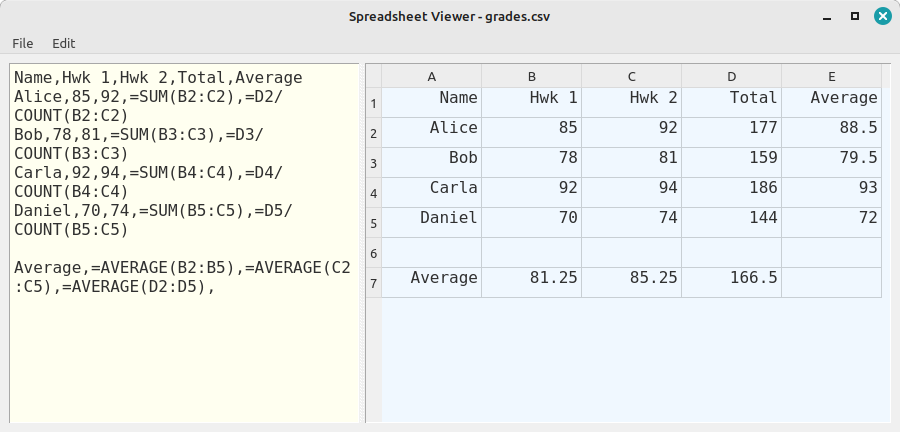
Modifications made in the left editor panel cause the spreadsheet panel to immediately recalculate all the formulas.
For example, change the value of Alice's first homework score. In the editor panel change the value 85 in cell B2 to 88 and observe the result of the formula in cell E2 changes from 88.5 to 90.
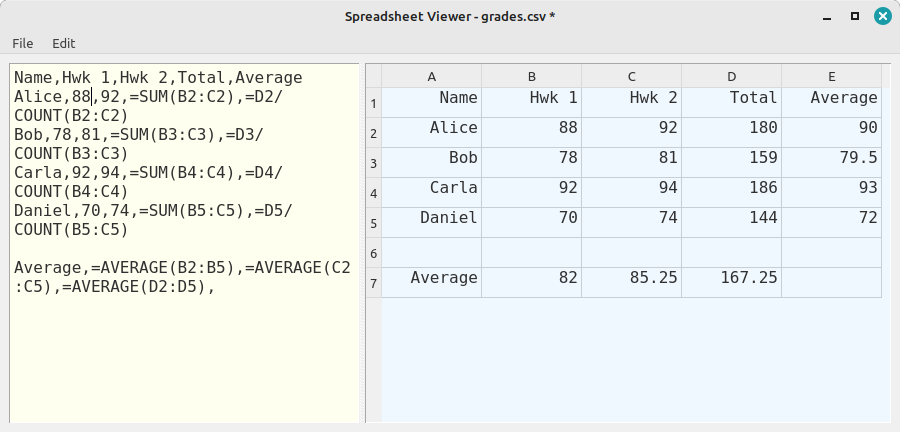
Standard editing functions are available from the Edit menu (and as shortcut keys) and File functions under the File menu.
Examples of several different file formats that are understood by the application are available in the sheets folder of the repository.
A video demonstration of the spreadsheet features is available.
The application can be started in several different modes:
usage: main.py [-h] [-i INPUT_FILE] [-o OUTPUT_FILE] [-w]

A plain-text file spreadsheet viewer and editor.

options:
  -h, --help            show this help message and exit
  -i INPUT_FILE, --input_file INPUT_FILE
                        (Optional) The file to be opened by the application.
                        If not specified, a blank spreadsheet is opened.
  -o OUTPUT_FILE, --output-file OUTPUT_FILE
                        (Optional) The output file to be generated.
                        Runs in batch mode when specified.
  -w, --watcher         (Optional) Start in watcher mode to monitor the specified input file.
This project wouldn't be possible without Ironcalc, an open-source spreadsheet engine.