The Collective Gaming Experience.
FlashMob Games is a real-time, large-scale multiplayer gaming platform designed for presentations, events, and massive audience engagement. Built with a high-performance Node.js/Socket.io backend and a premium React 19 frontend, it enables hundreds of players to control shared game entities simultaneously via their smartphones.

Manage boredom with high-octane collective action:
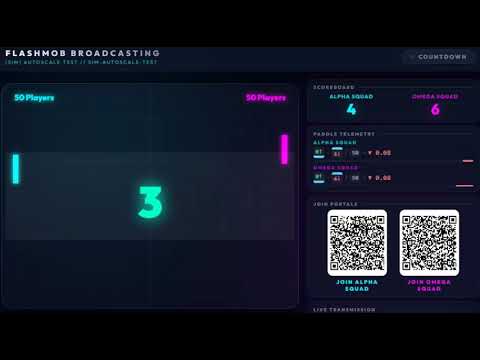
High-speed team-based paddle sports.

Collaborative brick-breaking with additive impulse physics.

Multi-team survival; lead your collective snake to dominance.

Players join via their smartphones, which transform into dynamic controllers optimized for each game mode.
| Landing Page | D-Pad Controller | 2-Button Controller |
|---|---|---|
 |
 |
 |
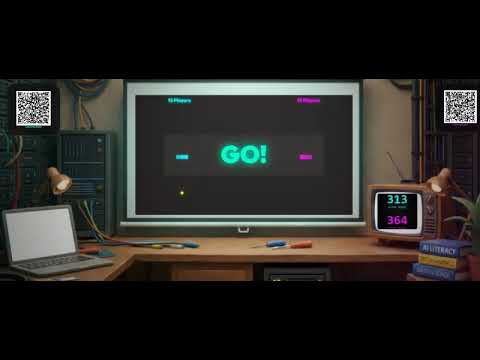
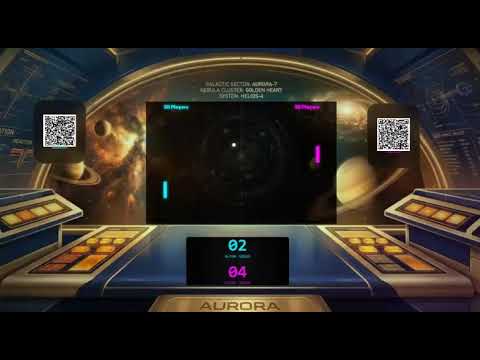
Elevate your event with a Cinematic Game Room. Beyond simple gameplay, operators can deploy immersive environments that transform the presentation into a high-production broadcast.
- Immersive Backgrounds: Use specialized themes or upload custom event-branded backgrounds.
- Integrated Telemetry: Display real-time system performance, player counts, and live transmission stats.
- Dynamic Overlays: Positioned QR codes and scoreboards designed for maximum visibility on large-scale projectors.
| Cyberpunk Command | Space Bridge Terminal | Lab Broadcast Setup |
|---|---|---|
 |
 |
 |
Experience the collective action in real-time:
| Paddle Battle Presenter | Vipers Cinematic Mode | Paddle Battle Cinematic Mode |
|---|---|---|
 |
 |
 |
Built with state-of-the-art web technologies for maximum performance and stability:
-
Frontend:
- Framework:
React 19+Vite 8 - Routing:
React Router Dom 7 - Real-time:
Socket.io-client 4 - Styling: Vanilla CSS (Custom Glassmorphism & HSL Design System)
- Icons:
Lucide-React
- Framework:
-
Backend:
- Runtime:
Node.js 25.5 - Server:
Express 5 - Real-time Engine:
Socket.io 4 (WebSockets) - Logging:
Pino+Pino-Pretty - Validation:
Zod(Shared Schemas) - Auth:
JSON Web Tokens (JWT)
- Runtime:
The platform includes a secured Management Dashboard for session operators.
- URL:
http://localhost:5173/admin - Authentication: Credentials are managed via the
.envfile.- Default Username:
operator - Default Password:
operator
- Default Username:

- Initialize Room: Log in to the dashboard and navigate to the Initialize Room panel.
- Deploy: Select a game type (e.g.,
Brick Burst), name your room, and click Deploy Room. - Control: Manage the live session from the Control Room.

- Project: Select your display mode from the dashboard:
- Click Host for the standard high-performance game view.
- Click Cinematic to launch the immersive broadcast experience with custom branding and telemetry.
- Join: Navigate to the Join view or show the generated QR codes. Players can scan to join the "Left" or "Right" collective.

- Results: Celebrate the victors on the live scoreboard.


- Node.js 22.x or later.
- npm 10.x or later.
- Clone the repository and install dependencies:
npm install
- Configure your environment:
cp .env.example .env
# Update credentials in .env
- Start the development environment:
npm run dev:server
npm run dev:client
- Access the views:
- Management:
/admin - Landing Page:
/ - Game Display:
/presenter
- Management:
graph TD
    subgraph Client_Layer [Frontend: React 19 & Vite 8]
        LP[Landing Page /]
        PV[Presenter View /presenter]
        PC[Player Controller /player]
        AV[Admin View /admin]
    end

    subgraph Server_Layer [Backend: Node.js 25 & Express 5]
        API[Express API]
        SIO[Socket.io Server]
        RM[Room Manager]
        GE[Game Engines]
        BS[Bot Service]
    end

    PC <-->|Real-time Socket.io| SIO
    PV <-->|Real-time Socket.io| SIO
    AV -->|REST API Auth| API
    API --> RM
    RM <--> GE
    RM <--> BS
sequenceDiagram
    participant P as Multiple Players
    participant S as Socket.io Server (Node)
    participant E as Game Engine (60 FPS)
    participant V as Projected Display (Presenter)

    P->>S: Individual Input (Up/Down/Move)
    Note over S: Buffers inputs for synchronous tick
    E->>S: Request Aggregated Inputs
    S-->>E: [Input_Vector_Map]
    Note over E: Calculate Collective Mean/Vote
    E->>E: Physics & Collision Resolve
    E->>S: Broadcast State
    S->>V: Frame Update (JSON)
This project is licensed under the PolyForm Noncommercial License 1.0.0.
- Personal Use: Free! You can host a game for your friends or family.
- Educational Use: Free! You can use this to learn or teach.
- Commercial Use: Requires a paid license. If you are a company, an event organizer charging for tickets, or if you intend to rewrite/distribute this code for profit, you must at least
to obtain a commercial license.

© 2026 FlashMob Games. Maintained by jovd83.