Quietly unsubscribe from bulk email.
A free, open-source Gmail unsubscribe app for Windows, macOS and Linux. It finds every sender mailing you in bulk, unsubscribes from the ones you pick, and blocks the ones that ignore you — without ever risking your receipts, order confirmations or password resets.
No server. No account. No telemetry. Your own Google credentials, so your email never passes through anybody else's computer. Nothing is ever permanently deleted.
Download · How it works · Why not a website? · FAQ
A run through the whole thing, start to finish.
- Connects to your Gmail using credentials you create yourself — Hush ships with none.
- Reads the sender, subject and date of your messages. Never the contents.
- Groups them by sender, showing how much each one sends and how often.
- For the senders you tick, it can do any combination of three things:
| What it does | Guaranteed? | |
|---|---|---|
| Unsubscribe | Sends the sender's own one-click unsubscribe — the identical request Gmail's button makes | No. It's a request; they might ignore it or take a fortnight |
| Block | Creates a Gmail filter that keeps their future mail out of your inbox | Yes. It's a rule in your account and doesn't ask anyone |
| Clear the backlog | Archives their old newsletters, or bins them if you'd rather | Yes, for everything Hush has scanned |
The recommended default is unsubscribe and block: the first takes you off their list properly at source, the second means it doesn't matter if they ignore you. That combination is the honest answer to "I unsubscribed and I'm still getting mail".
It's a one-shot tool. Run it, deal with your senders, close it. Nothing runs in the background and you can uninstall it straight afterwards — the unsubscribes, filters and deletions all stay done.
Nothing is ever permanently deleted, and Hush never asks for a permission that would let it. Binned mail and blocked mail both go to Trash, where Gmail keeps it for 30 days. Filters are visible and removable under Settings → Filters in Gmail.
Google asks you to approve three things on its own consent page, as separate tick-boxes you can decline individually:
- Read your mail — sender, subject and date only. Required.
- Manage your mail — to move old newsletters to Trash. Cannot delete permanently; that is a different permission and Hush never asks for it.
- Change your settings — to add the filter that blocks a sender for good.
Decline any of them and Hush still runs, with that feature switched off. There is also a read-only option on the connect screen if you would rather grant nothing until you have seen what the app found.
This is the part worth understanding before you trust it with your inbox.
Bulk and marketing mail carries a List-Unsubscribe header (RFC 2369).
Transactional mail — receipts, shipping notices, password resets, two-factor
codes, invoices — generally does not, because there is nothing to unsubscribe
from.
So: a sender is only ever offered to you if their mail carries that header. Senders without it are not shown, not selectable, and not reachable through any path in the app. That single rule prevents the worst thing this kind of tool can do.
That gate lives in one function — Group::finish in
src-tauri/src/store.rs — and everything downstream reads from it, so no part of
the interface can route around it.
On top of that:
- A never-touch list. Add anyone to it and they can't be selected, in this session or any future one.
- Warnings on likely-transactional senders. Banks, payment processors, airlines, delivery services, government, healthcare — plus subject-line signals like receipt, order, invoice, verification code, reset your password. These are not blocked, because plenty of shops send both marketing and receipts from the same address. They're flagged in a warning colour, with a plain-language reason, and need a second, separate confirmation.
- Nothing is ever pre-selected. Every checkbox starts empty. The bulk selection helpers deliberately skip flagged senders.
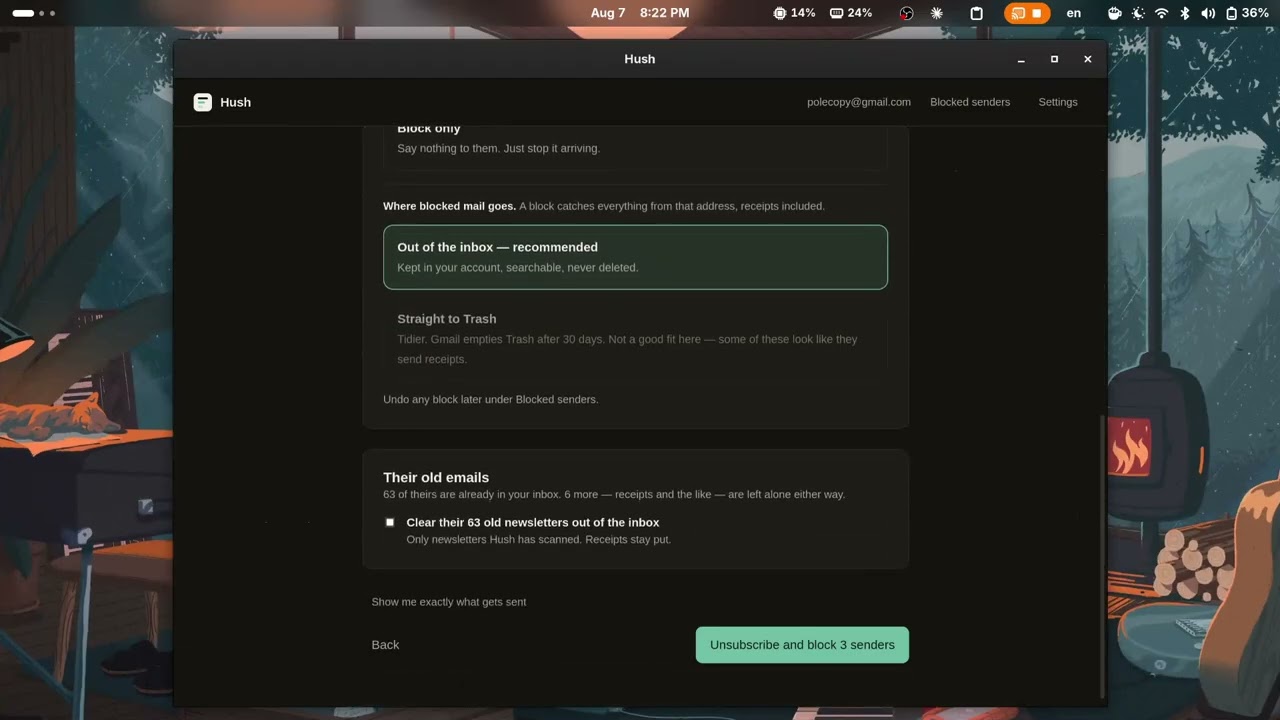
- A confirmation screen that says exactly who, how many, and what will be sent — with a panel showing the literal request.
- Blocking archives by default. A filter is the one thing here that is not header-gated — it catches everything from that address, receipts included — so the default keeps mail in your account rather than deleting it.
- Every block is reversible from inside the app. See Managing your blocks.
There are three kinds of unsubscribe in the wild. Hush never hands you any of them to do yourself.
| What Hush does | |
|---|---|
| One-click (RFC 8058) | Sends a POST with body List-Unsubscribe=One-Click. Fully automatic, and about 93% of senders in practice. |
mailto: |
Blocked. Doing it properly would mean sending email as you, which is a bigger permission than everything else Hush asks for combined — for about 6% of senders that blocking handles anyway. |
| A plain link | Blocked. A bare link might be a one-tap unsubscribe, a preference centre, a login wall or a confirmation page — nothing can tell which, so Hush doesn't guess and doesn't ask you to go and find out. |
That last row is the important one. An earlier version listed those senders with their links so you could open each one yourself, which is a to-do list dressed up as a feature. A filter stops their mail without needing the sender to cooperate at all, so that is what happens instead. There is no screen in this app that ends with you having a job.
Hush will not follow redirects on a one-click endpoint (RFC 8058 forbids them), sends no cookies, and refuses any unsubscribe URL that resolves to your own network rather than the public internet.
Every mass-unsubscribe tool is an interface over three controls: unsubscribe, block, or filter. Tools that only do the first cannot answer the commonest complaint about them — "I unsubscribed and they're still emailing me."
Unsubscribing is a request. It depends on the sender honouring it, doing so promptly, and not having you on four other lists under a different address. Even a flawless implementation can't promise the mail stops, and any tool that says otherwise is overstating.
A Gmail filter isn't a request. It's a rule in your own account, and it works identically whether the sender is scrupulous, slow, or ignoring you outright.
So Hush does both, and is clear about which is which. There are also senders who
accept the one-click POST with a 200 and then still want you to press a
button on their page — that violates RFC 8058, it's undetectable in advance
because they respond identically to a compliant sender, and it's exactly why
blocking exists.
Unsubscribing stops the next newsletter. It does nothing about the 600 already sitting in your inbox, so Hush can bin those too — but only if you ask, twice: once when connecting (it needs a wider Google permission, and it's a tick-box that starts off), and again on the confirmation screen before each run.
Two things make it safe rather than alarming:
It only bins mail that carried an unsubscribe header. This is the same gate that decides who's unsubscribable, reused. A shop that sends you marketing and order confirmations from one address has the header on the marketing and not on the receipts — so the marketing goes and the receipts stay. The confirmation screen tells you the split before you commit: "Also bin their old emails (658) … 164 other emails from these senders — receipts, confirmations and the like — will be left alone."
It moves mail to Trash, never deletes it. Gmail keeps trashed mail for 30
days, so a mistake is yours to undo without needing us. Hush has no code path
that permanently deletes anything, and never requests a permission that would
let it — gmail.modify grants trashing but not permanent deletion, which is
exactly why it's the one used.
If you skip the permission, everything else works exactly the same. The tick-box is simply absent.
Binning a backlog is header-gated — Hush only ever moves mail that carried an unsubscribe header, which is what keeps your receipts out of it.
A filter has no such protection. It matches on the address, so it catches everything that address sends from then on. A shop that mails you its newsletter and your order confirmations from the same address will have both caught.
So blocking asks you which you want:
| What happens | Recoverable? | |
|---|---|---|
| Out of the inbox (default) | Their mail skips the inbox and waits in your account, tagged with a Hush label |
Always. Nothing is deleted, ever |
| Straight to Trash | Their mail goes to Trash | For 30 days, then Gmail deletes it permanently |
Archiving is preselected in every path. Choosing Trash takes a second, explicit tick, and the warning names what you might lose. If any sender you picked looks like it sends receipts, the Trash option is de-emphasised and says so.
There is no delete-forever option and there will not be one. That needs the
https://mail.google.com/ scope. Hush does not request it, so the app is not
capable of permanently deleting your mail even by mistake.
The same choice applies to old mail. Archiving takes their newsletters out of
the inbox and files them under the Hush label — the inbox is clean and nothing
is deleted. Trashing is there if you want it, behind the same explicit tick.
Either way only mail that carried an unsubscribe header is touched, so receipts
are never in scope.
Blocks live in your Gmail settings, not in Hush. The Blocked senders screen reads them back from Google every time you open it, so:
- Your blocks are already there on a second computer, or after a reinstall.
- There is no local list to fall out of step with reality.
- Nothing about what you blocked is stored on your machine.
Every filter Hush creates applies a Gmail label called Hush. That is how the
app recognises its own work — and it labels the caught mail too, so unblocking
can put back exactly what that block caught and nothing else.
Filters you wrote yourself are shown read-only. Hush will not modify or delete a rule it did not create; the label is the only thing it goes on, and no filter without it is ever touched. Delete the label in Gmail and Hush simply stops recognising its own filters — which fails in the safe direction.
Unblocking deletes the filter and offers to put back the mail it caught. Anything Gmail has already purged from Trash is gone, and the app says so rather than implying otherwise.
Leaves your computer: requests to googleapis.com and accounts.google.com,
and — only for senders you tick — one request to that sender's own unsubscribe
endpoint.
Never leaves your computer: everything else. There is no Hush server. There
is no analytics, no crash reporting, no update ping, no usage counter. You can
verify this: the app's web layer runs under a Content Security Policy that
forbids network requests entirely (src-tauri/tauri.conf.json), and the only
HTTP client in the Rust code is used for Google and for unsubscribe endpoints.
Stored on your computer, in a single SQLite file:
- Per message: sender address, sender name, subject, date, and the unsubscribe headers.
- Your never-touch list, your settings, and what happened when you unsubscribed.
Subjects are stored because the safety heuristics read them — a sender whose recent subjects are all "Your order has shipped" needs a warning, and that judgement can't be made without the words.
Stored in your operating system's keychain: the Google refresh token, and nothing else. If your machine has no working secret store, Hush keeps it in memory for the session and tells you so, rather than quietly writing it to a file.
Settings → Erase everything revokes access with Google, clears the keychain, and deletes the database. Your mail is untouched by it — that button only clears what's on this computer.
| Permission | When | What it allows |
|---|---|---|
gmail.readonly |
Always | Reading message metadata. Cannot change anything. |
gmail.modify |
For binning old mail, and for putting mail back when you unblock | Moving mail to and from Trash, and adding the Hush label. Not permanent deletion — that is a different scope, and Hush never asks for it. |
gmail.settings.basic |
For blocking, and for the Blocked senders screen | Creating, reading and deleting Gmail filters. Reading them back needs no wider permission than making them, so managing your blocks costs you nothing extra. |
Google presents these as separate tick-boxes on its own consent page, so you can decline any of them there. Hush trusts what Google actually granted rather than what it asked for, so declining leaves that feature switched off rather than failing later.
Notably absent, and deliberately: gmail.send, which would let Hush send email
as you, and https://mail.google.com/, which permits permanent deletion. Hush
requests neither, so it is not capable of either.
The app walks you through this one screen at a time, with buttons that open the exact pages. The short version:
- Create a project at console.cloud.google.com/projectcreate.
- Enable the Gmail API.
- Fill in app details — pick External as the audience.
- On the audience page, leave publishing status as Testing and add your own address as a test user.
- Create an OAuth client of type Desktop app on the clients page.
- Press Download JSON on the client you just made, and paste the whole file into either box in Hush — it fills in both.
Keeping the project in Testing means Google never reviews it — because nobody except your listed test users can use it. No verification, no security assessment, no waiting.
The cost: Google expires the connection every seven days. Hush will notice and ask you to reconnect, which is one click. This is Google's rule and there is nothing the app can do about it short of asking you to publish the project and submit to review, which defeats the point.
Google issues desktop OAuth clients a secret, and then documents that it is not treated as confidential — it ships inside every copy of any app that uses it. Hush stores yours in the local database rather than the keychain for that reason, and relies on PKCE, which is what actually binds an authorisation response to the session that asked for it.
Download from Releases. Nothing else is required — no Node, no Rust, no Python.
| Platform | File |
|---|---|
| Windows | .msi |
| macOS | .dmg — universal, runs on both Apple silicon and Intel |
| Linux | .deb (Debian 12+, Ubuntu 23.04+), .rpm (Fedora, RHEL, openSUSE), or .AppImage |
On Linux the app needs WebKitGTK 4.1, which is what the system provides for
rendering. Ubuntu 22.04 and older ship 4.0 only, so the .deb will refuse to
install there with an unmet dependency on libwebkit2gtk-4.1-0 — that is the
distro being too old, not the package being broken. Debian 12, Ubuntu 23.04 and
anything newer are fine.
Unless the maintainer has an Apple Developer account, macOS builds are not signed or notarised, and macOS will refuse to open them by double-click.
To open it anyway:
- Drag Hush to Applications.
- Right-click (or Control-click) the app → Open → Open in the dialog.
If macOS says the app "is damaged and can't be opened", that's Gatekeeper's message for an unsigned download rather than actual damage. Clear the quarantine flag:
xattr -dr com.apple.quarantine /Applications/Hush.appOnly run that on a build whose checksum you've verified (see below).
Hush can keep everything beside its own executable instead of in your home folder — for a USB stick, or a computer that isn't yours.
- Download the AppImage (Linux) or the plain
.exe(Windows). - Put a file called
hush-portable.txtnext to it. It can be empty. - Run it.
The database and log go into a hush-data folder beside the executable, and
nothing is written to your home folder, your registry, or your keychain. Setting
HUSH_PORTABLE=1 does the same thing without the marker file.
The one trade-off: portable mode does not save your Google connection. A keychain entry belongs to the machine, and the alternative — your refresh token sitting in a plain file on a memory stick — is worse than signing in again. So you reconnect each time you run it, and the machine keeps nothing.
If the folder can't be written to, Hush says so in the log and falls back to running normally rather than refusing to start.
Releases are built by GitHub Actions on GitHub's own runners — not on anyone's laptop. The workflow file is in this repository, and every run's log is public.
Each release publishes SHA256SUMS. To check what you downloaded:
# macOS / Linux
shasum -a 256 -c SHA256SUMS --ignore-missing

# Windows (PowerShell)
Get-FileHash .\Hush_0.1.0_x64_en-US.msi -Algorithm SHA256git clone https://github.com/justlinuxnoob/hush
cd hush
git checkout v0.1.0 # the tag you downloaded
npm ci # exact versions from package-lock.json
npm run tauri buildThen compare your SHA256 against the published one.
Honest caveat: the checksums will probably not match yet. Fully reproducible
builds need every input pinned — compiler, linker, system libraries, embedded
timestamps and paths — and this project is not there. What is pinned today: the
Rust toolchain (rust-toolchain.toml), the exact dependency versions
(Cargo.lock, package-lock.json), and CARGO_INCREMENTAL=0 with
codegen-units = 1. See NOTES.md for what remains.
What you can verify today, and what actually matters: that the published binary came from this source, built by a public CI run you can read, from a commit you can inspect.
Requires Rust and Node 20+. On Debian or Ubuntu you also need:
sudo apt install libwebkit2gtk-4.1-dev libgtk-3-dev libayatana-appindicator3-dev \
                 librsvg2-dev build-essential curl wget file libssl-dev
Then:
npm install
npm run tauri dev                                  # run it
cargo test --manifest-path src-tauri/Cargo.toml    # run the tests

VITE_HUSH_DEMO=1 npm run dev   # the interface, with a fake backend and no Google
See NOTES.md for what's unfinished and what was guessed at.
Gmail bills in "quota units" rather than requests, and the published per-user
ceiling has changed more than once. Rather than hard-code a number that may
already be wrong, Hush uses an adaptive limiter: it starts conservatively,
speeds up while requests succeed, and halves its rate the moment Google pushes
back — additive increase, multiplicative decrease, the same control loop TCP
uses. Retries use exponential backoff with jitter and honour Retry-After.
Scans are cached in SQLite, resumable, cancellable at any point, and a second scan asks Gmail only what changed since the last one using its history marker.
Every web-based unsubscribe service works the same way: you grant it access to your mailbox, and its servers read your mail. That is not a criticism of any particular one — it is the only way a website can work. Your mail has to reach their computer for their code to run on it.
The best-known example of where that leads: Unroll.me told users "we won't touch your personal stuff" while sharing their e-receipts with its parent company, which sold the anonymised purchase data as market research. The FTC settled with them in 2019 over it (FTC press release).
Hush runs on your computer and talks to Google directly. There is no Hush server to send anything to, no account to create, and no terms of service that can change next year. The trade-off is real and stated up front: you click through a few pages on Google's site once to make your own credentials. Hush opens each page for you and names the button to press, and the last step is pasting in the file Google gives you. A couple of minutes, once — and that is what buys the guarantee.
Does clicking unsubscribe confirm my address is real?
For legitimate bulk senders, no — the List-Unsubscribe header is the mechanism
Gmail's own unsubscribe button uses, and Google requires large senders to honour
it. For actual spam, yes, it can. Hush only ever offers senders whose mail
carries that header, which is a decent proxy for "runs a real mailing list", but
it is a proxy and not a promise. If something looks like spam, block it instead.
Will this delete my receipts or order confirmations? Binning a backlog only touches mail that carried an unsubscribe header, so transactional mail is skipped by construction. Blocking is the one thing that catches everything from an address, which is why it defaults to archiving instead of deleting. See Archive or Trash.
Can it permanently delete my email?
No. That requires the https://mail.google.com/ scope. Hush does not request
it, so it is not capable of it.
How do I unsubscribe from all my emails at once? Hush shows every bulk sender with a count of how much each one sends, and there are bulk-selection helpers — but nothing is preselected and flagged senders are skipped by them. Deliberately: "unsubscribe from everything" is how people lose mail they wanted.
Does it work with Outlook, Yahoo, or Proton? Not today. It is Gmail-only, because the safety mechanism leans on Gmail's API for metadata-only reads and on Gmail filters for blocking.
Do I have to keep it running? No. It is a one-shot tool. Run it, deal with your senders, quit. The unsubscribes, filters and deletions all stay done.
Is my data sent anywhere? No. See What touches what — the web layer runs under a Content Security Policy that forbids network requests outright, so it is verifiable rather than a promise.
See CONTRIBUTING.md. The short version: the safety gate is not negotiable, and changes near it need tests.
MIT.