
An intelligent CLI tool that transforms raw Allure test results into an interactive dashboard featuring a powerful AI analyst. Get visual insights, proactive summaries, and ask complex questions about your test failures in natural language.
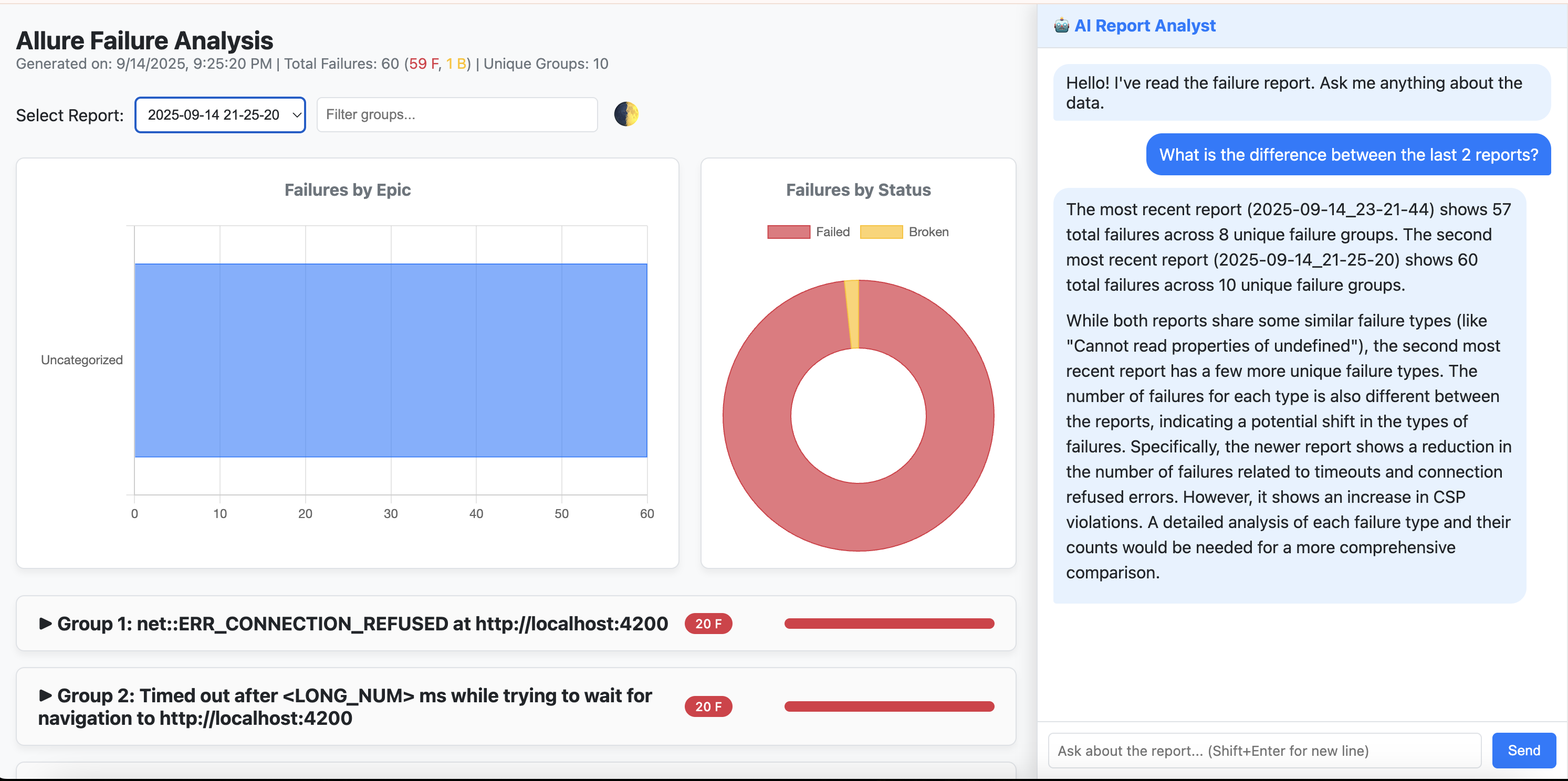
✨ Interactive HTML Dashboard: Displays grouped failures with expandable details, including stack traces and examples.
🤖 Integrated AI Analyst (Powered by Gemini):
- Conversational memory for follow-up questions.
- Autonomous use of analysis tools (historical trends, bug frequency, etc.).
- Natural language queries: “What’s the difference between the last two reports?”
🚀 Proactive Executive Summary: Automatic summary of the latest run (configurable).
📊 Visual Data Dashboard: Failures by epic, status breakdown, trends.
📈 Historical Trend Analysis: Identify patterns and track bug recurrence over time.
- Python 3.11+
- pip
- An Allure results directory from your test runs.
macOS tip (Homebrew):
brew install python@3.11
pip install allure-ai-analyzer-
Create a virtual environment (recommended):
python3.11 -m venv .venv source .venv/bin/activate -
Install the CLI:
pip install allure-ai-analyzer
-
Configure your API key:
Create a.envfile in your automation project root:GEMINI_API_KEY="your-api-key-here" -
Generate a report:
Run from the folder containingallure-results:allure-analyze generate
-
View the dashboard + AI analyst:
allure-analyze view
Default server: http://127.0.0.1:8000
Override defaults with allure-analyzer-config.yaml in your project root.
Default config (src/allure_analyzer/config/default_config.yaml):
top_n_groups_to_report: -1
include_broken: true
proactive_summary_on_load: true
CLI flags:
--path /path/to/results--config /path/to/config.yaml--top-n 10--exclude-broken--port 8001--no-proactive-summary
- Generate a report:
allure-analyze generate --top-n 10
- View the dashboard:
allure-analyze view --port 9000
- Command not found: Activate your venv and check
pip show allure-ai-analyzer. - No matching distribution: Ensure you’re on Python ≥3.11.
- Assets not found: Make sure you installed from PyPI, not a local copy missing
static/ortemplates/.
Example queries:
- “What is the difference between the last two reports?”
- “Analyze failure trends for the last 30 days.”
- “What was the most impacted epic in the latest run?”
- “Summarize the key issues in the latest report.”