II.4. Quick tutorial TextTest
The creator of the software is Mingrui "Ray" Zhang and the GitHub repository for this website can be found at : github.com/DrustZ/TextTestPP.
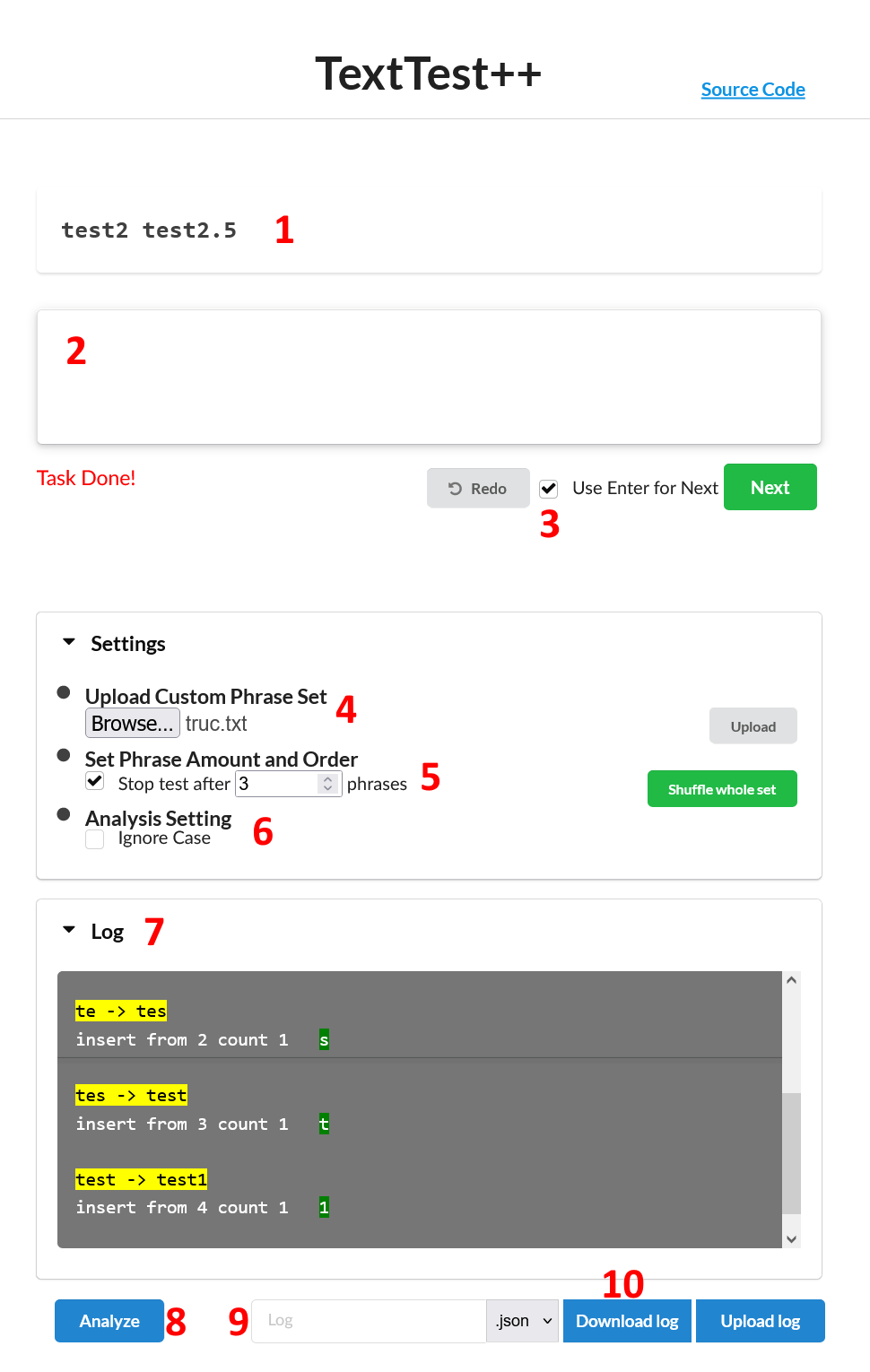
-
Phrase that testers have to type
-
Text box testers have to type in
-
Check this box to mark phrase as valid when tester hits Enter, otherwise click the green "Next" button next to it
-
Upload list of phrases separated by a new line and do not forget to hit "Upload" for it to take effect
-
Set max phrase amount, and shuffle using the green button
-
The test doesn't block phrases to be entered when the specified amount of phrases is reached. It prompts "Task Done!" in red below the text box (as seen on the screenshot).
-
In the logs it makes the "Trial" value to be modulo the specified number of phrases and creates a new dictionary in the main list. During the analysis part, we will see what it means for our post-experiment analysis.
-
-
Check this box if the text is not case sensitive
-
Log box where we can visually see the characters, the errors and corrections typed in real time
-
MUST press this button to be able to download the log file
-
Name your log file, and choose its extension : json or csv. The two are not the same and contain different key-values pairs.
-
Click this button to download the log file using the specifications entered on step 9
The JSON and CSV files do not contain the same data. The CSV file contains way more numerical data, while the JSON one shows the precise inputs of the tester. For our experiment, I think the JSON one is the more appropriate as we need more the timestamp and inputs than the "Character Per Action" for instance.
All of the specification is available in the burger menu under the "Reference of the JSON and CSV file variable names" subtitle.
Let's go over the JSON key-value pairs.
[
    {
        "Transcribe": [
            {
                "Text": "m",
                "TimeStamp": 1517175820224
            },
            {
                "Text": "my",
                "TimeStamp": 1517175820417
            }
        ],
        "Action": [
            [
                "insert",
                0,
                1
            ],
            [
                "insert",
                1,
                1
            ]
        ],
        "Trial": 0,
        "Present": "my watch fell in the water",
        "IF": 0,
        "INF": 24,
        "C": 2,
        "CER": "0.000",
        "UER": "0.923",
        "TER": "0.923",
		"Transcribed": "my",
		"Time": 193
    }
]
-
"Transcribe" contains each iteration of the transcription phrases.
- "Text" is the current iteration.
- "TimeStamp" is the UNIX timestamp in milliseconds at which the action happened.
-
"Action" contains a list of what happened on each iteration.
- 1: Specifies whether the iteration added (a) new character(s) (insert), deleted some (delete), or changed some (replace).
- 2:
- For insert, specifies the index of the string where the insertion started.
- For delete and replace, specifies the index of the string where the leftmost character of the string was located. Another explanation for delete would be the index of the string where the cursor is left at after the deletion.
- 3:
- For insert, specifies the number of characters that have been added since the last iteration.
- For delete and replace, specifies the number of characters that have been deleted.
-
"Trial" defines the at what index we are on our phrases list. It basically increments starting from 0, and until the defined number of phrases is reached, at what point it restarts from 0.
-
"Present" is the presented phrase.
-
IF/INF/C/CER/UER/TER is the corresponding metric (explanations taken from the explanations page on the website):
- IF: Incorrect Fixed, contains all deleted characters in the T-sequence.
- INF: Incorrect Not Fixed, Minimum string distance (MSD) between P and T
- C: Correct, contains correct characters in T
- CER: Corrected Error Rate
$CER = IF / (C + INF + IF)$
- UER: Uncorrected Error Rate
$UER = INF / (C + INF + IF)$
- TER: Total Error Rate
$TER = (INF + IF) / (C + INF + IF)$
-
"Transcribed" is the final string when the "Next" button is pressed, or the tester has typed "Enter" with the option "Use Enter for Next" enabled.
-
"Time" is the difference in milliseconds of time since the first action up until the last one.