

A local-first SQL data studio with a visual ERD canvas, spreadsheet-style data explorer, SQL console, and fake data seeding — supports Postgres, MySQL, and SQLite. No installation required — just download and run a single binary.
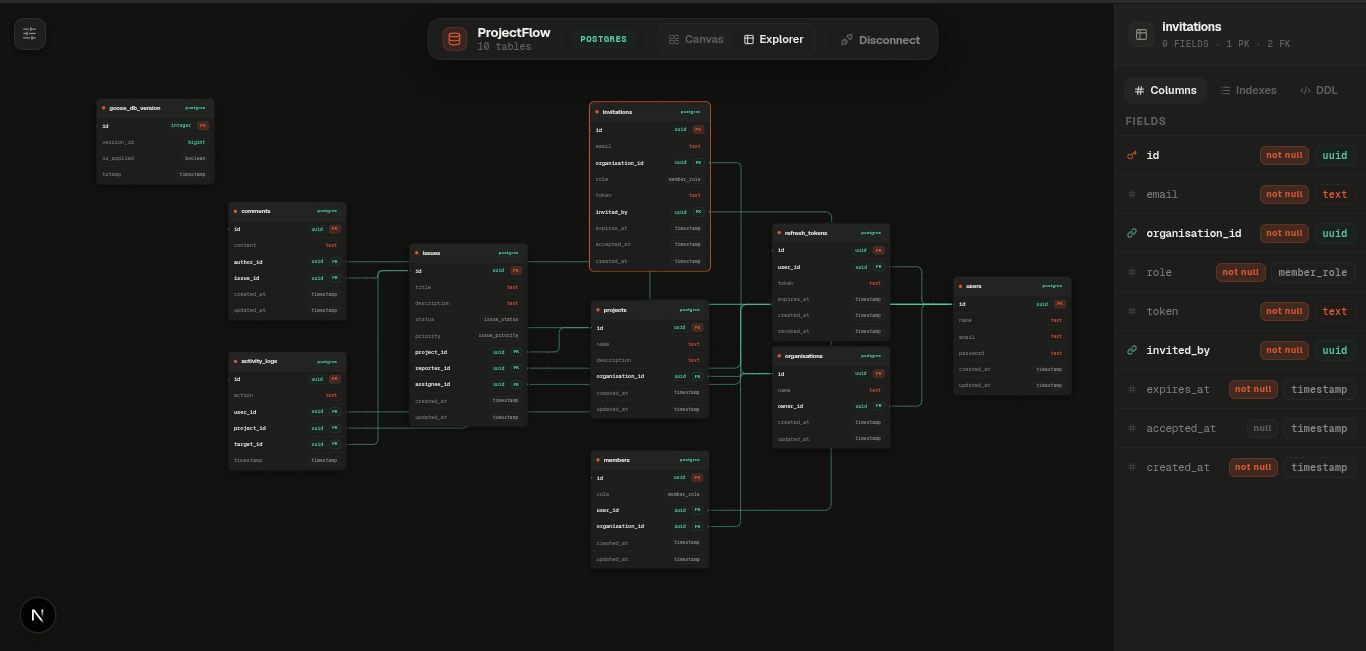 Canvas — interactive ERD with auto-layout, relation edges, and an inspector panel.
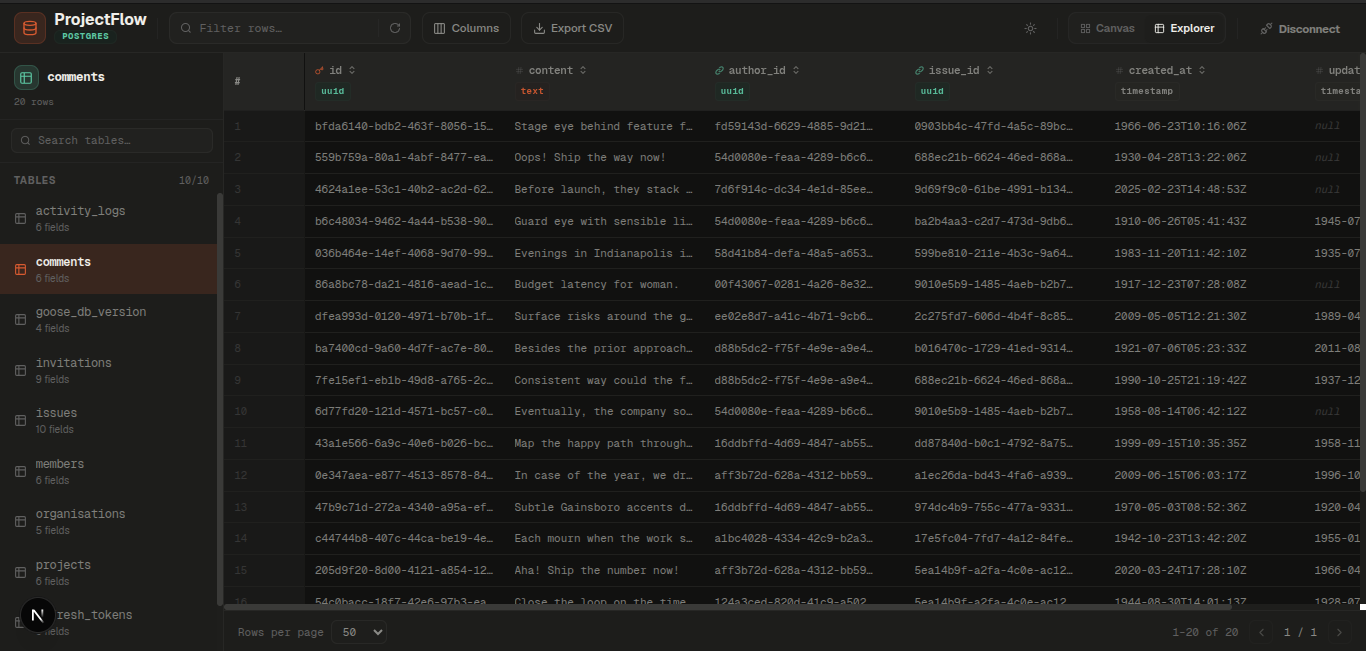 Explorer — spreadsheet-style data grid with inline editing and foreign-key navigation.
- Single binary — no separate services. One file, run it anywhere.
- Visual ERD canvas — interactive schema graph with automatic layout, relation edges, and an inspector panel for tables and relations.
- Data explorer — spreadsheet-style grid with inline cell editing, server-side sorting/search/pagination, foreign-key navigation, and CSV export.
- SQL console — syntax-highlighted editor with query history, a confirmation gate on destructive queries, and JSON/CSV export of results.
- Seed data generator — populates every table with realistic fake data in dependency order, respecting foreign keys and enum constraints.
- Schema export — generate Prisma or Drizzle schema files directly from an introspected database.
- Multi-provider — works with Postgres, MySQL, and SQLite through a common provider interface.
- Dark & light theme — clean, modern UI, toggleable at runtime.
curl -fsSL https://raw.githubusercontent.com/knnedy/nexusql/main/install.sh | shThen run:
nexusqlOpen your browser at http://localhost:8080 (or the port printed in your terminal).
The install script and released binaries assume Linux/macOS. If you're on Windows, build from source (below) for now.
Usage of nexusql:
  -host string
        network interface to bind (default "0.0.0.0")
  -port int
        TCP port for the web server (default 8080)
  -version
        print version and exit
# run with defaults
nexusql

# run on a custom port
nexusql -port 9090

# restrict to localhost only
nexusql -host 127.0.0.1

# check version
nexusql -version
On first launch, connect to a database using a connection URI (postgres://, mysql://, or sqlite://) and NexusQL will introspect the schema and open the Canvas view.
| Mode | Contents |
|---|---|
| Canvas | Interactive ERD graph · auto-layout · table/relation inspector · SQL console · seed generator · Prisma/Drizzle export · PNG export |
| Explorer | Table list · sortable/searchable data grid · inline cell editing · foreign-key navigation · CSV export |
If you prefer to install manually:
# amd64
curl -L https://github.com/knnedy/nexusql/releases/latest/download/nexusql_linux_amd64.tar.gz | tar -xz
sudo mv nexusql /usr/local/bin/

# arm64 (Apple Silicon, ARM servers)
curl -L https://github.com/knnedy/nexusql/releases/latest/download/nexusql_linux_arm64.tar.gz | tar -xz
sudo mv nexusql /usr/local/bin/Requirements
- Go 1.22+
- Node.js 18+
- pnpm
git clone https://github.com/knnedy/nexusql.git
cd nexusql
make build
./bin/nexusql
make build builds the frontend as a static export, embeds it into cmd/nexusql/out, then compiles the Go binary to bin/nexusql.
For development with hot reload (Go backend via air on :7080, Next.js dev server on :3000):
make devOther targets:
make run    # build then run ./bin/nexusql
make clean # remove build artifacts (web/out, web/.next, bin, cmd/nexusql/out)curl -L https://github.com/knnedy/nexusql/releases/download/v0.1.0/checksums.txt -o checksums.txt
sha256sum -c checksums.txtsudo rm /usr/local/bin/nexusql| Layer | Technology |
|---|---|
| Backend | Go, chi/v5, pgx/v5, provider interface for Postgres/MySQL/SQLite |
| Frontend | Next.js, TypeScript, Tailwind CSS, TanStack Query, TanStack Table, React Flow (@xyflow/react), Zustand |
| Fake data | GoFakeIt |
| Distribution | Single binary via go:embed |