- About D2RLAN
- Player Setup Guide
- Author Setup Guide
- Program Requirements/Specs
- Developer Notes
- Credits
This app is designed to be a code-less, open, all-in-one solution for D2R mod management.
It is designed to be used with Multi-Player mods that utilize Version 2.4 of D2R's filebase.
It has been forked from D2RLaunch, it's Single-Player sister.
It has many features designed to be used by both mod authors and players to enhance their overall experience.
Mod Authors can customize D2RLAN to their mod by editing their modinfo.json file.
Mod Players can download, update and customize mods in a few button clicks.
Some features require additional author support to function correctly, and will be indicated with a +
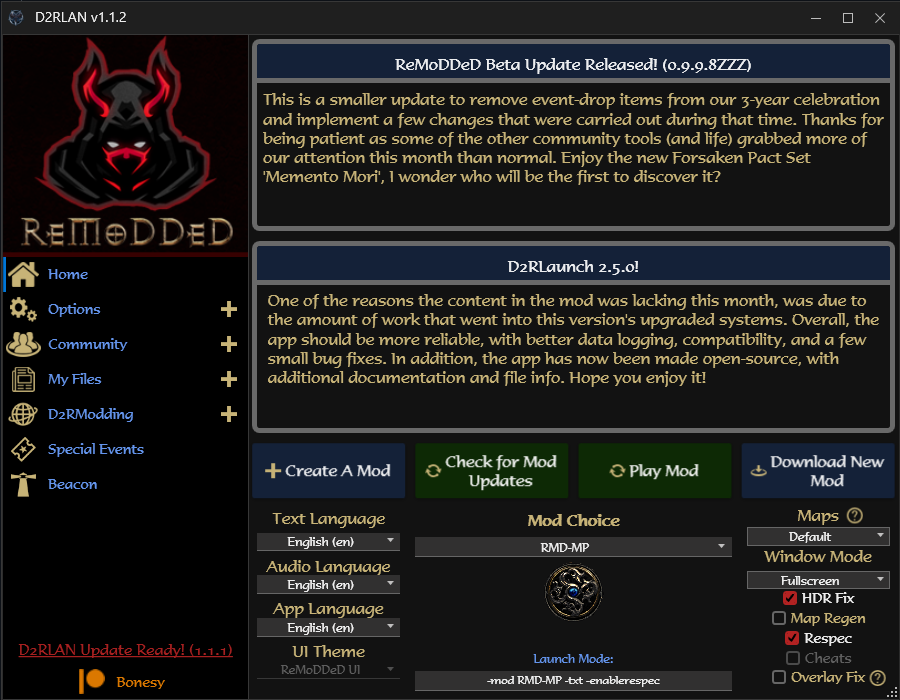
Publicly ready download can be found at D2RModding
Mod Manager-Related Features
- +Mod Downloader: One-Click download and install of many popular mods
- +Mod File Updater: One-Click updating to the most recent version's mod files
- Mod Creator: One-Click creation of a blank, D2R compatible mod
- Mod Launcher: Quickly switch and control startup settings for installed mods
- +News Display: Read the recent mod news from author with real-time updating
- Audio/Text Languages: Change in-game text or audio languages individually
- TCP/IP Patcher: Enables previously removed TCP/IP feature to allow Multi-Player functionality
- Game Browser/Advertiser: Includes 'Beacon', an app that allows players to view and advertise active LAN games
- Fast Load Option: Fast Load option which extracts ALL game files for slightly improved loading times
- Queue-Skipping: Disables BNET access while app open to skip the queue-check process and extra protection
Quality-Of-Life Features
- Automatic Backup/Restore: Automatically backs up your save and stash files, with quick restoral option
- Advanced Monster Stats: Ability to display real-time HP and Resistances for monsters and mercenaries
- Dynamic HP Display: Control monster HP bar colors for various life% threshholds
- Stash Tab Naming: Ability to individually rename stash tabs to your liking
- +Buff Icon Display: Design your own Buff Icon layout for tracking timed buffs (no timer, icons only)
- Hotkey Controls: Set hotkeys for Cube Transmuting, Item Identification, Stat/Skill Respec, and much more
- Chat Controls: Change coloring of chat channel, player name and message content
- Merc Identifier: Add a glowing indicator above your mercenary to help identify them in large crowds
- Rune Identifier: Add special visual effects to mid and high runes when dropped on the ground
- Item Display: Simplify common items, such as potions, scrolls, etc to use icons instead of text (screen clutter)
- Hide Helmets: Ability to Hide all Helmets from the world view display
- Item Level Display: Toggleable Item Levels Display (appears next to item name)
Gameplay-Changing Features (Author may enable/disable as desired)
- Monster Customizations: Various controls which allow editing of Monster Density, Drop Rates, Experience, etc
- Expanded Storage: Ability to toggle various Expanded Storage functionality for Inventory, Merc, etc
- More Shared Stash Tabs: Unlocks 4 additional Shared Stash Tabs (1 personal, 7 shared)
- Super Telekinesis: Upgraded Telekinesis skill which can pick up any* item instead of just pots/scrolls
- Cheat/Debug Commands: Ability to enable (and use) dozen's of in-game text commands
Miscellaneous Features
- +Vault Access: Quick-Access to our external app, The Vault, which allows infinite item storage and grail-tracking
- Quick File Access: Quickly access mod, save and app config files in the side menu
- +Community Access: Quick-Access to the mods wiki, discord or patreon sites
- Map Seeds: Quickly force map seeds with pre-defined map layouts (or use your own)
- Font Switching: Change in-game font to one of 12 currently supported fonts
- Color Dyes: Item Color Dye System for the world view display
- +UI Themes: Change UI Theme to the one used in the popular mod, ReMoDDeD
- +Merged HUD Display: Merged HUD Design which can be toggled on or off
- Skill Icon Pack: Choose one of 3 Skill Icon Packs currently available
- +Runeword Menu Sorting: Sort in-game runeword menu by name, type or level
- Character Renaming: Rename your character (in-game name also)
- Character Map Seeds: Edit your characters map seed directly from save file
- Cinematic Subtitles: Improved subtitle text and no longer formatted for the deaf/hard-of-hearing
- Cinematic Skipper: Ability to skip Act Cinematics automatically
- Code-less: No code needed to add D2RLAN support; control news, features, community links or appearance
- Easy Installs/Advertisement: Add your mod to the database; players can easily view and install with one-click
- Mod Updating: Allow players to upgrade to your most recent mod version (with backups) in one-click
- Real-Time News: Control the news feed displayed to dynamically address your player-base
- Feature Controls: Enable or Disable certain mod features for your mod specifically
- Player Experience: Add frequently requested features and QoL perks to your mod instantly
- Make It Your Own: Control the displayed app logo and community links (discord, wiki, patreon)
The process to setup the launcher should be simple and straight forward, but here's how to do it:
- Step 1: Download and Install the .NET Desktop Runtime 7.0 which is required for the app to run.
- Step 2: Download D2RLAN from D2RModding, then drag the D2RLAN folder from the downloaded .zip to your Desktop or other convenient location.
- Step 3a: Browse to the Launcher folder and run D2RLAN.exe.
- Step 3b: Depending on your version, an update notification may appear in the bottom left of the app.
- Step 4: Click the Download New Mod button and select 'Base TCP Files' from the dropdown box.
This will acquire the setup package needed to download Version 2.4 D2R Files.
This specific version of D2R is required to use TCP/IP functionality and D2RLAN.
Depending on your network speed, current traffic, etc...this download may take anywhere from minutes to hours. - Step 5: Click the Download New Mod button and select your desired mod from the dropdown box.
- Step 5: View the QoL Options and other settings to customize things to your liking.
- Step 6: Press the Play Mod button to start the mod with your chosen configuration and enjoy!
*You may need to run the launcher as Administrator and/or exclude the folder from your Antivirus
**For any issues or questions, please reach out in our Discord
In order to fully support the various features of this launcher, some additional steps will be needed from you.
Some features will require your permission to use, additional files provided or mod download/community links.
As mentioned, no coding is needed for any of these customizations and the instructions are outlined below.
All of the D2RLAN customizations are determined by this file, since it is included/required by your mod already.
With that said, please edit your modinfo.json file using the following template, being sure to respect the line counts.
The launcher will compare the players file to the web file to determine mod version status and control features/info.
Change your enabled/disabled options as desired (Expect the Option Controls to be updated in future releases)
{
    "name": "MyModName",
    "savepath": "MyModName/"

/*
--My Mod Details--
Mod Download: https://MyModFilesLink.zip
Mod Config Download: https://MyModInfo.json
Mod Version: 0.1.2.3
News 1 Title: "My Mod was Updated! (Version 0.1.2.3)"
News 1 Message: "This is some news message that I like"
News 2 Title: "More News for the Community!"
News 2 Message: "This is some other news message that I like"

--General Options--
Map Layouts: Enabled
UI Themes: Enabled
Customizations: Enabled
Vault Access: Enabled

--Additional Options--
Item Icons: Enabled
Runeword Sorting: Enabled
HUD Display: Enabled
Monster Stats Display: Enabled

--Author Links--
Discord: https://MyDiscordLink.com
Wiki: https://MyWikiLink.com
Patreon: https://MyPatreonLink.com
*/

}
In order to provide downloading, updating and configuration changes to be made dynamically by the launcher, we need to setup proper links.
For a proper link, it needs to be both static and direct.
- Static - This means when the file has been updated/replaced, the link itself does not change
- Direct - This means that when the link is clicked, the file is downloaded directly, not a webpage button download
To setup a link that satisfies both of these requirements, you can use services such as Google Drive, Dropbox, Github, Amazon S3, etc. Provided below are instructions for some of them I have used previously or currently:
- Github - Click the green Code button, then right-click the Download Zip option and select Copy Link Address
- Google Drive - Copy your google provided link into this Online Generator to convert it to a static-direct link.
When updating the file, you must use the File Properties > File Information > Manage Versions method - Dropbox - Replace the &dl=0 at the end of your dropbox provided url with &dl=1
The First time you upload modinfo.json, you will need to use a dummy config link, because you havnt uploaded it yet
I recommend adding your mod to the Mod Database, which allows players to easily view and install your mod.
As long as you follow the above linking rules, then the links provided in your modinfo.json file will never need to be updated between mod or config changes!
For some features, additional files must be provided to D2RLAN, due to the variety of changes/complexity.
As an example, the Event Manager cannot host Special Events if it has no instructions or files provided for this task.
Any feature that is optional or requires file-safekeeping will use a new D2RLAN folder in your mod directory.
Each feature will be placed in it's own subfolder within it, following these rules:
Runeword Menu Sorting: Utilizes a folder named Runeword Sort and may contain up to 6 files:
- runewords-ab.json / helppanelhd-ab.json: Used to display the runewords sorted Alphabetically
- runewords-it.json / helppanelhd-it.json: Used to display the runewords sorted By ItemType
- runewords-lv.json / helppanelhd-lv.json: Used to display the runewords sorted By Required Level
helppanel files are optional if you've chosen to replace it with your runeword menu (quick-access)
UI Theme: Utilizes a folder named UI Theme and should contain 2 folders (for now):
- Retail: Used to display your own modified UI, based on the Retail Theme.
- ReMoDDeD: Used to display the heavily customized UI, based on the ReMoDDeD mod.
Buff Icons: Utilizes a folder named Buff Icons and should contain X files (explained below, not yet complete):
- Skill_Names.txt: Used to provide the launcher with your mods list of buff skills (if different from retail).
- Preview_SkillName.png: For each custom buff icon you have, include an image the launcher can use for it.
Custom Mod/App Logo: Looks for a file named Logo.png to be used in the top left of D2RLAN.
The size of the logo can vary to your liking, but I recommend something around 200x200 or so.
Merged HUD: Contains the needed files for the Merged HUD Option:
As previously mentioned, some folders will be created automatically by the launcher, mostly for file-safekeeping:
- Customizations: Created to store unedited copies of the armor, misc, weapons, levels and treasureclass txt files.
This is needed for the Monster Customizations options to work correctly. - Monster Stats: Created to store edited copies of the monster hp bar layout files, for various option displays.
This is needed for the Monster Stats option to work correctly.
To update your mod or config files, simply replace the .zip or .json file used in w/e you service chose in Step 2.
If you followed those instructions carefully, then the link does not need updating and your edits are immediately live.
When D2RLAN goes to download the mod or access the config file; it will retrieve the updated version(s).
You can use this to dynamically update mod files, allowed features, news messages, app logo, etc.
Keep in mind that you are pushing data to the web, and the launcher is automatically pulling that data down.
In order to fully utilize this app, or receive staff support, some requirements must be met.
- .NET Desktop Runtime 7.0: This program is included in the D2RLAN download, but can also be found via the Microsoft website. It is needed to run the program itself.
- Windows OS: This is the only supported Operating System for the launcher, although emulation layers may also work for it (WINE, Lutris, etc)
- Battle.Net Purchased: This program is only intended for and actively tries to be restricted to, legally purchased D2R copies. If you want to support modding, then purchase the game!
- Code Base: This program was designed using C# and WPF. I am a novice coder, so expect inconsistencies, inefficiencies and general issues.
- D2RHUD.dll: This file is used to enable hotkey controls and advanced monster stats display options (Source)
It is also used for various 'hooks', such as Save/Chat functionality while using TCP/IP
This app was made because I am passionate about helping everyone get the most out of their D2R experience.
I put much effort into making it easy, open and powerful, while balancing it with author intentions/efforts.
So thanks for everyones patience and support during this free-time side project of mine; some final words on it:
To The Players:
Enjoy the many new QoL features, TCP/IP functionality, mod controls and hassle-free modding that comes with using D2RLAN.
I know sometimes the worst part about modding, can be dealing with all the frustration and confusion around them.
I also know that everyone likes to play just a little bit differently, and noone can say no to some added QoL.
So I hope this app helps fill in a large gap of what may have been missing from your mod experience.
To The Authors
Enjoy what I hope is a very simple, code-less method to control the launchers various systems to your liking.
(Please keep in mind you will need to use the Version 2.4 file package when making your mod compatible with TCP/IP).
I know sometimes it can be frustrating dealing with so many files, troubleshooting with your community, etc.
I also know that many of the same features get requested by players or wish were included by default.
So I hope this app helps provide some of that to your player-base; letting them enjoy your mod even longer.
To The Developers
I respectfully request that you help improve this project rather than fork it, if you wish to modify it.
Much effort was made to allow authors control of the launcher in a dynamic fashion, without coding needed.
I wish for it to be open and hope you might be convinced to help improve it further.
With that said; a standard GPL License has been attached to this project.
In order for build deployment, you will need to provide your own Licenses/API Keys for the following services:
SyncFusion: Used for various form controls and library functions
Google Sheets: Used to retrieve the Mod Listing from the Mod Database and update the Download Dropdown
File should be named appSettings.json and placed in the Resources folder. An example file has already been included.
Special thanks to the following people or groups for their help along this project's journey so far:
- Ethan-Braddy for helping convert this project from WinForms to WPF, improving stability/performance
- Dschu012 for being there to answer my dumb questions and D2RHUD's base implementation
- D2RModding Community for being patient, supportive and assisting with bug-reports or improvements
- Killshot for helping with D2RHUD function hooks and debug assistance
1.1.8
- Added 'Skip Act Cinematics' Option- Fixed User Settings issue with UI Theme choice
- Changed default RW Sorting method (RMD)
1.1.7
- Adjusted default Runeword Sorting method- User Settings Saving for Runeword Sorting Updated
1.1.6
- Reverted D2RHUD update logic- Fixed an issue with Personal Stash file safekeeping
1.1.5
- Added In-Game UI Theme Switcher (RMD Only for now)- Adjusted D2RHUD for forced update (will come up with update system later)
- Adjusted Stash Tab Renamer to not display @ symbols to avoid confusion
- Small updates to Stash Tab Renamer UI for clarity
1.1.4
- Fixed the 'Show Item Levels' option- Fixed an issue which would potentially cause strings to be replaced unintentionally
- Fixed Stash Tab Unlock Logging
1.1.3
- Updated Stash Tab Versioning Info- Added Log Output for Stash Unlocking
- Updated Project Reference Files
1.1.2
- Source Code is now available via https://github.com/locbones/D2RLAN-WPF- Code Cleanup performed to comment, organize and simplify functions
- More logging info added to output logs to indicate options used, function chain status, etc
- Fixed an issue where Customizations UI Display would not update correctly after reloading it
- Improved the Auto Backup functionality and logging data
- Added a new log file for D2RHUD hooking progress (save issue troubleshooting)
- Shared Stash Backups will now appear in the Restoral dropdown box
- Added the ability to restore shared stash files individually instead of grouped with character
- Cold color has been lightened to make it more readable (when using the Advanced Monster Stats Display option)
- An "Overlay Fix" option has been added for improved compatibility with MSI Afterburner
- .NET Runtime package is now included with core package files
- Core file package has been updated from 1.1.0 to 1.1.2
1.1.1
- Updated earlier controller fix to support ReMoDDeD players also (oops)- Beacon app updated to version 1.0.6; now displays mod version, slightly improved load logic
1.1.0
- Hotfix update to resolve app loading failure when UserSettings don't yet exist- Core files package updated
1.0.9
- Fixed an issue that would cause a crash when controller player tried to view custom skill icons in tree- Fixed an issue that would cause BNET access to remain disabled until opened the BNET app
- Removed The Vault and Fast Load Options (non-functional in MP currently)
- Gem Mode Added; This feature is working as intended
1.0.8
- Custom Command Hotkeys can now be set for player commands also (/nopickup, /players X, etc)- Startup Commands can now be set; allows you to automatically apply a series of commands on game start
- Fixed an issue where the game would crash when using a hotkey outside of an active game
- Fixed an issue with retrieving save files location for "alternate" OS/User configs
1.0.7
- UI Theme and Icon updated to distinguish itself from D2RLaunch- Fixed an issue that would cause Expanded Merc layouts not to be applied
- Added missing references for needed files for various QoL Options
1.0.6
- Core Files Package now has documentation and tools included, and has been updated to 1.0.6 (website link)- Fixed an issue where Customizations would not function when missing needed files
- Fixed an issue where Expanded Storage options would not apply
- Fixed an issue that caused the D2RLAN update prompt to fail to appear in some scenarios
- Fixed an issue that would cause player trades to fail if exceeding the retail gold cap
1.0.5
- Chat colors can now be customized in launcher (Channel, Player and Message)- Fixed a crashing issue when linking certain items in chat
- Fixed a crashing issue when typing messages over 256 characters in length
1.0.4
- Added support for item linking in chat- Chat colors can now be controlled (user-customizable next update)
- MemoryConfig updated for pname display and gold max cap
- Fixed an issue that would cause stat point buttons to disappear when using expanded storage feature
1.0.3
- Fixed an issue that would cause ReMoDDeD UI to be force chosen- Added support for "special" hotkeys; Insert, Delete, etc
1.0.2
- Fixed an issue which would cause mod to fail to start when setting runeword layouts- Fixed an issue that would prevent "Show Item iLvls" option from saving preferences
- Fixed an issue that would cause crash or gold overflow if selling items and also over retail gold limit
1.0.1
- Fixed an issue that would cause ReMoDDeD players unable to launch game- Fixed the Item Level Toggle for ReMoDDeD players