- About D2RLaunch
- Player Setup Guide
- Author Setup Guide
- Program Requirements/Specs
- Developer Notes
- Credits
- Changelogs
This app is designed to be a code-less, open, all-in-one solution for D2R mod management.
It is designed to be used with Single-Player mods that utilize the Latest Versions of D2R's filebase.
(Please use D2RLAN, The Multi-Player-Enabled fork of this app) (TCP/IP).
It has many features designed to be used by both mod authors and players to enhance their overall experience.
Mod Authors can customize D2RLaunch to their mod by editing their modinfo.json file.
Mod Players can download, update and customize mods in a few button clicks.
Some features require additional author support to function correctly, and will be indicated with a +
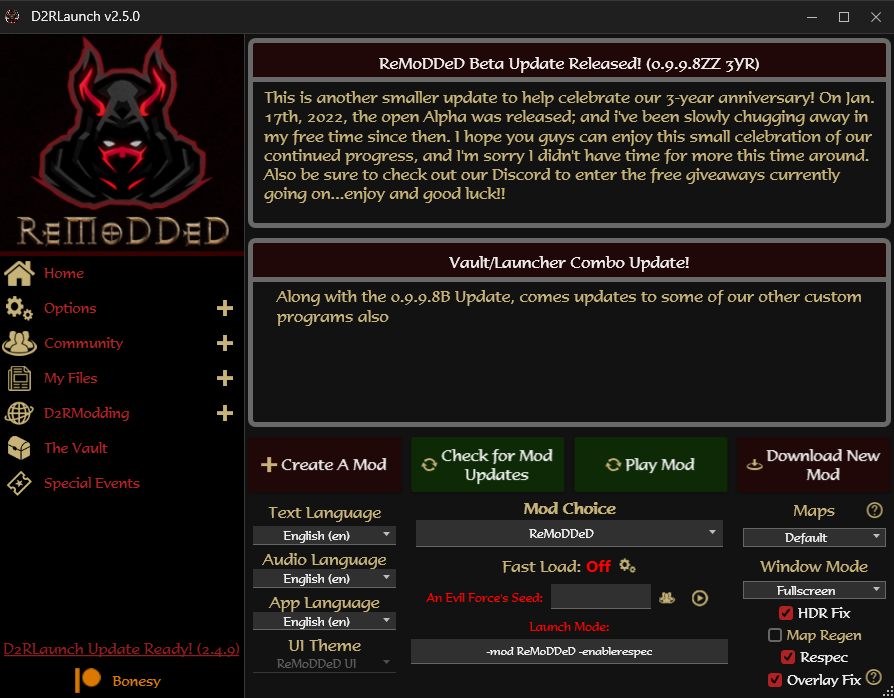
Mod Manager-Related Features
- +Mod Downloader: One-Click download and install of many popular mods
- +Mod File Updater: One-Click updating to the most recent version's mod files
- Mod Creator: One-Click creation of a blank, D2R compatible mod
- Mod Launcher: Quickly switch and control startup settings for installed mods
- +News Display: Read the recent mod news from author with real-time updating
- Audio/Text Languages: Change in-game text or audio languages individually
- Game Data Extractor: Built-In CASC Extractor to retrieve needed/missing files from your internal game storage
- Fast Load Option: Fast Load option which extracts ALL game files for slightly improved loading times
- Queue-Skipping: Disables BNET access while app open to skip the queue-check process and extra protection
Quality-Of-Life Features
- Automatic Backup/Restore: Automatically backs up your save and stash files, with quick restoral option
- Advanced Monster Stats: Ability to display real-time HP and Resistances for monsters and mercenaries
- Dynamic HP Display: Control monster HP bar colors for various life% threshholds
- Stash Tab Naming: Ability to individually rename stash tabs to your liking
- +Buff Icon Display: Design your own Buff Icon layout for tracking timed buffs (no timer, icons only)
- Hotkey Controls: Set hotkeys for Cube Transmuting or Auto-Sorting items
- Merc Identifier: Add a glowing indicator above your mercenary to help identify them in large crowds
- Rune Identifier: Add special visual effects to mid and high runes when dropped on the ground
- Item Display: Simplify common items, such as potions, scrolls, etc to use icons instead of text (screen clutter)
- Hide Helmets: Ability to Hide all Helmets from the world view display
- Item Level Display: Toggleable Item Levels Display (appears next to item name)
Gameplay-Changing Features (Author may enable/disable as desired)
- Monster Customizations: Various controls which allow editing of Monster Density, Drop Rates, Experience, etc
- Expanded Storage: Ability to toggle various Expanded Storage functionality for Inventory, Merc, etc
- More Shared Stash Tabs: Unlocks 4 additional Shared Stash Tabs (1 personal, 7 shared)
- Super Telekinesis: Upgraded Telekinesis skill which can pick up any* item instead of just pots/scrolls
- Special Event System: Join Mod Author Hosted Special Events with the Event Management System
Miscellaneous Features
- +Vault Access: Quick-Access to our external app, The Vault, which allows infinite item storage and grail-tracking
- Quick File Access: Quickly access mod, save and app config files in the side menu
- +Community Access: Quick-Access to the mods wiki, discord or patreon sites
- Map Seeds: Quickly force map seeds with pre-defined map layouts (or use your own)
- Font Switching: Change in-game font to one of 12 currently supported fonts
- Color Dyes: Item Color Dye System for the world view display
- +UI Themes: Change UI Theme to the one used in the popular mod, ReMoDDeD
- +Merged HUD Display: Merged HUD Design which can be toggled on or off
- Skill Icon Pack: Choose one of 3 Skill Icon Packs currently available
- +Runeword Menu Sorting: Sort in-game runeword menu by name, type or level
- Character Renaming: Rename your character (in-game name also)
- Character Map Seeds: Edit your characters map seed directly from save file
- Cinematic Subtitles: Improved subtitle text and no longer formatted for the deaf/hard-of-hearing
- Cinematic Skipper: Ability to skip Act Cinematics automatically
- Code-less: No code needed to add D2RLaunch support; control news, features, community links or appearance
- Easy Installs/Advertisement: Add your mod to the database; players can easily view and install with one-click
- Mod Updating: Allow players to upgrade to your most recent mod version (with backups) in one-click
- Real-Time News: Control the news feed displayed to dynamically address your player-base
- Feature Controls: Enable or Disable certain mod features for your mod specifically
- Player Experience: Add frequently requested features and QoL perks to your mod instantly
- Make It Your Own: Control the displayed app logo and community links (discord, wiki, patreon)
- Event Manager: Easily setup real-time events for your player-base using the Event Manager System
The process to setup the launcher should be simple and straight forward, but here's how to do it:
- Step 1: Download and Install the .NET Desktop Runtime 7.0 which is required for the app to run.
- Step 2: Download D2RLaunch from D2RModding, then drag the D2RLaunch folder from the downloaded .zip to your Desktop or other convenient location.
- Step 3a: Browse to the Launcher folder and run D2RLaunch.exe.
- Step 3b: Depending on your version, an update notification may appear in the bottom left of the app.
- Step 4: Click the Download New Mod button and select your desired mod from the dropdown box.
- Step 5: View the QoL Options and other settings to customize things to your liking.
- Step 6: Press the Play Mod button to start the mod with your chosen configuration and enjoy!
*You may need to run the launcher as Administrator and/or exclude the folder from your Antivirus
**For any issues or questions, please reach out in our Discord
In order to fully support the various features of this launcher, some additional steps will be needed from you.
Some features will require your permission to use, additional files provided or mod download/community links.
As mentioned, no coding is needed for any of these customizations and the instructions are outlined below.
All of the D2RLaunch customizations are determined by this file, since it is included/required by your mod already.
With that said, please edit your modinfo.json file using the following template, being sure to respect the line counts.
The launcher will compare the players file to the web file to determine mod version status and control features/info.
Change your enabled/disabled options as desired (Expect the Option Controls to be updated in future releases)
{
    "name": "MyModName",
    "savepath": "MyModName/"

/*
--My Mod Details--
Mod Download: https://MyModFilesLink.zip
Mod Config Download: https://MyModInfo.json
Mod Version: 0.1.2.3
News 1 Title: "My Mod was Updated! (Version 0.1.2.3)"
News 1 Message: "This is some news message that I like"
News 2 Title: "More News for the Community!"
News 2 Message: "This is some other news message that I like"

--General Options--
Map Layouts: Enabled
UI Themes: Enabled
Customizations: Enabled
Vault Access: Enabled

--Additional Options--
Item Icons: Enabled
Runeword Sorting: Enabled
HUD Display: Enabled
Monster Stats Display: Enabled

--Author Links--
Discord: https://MyDiscordLink.com
Wiki: https://MyWikiLink.com
Patreon: https://MyPatreonLink.com
*/

}
In order to provide downloading, updating and configuration changes to be made dynamically by the launcher, we need to setup proper links.
For a proper link, it needs to be both static and direct.
- Static - This means when the file has been updated/replaced, the link itself does not change
- Direct - This means that when the link is clicked, the file is downloaded directly, not a webpage button download
To setup a link that satisfies both of these requirements, you can use services such as Google Drive, Dropbox, Github, Amazon S3, etc. Provided below are instructions for some of them I have used previously or currently:
- Github - Click the green Code button, then right-click the Download Zip option and select Copy Link Address
- Google Drive - Copy your google provided link into this Online Generator to convert it to a static-direct link.
When updating the file, you must use the File Properties > File Information > Manage Versions method - Dropbox - Replace the &dl=0 at the end of your dropbox provided url with &dl=1
The First time you upload modinfo.json, you will need to use a dummy config link, because you havnt uploaded it yet
I recommend adding your mod to the Mod Database, which allows players to easily view and install your mod.
As long as you follow the above linking rules, then the links provided in your modinfo.json file will never need to be updated between mod or config changes!
For some features, additional files must be provided to D2RLaunch, due to the variety of changes/complexity.
As an example, the Event Manager cannot host Special Events if it has no instructions or files provided for this task.
Any feature that is optional or requires file-safekeeping will use a new D2RLaunch folder in your mod directory.
Each feature will be placed in it's own subfolder within it, following these rules:
Runeword Menu Sorting: Utilizes a folder named Runeword Sort and may contain up to 6 files:
- runewords-ab.json / helppanelhd-ab.json: Used to display the runewords sorted Alphabetically
- runewords-it.json / helppanelhd-it.json: Used to display the runewords sorted By ItemType
- runewords-lv.json / helppanelhd-lv.json: Used to display the runewords sorted By Required Level
helppanel files are optional if you've chosen to replace it with your runeword menu (quick-access)
UI Theme: Utilizes a folder named UI Theme and should contain 2 folders (for now):
- Retail: Used to display your own modified UI, based on the Retail Theme.
- ReMoDDeD: Used to display the heavily customized UI, based on the ReMoDDeD mod.
Buff Icons: Utilizes a folder named Buff Icons and should contain X files (explained below, not yet complete):
- Skill_Names.txt: Used to provide the launcher with your mods list of buff skills (if different from retail).
- Preview_SkillName.png: For each custom buff icon you have, include an image the launcher can use for it.
Custom Mod/App Logo: Looks for a file named Logo.png to be used in the top left of D2RLaunch.
The size of the logo can vary to your liking, but I recommend something around 200x200 or so.
Merged HUD: Contains the needed files for the Merged HUD Option:
As previously mentioned, some folders will be created automatically by the launcher, mostly for file-safekeeping:
- Customizations: Created to store unedited copies of the armor, misc, weapons, levels and treasureclass txt files.
This is needed for the Monster Customizations options to work correctly. - Monster Stats: Created to store edited copies of the monster hp bar layout files, for various option displays.
This is needed for the Monster Stats option to work correctly.
To update your mod or config files, simply replace the .zip or .json file used in w/e you service chose in Step 2.
If you followed those instructions carefully, then the link does not need updating and your edits are immediately live.
When D2RLaunch goes to download the mod or access the config file; it will retrieve the updated version(s).
You can use this to dynamically update mod files, allowed features, news messages, app logo, etc.
Keep in mind that you are pushing data to the web, and the launcher is automatically pulling that data down.
In order to fully utilize this app, or receive staff support, some requirements must be met.
- .NET Desktop Runtime 7.0: This program is included in the D2RLaunch download, but can also be found via the Microsoft website. It is needed to run the program itself.
- C++ Redistributable 2015-2022: This program is included in the D2RLaunch download, but can also be found via the Microsoft website. It is needed to perform CASC Extraction of internal game storage.
- Windows OS: This is the only supported Operating System for the launcher, although emulation layers may also work for it (WINE, Lutris, etc)
- Battle.Net Purchased: This program is only intended for and actively tries to be restricted to, legally purchased D2R copies. If you want to support modding, then purchase the game!
- Code Base: This program was designed using C# and WPF. I am a novice coder, so expect inconsistencies, inefficiencies and general issues.
- D2RHUD.dll: This file is used to enable hotkey controls and advanced monster stats display options (Source)
- CASCLib.NET.dll: This file is used to enable file extraction from your internal game storage (Source)
This app was made because I am passionate about helping everyone get the most out of their D2R experience.
I put much effort into making it easy, open and powerful, while balancing it with author intentions/efforts.
So thanks for everyones patience and support during this free-time side project of mine; some final words on it:
To The Players:
Enjoy the many new QoL features, mod controls and hassle-free modding that comes with using D2RLaunch.
I know sometimes the worst part about modding, can be dealing with all the frustration and confusion around them.
I also know that everyone likes to play just a little bit differently, and noone can say no to some added QoL.
So I hope this app helps fill in a large gap of what may have been missing from your mod experience.
To The Authors
Enjoy what I hope is a very simple, code-less method to control the launchers various systems to your liking.
I know sometimes it can be frustrating dealing with so many files, troubleshooting with your community, etc.
I also know that many of the same features get requested by players or wish were included by default.
So I hope this app helps provide some of that to your player-base; letting them enjoy your mod even longer.
To The Developers
I respectfully request that you help improve this project rather than fork it, if you wish to modify it.
Much effort was made to allow authors control of the launcher in a dynamic fashion, without coding needed.
I wish for it to be open and hope you might be convinced to help improve it further.
With that said; a standard GPL License has been attached to this project.
In order for build deployment, you will need to provide your own Licenses/API Keys for the following services:
SyncFusion: Used for various form controls and library functions
Google Sheets: Used to retrieve the Mod Listing from the Mod Database and update the Download Dropdown
File should be named appSettings.json and placed in the Resources folder. An example file has already been included.
Special thanks to the following people or groups for their help along this project's journey so far:
- Ethan-Braddy for helping convert this project from WinForms to WPF, improving stability/performance
- Dschu012 for being there to answer my dumb questions and D2RHUD's base implementation
- D2RModding Community for being patient, supportive and assisting with bug-reports or improvements
This changelog list is mainly for reference use, as the project repo and codebase has changed much over time
Changelogs (2.5.1 - 3.0.0)
2.5.6
- Added 'Skip Act Cinematics' Option- Fixed User Settings issue with UI Theme choice
- Changed default RW Sorting method (RMD)
2.5.5
- Added In-Game UI Theme Switcher (RMD Only for now)- Adjusted D2RHUD for forced update (will come up with update system later)
- Adjusted Stash Tab Renamer to not display @ symbols to avoid confusion
- Small updates to Stash Tab Renamer UI for clarity
2.5.4
- Fixed the 'Show Item Levels' option- Fixed an issue which would potentially cause strings to be replaced unintentionally
- Fixed Stash Tab Unlock Logging
2.5.3
- Updated Stash Tab Versioning Info- Added Log Output for Stash Unlocking
- Updated Project Reference Files
2.5.2
- Re-Added Popup Warning for Save File Size (Patch 1.6.9, lost in Rebuild)- Added "Ultra" rune support for RMD
2.5.1
- Removed D2RHUD.dll as a Project Resource- Launcher will now retrieve latest D2RHUD.dll file from Github when missing
- Fixed an issue that would cause launcher version checking to fail if program crashed during task previously
Changelogs (2.0.1 - 2.5.0)
2.5.0
- Source Code is now available via https://github.com/locbones/D2RLaunch-WPF- Code Cleanup performed to comment, organize and simplify functions
- More logging info added to output logs to indicate options used, function chain status, etc
- Fixed an issue where Customizations UI Display would not update correctly after reloading it
- Improved the Auto Backup functionality and logging data
- Shared Stash Backups will now appear in the Restoral dropdown box
- Added the ability to restore shared stash files individually instead of grouped with character
- Cold color has been lightened to make it more readable (when using the Advanced Monster Stats Display option)
- An "Overlay Fix" option has been added for improved compatibility with MSI Afterburner
- .NET Runtime package is now included with core package files
- Core file package has been updated from 2.3.3 to 2.5.0
2.4.8 - 2.4.9
- Fixed an issue with retrieving save files location for "alternate" OS/User configs2.4.7
- Improved/Reduced code for managing keybind and monster stat display QoL Options- Fixed an issue where Monster Stats wouldn't display if no QoL keybinds were set
2.4.6
- Fixed an issue where Item ilvls display option would revert to "Don't Modify" option after changing it- Fixed an issue that would prevent extra stash tabs from being unlocked for existing stash files
2.4.5
- Fixed an issue with blank app screen when no mods or user settings were detected2.4.4
- Added Character Map Seed Reader/Editor2.4.3
- Added "Don't Modify" option to Item iLvls- Added support for newline characters in News Display messages
- Fixed an issue where author settings weren't refreshing with mod selection change
2.4.2
- Changed Download App Updates method to asynchronous operation for improved performance- Fixed an issue with vault update function
2.4.1
- Added Event Manager system to Side Menu (Author Controlled Special Events)- Fixed an issue which would cause restore function to open wrong folder on first usage
- Fixed an issue which would cause restore function to parse timestamps incorrectly
2.4.0
- Fixed an issue that would cause subtitles to disappear partway through cinematic- Moved subtitle positioning down to letterbox area
- Improved Subtitle replacement logic
2.3.9
- Fixed an issue that would result in main screen failing to load if user had no mods installed (again)- Added a new QoL Option to toggle Cinematic Subtitle Display Mode (SDH or Standard)
2.3.8
- Fixed an issue that would cause Launch Options box to not display arguments- Separated the Monster Stats and Keybind Plugin functions so they can be used independently
2.3.7
- Fixed an issue that would cause hotkey bindings to fail if multiple functions used the same hotkey- Added more keybinds to the recognized keys list
- Added a function to Autosort Cube
2.3.6
- Fixed an issue that would result in main screen failing to load if user had no mods installed- Added preliminary support for custom keybind functions: Transmute, and Autosort
2.3.5
- Hotfix for game launch error (game.exe)2.3.4
- Added Status indicator to CASC Extraction- Added an option not to modify UI Theme
- Improved save folder discovery function
- Fixed an issue that would cause mod files to extract incorrectly when downloading a mod
2.3.3
- Fixed an issue that caused app blank screen if user settings did not yet exist2.3.2
- D2R Save Folder should now be dynamically found by GUID instead of default folder structure- CASC Extractor will now show status updates as it progresses
- Fixed an issue that would cause window not to exit when CASC extraction completed
- Fast Load Status will be updated automatically after extraction completes
- Fixed an issue that would cause launch arguments not to update when respec option was toggled (display issue only)
2.3.1
- D2R Launch Arguments are now shown and customizable (for seeds and such)- DirectTxt Functionality has been altered for individual mods (to help avoid user error)
- "Fast Load" status will be evaluated and displayed to user (requires CASC extraction)
2.3.0
- The Create-A-Mod option will now use it's own mod folder for saves and copy retail save files to it2.2.9
- Advanced Monster Stats will now display for player summons and will be hidden for NPC's- Exocet font will now be provided by D2RLaunch and will be used for Stats Display
- The "Fix Stash" option has been removed; it applies automatically (if needed)
2.2.8
- Fixed more issues with Merged HUD option- Added D2RLaunch Error Logs Quick Access link to Side Menu
2.2.7
- Fixed another launching issue (typos suck, sorry)2.2.6
- Fixed an issue which would cause mod unable to launch depending on user settings- Disabled the -immunity reduction updating on monster stats display (to avoid confusion until I can better display its quirks)
2.2.5
- Added Monster HP Bar GIF Preview for Stats Display option- Fixed an issue with standard hud display being corrupted after using merged hud display and while on controller mode
2.2.4
- Fixed an issue with color dye option being enabled for ReMoDDeD players2.2.3
- Fixed an issue which would cause show item levels option not to hide levels after enabling2.2.2
- Added Borderless Window Mode Controls- Fixed an issue with monster health files not being swapped correctly when toggling options
2.2.1
- Resource File Updates and Minor Bug Fixes2.2.0
- Added Monster HP Bar Display Options- Merged Dynamic HP Bar option with Monster HP
- Merged Monster Stats option with Monster HP
- Updated Monster Stats Display to also show immunity reduction benefits
2.1.9
- Fixed an issue with Color Dye system which would not allow you to remove purple color dyes- Fixed an issue with text displaying gold instead of red color on red dyed items
- Added Color Dye Preview Popup
2.1.8
- Fixed an issue with Expanded Storage Click Areas and Quest Border Panel image- Fixed an issue which would cause Hireling Inventory panel border image to break if enabled then disabled
2.1.6 - 2.1.7
- Expanded Storage functions rebuilt to allow individualized side panel entries- Updated Expanded function's needed files resource
2.1.5
- Fixed an issue with layout positioning when using the expanded stash feature- Updated first-time use message for expanded features for further clarification
2.1.4
- Restored asynchronous behavior of Auto Backups and fixed backup intervals (proper)2.1.3
- Fixed an issue that would cause Hardcore shared stash files not to be backed up- Removed asynchronous behavior from AutoBackups; seemed to be causing irregular backup intervals
2.1.2
- Fixed an issue that would cause monster health bar to be desychronized after repeatedly switching between enabled/disabled status2.1.1
- Fixed an issue that would cause decimals to be replaced by commas for some languages due to Windows Localization (breaks json file)2.1.0
- Project DLL's embedded into app for user cleanup- Fixed an issue which would cause Dynamic HP Bar's disabled option to break filename
2.0.9
- Dynamic Monster HP Bar feature added - Adds Warning and Critical HP thresholds to the bar, changing bar colors to indicate their life threshold(At 67% to 100%, bar is green; At 34% to 66%, the bar is orange; At 33% or below, the bar is red.)
- Adjusted Main Menu layouts for left/right quick toggle buttons
- Improved error catching and processing for Monster Stats Display option
2.0.8
- Added support for Item Color Dyes in QoL Options- allows changing world view colors of items(Cube 3x perfect gems of desired color with item to color dye - Skulls are considered black, Antidotes remove dyes)
- Disabled permanently activated features for ReMoDDeD players (color dyes, expanded storage, etc)
2.0.7
- Added preliminary support for toggleable Expanded Storage Options (QoL Options)- Fixed an issue which would cause an object reference error when attempting to make character backups which did not yet exist
2.0.6
- Improved window popups to center and adjust based on main form location- Image Previews on QoL Options page improved and match form size
- Fixed an issue that would cause an "Object reference not set to an instance of an object" error when attempting to backup characters on any mod that used the retail save location
2.0.5
- Fixed an issue that would cause a blank screen/failure for main UI to load for mods whose authors have not added D2RLaunch support- Improved the Character Restore function to allow easy restoral of timestamped save files
2.0.4
- Fixed an issue that would cause an error for _profilehd.json to appear when using the HDR Fix option- Code Cleanup and Comments in prep for Public Source Code Release
2.0.3
- Fixed an issue which would cause item icons not to toggle correctly- Customizations option now available for authorized mods
- Window UI adjusted to allow smaller element sizing
- Minor theme/palette updates
2.0.2
- Resolved many issues which would cause QoL options to write incorrectly or in the wrong location- Resolved all known and reported crashing issues for various mods
2.0.1
- Temporary hotfix for mod crashing issuesChangelogs (1.5.1 - 2.0.0)
1.7.3 - 2.0.0
- Initial Release of Re-Built Launcher (WinForms -> WPF), primarily spearheaded by [Ethan-Braddy](https://github.com/Ethan-Braddy)- Dynamically scalable UI with increased responsiveness and efficiency
- Improved code execution, function loading, app stability and error reporting
- Better compatibility and integration with Windows
- Launcher no longer force updates on startup - can be deferred until user interaction
- If no D2R install path is found, it can now be manually specified by user
- Multiple/Infinite mod backups of previous versions may be made when updating
- Auto-Backups are now enabled by default and characters are saved into folder of their own name
1.7.3
- Mod version will now be read and applied to newly downloaded mods- Fixed an issue that would cause mod version to update in a separate file when using the update method
1.7.2
- Updated Vault and Self-Updater links1.7.1
- ReMoDDeD UI now forced for ReMoDDeD players (temporary)1.7.0
- Adjusted target filesize for save warning to 7KB1.6.9
- Fixed an issue which would cause density customizations to be un-revertable- Added a save file size warning to the auto-backup feature
- Disabled item level and icons toggle for ReMoDDeD only (temporary)
1.6.7 - 1.6.8
- Backend fixes to deal with potential link unavailable issues- Compatibility update for ReMoDDeD
1.6.6
- Fixed an issue that would cause mod to sometimes launch with incorrect arguments- Fixed an issue that would cause customizations option to crash game if it wasn't able to find mod's needed files
1.6.5
- Fixed an issue which would cause some mods using .bins to not launch correctly if using buff icons- Fixed an issue which would cause an error when attempting to read user settings when no mods are installed
1.6.3 - 1.6.4
- Added a backup server to avoid Error 429/500 some users were receiving during heavy traffic usage- Fixed an issue that would cause an error when using the personalized stash tabs feature if the files already existed
1.6.2
- Added initial support for the "Buff Icon Manager" feature- Integrated Assassin Charge Icons into the manager
- Improved the Download Mod feature to better handle various mod folder structures when extracting
- Fixed an issue where it would not create the MyUserSettings file in certain scenarios
- Fixed an issue that prevented ReMoDDeD players from using the -direct launch option
1.6.1
- Fixed a runtime error that would cause the CASC Storage functions to fail for many users1.6.0
- CASC Storage is now supported- Missing files that are required for QoL options will now be extracted from your CASC
- One-click setup of -direct -txt mode, including extracting files from CASC and overwriting with mod files
- Optional update option to skip CASC extraction and overwrite with mod files only
- Skill Icon Pack option added in QoL Options, currently supports default + 2 other icon pack choices
1.5.8 - 1.5.9
- Fixed an issue that caused icons not to apply to rejuvenation potions- Fixed an issue that would sometimes cause an access denied error when running the vault
- Fixed an issue that would prevent correct item names from being displayed when switching back to no icons
- Fixed a sideloading issue for ReMoDDeD files/features
1.5.7
- Fixed an error that would popup due to item icon feature code changes- Fixed an issue that would cause treasureclassex.txt to be incorrectly modified for existing edits
1.5.6
- Credentials update (house-keeping)1.5.5
- Fixed an issue that prevented Runeword Sorting feature from functioning unless Standard UI theme was selected- Fixed an issue which caused the item icons feature to not function for ReMoDDeD players specifically
- General code cleanup and comments
1.5.4
- Vault updates are now checked only if launching the Vault, instead of on app startup- Vault and D2RLaunch User Data can be accessed in the My Files quick menu
- Fixed an issue which could cause an update loop to occur
- Fixed an issue that would sometimes stop UserSettings from being updated or read on app launch
1.5.2 - 1.5.3
- Hotfix for check mod updates feature not checking mod version correctly1.5.1
- Changed how D2RLaunch chooses -bin or -txt launch settings to better deal with Vault compatibility- Fixed an error when translating news for mods who have not added D2RLaunch support
Changelogs (1.0.1 - 1.5.0)
1.5.0
- Re-enabled Vault's Quick Access from menu- Fixed an issue which caused an error message with the Super Telekinesis feature
- Fixed an issue that would cause Personalized Stash tabs to reset after UI theme was applied
- Updater program now shows download progress
1.4.9
- Added a 3rd option for Assassin Charge Icons: Enabled (No Orbs)- Added 2 new QoL Options, "Item Display" and "Super Telekinesis"
- Font Preview image is now hidden by default and user-toggleable
- Adjustments made to button coloring for active status
- Monster Customizations layout and display adjusted
- Removed old assets and compressed images to reduce launcher size
- D2RLaunch User Files can now be accessed in the My Files sub-menu
1.4.8
- Added Danish Language option by user request- Standardized UI theme across the app and added mouseover effects to all buttons
- Improved junk character garbage collection for auto-translated news display text
- Extensive code cleanup for monster customizations feature and a few other loading functions
- Simplified the Download New Mod panel to make it easier to understand
- Fixed some English language display issues
- Fixed an error that would occur when cancelling during the rename character process
1.4.7
- Chinese (zh-CN) translations improved by @demo- Many UI adjustments for main program screen and some layout bugs fixed
- Simplified Mod Update coding for increased reliability/stability
- Mod update progress will now neatly display download speed, file size and estimated time remaining
- Adjusted button mouseover effects on main program screen
- Fixed an issue which could sometimes cause a fatal error if no mods were installed
1.4.6
- D2RLaunch's Language can now be manually selected via dropdown- Language translations are now performed in real-time instead of requiring app reload
- UI Theme adjustments to reduce brightness and adjust news panels
- Optimized approximately 500 lines of code for improved efficiency
- Small text adjustments for positioning, colors, etc
- Fixed an issue that would cause the map layouts feature to sometimes fail
1.4.5
- Languages not yet supported will now fallback to English- Restructured the app loading process for improved efficiency and performance
- Fixed an issue which caused the Map Layouts option to appear blank on startup
- Fixed an issue that caused game install path to not be saved to user profile correctly
- Fixed an issue which caused an error on startup if no mods were installed (but used to be)
1.4.4
- Localization Support for the following 13 languages added:German, English, Spanish (Spain), Spanish (Mexico), French, Italian, Japanese, Korean, Polish, Portugese (Brazil), Russian, Chinese (Simplified), Chinese (Taiwan)
- Adjusted various UI elements to better suit localization
1.4.3
- Added buttons next to QoL options to enable popup feature preview images and animated gifs1.4.2
- Altered the Update mod files code for improved reliability and adjusted the progress labels during download- When downloading a new mod, it will now read and apply the mod version during the install process
- The check for updates option will now search for the .mpq folder name to correctly rename github generated folders
- The Monster Stats Display option is now available to all mods and has been relocated in the options panel
- Fixed an issue which would cause updating mod files to fail if github failed to report content-length of the file
- Fixed an issue which caused the download mod option to fail if the same mod was currently selected and also had a custom logo applied
1.4.1
- Users can now view total play time (with launcher open) by clicking the mod logo- Fixed an issue which caused the personal stash tabs option to fail after multiple edits
1.4.0
- More UI and font adjustments- Code improvements and cleanup
1.3.9
- Discord, Wiki and Patreon links can now change with mod selection- D2RModding links for Website, Discord, Youtube added as it's own section at bottom
- Font standardized across program and smaller UI tweaks for display scaling compatibility
- Time Estimate for Download Mod function improved and a status message added if content-length is empty
- Fixed an issue which caused a fatal error when renaming stash tabs with less than 8 enabled
- Resolved a conflict between UI theme and Personal Stash tabs that would cause an error
1.3.8
- Fixed an issue where the "Install Mod" button would disappear when using a windows display scale setting above 100%1.3.7
- Added extra folder operations to handle github automatically generated folder names- Fixed an issue which caused a fatal error when downloading mod files with an unreported size
1.3.6
- Added functionality for the 'D2RModding Mod Database', which allows quick installs for players with author-submitted mods1.3.5
- Added the ability to install submitted mods via dropdown selector- Adjusted the "Protected MPQ" warning message to be more detailed
- Fixed an issue that prevented program from closing completely if you also installed a new mod
1.3.4
- Adjusted mod update option to better work with the new download mod feature- Fixed loading issues for mods using protected MPQ's
- Added more public code comments/documentation
1.3.3
- Fixed an issue that caused mod update button from functioning correctly- Added support for monster customizations to personal mods
- Fixed an issue that prevented personalized stash tabs from functioning correctly with personal mods
- Updated mod download option to show progress info as it installs mod
1.3.2
- Additional improvements made to install detection for alternate Windows User configurations- Added feature to create a "blank mod" and use all supported launcher features
- Added ability to download, extract and install mods through launcher
1.2.4 - 1.3.1
- Improvements to mod detection process and error handling for many reported bugs and issues- Fixed error which caused many players to receive a "game install location not found" message
- Fixed error when opening the launcher caused by the HDR opacity fix
- Stash Fix and My Save Files buttons now load vanilla characters for mods configured as such
- Stash UI no longer overwrites other mods who aren't using expanded storage
1.2.3
- Fixed an issue when updating mod files (cleaning task interference)- Added a new launcher option to fix HDR opacity
- Enabled new user settings controls for HDR opacity
1.2.2
- Fixed an issue which caused an error message to appear on first startup if no mods are installed1.2.1
- Improved download operation and further minimized resources used- Fixed an issue with personalized stash tabs resetting after launcher restart
- Fixed an issue which caused runeword sorting to revert to alphabetical after launcher restart
- Launcher now updates the version tracking for new installs
- A popup message is displayed informing you to do a scan/repair with blizzard launcher if no game install location is found
1.2.0
- Relocated web server to resolve the download quota limit caused from excessive updates (Sorry!)1.1.9
- Attempt to resolve updater 403 errors with API use EDIT: unsuccessful1.1.8
- Fixed an error when editing stash tabs for mods that did not edit the file yet- Fixed an issue when editing only some of the tab names and leaving others default
1.1.7
- Fixed an error with game path in Personalized Stash Tabs option1.1.6
- Added option for Personalized Stash Tabs- User Settings re-structured (Please delete folder in C:/Users/Username/AppData/Local/D2RLaunch)
1.1.5
- Fixed an error when using the modified help menu option1.1.4
- Added an option to toggle helmet display on characters in-game- Fixed an error that occurred if the user's "Mods" folder didn't exist
- Update button now disabled while user is updating files
1.1.3
- Fixed an issue where mod files download wouldn't start when selecting "Yes" to backup option- Fixed an issue with error message when trying to update mod version tracker
1.1.2
- ReMoDDed Beta prep1.1.1
- Add support for mods that use retail folder location for save files1.1.0
- Fixed an issue which caused folder cleaning to fail if a custom logo was applied1.0.9
- Fixed an issue when updating mod and selecting "No" to the backup option- Fixed an issue where user settings would be reset during a mod update
1.0.8
- Fixed mod downloader functions broken with 1.0.7 loading changes1.0.7
- Fixed an issue when launching mods using protected MPQ's- Correctly loads user settings for mods with protected MPQ's
- Automatic Mod Updates now disabled for mods with protected MPQ's
- Additional Options now inform you of disabled features when using a mod with a protected MPQ
- Fixed an error which caused Vanilla++ to launch with wrong arguments
- Code optimizations for mod and user settings loading
1.0.6
- Fixed an issue which caused monster stats display option to read incorrect files1.0.5
- Fixed an issue which caused loot drop setting to not correctly apply edits (Customizations)1.0.4
- Removed excessive popup messages from auto backups success (debug message)Added ability for launcher to track your total playtime (Click logo to display, will move later)
1.0.3
- Fixed an issue which sometimes caused download to appear in the wrong folder1.0.2
- Fixed an issue which caused show item levels to not save to user settings correctly- Added 'Download Only' options for new players to ReMoDDeD/Vanilla++
1.0.1
- Fixed error when selecting rune display option multiple times- Fixed error when selecting the no background option for monster stats display
- Fixed issue with playing mods with special characters in the modname