


Powerful forms for Espanso.
Define rich, interactive forms in YAML. Insert templated output anywhere.
espanso-dynamic-forms-demo-form.mp4
Espanso's built-in forms are great for quick input. But what if you need:
- Validation — required fields, patterns, type checking
- Advanced layouts — tabs, groups, conditional visibility
- More input types — date pickers, file uploads, checkboxes, sliders
- Powerful templating — conditionals, loops, filters with Liquid
Espanso Dynamic Forms fills that gap. Define your form in a YAML file, reference it in an Espanso trigger, and get a polished Material Design form every time.
→ Compare to Espanso Forms to see the full differences.
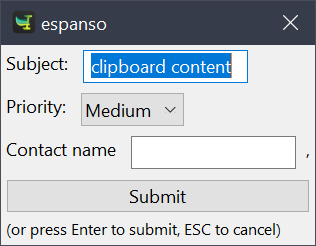
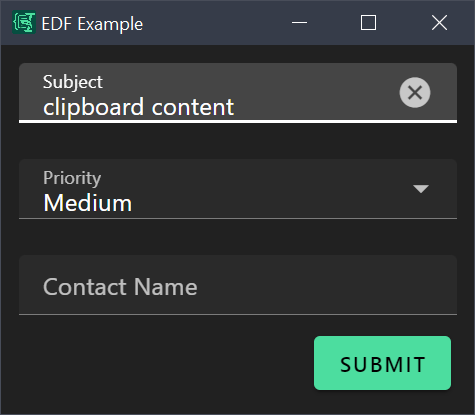
1. Install — Download from Releases and install. (Installation Guide)
2. Add a trigger to your Espanso config (%APPDATA%\espanso\match\base.yml on Windows):
matches:
  - trigger: ":demo"
    replace: "{{output}}"
    force_mode: clipboard
    vars:
      - name: output
        type: script
        params:
          args:
            - C:/Program Files/Espanso Dynamic Forms/EDF.exe
            - --form-config
            - \{\{env.EDF_FORMS}}/demo.yml
3. Type :demo in any text field — fill the form, hit Submit, and watch the output appear.
→ Getting Started Guide for step-by-step setup.
📝 You type a trigger → 📋 Form appears → ✍️ Fill fields → ✅ Submit → 📤 Formatted text inserted
Your forms are defined in YAML with four sections:
| Section | Purpose |
|---|---|
schema |
Define fields and types (docs) |
uischema |
Control layout and appearance (docs) |
data |
Set default values, use {{clipboard}} (docs) |
template |
Format output with Liquid syntax (docs) |
→ Form Config Reference for complete documentation.
The app includes a library of pre-built forms:
| Form | Use Case |
|---|---|
| Code | Get AI help with code |
| Draft follow-up emails | |
| Reply | Compose message replies |
| Files | Batch file processing |
→ Forms Library for all available forms and boilerplate snippets.
Need something custom? The Form Factory helps you describe what you need and generates the config with AI.
- JSON Forms schema — industry-standard way to define form structure
- Liquid templating — filters, conditionals, loops for flexible output
- Material Design UI — clean, modern interface via Vuetify
- Validation built-in — required fields, patterns, type checking
- Environment variables —
{{env.VAR}}and{{clipboard}}tokens - File handling — upload files, read content, extract metadata
- Tabbed interfaces — organize complex forms with categories
- Conditional visibility — show/hide fields based on other values
| Platform | Status |
|---|---|
| Windows | ✅ Supported |
| Linux | ✅ Supported |
| macOS |
Espanso Dynamic Forms Docs — The full documentation site:
- Getting Started — Installation and first form
- Form Config — Schema, UI, data, and templates
- Form Elements — Controls and layouts reference
- Liquid Templating — Output formatting guide
- Use Cases — Real-world examples
Interested in contributing? See the codebase overview:

Questions or issues? Open an issue on GitHub.

Definer - Popup Translator & Dictionary
Instant definitions, translations, search, and AI results for words and phrases you select or type.