Built with Play 2.2.1
###Installation:
- Grab Play 2.2.1 from here and move to any <directory> with rw access
- Add <directory/bin> to PATH variable
- Clone this Repository and type
play runto run app - For use with Eclipse, type
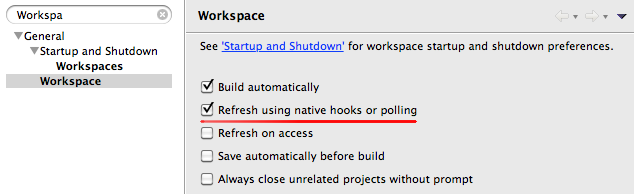
play eclipseto create files to Import as Existing Project - Guide to configure your IDE is here, this part is important:
###Running/Debugging the Application:
- Navigate to application directory
- Run
play debug runto start the application - In Eclipse, add a new Debug Configuration with the parameters:
- Remote Java Application
- Connection Type: Standard (Socket Attach)
- Host:
localhost - Port:
9999 - Run
Debug as-> select your configuration
##Git & Collab
###Branches & Forks For a clean and proper collaboration the following workflow is used:
- Set your git to
no-ffmerges bygit config --global --add merge.ff false - The original (doque's) repo will be the central repository called
upstream - Everybody forks the repo and clone his/her own fork to local
- Branches:
masteris a stable (i.e. release) branch,developis something between alpha and RC and there will be severalfeatureXYZbranches. - For every feature (or feature group) you create a branch based on the current
develop(i.e. yourdevelopbranch based on the most recentupstream/developmentbranch). If necessarypull,fetch&mergeorrebaseyourdeveloponupstream/developbefore you create the new feature branch - When a branch is ready to be merged you
fetch upstream/developandrebaseyour branch on it and then create a pull request. If there are conflicts you have to solve them before creating the pull request toupstream/develop
If you care why we decided to do it like this refer to here for branching patterns and here for no-ff.
For more detailed instructions see GitTutorial.md
###Commits
For commit messages a simple pattern is used:
- First line contains a classification and a short description. The classification may be refactor, style, fix, feature, documentation (mey be extended later on). Limit the first line to 50 characters, so it will be displayed nicely on github
- After that there will be a blank line followed a more detailed description in the 3rd line (and any further lines).
For example:
docu: adds info about git

Gives info about branching pattern, fork behaviour
and git settings and commit messages
Using this pattern will make the overall log is very readable and it is easy to automate the change log creation.