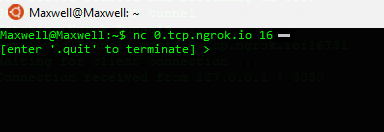
This illustrates a TCP Server listening on all network interfaces on a random port on your local machine and using ngrok to expose it to the internet.
The concept here can be used to create and communicate with services in an entreprise settings for small tasks like log management etc.
The Ngrok.cs class downloads and extract the ngrok executable depending on your OS.
Make sure you have .NET Core installed. You must have an ngrok authtoken first.
> git clone https://github.com/maxwellobi/.NETCore-ngrok-remote-tcp-server.git TCPRemoteServer
> cd TCPRemoteServer
> dotnet restore
> dotnet run --authtoken "abcdefghijklmnopqrstuvwxyz"
If run successfully you will see the ngrok tunnel public url which can then be used by any TCP Client to connect

You can connect any TCP Client to this server or build your own. For instance, you can use netcat