A metronome, BPM detector and tuning fork app for AsteroidOS.
This app was born from a single direct message. A German choir director named Dominik had just installed AsteroidOS on his Huawei Watch and asked in the community where he might find a tuning fork and metronome app — or at least suggest the idea to a developer. The answer was: let's just build it right now. What started as a quick favour during the buzz of the AsteroidOS 2.0 launch turned into three days of focused development, growing from a simple wav playback and blinking circle into what you see here. Dominik joined the Matrix channel and was using the app the same day it was published. Rob, a regular community member from the US, picked it up at choir rehearsal before the week was out. It is, at the time of writing this, the most visually polished and feature-complete app currently available on AsteroidOS — and it came together entirely in the open, in a weekend.
Tap anywhere on screen to detect tempo by measuring the intervals between taps. A rolling average of up to eight taps produces a stable reading across the supported range of 40–208 BPM. Starting a new tap series after a pause automatically discards previous data so switching tempos is immediate. Each tap emits ripple rings and six sparkle rays from the pulse circle edge, and the BPM label pumps bright on each tap. A pulsing circle visualises the current BPM continuously between taps. The detected BPM is shared with the Metronome page and persisted across app restarts.
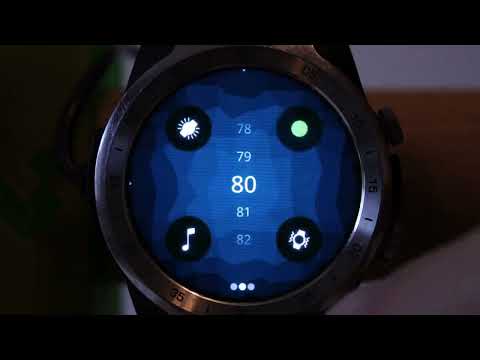
A full-screen pulsing circle runs at the stored BPM — opt-in so it does not surprise you on first open. The page header fades while the flash is running to maximise lit pixels. Tempo is adjusted with a circular spinner. Four toggle buttons independently activate the beat flash, an audible tick, haptic (vibration) feedback, and color cycling. Active buttons pulse in BPM rhythm in lockstep with the beat clock. The tick button is hidden automatically on devices without a speaker. Useful for eyes-free or sports use.
Hidden automatically on devices without a speaker. Tap the frequency display to cycle through seven reference pitches — G4 (392 Hz), Ab4 (415 Hz), A4 Verdi (432 Hz), A4 Standard (440 Hz), A4 Orchestra (442 Hz), A4 High (444 Hz) and Bb4 (452 Hz). Tap the play button for a short preview. Hold to lock a continuous gapless loop that keeps playing until you tap to stop. The button emits ripple rings while playing and breathes gently while idle. The frequency label pulses while looping, visible even when your finger covers the button. The selected frequency is persisted across app restarts.
The display stays on automatically while any active output is running — metronome sound, haptic, flash, or a locked tuning fork loop. It sleeps normally in all other states.
Edge indicators on each page signal available swipe directions. The app uses a horizontal three-page layout — BPM Detect, Metronome, Tuning Fork — navigated by swiping left or right. On devices without a speaker the Tuning Fork page is hidden and the layout is two pages.
The app launched as a minimal metronome with a circular spinner and a pulsing beat circle. The tuning fork page was added as a companion tool for pitch reference, initially with a simple tap-to-play mechanic. Subsequent work added beat-synchronised button animations, a full-screen flash mode, per-page background colors, tap sparkle effects on the BPM detector, ripple rings on the tuning fork button, and a gapless infinite loop mode. Later releases added screen keepalive, hardware guards to hide audio features on speakerless watches, and edge swipe indicators consistent with the AsteroidOS system UI. The codebase was then refactored from a single file into separate page components for maintainability and community review.
All sound assets are generated using SoX and shipped as 16-bit mono PCM WAV files.
Metronome tick
sox -n -r 44100 -b 16 -c 1 tick.wav synth 0.025 tri 2000 fade h 0.002 0.025 0.008 vol 0.7Tuning fork tones (repeat for each frequency)
sox -n -r 44100 -b 16 -c 1 440hz.wav synth 0.5 sine 440 vol -1dBNote: the duration must result in a whole number of sine cycles to avoid a click at the loop splice point. 415 Hz requires a corrected duration:
sox -n -r 44100 -b 16 -c 1 415hz.wav synth 0.5012 sine 415 vol -1dB- AsteroidOS / asteroid-launcher
nemo-keepalive— conditional screen blankingnemo-ngf— haptic feedback- Qt 5.15 / QtMultimedia 5.8