An Arduino Smart I2C LCD Display backpack adapter and I/O expander
This package lets you add a display and expand the analog/digital I/O of your project with just one I2C device.
It allows custom calculations to be done on the adapter. It adds digital filtering to the analog readings to improve accuracy.
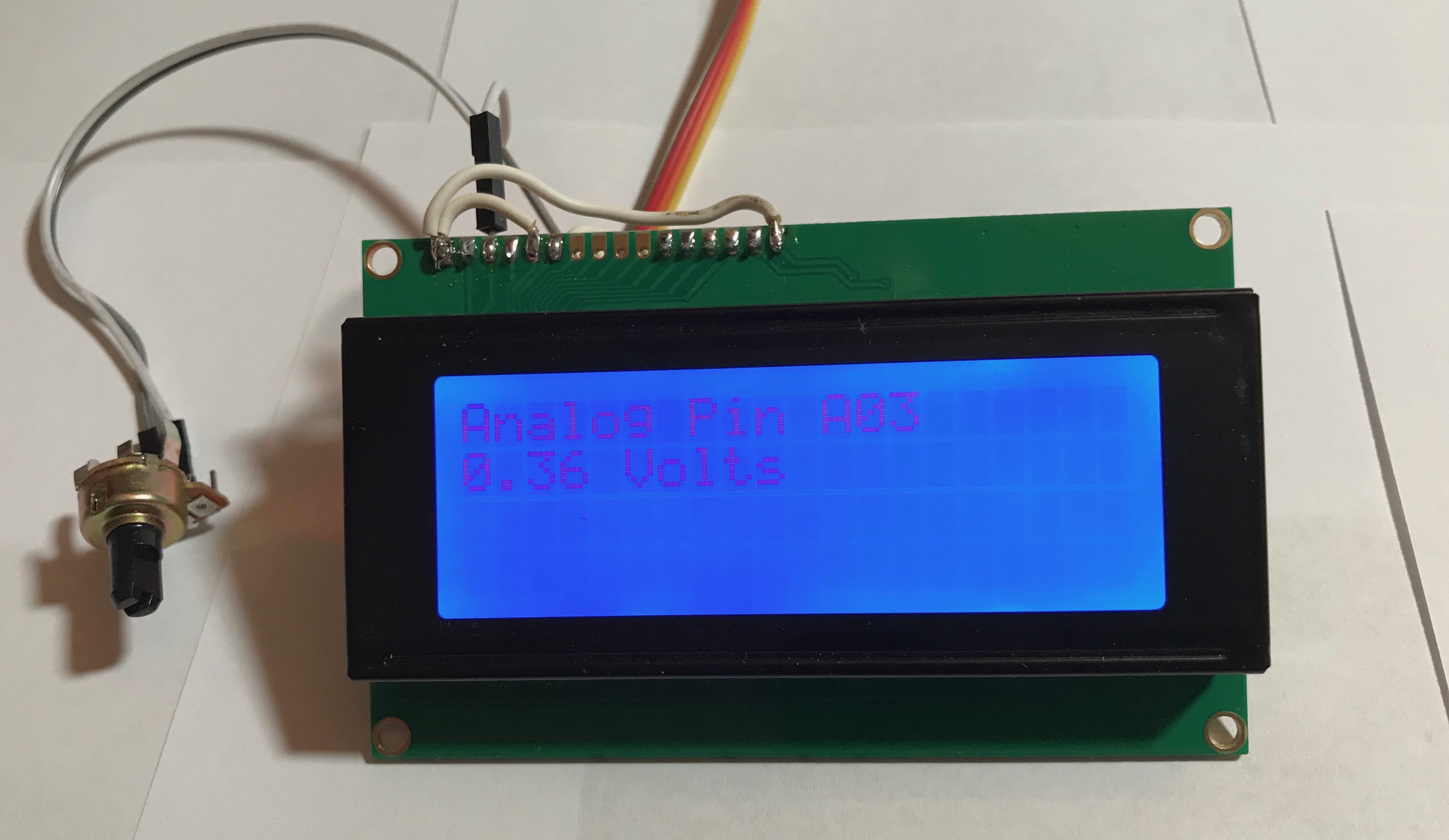
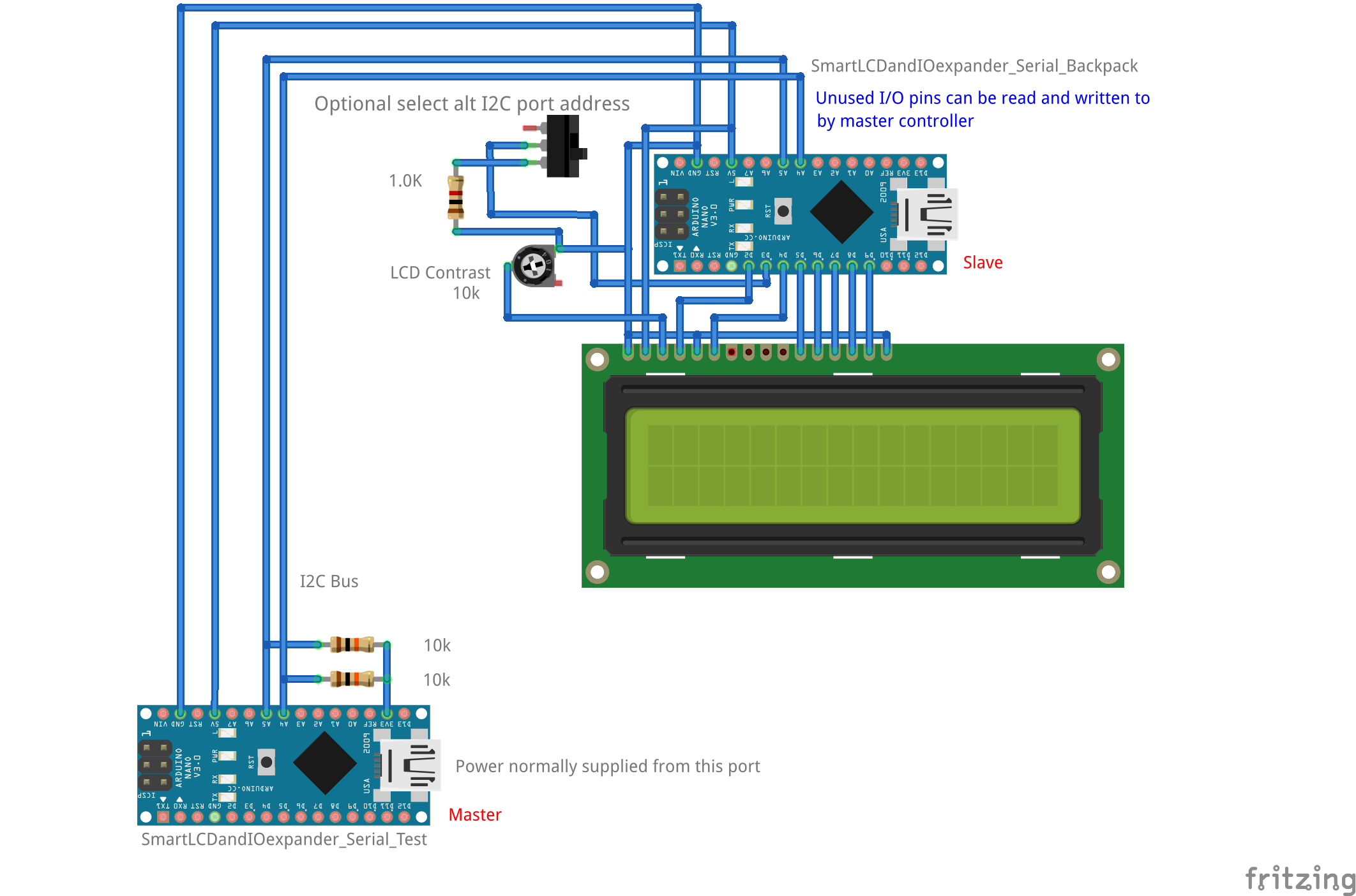
Download the repository and unpack it into your Arduino Sketch user library directory.
On the Mac it is: ~/Documents/Arduino/libraries/
Restart the Arduino development system and go to Examples.
There should be two example Sketches.
The first one: SmartLCDandIOexpander_I2C_Backpack is the code you program into an Arduino Nano and mount to the back of the LCD display.
This display will emulate the inexpensive I2C LCD displays available on eBay and Amazon, that have the I2C to parallel backpack mounted on them.
In addition, the Smart Display Backpack can expand your analog and digital I/O ports. The included library allows reading and writing to the digital and analog I/O pins on the Smart Backpack from another Arduino over the I2C bus.
The second example file: SmartLCDandIOexpander_I2C_Test is programmed into a second Arduino, connected by the I2C bus to the Smart I2C LCD Display backpack adapter. This second Arduino will demonstrate the operation of the Smart Display Backpack.
Photos are in the "extras" directory that you should be able to determine the mounting and wiring of the Smart Backpack to the LCD display
The example files require the following libraries: The code uses the following libraries:
SoftTimer.h -- https://github.com/prampec/arduino-softtimer
Also requires: -- https://github.com/prampec/arduino-pcimanager
LiquidCrystal_PCF8574.h -- https://github.com/mathertel/LiquidCrystal_PCF8574
The above are all installable from the Arduino library manager, the GitHub URLs are just for reference.
The following should be included by default in the Arduino development system.
Wire
LiquidCrystal
This readme and code is hosted at: https://github.com/mountaintom/SmartLCDandIOexpander_I2C
// This is a Smart I2C LCD Display backpack adapter and I/O expander.
//
// This is intended to replace the common PCF8571 based I2C backpack
// adapters used with inexpensive (2 x 16 and 4 x 20) parallel LCD displays.
// This adapter code can be programmed into a Nano and mounted
// to the back of the LCD display.
// This adapter has extended commands that allow the adapter to
// read and write I/O pins on the Nano, in addition to the
// functioning as a generic I2C LCD display adapter.
//
// This I2C Display adapter code should handle IC2 LCD display data
// (from a normal IC2 LCD display library) and Extended I/O commands without
// coordination or interference with each other.
//
// This is a general use smart display adapter. However,
// it was inspired by the desire to create a simple way to
// expand the available I/O ports with the uBITX radio transceiver.
//
// Author: Tom Stall, WB6B <mtm<-@->mountaintom<-.->com>
// Copyright: 2018 Tom Stall
// Version: 0.1.1
// Date: 20180702
// License: GNU General Public License

/**
    This program is free software: you can redistribute it and/or modify
    it under the terms of the GNU General Public License as published by
    the Free Software Foundation, either version 3 of the License, or
    (at your option) any later version.

    This program is distributed in the hope that it will be useful,
    but WITHOUT ANY WARRANTY; without even the implied warranty of
    MERCHANTABILITY or FITNESS FOR A PARTICULAR PURPOSE.  See the
    GNU General Public License for more details.

    You should have received a copy of the GNU General Public License
    along with this program.  If not, see <https://www.gnu.org/licenses/>.
*/

// I2C clock and data pins of both Arduino's
// are connected together as a bus.
// The I2C bus clock and data pins need to
// have pull-up resistors. 10K ohms to either
// 5V or 3.3V work. Use 3.3V if you have
// other parts on the bus that run on 3.3V.
// This works without level shifters.
//
// It would be preferred that rather than
// branching numerous versions of the
// interface library, that improvements and additions
// be contributed back to this library.
//
// However, for those who want the minimal interface,
// it is actually easy to create the commands by hand.
// You could cut and paste just what you need from the included
// interface library code, such as the rotate code, into your code.

// Digital write a 1 to pin 13 would be:
//   "xxD13DW01\n"
// Analog write 57% duty cycle to pin 10 would be:
//   "xxD10AWxx0.57\n"
// Digital read from pin 12 would be:
//   "xxD12DR\n"
// Analog read pin A3 would be:
//   "xxA03AR\n"
// Set pin D10 to output mode would be:
//   "xxD10PMOT"
//
// The trick is the bits in each character need
// to be rotated left by 2, so the extended commands
// can work using the never used
// LCD R/W pin as a selector to route
// the extended commands to the extended IO code.
//
// The read commands need to be followed up with
// read routine using Wire.requestFrom().
// The return data does not need to be rotated.
//
// The command structure looks like this.
//
//"iipppccssvvvvv\n\0";
//
// ii       = command ID.
// ppp      = pin number.
// cc       = primary command.
// ss       = sub command.
// vvvvv... = variable length data (up to buffer size - 11).
// \n command termination.
// \0 Standard C string termination.
//
// Note: cID can be ignored in
// simple straight line code projects.
//
// The included interface library provides
// error status check functions.
// If in simple projects you choose to ignore errors,
// then the the library will behave in a pseudo "wires
// fell off" mode. The digital pins will read high
// and the analog voltage readings will go to 2.0 volts
//
..