



An Android weather application modernized using Jetpack Compose, Material 3, and the MVVM pattern with Unidirectional Data Flow (UDF). Instant Weather fetches data from the OpenWeatherMap API to provide real-time weather information, managed reactively with Kotlin Coroutines and Flows. It also integrates Algolia Instant Search with Paging 3 for seamless location searching.

The application follows modern Android development practices:
- Single-Activity Architecture: Built entirely with Jetpack Compose.
- MVVM + UDF: Uses
UiStateandUiEventpatterns for predictable state management. - Navigation Compose: Type-safe navigation between screens.
- Reactive Data Layer: Fully powered by Kotlin Coroutines and StateFlow.
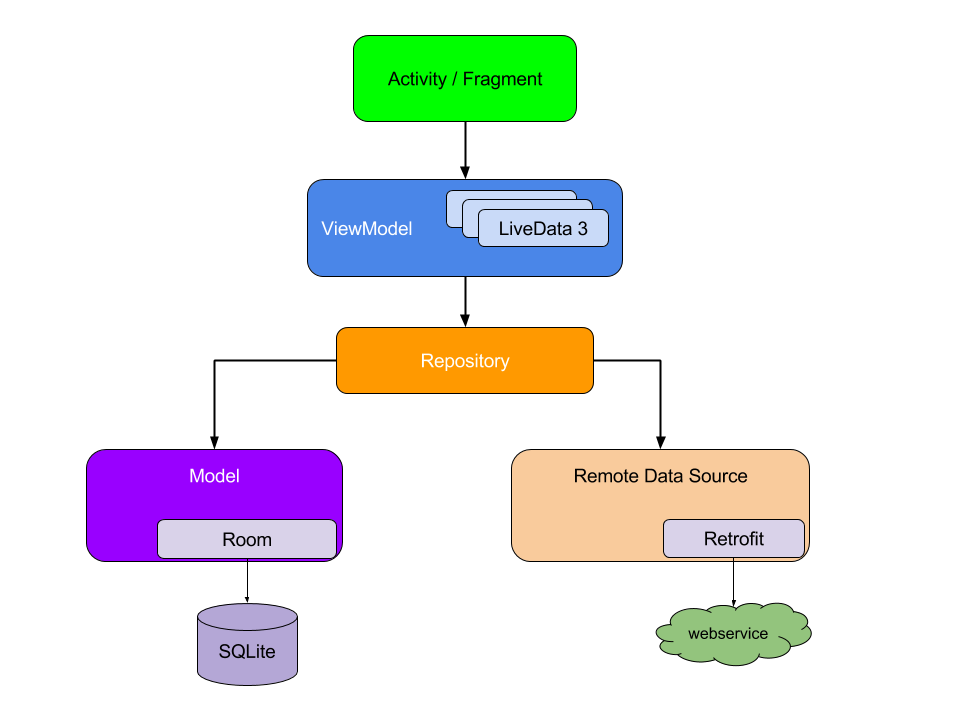
- Jetpack Compose - Android's modern toolkit for building native UI.
- Material 3 - The latest version of Google's open-source design system.
- Dagger Hilt - For dependency injection.
- Retrofit - A type-safe HTTP client for Android and Java.
- Kotlin Coroutines & Flow - For asynchronous programming and reactive data streams.
- Room - A persistence library providing an abstraction layer over SQLite.
- Navigation Compose - For navigating between composables while preserving type safety.
- Algolia InstantSearch - Seamless search integration with Compose support.
- Paging 3 - For loading and displaying pages of data from the network and database.
- Work Manager - To manage background jobs like weather updates.
- Timber - Extensible logging utility.
- AndroidX Splash Screen - Official API for splash screens across all Android versions.
- Gradle Version Catalog - Centralized dependency management.
Instant Weather requires a minimum API level of 21. Clone the repository. You will need an API key i.e. API_KEY from Open Weather to request data. If you don’t already have an account, you will need to create one in order to request an API Key. Also, you will need to create an app on Algolia.
Generate a search only API key i.e. ALGOLIA_API_KEY, the APP ID i.e. ALGOLIA_APP_ID for the app you created and then create an Index under that app, you will need the index name i.e. ALGOLIA_INDEX_NAME to setup the search functionality in this application. You can populate the index with records from here.
Each record follows this structure:
{
    "objectID": "ffe74e4cdddbc_dashboard_generated_id",
    "country": "Zimbabwe",
    "geonameid": 1085510,
    "name": "Epworth",
    "subcountry": "Harare"
}
In your project's root directory, inside the local.properties file (create one if unavailable) include the following lines:
API_KEY = "YOUR_API_KEY"
ALGOLIA_API_KEY = "YOUR_API_KEY"
ALGOLIA_APP_ID = "YOUR_APP_ID"
ALGOLIA_INDEX_NAME = "YOUR_INDEX_NAME"
All contributions are welcome. If you are interested in seeing a particular feature implemented in this app, please open a new issue after which you can make a PR!
MIT License

Copyright (c) 2020 Mayokun Adeniyi

Permission is hereby granted, free of charge, to any person obtaining a copy
of this software and associated documentation files (the "Software"), to deal
in the Software without restriction, including without limitation the rights
to use, copy, modify, merge, publish, distribute, sublicense, and/or sell
copies of the Software, and to permit persons to whom the Software is
furnished to do so, subject to the following conditions:

The above copyright notice and this permission notice shall be included in all
copies or substantial portions of the Software.

THE SOFTWARE IS PROVIDED "AS IS", WITHOUT WARRANTY OF ANY KIND, EXPRESS OR
IMPLIED, INCLUDING BUT NOT LIMITED TO THE WARRANTIES OF MERCHANTABILITY,
FITNESS FOR A PARTICULAR PURPOSE AND NONINFRINGEMENT. IN NO EVENT SHALL THE
AUTHORS OR COPYRIGHT HOLDERS BE LIABLE FOR ANY CLAIM, DAMAGES OR OTHER
LIABILITY, WHETHER IN AN ACTION OF CONTRACT, TORT OR OTHERWISE, ARISING FROM,
OUT OF OR IN CONNECTION WITH THE SOFTWARE OR THE USE OR OTHER DEALINGS IN THE
SOFTWARE.