Building and Bootstrapping
Because of the complexity of the project and the fact that it is bootstrapped, building MAGIC requires a few careful steps.
The bootstrapping strategy depends on compiled binaries (DLL files) because these can be loaded into the CLR without a compiler. The basic idea is to build Clojure.Runtime and MAGIC (and its dependencies and runtime), copy those into Nostrand, and build Nostrand as a final step. The result is a fully bootstrapped REPL with MAGIC as its compiler.
Roughly speaking the process flows like this:
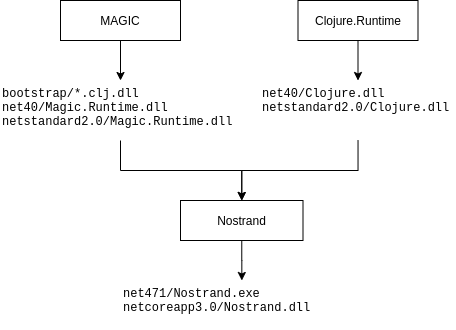
Clojure.Runtime is a normal C# project and is built using the standard dotnet CLI tool.
$ git clone https://github.com/nasser/Clojure.Runtime.git
$ cd Clojure.Runtime
$ dotnet build
...
Clojure -> bin/Debug/netstandard2.0/Clojure.dll
Clojure -> bin/Debug/net40/Clojure.dll
...
You may see some warnings, but that is normal. The relevant files produced are bin/Debug/netstandard2.0/Clojure.dll and bin/Debug/net40/Clojure.dll for .NET Standard and .NET Framework 4.0 respectively (.NET 3.5 is not supported yet).
MAGIC is a Clojure project with dependencies. It is designed to be built from Nostrand, which circularly depends on MAGIC. You can use a released version of Nostrand or a Nostrand you built previously using this procedure to build MAGIC.
MAGIC's Clojure code is built with the following
$ git clone https://github.com/nasser/magic
$ cd magic
$ nos build/bootstrap
This runs the boostrap function in the build.clj file which is configured to compile all of MAGIC and its dependencies into .clj.dll files in a boostrap folder.
You then need to build Magic.Runtime
$ cd Magic.Runtime
$ dotnet build
...
Magic.Runtime -> bin/Debug/net35/Magic.Runtime.dll
Magic.Runtime -> bin/Debug/net40/Magic.Runtime.dll
Magic.Runtime -> bin/Debug/netstandard2.0/Magic.Runtime.dll
...
That produces binaries for .NET 3.5, .NET 4.0 and .NET Standard.
Nostrand is written in C# and Clojure and depends on the binaries produced during the previous steps. You need to copy them into the relevant locations in the Nostrand file tree and then build Nostrand using the dotnet CLI tool.
$ git clone https://github.com/nasser/nostrand
$ cd nostrand
$ cp /path/to/magic/boostrap/* references/
$ cp /path/to/magic/Magic.Runtime/bin/Debug/netstandard2.0/* references-netstandard/
$ cp /path/to/Clojure.Runtime/bin/Debug/netstandard2.0/* references-netstandard/
$ cp /path/to/magic/Magic.Runtime/bin/Debug/net40/* references-net4x/
$ cp /path/to/Clojure.Runtime/bin/Debug/net40/* references-net4x/
$ dotnet build
...
Nostrand -> bin/x64/Debug/netcoreapp3.0/Nostrand.dll
Nostrand -> bin/x64/Debug/net471/Nostrand.exe
...
Replace /path/to/magic with the path you clone magic into and /path/to/Clojure.Runtime with the path you cloned Clojure.Runtime into.
The resulting Nostrand.exe should be usable from Mono, and Nostrand.dll should be usable from dotnet.
$ mono bin/x64/Debug/net471/Nostrand.exe cli-repl
user> ...

$ dotnet bin/x64/Debug/netcoreapp3.0/Nostrand.dll cli-repl
user> ...In some instances, especially when debugging compiler bugs, you may need to build MAGIC from the original ClojureCLR compiler as opposed to building it from itself. To do this, you will need to use a patched Nostrand REPL that is set up for MAGIC bootstrapping.
$ git clone https://github.com/nasser/nostrand
$ cd nostrand
$ git checkout magic-bootstrap
$ dotnet build
...
Nostrand -> bin/x64/Debug/net471/Nostrand.exe
...
You can then use this Nostrand REPL to build MAGIC
$ cd /path/to/magic
$ mono /path/to/nostrand/bin/x64/Debug/net471/Nostrand.exe build/boostrap :portable
Note the addition of the :portable argument which ensures that the resulting binaries are usable in .NET Framework or .NET Standard contexts.