A port of geotiff.js to .Net.
This project adds native .Net handling of geotiff files, the benefits being:
- Easier cross platform compatibility (over GDAL which requires native dependencies to be compiled on the target platform)
- Asynchronous streamed reads from AWS, HTTP servers and filesystems.
- Easier debugging
- Extensibility in C# (e.g. define your own source types, decoders, sidecar file handlers)
- Support for multi-image, multi-tile, multi-strip and compressed tiffs. Currently supported compression methods are Deflate, packbits, LZW and JPEG.
- Support for
.ovrand.msksidecar files.
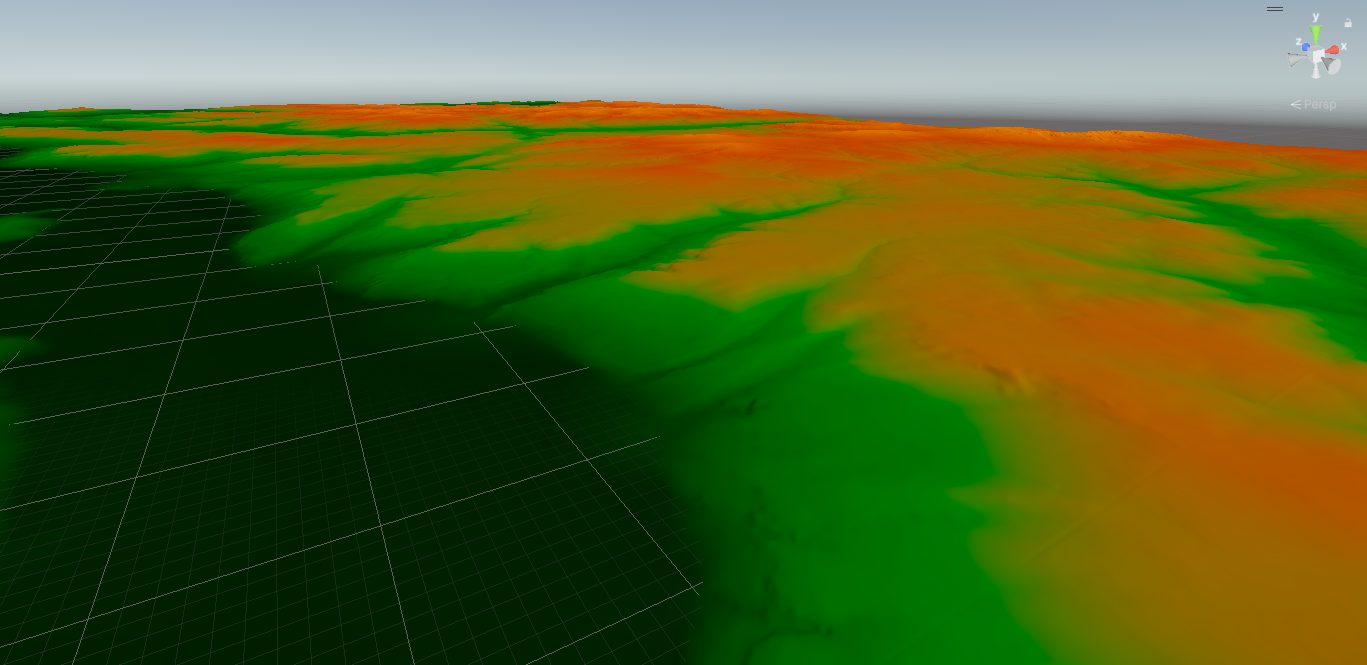
It also opens up the .Net ecosystem to GIS developers, for example, desktop applications, ASP.Net apps and game engines. Here's a cool screenshot of a geotiff visualised in 3D using Unity using this library:
Read everything as a 2D array from the first sample of the first image from a file:
var lonLatTif = Path.Combine(GetDataFolderPath(), "elevationData.tif");
await using var fsSource = new FileStream(lonLatTif, FileMode.Open, FileAccess.Read);
GeoTIFF geotiff = await GeoTIFF.FromStream(fsSource);
GeoTIFFImage image = await geotiff.GetImage(0);
Raster readResult = await image.ReadRastersAsync();
RasterSample sample0 = readResult.GetSampleAt(0);
ushort[] result = sample0.GetUShortArray();
Read data within a bounding box from the first overview of a cloud optimised GeoTiff.
using var httpclient = new HttpClient();
var baseURL = "http://localhost:8002/TCI.tif";
var geoTiffHttpClient = new GeotiffHTTPClient(baseURL, client);
GeoTIFF? cog = await GeoTIFF.FromRemoteClientAsync(geoTiffHttpClient);

var hasOverviews = await cog.HasOverviewsAsync(); // true
GeoTiffImage? firstOverview = await cog.GetImageAsync();

// Note that coordinates are in the same coordinate system as the Tiff itself.
var bbox = new BoundingBox() { XMin = 585640, YMax = 1818911, XMax = 609070, YMin = 1791662 };
var readResult = await firstOverview.ReadRasterBoundingBoxAsync(bbox);
var sample1 = readResult.GetSampleAt(0);
var ushorts = sample1.GetByteArray();
note that if your bounding box extends past the edge of the bounding box of the tiff, it will throw an exception. PR accepted to allow reading past the edge and padding!
Read data at the pixel at a coordinate from an AWS S3 bucket:
using var client = new AmazonS3Client(new AmazonS3Config { ... });
var gtAWSClient = new GeotiffAWSClient("testbucket", "modelOutputDataCOG.tif", client);
GeoTIFF? geotiff = await GeoTIFF.FromRemoteClient(gtAWSClient);
var image = await geotiff.GetImage();
var result = await image.ReadValueAtCoordinate<double>(lon, lat);
var waterVelocityAtCoordinate =  result.GetSampleResultAt(0).GetDoubleArray()[0];
var waterDepthAtCoordinate = result.GetSampleResultAt(1).GetDoubleArray()[0];
Read data from a file that has external overviews in an .ovr sidecar file
var externalOverviewTifPath = Path.Combine(GetDataFolderPath(), "external_overviews.tif");
var ovrFilePath = externalOverviewTifPath + ".ovr";

await using var mainStream = File.OpenRead(externalOverviewTifPath);
await using var ovrStream = File.OpenRead(ovrFilePath);

var overviewMultiTiff = await MultiGeoTIFF.FromStreams(mainStream, new[] { ovrStream });
var imageCount = await overviewMultiTiff.GetImageCount();// 4; 1 from the main file and 3 from the overviews.
var hasOverviews = await overviewMultiTiff.HasOverviews(); // true
Read a tif file, then resample it:
string resampleTestTif = Path.Combine(GetDataFolderPath(), "resampleTest.tif");
await using var stream = File.OpenRead(resampleTestTif);

GeoTIFF? geotiff = await GeoTIFF.FromStreamAsync(stream);
GeoTiffImage image = await geotiff.GetImageAsync();
Raster readResult = await image.ReadRastersAsync();
RasterSample firstSampleOriginal = readResult.GetSampleAt(0);
double[,] firstSampleData= firstSampleOriginal.Get2DDoubleArray();
IRasterResampler resampler = new BiLinearRasterResampler();
Raster resampledResult = resampler.Resample(readResult, 3, 3);

RasterSample first = resampledResult.GetSampleAt(0);
double[,] final = first.Get2DDoubleArray(); // Default BiLinearRasterResampler converts results to double.
There is also NearestNeighbourRasterResampler which is better suited to integer data. However, you can also implement your own resampling algorithms if these don't fit your use case. The default resamplers do not account for masked data.
Note that conceptually, a Raster is independent of the GeoTiffImage that it was read from, and so it stores its own information on its bounding box, affine transformation and resolution. So the affine transformation and resolution will change when resampling.
Read data from a file that you don't know the data type of ahead of time (e.g. a user uploads a file, or iterating over files in a folder)
var unknownDataTypeTif = Path.Combine(GetDataFolderPath(), "mystery.tif");
await using var fsSource = new FileStream(lonLatTif, FileMode.Open, FileAccess.Read);
var geotiff = await GeoTIFF.FromStream(fsSource);
int count = await geotiff.GetImageCount();
var image = await geotiff.GetImage();
var readResult = await image.ReadRastersAsync();

var sample0 = readResult.GetSampleAt(0);

var result = sample0.GetAsDoubleArray(); // Get As -> Converts your datatype, useful if you don't mind much about the datatype.
var result = sample0.GetAsIntArray();


if (result.IsInteger) // any signed or unsigned integer type.
{
    var result = sample0.GetAsIntArray();
}

if (result.IsFloatingPoint) // either a double of float
{
        var result = sample0.GetAsDoubleArray();
}

// If precision or performance are important, or if your data values are close to the upper/ lower limits of the storage type, you can do:
switch (sample0.SampleType)
{
    case GeotiffSampleDataType.UInt8:
	// Your logic for byte sample data here
        break;
    case GeotiffSampleDataType.Int8:
        break;
    case GeotiffSampleDataType.Int16:
        break;
    case GeotiffSampleDataType.UInt16:
        break;
    case GeotiffSampleDataType.UInt32:
        break;
    case GeotiffSampleDataType.UInt64:
        break;
    case GeotiffSampleDataType.Int32:
        break;
    case GeotiffSampleDataType.Float32:
        break;
    case GeotiffSampleDataType.Double:
        break;
    default:
        throw new ArgumentOutOfRangeException();
}
If you want to reshape the data into a 2D array organised so that the first element is at the top left (as per geotiff convention, at its origin):
string lonLatTif = Path.Combine(GetDataFolderPath(), "lat_lon_grid.tif");
await using var fsSource = new FileStream(lonLatTif, FileMode.Open, FileAccess.Read);
GeoTIFF? geotiff = await GeoTIFF.FromStreamAsync(fsSource);
var image = await geotiff.GetImageAsync(0);
var readResult = await image.ReadRastersAsync();
var reshaped = readResult.GetSampleAt(0).GetAs2DDoubleArray();

Console.WriteLine(reshaped[0,0]); // value at the geotiff origin
For reading of tags that are standard (either in the Tiff standard, GeoTiff Standard, or custom tags defined by GDAL), there are two different methods:
For some important tags, especially geotiff specific tags, there are high level methods that tell you the type of value (as defined by the specifications) without you having to guess or otherwise know ahead of time, for example:
GeotiffImage yourImage = ...;

int planarConfig = image.GetPlanarConfiguration();
int nBytesPerPixel = image.GetNumberOfBytesPerPixel();
int predictor = image.GetPredictor();
VectorXYZ origin = image.GetOrigin();
BoundingBox bbox = image.GetBoundingBox();
VectorXYZ resolution = image.GetResolution();

// There are also some higher level methods for important tags that might be represented in multiple different forms:
AffineTransformation? affineTransform = GetOrCalculateAffineTransformation();
Note that the values here are cast to int even if they are stored as other types, because they are used internally by this library to index arrays or other operations.
You can also read tags using this method:
Tag predictorTagMethod1 = image.GetTag(TagFields.Predictor);
// This is the equivalent to the above:
Tag predictorTag = image.GetTag("Predictor");
// Then, you can extract the value from tags using two different methods.
// If you know the type and want to be precise:
ushort predictorValueUShort = predictorTag.GetUShort()

// if you don't know the type and don't mind converting:
int predictorValueConverted = predictorTag.GetAsInt();
double predictorValueDoubleConverted = predictorTag.GetAsDouble();

// or:
if (predictorTag.IsInteger)
{
    int predictorValueConverted = predictorTag.GetAsInt();
}
else if (predictorTag.IsFloatingPoint)
{
    double predictorValueConverted = predictorTag.GetAsDouble();
}
// else its probably a string
predictorTag.GetString();
Finally, if you know the tag id and its not available from this library (e.g. custom tags) you can access it from its numeric ID:
image.GetTag(65000).GetString().ShouldBe("hello world");New contributors are very welcome. If you’d like to get involved, please open an early PR or start a discussion to share your ideas. Check the issues tab for good first items to work on.
The Compliance tests are a set of that compare the read tag and pixel read values between geotiff.js and geotiff.net. The tifs are not kept under version control, but are downloaded from OSGeo's website which is a good sample set to test against.
There are several packages for reading and writing geotiffs.
- GDAL through gdal.netcore - Quite low level. Synchronous. Packages up GDAL for you so you don't have to compile it + the C# bindings yourself.
- ImageSharp - Does not support geotiff tags, COGs or spatial operations, synchronous.
- Mission controller - Does not support COGs or spatial operations, synchronous. Tailored to the requirements of Ardupilot itself.
- DEM.NET - a wrapper around LibTiff.Net. Synchronous. Only filesystem files supported.