Skip to content

feat: multi-admin support for self-hosted dashboard - #4

Open
adiraju13 wants to merge 24 commits into
customer-mirror/base/InsForge-InsForge-1495-20260701T172458Zfrom
customer-mirror/head/InsForge-InsForge-1495-20260701T172458Z
Open

feat: multi-admin support for self-hosted dashboard#4
adiraju13 wants to merge 24 commits into
customer-mirror/base/InsForge-InsForge-1495-20260701T172458Zfrom
customer-mirror/head/InsForge-InsForge-1495-20260701T172458Z

Conversation

@adiraju13

@adiraju13 adiraju13 commented Jul 1, 2026

Copy link
Copy Markdown

Softlight Overview

Current PR UI

Design Score: 1/5

Suggested fixes

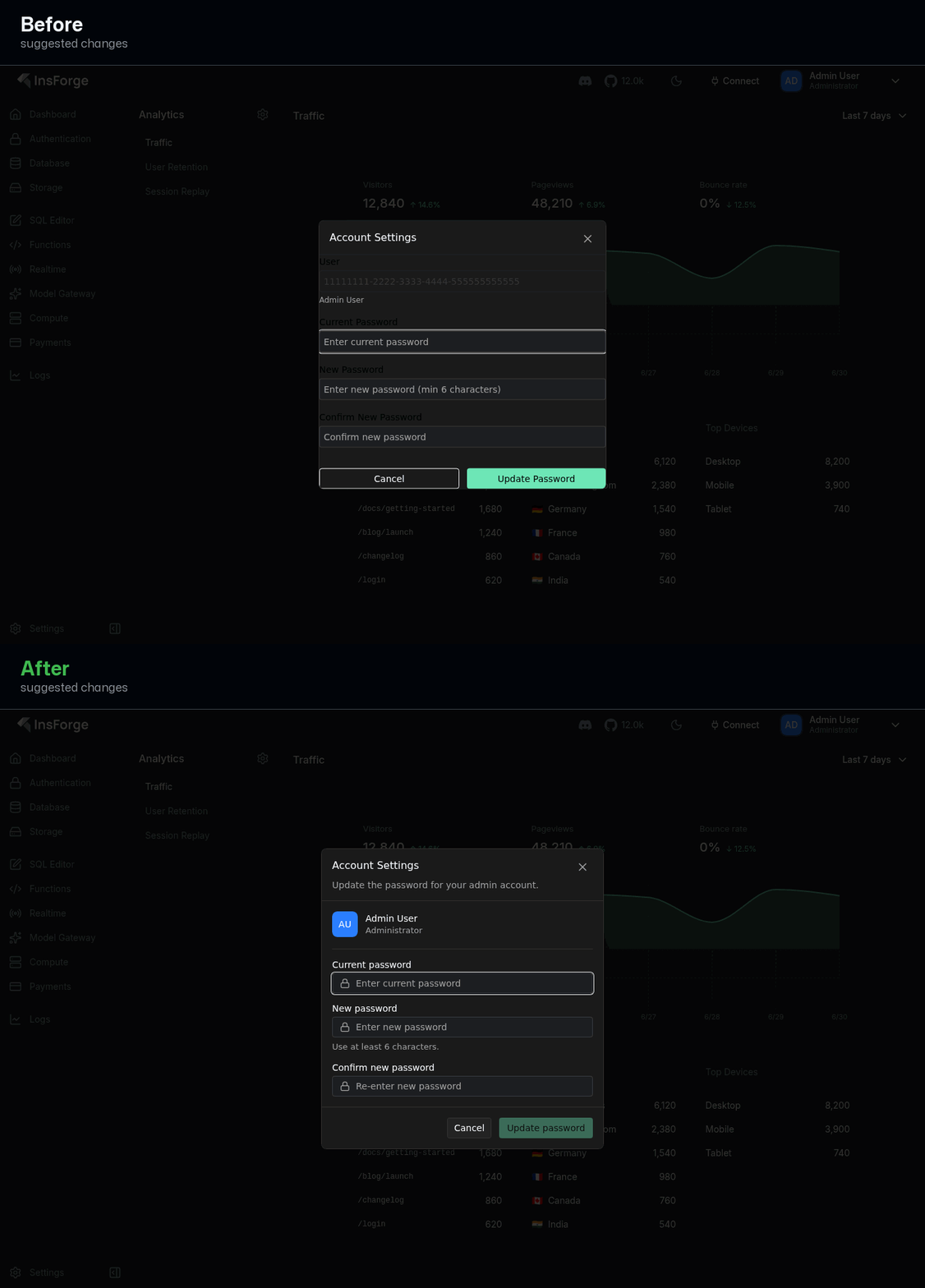
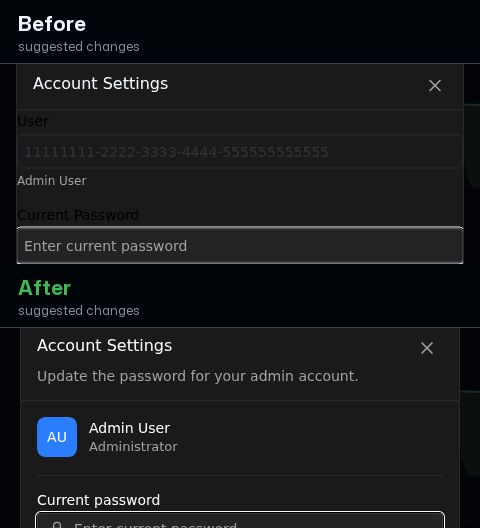
  • Admins now see a recognizable name and role instead of an unreadable ID.
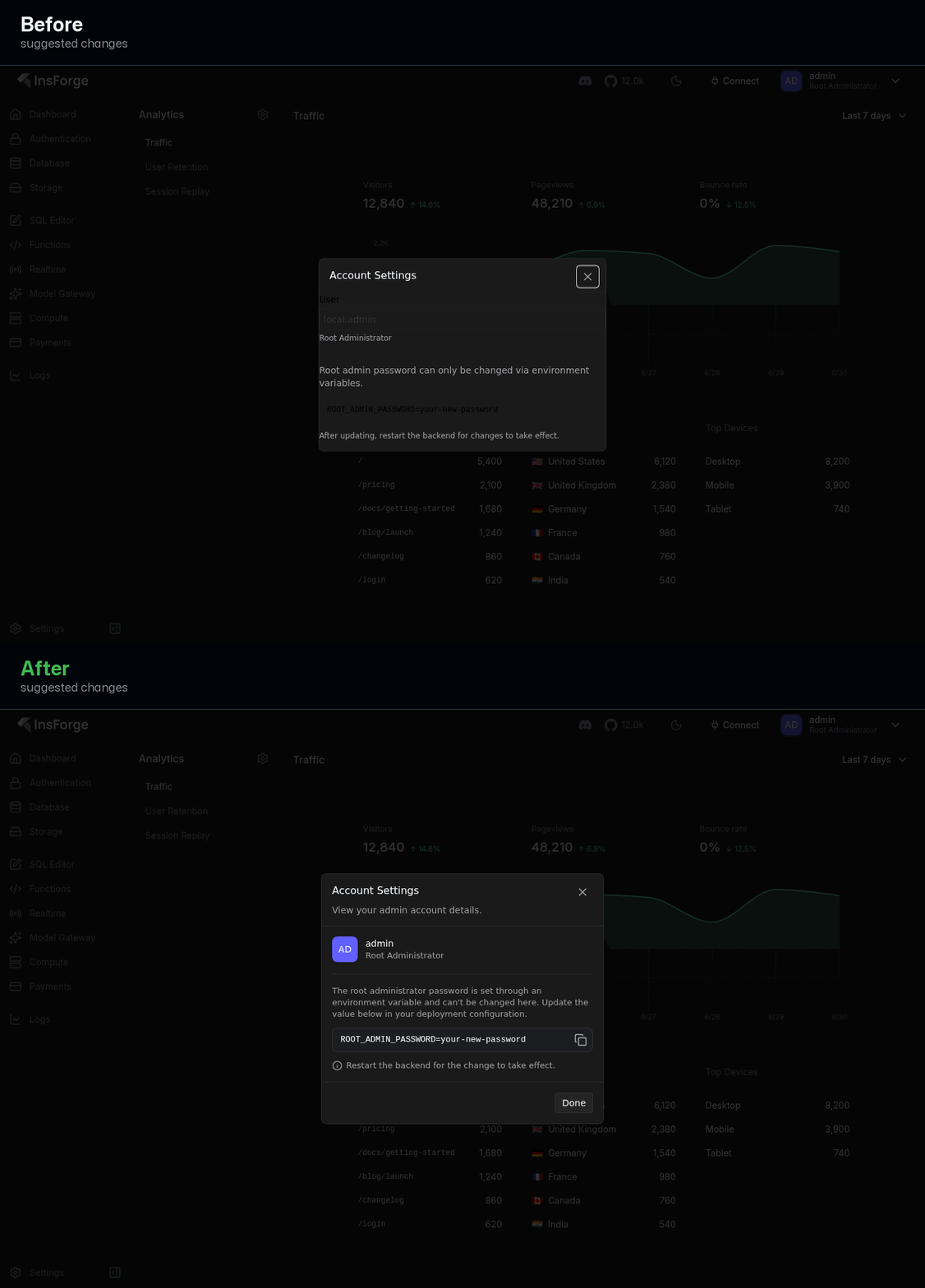
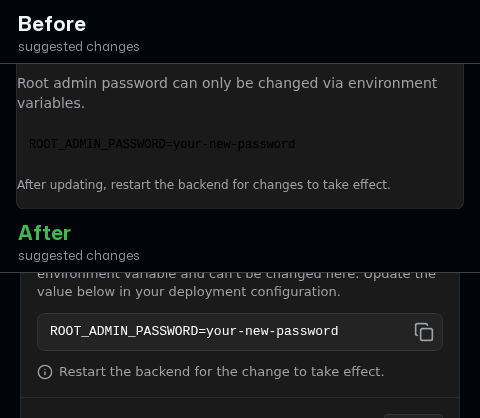
  • Root admins can copy the env variable in one click instead of selecting text manually.
  • The password form now looks contained and orderly instead of crammed to the dialog edges.

Redesign

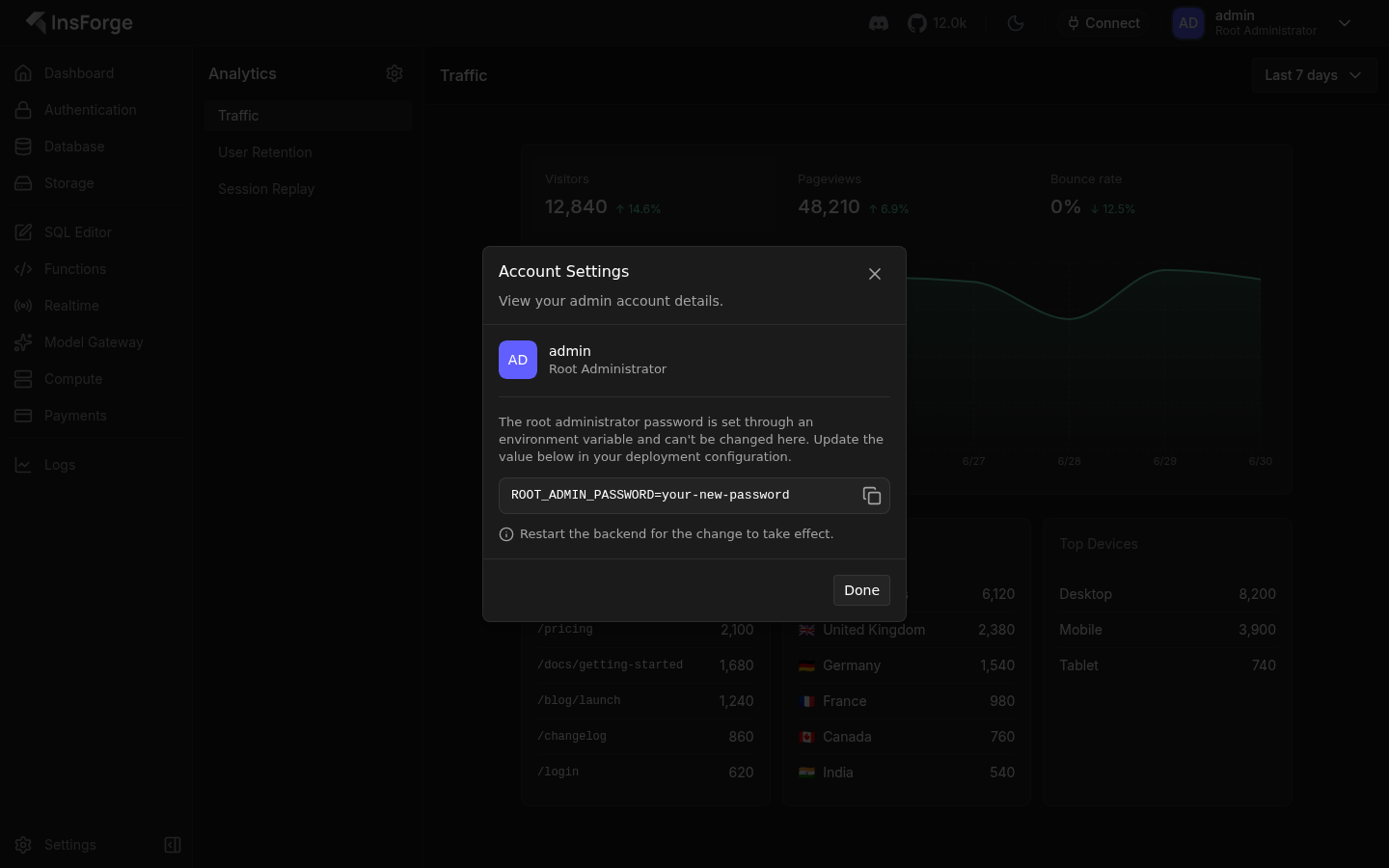
The new Account Settings dialog looked unfinished — fields ran to the edges and it showed a raw account ID — so this pass rebuilt it on the product's own dialog styling with a clear identity header and a tidy layout.

  • Replaced the raw user ID with a real identity header (avatar, name, role) and gave the dialog proper padding, sectioning, and a right-aligned action footer.
  • Made the change-password form feel like a sibling of the sign-in screen, and turned the root notice's env variable into a one-click copyable row.

Fix: [Feature]: Multi-admin support for self-hosted dashboard InsForge#1478

Issue : - InsForge#1478

Summary

This PR implements multi-admin support for self-hosted InsForge deployments, replacing the single env‑based admin with a database‑backed admin model.

What's changed:

Backend:

  • Adds auth.project_admins table (migration 049) with columns for username, password_hash, root status, and audit metadata
  • Creates AdminService with full CRUD operations (create, list, delete, password change)
  • Updates AuthService.adminLogin() to verify against database instead of env vars
  • Adds admin API endpoints: GET /api/auth/admin, POST /api/auth/admin, DELETE /api/auth/admin/:username, POST /api/auth/admin/change-password
  • Adds requireRoot middleware to protect root-only operations

Frontend:

  • Login page now uses username + password instead of email + password
  • Adds AccountSettingsDialog for password change (accessible from avatar dropdown)
  • Adds AdminManagement UI (root only) for creating/deleting admins
  • Updates AuthContext to store admin session and root status
  • Avatar dropdown shows "Admin Management" for root users and "Account Settings" for all admins

Security:

  • Passwords hashed with bcrypt
  • Root admin cannot delete themselves
  • Non-root admins cannot access admin management endpoints
  • Password hashes never returned in API responses

How did you test this change?

Automated Tests:

  • npm run typecheck - passes (0 errors)
  • npm test - passes (1267 tests)
  • ✅ Added unit tests for admin service and migration

Video

Watch Demo Video on YouTube

ScreenShot

Screenshot 2026-06-09 101643
Screenshot 2026-06-09 101658

Manual Testing Performed:

Backend API Testing:

# Login as root admin
POST /api/auth/admin/sessions → returns accessToken and admin object with isRoot=true

# List all admins
GET /api/auth/admin → returns list of admins

# Create new admin (root only)
POST /api/auth/admin → creates admin with provided username/password

# Change password (any admin)
POST /api/auth/admin/change-password → updates password after verifying old password

# Delete admin (root only)
DELETE /api/auth/admin/:username → removes non-root admin


<!-- This is an auto-generated description by cubic. -->
---
## Summary by cubic
Adds multi-admin support to the self-hosted dashboard with DB-backed admins, root-only management, and an Account Settings UI. Keeps the env-based root (`sub: 'local:admin'`), authenticates DB admins, includes `username` in the session, and fixes deletion and 404 issues (addresses #1478).

- **New Features**
  - Migration 052 adds `auth.project_admins`; introduces `AdminService`; seeds the root admin from `ROOT_ADMIN_USERNAME`/`ROOT_ADMIN_PASSWORD` without overwriting an existing password.
  - Auth: async `adminLogin` checks env root first, then DB admins (UUID `sub`); adds `requireRoot` for management routes; timing-attack mitigation via bcrypt dummy compare.
  - APIs: root-only list/create/delete with safeguards (no deleting root or self) and self change-password; `GET /sessions/current` now returns `username`; validates usernames with `^[a-zA-Z0-9_-]{3,50}$`.
  - Dashboard: header shows the signed-in admin name and role; adds Account Settings dialog (non-root can change password; root shows env-based change guidance); adds `createAdminSchema` and `changeAdminPasswordSchema` in `@insforge/shared-schemas`.

- **Bug Fixes**
  - Fixed UUID cast error in admin deletion flow to ensure `DELETE /api/auth/admin/:username` works reliably.
  - Fixed a review 404 encountered during navigation.

<sup>Written for commit 05f670d38098d091e317e9f693b6cd3dea706c80. Summary will update on new commits.</sup>

<a href="https://cubic.dev/pr/InsForge/InsForge/pull/1495?utm_source=github" target="_blank" rel="noopener noreferrer" data-no-image-dialog="true"><picture><source media="(prefers-color-scheme: dark)" srcset="https://www.cubic.dev/buttons/review-in-cubic-dark.svg"><source media="(prefers-color-scheme: light)" srcset="https://www.cubic.dev/buttons/review-in-cubic-light.svg"><img alt="Review in cubic" src="https://www.cubic.dev/buttons/review-in-cubic-dark.svg"></picture></a>

<!-- End of auto-generated description by cubic. -->


<!-- Macroscope's pull request summary starts here -->
<!-- Macroscope will only edit the content between these invisible markers, and the markers themselves will not be visible in the GitHub rendered markdown. -->
<!-- If you delete either of the start / end markers from your PR's description, Macroscope will append its summary at the bottom of the description. -->
> [!NOTE]
> ### Add multi-admin support to the self-hosted dashboard
> - Introduces a `auth.project_admins` database table (via [migration 052](https://github.com/InsForge/InsForge/pull/1495/files#diff-13e4c9e2053643f83ace5e431e8c9c241a3060391ca0c055afb6ee4f7b847716)) and a new [`AdminService`](https://github.com/InsForge/InsForge/pull/1495/files#diff-62715d27301e6cb3e8cea03192b456545b048f329d8078c37f58a36483175038) for DB-backed admin management with bcrypt password hashing and soft deletes.
> - Extends `adminLogin` in [`AuthService`](https://github.com/InsForge/InsForge/pull/1495/files#diff-efb526d1eb72363a928158c9f2b98bf73e757c5610a4e10e00ed067d3075738c) to support both the env-configured root admin (`sub: 'local:admin'`) and database admins (sub set to their UUID).
> - Adds root-only API endpoints to list, create, and delete admins, plus a `POST /auth/admin/change-password` endpoint available to all admins.
> - Adds a `requireRoot` middleware that restricts management endpoints to the root admin JWT (`sub === 'local:admin'`).
> - Adds an Account Settings dialog to the dashboard header where non-root admins can change their password; root admins see instructions to update via environment variables.
> - Risk: [`AdminService.deleteAdmin`](https://github.com/InsForge/InsForge/pull/1495/files#diff-62715d27301e6cb3e8cea03192b456545b048f329d8078c37f58a36483175038) has a SQL query with two placeholders but only one bound parameter, causing a runtime error when delete is invoked.
>
> <!-- Macroscope's review summary starts here -->
>
> <sup><a href="https://app.macroscope.com">Macroscope</a> summarized 05f670d.</sup>
> <!-- Macroscope's review summary ends here -->
>
<!-- Macroscope's pull request summary ends here -->

<!-- This is an auto-generated comment: release notes by coderabbit.ai -->
## Summary by CodeRabbit

* **New Features**
  * Full admin account management (create/list/delete admins); sessions now include username and root flag.
  * Account Settings dialog to change password; header shows admin username/role and profile actions.
  * Startup seeds a configured root admin; DB migration adds project-admin storage with root flag.

* **Chores**
  * Bumped bcryptjs and added types.
  * Minor ESLint/prettier config tweak.

* **Tests**
  * Added unit tests for migration and admin auth/management.

* **Documentation**
  * Noted legacy env var fallbacks for root admin credentials.
<!-- end of auto-generated comment: release notes by coderabbit.ai -->

Amresh-01 added 24 commits June 8, 2026 18:35
…write, handle admin session refresh, and add unit tests
…ns`Adds regex validation to createAdminSchema so usernames containing path-separator characters (e.g. '/') cannot be created. Such usernames would make the DELETE /api/auth/admin/:username route permanently unreachable since Express only matches a single path segment.`Allowed characters: a-z, A-Z, 0-9, hyphens, underscores.
- Add .gitattributes with * text=auto eol=lf to enforce LF across all
  text files and prevent Windows autocrlf from breaking prettier/eslint
- Set git core.autocrlf=false for this repo
- Fix CRLF in backend/src/api/routes/docs/index.routes.ts
- Normalize all packages (shared-schemas, ui, dashboard, backend) to LF

All 5 packages now pass npm run lint.
@softlight

softlight Bot commented Jul 1, 2026

Copy link
Copy Markdown

Redesign

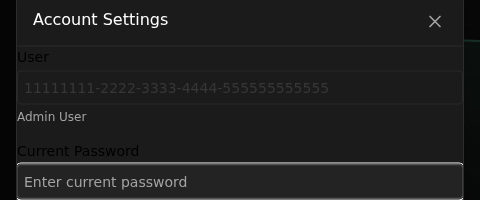
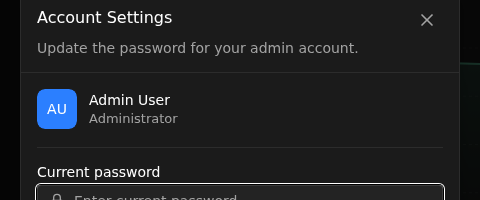
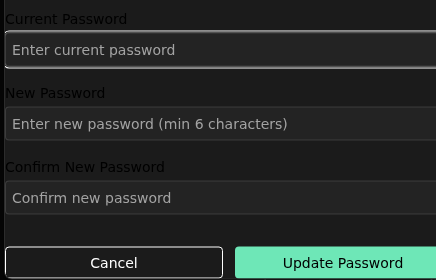
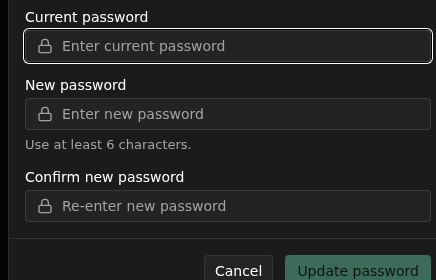
Change password: real identity header and tidy form replace an edge-to-edge layout showing a raw ID

Before · After

Change password

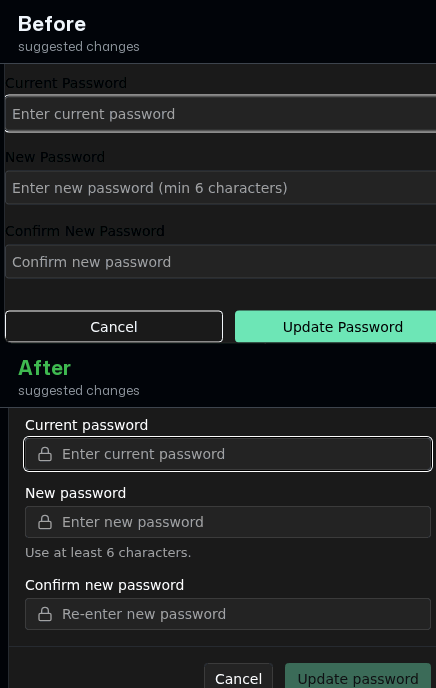
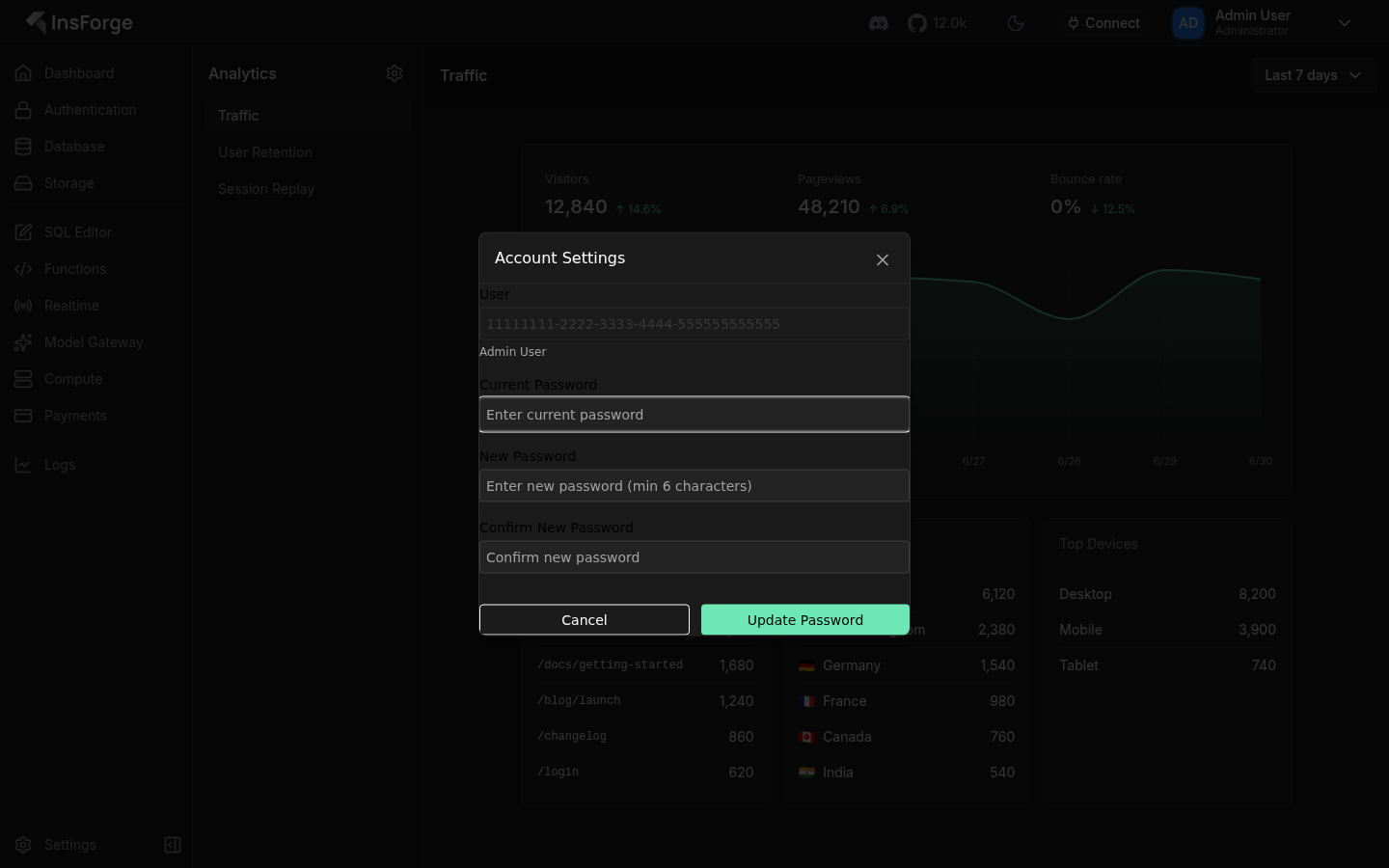
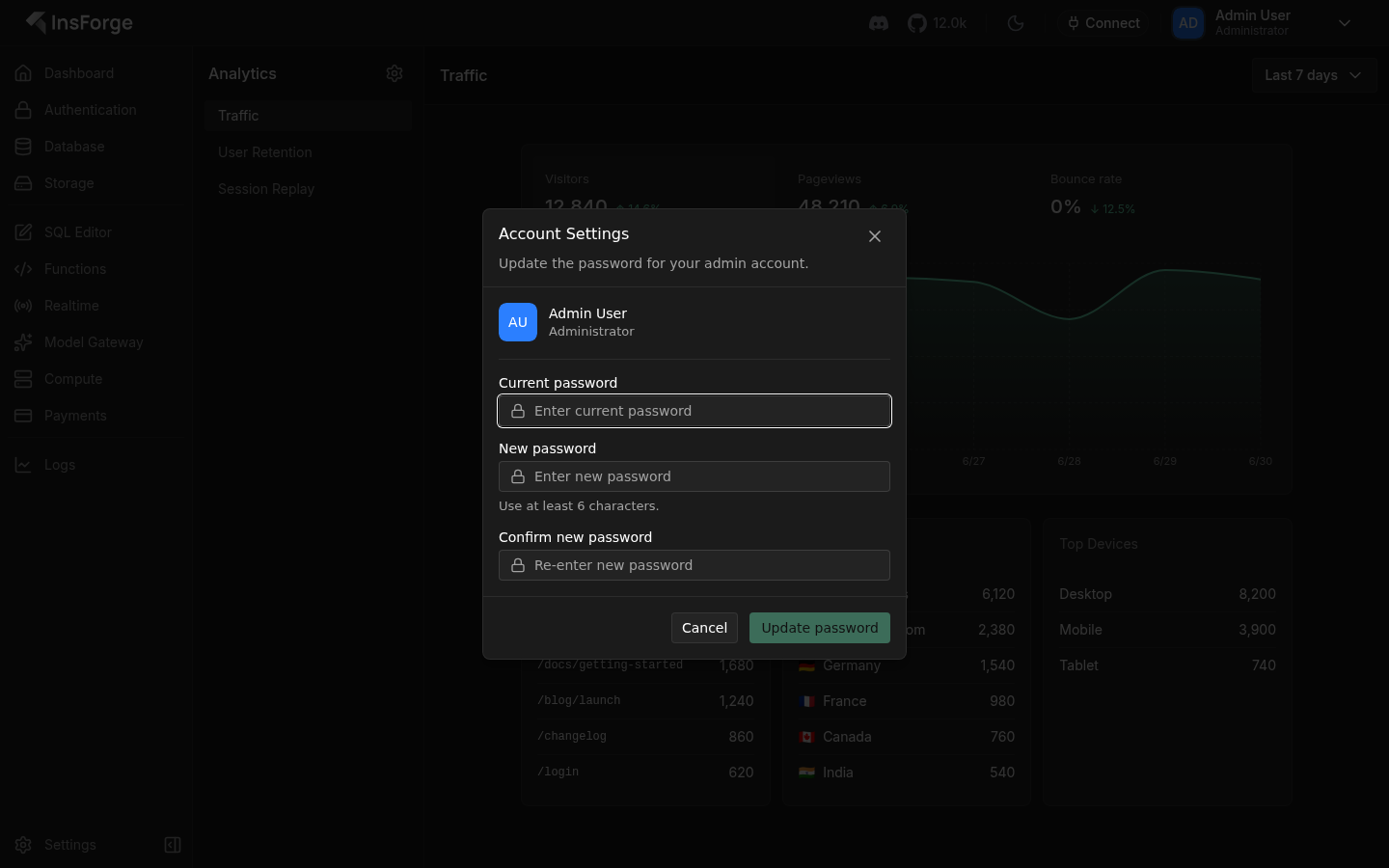
  • The 'User' field printed a raw UUID; it now shows an avatar with the username and 'Administrator' role, matching the header.
  • Fields no longer run to the dialog edges — padded body, labeled inputs with lock icons like sign-in, a '6 characters' hint, and a bordered footer with Cancel + a clear 'Update password'.

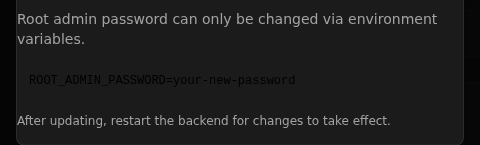
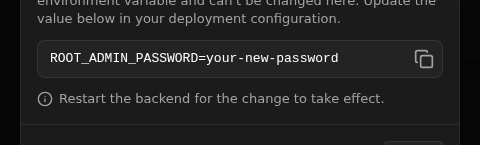
Root notice: friendly identity and a one-click copyable env variable replace a raw ID and a dead code box

Before · After

Root notice

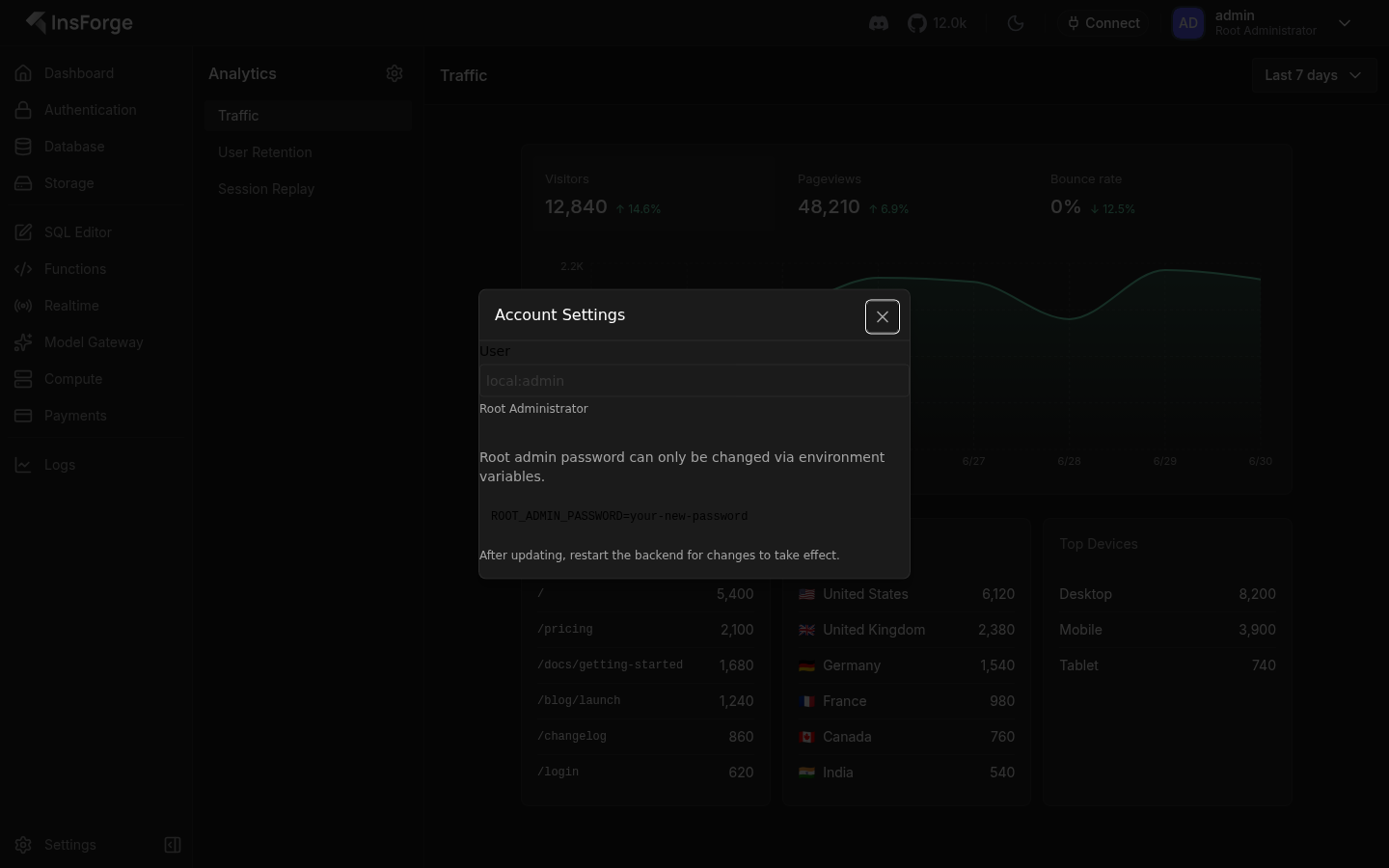
  • Root identity showed 'local:admin'; it now reads 'admin · Root Administrator' with an avatar.
  • The ROOT_ADMIN_PASSWORD line is now a proper code row with a one-click copy button plus a clear restart reminder, all in the same padded, footer-terminated layout as the admin form.
Prompt to build with AI
This is a comment left during a design review.

Goal:
Apply the Designer's pass shown in the before/after references below. Preserve product behavior, routes, data meaning, and the local design system while matching the stronger composition, hierarchy, spacing, alignment, and visual balance.

Current PR screenshots:
- Account Settings dialog — non-root password change form current PR: https://drive.orianna.ai/1de49065bdde59dca8024f8ea9e61d36.png
- Account Settings dialog — root admin env-variable notice current PR: https://drive.orianna.ai/1495135cb48d80edb85dad453dc83ef3.png

After/Designer's pass screenshots:
- Account Settings dialog — non-root password change form prototype: https://drive.orianna.ai/e953593c3d5eb37af88ec8a4b4e18d10.png
- Account Settings dialog — root admin env-variable notice prototype: https://drive.orianna.ai/0d91b3b9e6b7c2862c0ed46fb0a96512.png

Context:
In the original dialog the form sat flush against the dialog walls, the 'User' field printed a raw database ID (a UUID for admins, 'local:admin' for root), and the buttons were full-width inside the body with no footer. This pass rebuilt it with the product's standard dialog structure — a header with a one-line description, an identity header (avatar + name + role) separated by a divider, clearly-labeled fields, and a bordered footer with a quiet Cancel and a clear primary action — so both admin and root states read as one polished, trustworthy account surface.

What the Designer's pass changed:
- Change password (admin): the 'User' field used to show a raw ID like 11111111-2222-… and the inputs touched the dialog edges. Now the top shows a clean identity header (avatar, name, role), the three password fields match the sign-in screen with clear labels and a 'use at least 6 characters' hint, and the actions sit in a proper footer.
- Account notice (root): the root's identity showed 'local:admin' and the env variable was a dead gray box you had to select by hand. Now it shows the friendly 'admin · Root Administrator' identity, a short explanation, and a one-click copy button on the ROOT_ADMIN_PASSWORD row, with a clear restart reminder.
- Consistency: both states now share the exact same header, identity header, divider, and footer, so switching between an admin and the root account feels like the same considered screen.

Use the before screenshots to understand the current surface and the after screenshots as the target direction. Make the smallest coherent set of source changes that gets the existing app to that visual result, then render and inspect the UI before stopping.

@softlight

softlight Bot commented Jul 1, 2026

Copy link
Copy Markdown

Before/after suggested changes

Before · After

Real account identity replaces a raw ID

The before showed the account as a raw ID string (11111111-2222-…) that means nothing to an admin. The after leads with a clear identity header — avatar, name, and role — so it's obvious whose password is being changed.

Prompt to fix with AI
This is a comment left during a design review.

Comment:
**Real account identity replaces a raw ID**
The before showed the account as a raw ID string (11111111-2222-…) that means nothing to an admin. The after leads with a clear identity header — avatar, name, and role — so it's obvious whose password is being changed.

Issue:
The dialog renders a disabled 'User' Input bound to displayName = user?.sub || 'Admin', which surfaces the raw UUID sub value, plus a small caption below it.

Suggested fix:
Adopt the redesign's identity header: replace the disabled User input with the `identity` block (Avatar + AvatarFallback initials via getUserInitials/getAvatarColor, displayName from user?.username || user?.sub, and roleLabel). Prefer user?.username over the raw sub for displayName.

Screenshots:
- Before: https://drive.orianna.ai/d8a2db275a8e68084be1648fa008ce1f.png
- After: https://drive.orianna.ai/7226ac67c19e06918ac193056e06c489.png
Use these screenshot URLs as visual evidence if your environment can open remote images.

How can I resolve this? Keep the fix scoped to the PR-touched UI and preserve existing design-system patterns.

@softlight

softlight Bot commented Jul 1, 2026

Copy link
Copy Markdown

Before/after suggested changes

Before · After

One-click copy for the env variable

Before, the ROOT_ADMIN_PASSWORD line sat in a dead gray box you had to select by hand. Now it's a clear row with a one-click copy button, so root admins can grab the variable without fiddling.

Prompt to fix with AI
This is a comment left during a design review.

Comment:
**One-click copy for the env variable**
Before, the ROOT_ADMIN_PASSWORD line sat in a dead gray box you had to select by hand. Now it's a clear row with a one-click copy button, so root admins can grab the variable without fiddling.

Issue:
The root notice renders the ROOT_ENV_VAR string inside a static styled box with no affordance to copy it.

Suggested fix:
Adopt the redesign's copyable env row: render ROOT_ADMIN_PASSWORD in a row with the `CopyButton` from @insforge/ui aligned right, as in the diff.

Screenshots:
- Before: https://drive.orianna.ai/1778d9da3e68e609a7183f8cac6c5eee.png
- After: https://drive.orianna.ai/da42a7e52d400914bac7184d45d78b38.png
Use these screenshot URLs as visual evidence if your environment can open remote images.

How can I resolve this? Keep the fix scoped to the PR-touched UI and preserve existing design-system patterns.

@softlight

softlight Bot commented Jul 1, 2026

Copy link
Copy Markdown

Before/after suggested changes

Before · After

Password fields no longer bleed to the dialog edges

Before, the password inputs stretched edge-to-edge and crowded together with no breathing room. After, the fields are padded and evenly spaced with clear labels, a helpful hint, and lock icons, so the form reads as one tidy sequence.

Prompt to fix with AI
This is a comment left during a design review.

Comment:
**Password fields no longer bleed to the dialog edges**
Before, the password inputs stretched edge-to-edge and crowded together with no breathing room. After, the fields are padded and evenly spaced with clear labels, a helpful hint, and lock icons, so the form reads as one tidy sequence.

Issue:
The form uses space-y-4 with inputs that extend to the DialogContent edges and no internal padding, producing a cramped edge-to-edge layout.

Suggested fix:
Adopt the redesign's padded, sectioned layout: wrap fields in DialogBody with consistent spacing, use the shared `passwordField` helper (label + Lock icon input + hint), and move actions into DialogFooter.

Screenshots:
- Before: https://drive.orianna.ai/41642e81367d9a4c8ab05598e9bf178f.png
- After: https://drive.orianna.ai/abcb733be8e365fea3ad25508631ad0c.png
Use these screenshot URLs as visual evidence if your environment can open remote images.

How can I resolve this? Keep the fix scoped to the PR-touched UI and preserve existing design-system patterns.

Sign up for free to join this conversation on GitHub. Already have an account? Sign in to comment

Labels

None yet

Projects

None yet

Development

Successfully merging this pull request may close these issues.

2 participants