LEVEL22
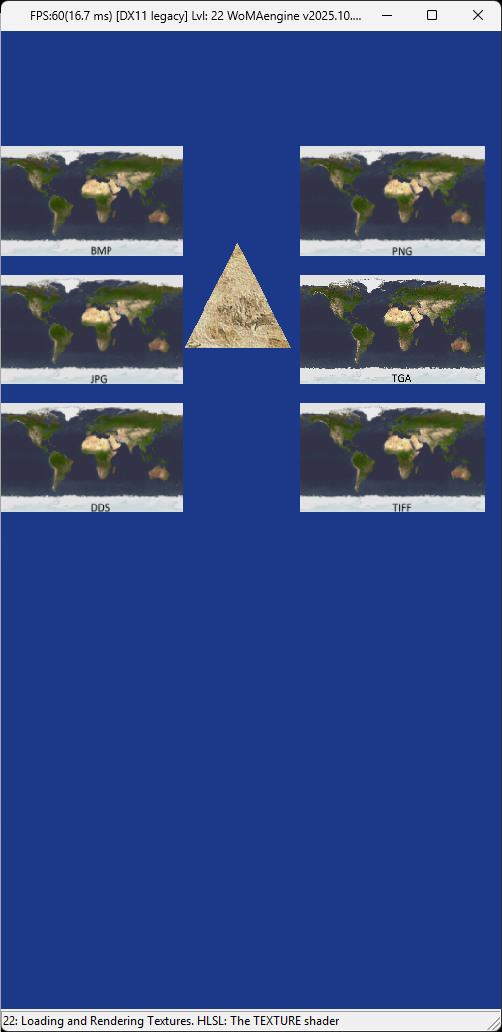
Welcome to Level 22 of the WoMA3Dengine tutorial series.
In this level you will:
- Load multiple texture formats (BMP, PNG, JPG, TGA, DDS, TIFF)
- Auto‑generate UV mapping for quads and triangles
- Display textures in organized rows
- Prepare texture sampling logic for Level 23
- Render a textured triangle (UV‑mapped)
This demo renders two sets of objects:
Each quad uses a different file format:
- Line 1 → BMP, PNG
- Line 2 → JPG, TGA
- Line 3 → DDS, TIFF
This demonstrates the engine’s multi‑format loader.
- Auto‑generated UVs
- Used later in Level 23 for lighting
Click to expand — CPU-side object creation
ModelTextureVertexType vertex;

#if (!defined  NO_SCENE_IMAGE_LOAD) || defined INTRO_DEMO
{
    // DEMO-1
    float X = 2.5f, Y = 1.5f, Z = 0;
    CREATE_VERTEXVECTOR_SQUAD_MODEL_OPTIMIZED(SquareTextureVertexVector, X, Y, Z);
    MAP_XZtoUV(SquareTextureVertexVector, X, Y, Z);

    #define X_pos 4.1f
    #define Y_pos +3

    // Line 1
    #if defined USE_IMAGE_BMP
        initLoadTexture3D(m_bmp3DModel, LEVEL22_IMAGE_bmp, SquareTextureVertexVector, IndexSquarList, SHADER_TEXTURE);
        m_bmp3DModel->rotateX(-3.14f / 2.0f);
        m_bmp3DModel->translation(-X_pos, Y_pos+8, 5);
    #endif

    #if defined USE_IMAGE_PNG
        initLoadTexture3D(m_png3DModel, LEVEL22_IMAGE_png, SquareTextureVertexVector, IndexSquarList, SHADER_TEXTURE);
        m_png3DModel->rotateX(-3.14f / 2.0f);
        m_png3DModel->translation(X_pos, Y_pos+8, 5);
    #endif

    // Line 2
    #if defined USE_IMAGE_JPG
        initLoadTexture3D(m_jpg3DModel, LEVEL22_IMAGE_jpg, SquareTextureVertexVector, IndexSquarList, SHADER_TEXTURE);
        m_jpg3DModel->rotateX(-3.14f / 2.0f);
        m_jpg3DModel->translation(-X_pos, Y_pos+4.5, 5);
    #endif

    #if defined SUPPORT_TGA
        initLoadTexture3D(m_tga3DModel, LEVEL22_IMAGE_tga, SquareTextureVertexVector, IndexSquarList, SHADER_TEXTURE);
        m_tga3DModel->rotateX(-3.14f / 2.0f);
        m_tga3DModel->translation(X_pos, Y_pos+4.5, 5);
    #endif

    // Line 3
    #if defined USE_IMAGE_DDS
        initLoadTexture3D(m_dds3DModel, LEVEL22_IMAGE_dds, SquareTextureVertexVector, IndexSquarList, SHADER_TEXTURE);
        m_dds3DModel->rotateX(-3.14f / 2.0f);
        m_dds3DModel->translation(-X_pos, Y_pos+1, 5);
    #endif

    #if defined USE_IMAGE_TIFF
        initLoadTexture3D(m_tif3DModel, LEVEL22_IMAGE_tif, SquareTextureVertexVector, IndexSquarList, SHADER_TEXTURE);
        m_tif3DModel->rotateX(-3.14f / 2.0f);
        m_tif3DModel->translation(X_pos, Y_pos+1, 5);
    #endif
}
#endif

#if defined SCENE_TEXTURE
{
    // DEMO-2 — Textured triangle
    float X = 1, Y = 1, Z = 1;
    ModelTextureVertexType vertex;
    CREATE_VERTEXVECTOR_TRIANGLE_MODEL_OPTIMIZED(TriangleTextureVertexVector, X, Y, Z);
    MAP_XYtoUV(TriangleTextureVertexVector, X, Y, Z);

    initLoadTexture3D(
        m_1stTriangleTextureVertexModel,
        LEVEL22_DEMO_TEXTURE,
        TriangleTextureVertexVector,
        IndexTriangleList,
        SHADER_TEXTURE
    );
}
#endifClick to expand — CPU-side render logic
#if !defined NO_SCENE_IMAGE_LOAD || defined INTRO_DEMO
// DEMO-1 — Image grid
#if defined INTRO_DEMO
    if (RENDER_PAGE == 22 || FORCE_RENDER_ALL)
#endif
{
    // Line 1
    #if defined USE_IMAGE_BMP
        m_bmp3DModel->Render(pContext);
    #endif
    #if defined USE_IMAGE_PNG
        m_png3DModel->Render(pContext);
    #endif

    // Line 2
    #if defined USE_IMAGE_JPG
        m_jpg3DModel->Render(pContext);
    #endif
    #if defined USE_IMAGE_TIFF
        m_tif3DModel->Render(pContext);
    #endif

    // Line 3
    #if defined USE_IMAGE_DDS
        m_dds3DModel->Render(pContext);
    #endif
    #if defined SUPPORT_TGA
        m_tga3DModel->Render(pContext);
    #endif
}
#endif

// DEMO-2 — Triangle
#if defined INTRO_DEMO
    if (RENDER_PAGE == 22 || FORCE_RENDER_ALL)
#endif
{
    m_1stTriangleTextureVertexModel->translation(0, 6.5, -5);
    m_1stTriangleTextureVertexModel->Render(pContext);
}Click to expand — 022Texture.hlsl
// --------------------------------------------------------------------------------------------
// Filename: 022Texture.hlsl
// --------------------------------------------------------------------------------------------
...
float4 PS_Main(PSIn input) : SV_TARGET
{
    int mode = int(saturate(input.texCoords.x) * 5.0);
    float4 textureColor = GetShaderTexture(shaderTexture, input.texCoords, 0, mode);

#if defined PS_USE_FOG
    float4 fogColor = float4(87/256.0f,87/256.0f,87/256.0f,1);
#endif

    return textureColor;
}✔ Demonstrates multiple image loaders
✔ Auto UV-mapping for quads and triangles
✔ Prepares filtering logic for Level 23
✔ Shows a clean grid‑based rendering layout
✔ Introduces texture shader pipeline
- Software filtering
- Per-pixel lighting
- UV-driven sampler selection
Generated automatically — WoMA3Dengine Wiki