Lightweight API driven Authoritative DNS server.
- All records can be edited over REST API
- All changes are effective immediatelly (or as long as it takes for Redis - eg. the backend for storing data - to distribute changes from master to replica instances)
- Basic record types (A, AAAA, CNAME, TXT, MX, CAA, NS, TLSA)
- ANAME pseudo-record for apex domains
- URL pseudo-record for HTTP and HTTPS redirects. Valid HTTPS certificates are generated automatically, HTTPS host gets A+ rating from SSLabs.
- URL record can be turned into a Cloudflare-like proxying by using
proxy=trueflag. Though, while Cloudflare makes things faster then PendingDNS makes things slightly slower due to not caching anything. - Periodic health checks to filter out unhealthy A/AAAA records
- DNSSEC with online (live) signing, enabled per zone over the API
- Lightweight
- Can be geographically distributed. All writes go to central Redis master, all reads are done from local Redis replica
- Request certificates over API
Limitations
- No support for zone files, all records must be managed over API
- Only the most basic and common record types
- DNSSEC uses online signing; denial of existence is NODATA (NOERROR) with compact NSEC "black lies" (no NSEC3, no true NXDOMAIN). Algorithm rollover is supported by re-enabling a zone with a new algorithm; there is no automated scheduled key rollover
- Only plain old DNS over UDP and TCP, no DoH, no DoT
- UDP responses are capped at the smaller of the requestor's advertised EDNS payload size and the server's configured
[dnssec] udpPayloadSize(1232 by default; 512 when the requestor advertises no EDNS), and truncated with TC=1 above that limit, per RFC 1035; clients then retry over TCP - Barely tested on Project Pending. Do not use this for mission critical domains. PendingDNS is only good for leftover domains, ie. for development and testing.
- Node.js, v18 or newer
- Redis, any version should do as only basic commands are used
$ npm install --omit=dev
$ npm start
If you want to run PendingDNS as a SystemD service, then there's an example service file with comments.
As root run the following commands to set up PendingDNS:
$ cd /opt
$ git clone https://github.com/postalsys/pending-dns.git
$ cd pending-dns
$ npm install --omit=dev
$ cp systemd/pending-dns.service /etc/systemd/system
$ cp config/default.toml /etc/pending-dns.toml
Edit the configuration file /etc/pending-dns.toml and make sure that you have correct configuration.
Also make sure that /etc/systemd/system/pending-dns.service looks correct.
Run the following commands as root
$ systemctl enable pending-dns
$ systemctl start pending-dns
There might be already a recursive DNS server listening on 127.0.0.1:53 (or more commonly, SystemD stub resolver on 127.0.0.53:53) so you can't bind your DNS server to 0.0.0.0. Instead bind directly to your outbound interface, you can usually find these by running ip a.
$ ip a
  …
  inet 172.31.41.89/20 brd 172.31.47.255 scope global ens5
  …
[dns]
  port = 53
host = "172.31.41.89"If you want to use PendingDNS as an authoritative DNS server for your domains then you need at least 2 instances of the server.
Additionally you need to set up both A and so-called GLUE records for the domain names of your name servers. Not all DNS providers allow to set GLUE records.
Here's an example how A records are set up for ns01.pendingdns.com and ns02.pendingdns.com that manage domains hosted on Project Pending:
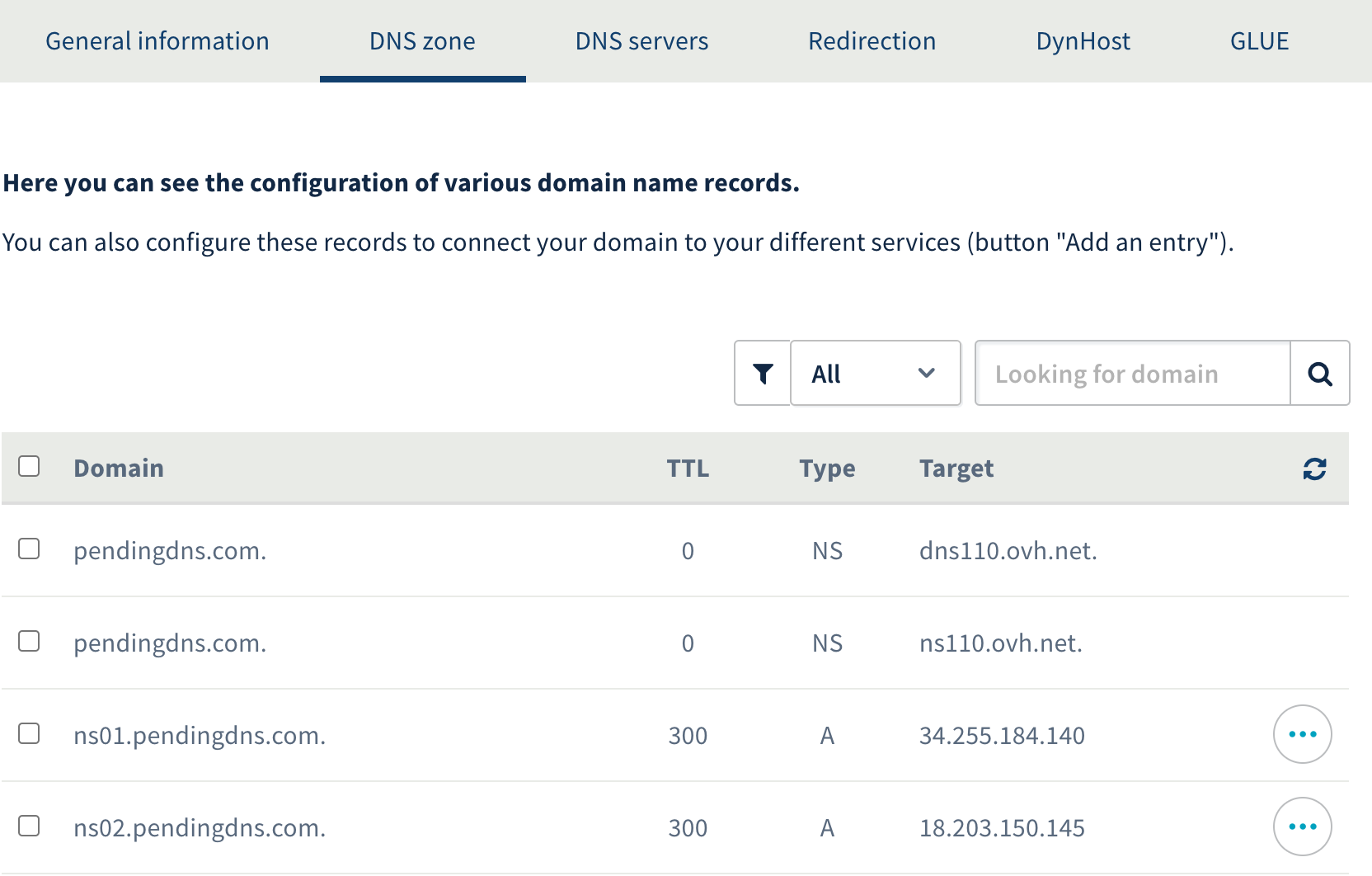
Registrar and DNS provider for these domains is OVH but you can use any registrar with GLUE support
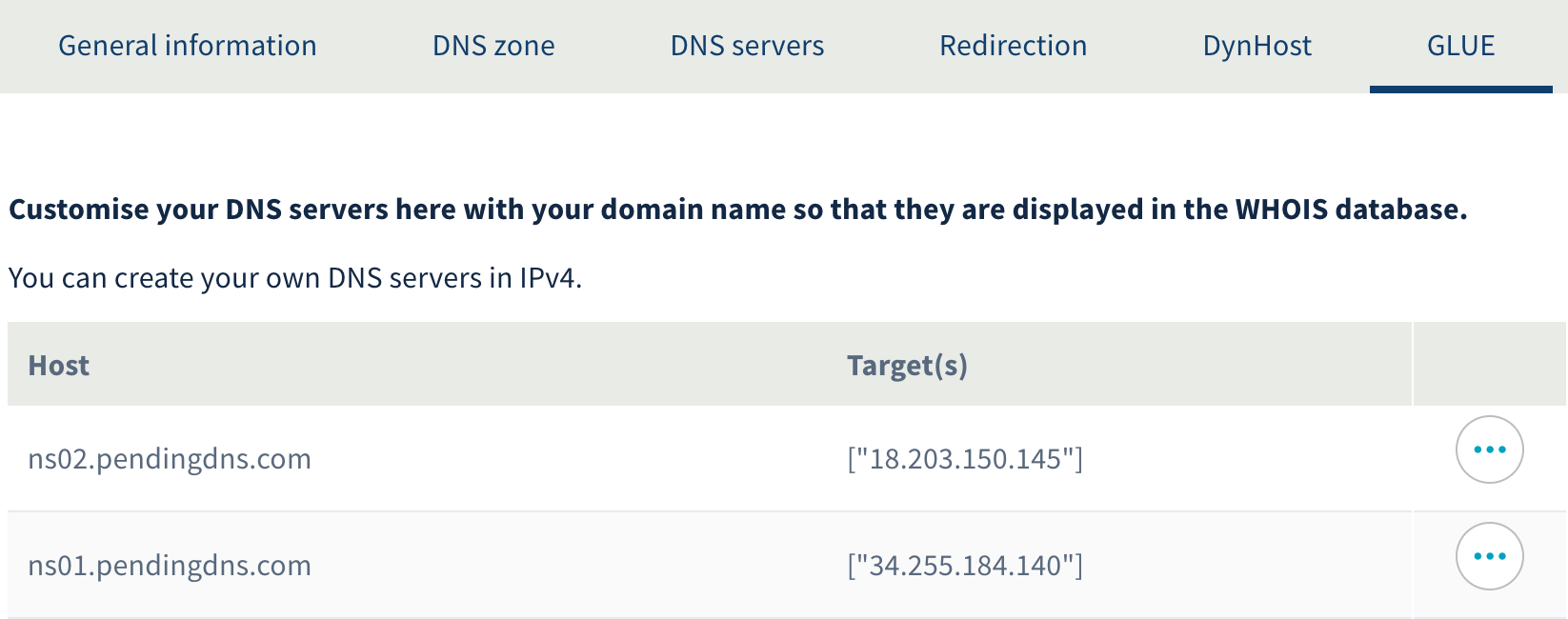
And the corresponding GLUE records:
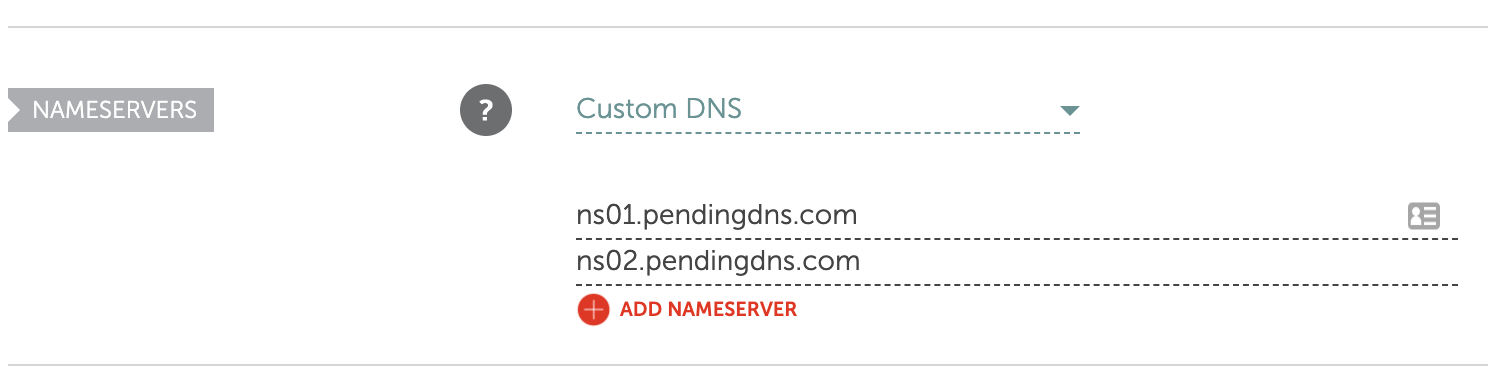
Without proper setup domain registrars do not allow your name server domain names to be used. Here's an example for a successful name server setup:
Install all dependencies (including dev dependencies):
$ npm install
The test suite runs with the built-in Node.js test runner and needs a local Redis instance listening on 127.0.0.1:6379. Tests use a dedicated database (db 15) which is flushed between runs, so it does not touch development or production data.
$ npm test
$ npm run lint
You can see the entire API docs from the swagger page at http://127.0.0.1:5080/docs
GET /v1/zone/{zone}/records
$ curl -X GET "http://127.0.0.1:5080/v1/zone/mailtanker.com/records"
{
    "zone": "mailtanker.com",
    "records": [
        {
            "id": "Y29tLm1haWx0YW5rZXIBQQEzc3lKWkkzbGo",
            "type": "A",
            "address": "18.203.150.145",
            "healthCheck": false
        },
        {
            "id": "Y29tLm1haWx0YW5rZXIud3d3AUNOQU1FAXhhV1lnbnFaMA",
            "type": "CNAME",
            "subdomain": "www",
            "target": "mailtanker.com"
        }
    ]
}
NB! system records (NS, SOA) have id=null and these records can not be modified over API
POST /v1/zone/{zone}/records
$ curl -X POST "http://127.0.0.1:5080/v1/zone/mailtanker.com/records" -H "Content-Type: application/json" -d '{
    "subdomain": "www",
    "type": "CNAME",
    "target": "@"
}'
{
    "zone": "mailtanker.com",
    "record": "Y29tLm1haWx0YW5rZXIud3d3AUNOQU1FAXhhV1lnbnFaMA"
}
All record types have the following properties
- subdomain (optional) subdomain this record applies to. If blank, or "@" or missing then the record is created for zone domain.
- type one of A, AAAA, CNAME, ANAME, URL, MX, TXT, CAA, NS, TLSA
A
- address is an IPv4 address
- healthCheck (String) is a health check URI, either
tcps?://host:portorhttps?://host:port/path. When doing TCP checks, successfully opened connection is considered healthy. For HTTP checks 2xx response code is considered healthy. TLS certificate is no validated, self-signed certificates are allowed.
AAAA
- address is an IPv6 address
- healthCheck (String) is a health check URI, either
tcps?://host:portorhttps?://host:port/path. When doing TCP checks, successfully opened connection is considered healthy. For HTTP checks2xxresponse code is considered healthy. TLS certificates for https/tcps are not validated, so self-signed certificates are allowed to be used for health check hosts.
CNAME
- target is a domain name or "@" for zone domain
ANAME
- target is a domain name
TXT
- data is the data string without quotes. Provide the entire value, do not chop it into substrings
MX
- exchange is the domain name of the MX server
- priority is the priority number of the MX
NS
- ns is the domain name of the NS server
CAA
- value is the domain name of the provider, eg.
letsencrypt.org - tag is the CAA tag, one of
issue,issuewildoriodef - flags (Number, default is
0) is the CAA flags octet (0-255)
TLSA
- subdomain typically uses the DANE form
_port._proto, eg._443._tcp.www - usage (Number, 0-3) certificate usage: 0 PKIX-TA, 1 PKIX-EE, 2 DANE-TA, 3 DANE-EE
- selector (Number, 0-1) 0 for the full certificate, 1 for the SubjectPublicKeyInfo
- matchingType (Number, 0-2) 0 full, 1 SHA-256, 2 SHA-512
- certificate (String) the certificate association data as a hex string
URL
- url (string) is the URL to redirect to. If it only has the root path set (eg. http://example.com/) then URLs are redirected with source paths (http://host/path -> http://example.com/path). Otherwise all source URLs are redirected exatly to destination URL (if url is http://example.com/some/path then http://host/path -> http://example.com/some/path)
- code (Number, default is
301) is the HTTP status code to use. Only used ifproxy=false - proxy (boolean, default is
false). If true then requests are proxied to destination instead of redirecting. Mostly useful when exposing HTTP-only resources through PendingDNS HTTPS.
PUT /v1/zone/{zone}/records/{record}
$ curl -X PUT "http://127.0.0.1:5080/v1/zone/mailtanker.com/records/Y29tLm1haWx0YW5rZXIud3d3AUNOQU1FAXhhV1lnbnFaMA" -H "Content-Type: application/json" -d '{
    "subdomain": "www",
    "type": "CNAME",
    "target": "example.com"
}'
{
    "zone": "mailtanker.com",
    "record": "Y29tLm1haWx0YW5rZXIud3d3AUNOQU1FAXhhV1lnbnFaMA"
}
NB! resulting record ID might be different from the original ID
DELETE /v1/zone/{zone}/records/{record}
$ curl -X DELETE "http://127.0.0.1:5080/v1/zone/mailtanker.com/records/Y29tLm1haWx0YW5rZXIBQQFjT2NWd0d6bE4"
{
    "zone": "mailtanker.com",
    "record": "Y29tLm1haWx0YW5rZXIBQQFjT2NWd0d6bE4",
    "deleted": true
}This API endpoint requests a new certificate from Let's Encrypt or returns a previously generated one.
Certificates can only be requested for domains that:
- have at least one resource record set for their zone (not important which kind)
- have correctly pointed NS records to your PendingDNS servers
$ curl -X POST "http://127.0.0.1:5080/v1/acme" -H "Content-Type: application/json" -d '{
    "domains": [
        "mailtanker.com",
        "*.mailtanker.com"
    ]
}'
{
    "dnsNames": ["*.mailtanker.com", "mailtanker.com"],
    "key": "-----BEGIN RSA PRIVATE KEY-----\nMIIEpAIB...",
    "cert": "-----BEGIN CERTIFICATE-----\nMIIFaT...\n",
    "validFrom": "2020-06-03T18:50:52.000Z",
    "expires": "2020-09-01T18:50:52.000Z"
}PendingDNS signs answers online (at query time) for zones that have DNSSEC enabled. DNSSEC must be turned on globally ([dnssec] enabled = true) and then enabled per zone over the API; enabling a zone generates a signing key (a CSK) that is stored in Redis and used to sign every RRset on the fly. Signing only happens for clients that set the EDNS DO bit. Denial of existence is always NODATA (NOERROR) with a signed compact NSEC ("black lies"): because the server can synthesize CAA/NS/SOA for any name, no name is treated as truly nonexistent, so there is no NXDOMAIN and no NSEC3.
After enabling a zone you must copy the returned DS record to the parent zone at your registrar to complete the chain of trust.
Enable DNSSEC for a zone
POST /v1/zone/{zone}/dnssec
The optional algorithm selects the signing algorithm: 13 ECDSA P-256/SHA-256 (default), 15 Ed25519, or 8 RSASHA256.
$ curl -X POST "http://127.0.0.1:5080/v1/zone/mailtanker.com/dnssec" -H "Content-Type: application/json" -d '{
    "algorithm": 13
}'
{
    "zone": "mailtanker.com",
    "enabled": true,
    "algorithm": 13,
    "keyTag": 48234,
    "ds": [{ "keyTag": 48234, "algorithm": 13, "digestType": 2, "digest": "a4f5...", "presentation": "48234 13 2 a4f5..." }],
    "dnskey": [{ "flags": 257, "protocol": 3, "algorithm": 13, "publicKey": "GjL2...", "keyTag": 48234, "presentation": "257 3 13 GjL2..." }]
}
Get DNSSEC status (DS and DNSKEY records)
GET /v1/zone/{zone}/dnssec
$ curl -X GET "http://127.0.0.1:5080/v1/zone/mailtanker.com/dnssec"
Returns the same enabled, algorithm, keyTag, ds and dnskey shape as the enable response. For a zone that has never had DNSSEC enabled, enabled is false and the ds/dnskey arrays are empty.
Disable DNSSEC for a zone
DELETE /v1/zone/{zone}/dnssec
$ curl -X DELETE "http://127.0.0.1:5080/v1/zone/mailtanker.com/dnssec"
{
    "zone": "mailtanker.com",
    "disabled": true
}
Roll the signing key to a new algorithm
Re-POST to the enable endpoint with a different algorithm. A new key is generated and kept alongside the old one, and the zone is signed with both algorithms (every RRset gets an RRSIG per algorithm) so validation keeps working during the rollover. The response lists every key in ds/dnskey. Publish the new DS at the registrar, wait for the old DS TTL to expire, then remove the old key.
Remove a signing key (finish a rollover)
DELETE /v1/zone/{zone}/dnssec/key/{keyTag}
Removes a non-active key. Removing the active key or the last remaining key is refused.
$ curl -X DELETE "http://127.0.0.1:5080/v1/zone/mailtanker.com/dnssec/key/48234"
- All DNS parsing / compiling is done using dns2 module by Liu Song
- Let's Encrypt certificates are generated using ACME.js module by AJ ONeal
MIT