Multi-Agent Research Crew for Instant, Citation-Rich Reports
Transforms a single prompt into a print-ready LaTeX PDF in under 10 minutes.


Give the system a prompt like:
“Create a 15–20 page report on AI agents in healthcare in 2025 for hospital CIOs.”
Within minutes you get:
- 50+ verified sources from Tavily
- Fact-checked claims by a dedicated agent
- Matplotlib charts (market forecast, risk matrix, trends)
- Structured academic writing (exec summary → conclusion)
- A complete PDF with title page, TOC, figures, citations
- No hallucinated references
⚡ End-to-end pipeline runs in <10 minutes
⚡ Zero manual formatting or citation work
Professionals in 2025 still lose 8–10 hours building a single research report:
- Searching and extracting sources
- Verifying claims
- Creating charts
- Writing structured academic sections
- Formatting citations
- Exporting to PDF or LaTeX
Traditional AI tools summarize text but cannot generate reproducible, citation-rich, multi-section research documents.
AutoResearcher solves this with a coordinated agent team.
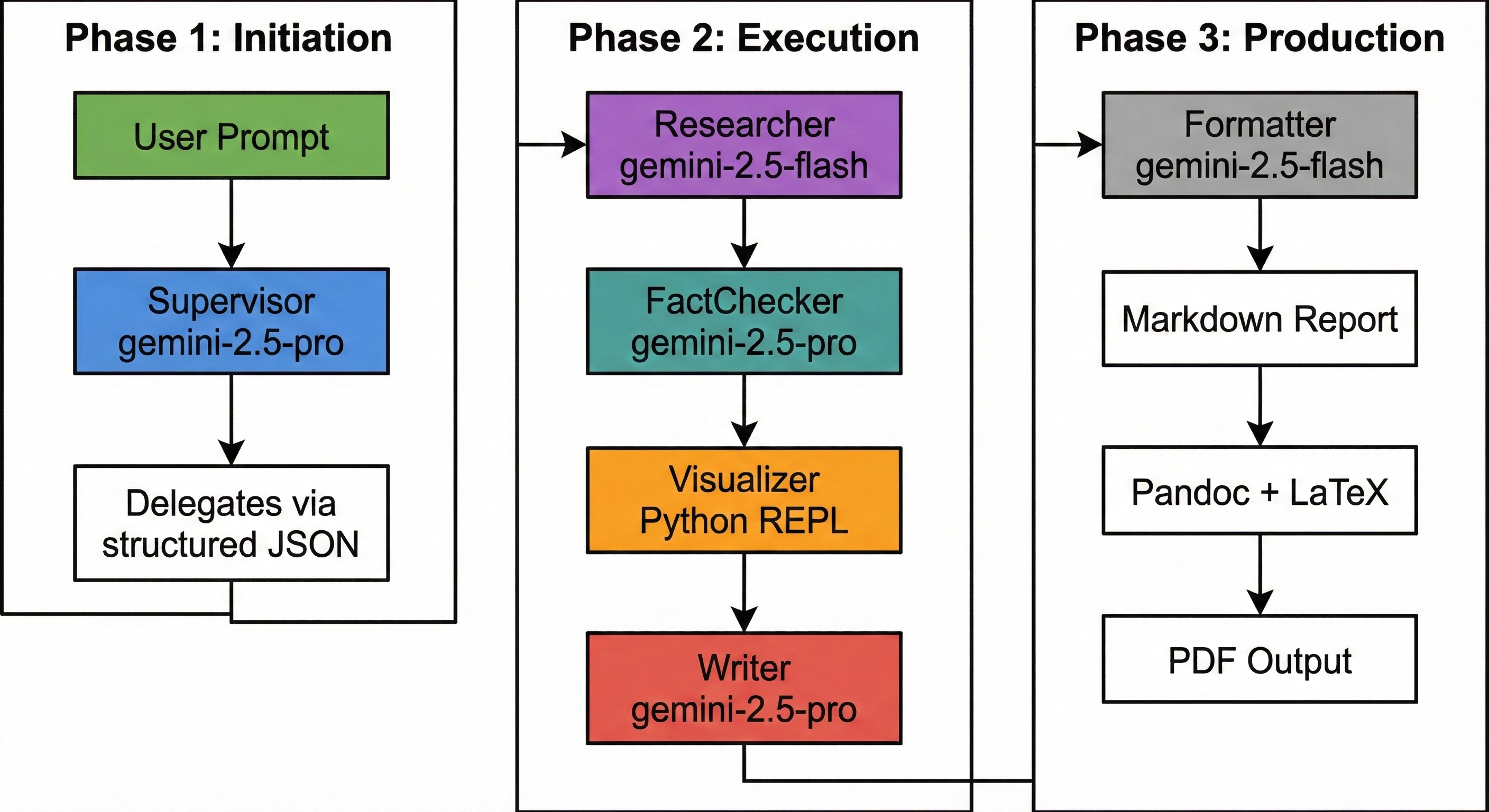
AutoResearcher uses a 7-agent hierarchical system built on the Vertex AI ADK for Python.
| Agent | Model | Tool | Role |
|---|---|---|---|
| Supervisor | Gemini 2.5 Pro | — | Manages workflow + structured JSON task routing |
| Researcher | Gemini 2.5 Flash | Tavily | Collects real, live web sources |
| FactChecker | Gemini 2.5 Pro | Tavily | Cross-checks claims and stats |
| Visualizer | Gemini 2.5 Flash | Python REPL | Generates charts via Matplotlib |
| Writer | Gemini 2.5 Pro | — | Produces academic-grade sections |
| Formatter | Gemini 2.5 Flash | — | Builds final Markdown with TOC + references |
| Compiler | — | Pandoc + LaTeX | Converts Markdown → PDF |
All agents share an in-notebook dictionary called MEMORY, enabling coordinated, stateful work.
- Open the notebook
https://www.kaggle.com/rayklanderman/autoresearcher-capstone - Add secrets:
PROJECT_IDGEMINI_API_KEYTAVILY_API_KEYSERVICE_ACCOUNT_JSON
- Run all cells
- Open the Colab notebook
- Add secrets (Runtime → Secrets) or edit code to input them manually
- Install dependencies → run all cells
💡 Tip: Cell 7 displays the entire agent pipeline—perfect for demos.
- Framework: Vertex AI ADK for Python
- Models: Gemini 2.5 Pro + Flash
- Tools: Tavily API, Matplotlib, Pandoc + LaTeX
- Runtime: Kaggle / Colab
- State Management: Shared in-notebook memory dictionary
- Security: All keys pulled from platform secrets
Install ADK:
pip install "git+https://github.com/google/adk-python.git@main"CapstoneProject-Autoresearcher/
├── autoresearcher.ipynb # Main Jupyter notebook
├── LICENSE # License file
├── README.md # This README
├── SECURITY.md # Security policy
├── CONTRIBUTING.md # Contributing guidelines
├── CODE_OF_CONDUCT.md # Community code of conduct
├── NOTICE # Legal notices and attributions
└── SECRET_HANDLING.md # Secure handling of secrets & API keys
For educational and capstone submission purposes only.
© 2025 Raymond Robert Klanderman